Cordova-plugin-googlemaps: Ionic cordova not showing map
Hi, I have a problem but I don't know how to explain it.
I created an app which use a map with some points., It was working before but since few weeks the maps doesn't show. There is nothing, neither a blank map.
I've check this link https://github.com/mapsplugin/cordova-plugin-googlemaps/wiki/TroubleShooting:-Blank-Map and everything seems right.
There isn't any errors which is more dificult to find the problem
I hope you could help me.
Thanks
 jcousin74
All 17 comments
Please try to create a very simple project at first, then confirm the map is showing or not.
 wf9a5m75
on 22 Feb 2017
wf9a5m75
on 22 Feb 2017
I tryed it as the one in your tutorial, but I get a blank map
2017-02-22 1:11 GMT-05:00 Masashi Katsumata notifications@github.com:
Please try to create a very simple project at first, then confirm the map
is showing or not.—
You are receiving this because you authored the thread.
Reply to this email directly, view it on GitHub
https://github.com/mapsplugin/cordova-plugin-googlemaps/issues/1319#issuecomment-281579218,
or mute the thread
https://github.com/notifications/unsubscribe-auth/AUEb7JhrNQqeatpjd-5R4PTcyEX22X61ks5re9GbgaJpZM4MINlb
.
jcousin74
on 22 Feb 2017
Then what native error did you get?
wf9a5m75
on 22 Feb 2017
I don't have any error, this is my problem. It just doesn't show anything,
empty.
I put the SH1, and I can see that some marker are added (in the code) but
no map.
Perhaps if I show you the code yu could help me, it's an ionic app.
Let me know.
Thanks
2017-02-22 10:03 GMT-05:00 Masashi Katsumata notifications@github.com:
Then what native error did you get?
—
You are receiving this because you authored the thread.
Reply to this email directly, view it on GitHub
https://github.com/mapsplugin/cordova-plugin-googlemaps/issues/1319#issuecomment-281694252,
or mute the thread
https://github.com/notifications/unsubscribe-auth/AUEb7GaRUmM67IWk83GjwPuAbu8wmv1Fks5rfE4rgaJpZM4MINlb
.
jcousin74
on 22 Feb 2017
I'm having the same problem. The maps just show black on iOS. (works in Android)
I'm using [email protected], [email protected], [email protected], [email protected]
platform -> [email protected], [email protected]
It's funny because yesterday it was working perfectly and then I upgrade both ionic and cordova today morning and then it's not working. So it might be something with the version. But it's just a guess. Unfortunately I don't remember the previous versions
 malvadeza
on 22 Feb 2017
malvadeza
on 22 Feb 2017
Please inspect the ionic versions by yourself.
First of all, the ionic wrapper is out of control from me.
And second, I have no knowledge about ionic framework.
wf9a5m75
on 22 Feb 2017
@wf9a5m75 Thanks for the answer.
I'm aware of that, just listed the ionic versions just to be safe and in case someone get here and have the answer for that.
I ran it now and I'm getting these messages now ClientParametersRequest failed, 3 attempts remaining (0 vs 10). Error Domain=com.google.HTTPStatus Code=400 "(null)"
I have checked the API Key in google console and everything is right, running on Android works (and I have feedback in the form of Traffic on the API) but in the XCode simulator all I see is a black screen. The user location seems to be avaible (I'm printing on console) but no rendering of the map and the error message mentioned.
Also I'm getting this message after sometime Google Maps SDK for iOS cannot connect or validate APIKey, but I'm 100% sure the API is valid and is open.
Cheers
malvadeza
on 22 Feb 2017
Google Maps SDK for iOS cannot connect or validate APIKey means the Google Maps SDK for iOS can not to the Google server. It's not plugin's problem.
You can try:
- recreate api key
- recreate your project
wf9a5m75
on 22 Feb 2017
Hi @wf9a5m75 ,
I have created a simple cordova app to implement the cordova-plugin-googlemaps. I can built the App in Android. But the app doesn't render the Map. It only displays blank image with Google icon at lower left corner.

Here the Environment details,
Cordova 6.5.0
Ionic 1.7.15
Installed platforms:
android 6.1.2
browser 4.1.0
Can you please help me to resolve this.
 souber3746
on 15 Mar 2017
souber3746
on 15 Mar 2017
As imI said above, your api key is wrong, or something.
wf9a5m75
on 15 Mar 2017
Since this issue shows up on Google when looking for the issue; maybe this helps someone:
It's also worth checking if you have enabled the "Google Maps SDK for iOS" for your project in Google Developers Console.
 ValentinKlinghammer
on 15 Sep 2017
ValentinKlinghammer
on 15 Sep 2017
I have the same problem. I think it's to do with CORS and WKWebview.... Just some ideas..
 dimitri320
on 29 Oct 2017
dimitri320
on 29 Oct 2017
I had the same problem which I could resolve by removing the crosswalk plugin.
Probably not the solution most were hoping for...
If you do not have it enabled, please
- make sure that you have proper styling for the element
- that the element does actually exist when you call the method (this would usually throw an error)
 joernlenoch
on 8 Nov 2017
joernlenoch
on 8 Nov 2017
I am using IONIC 2 and have the same problem, the google api key is correct and couldn't find the problem. Any Idea ?
Thanks
 ananharutyunyan
on 17 Nov 2017
ananharutyunyan
on 17 Nov 2017
Same problem. The google api key is correct.
 victorhugorch
on 23 Nov 2017
victorhugorch
on 23 Nov 2017
Ionic version: 3.19.0
Npm version: 5.6.0
Node version: 9.3.0
Cordova version: 8.0.0
Hello.
Thanks for the plugin development ... it's great!
I wanted to report that I found problems with the iPhone emulator.
On the Android emulator, it seems to work great!
This is what i see:
On Android Nexus 5X emulator:

On iPhone 7 emulator:
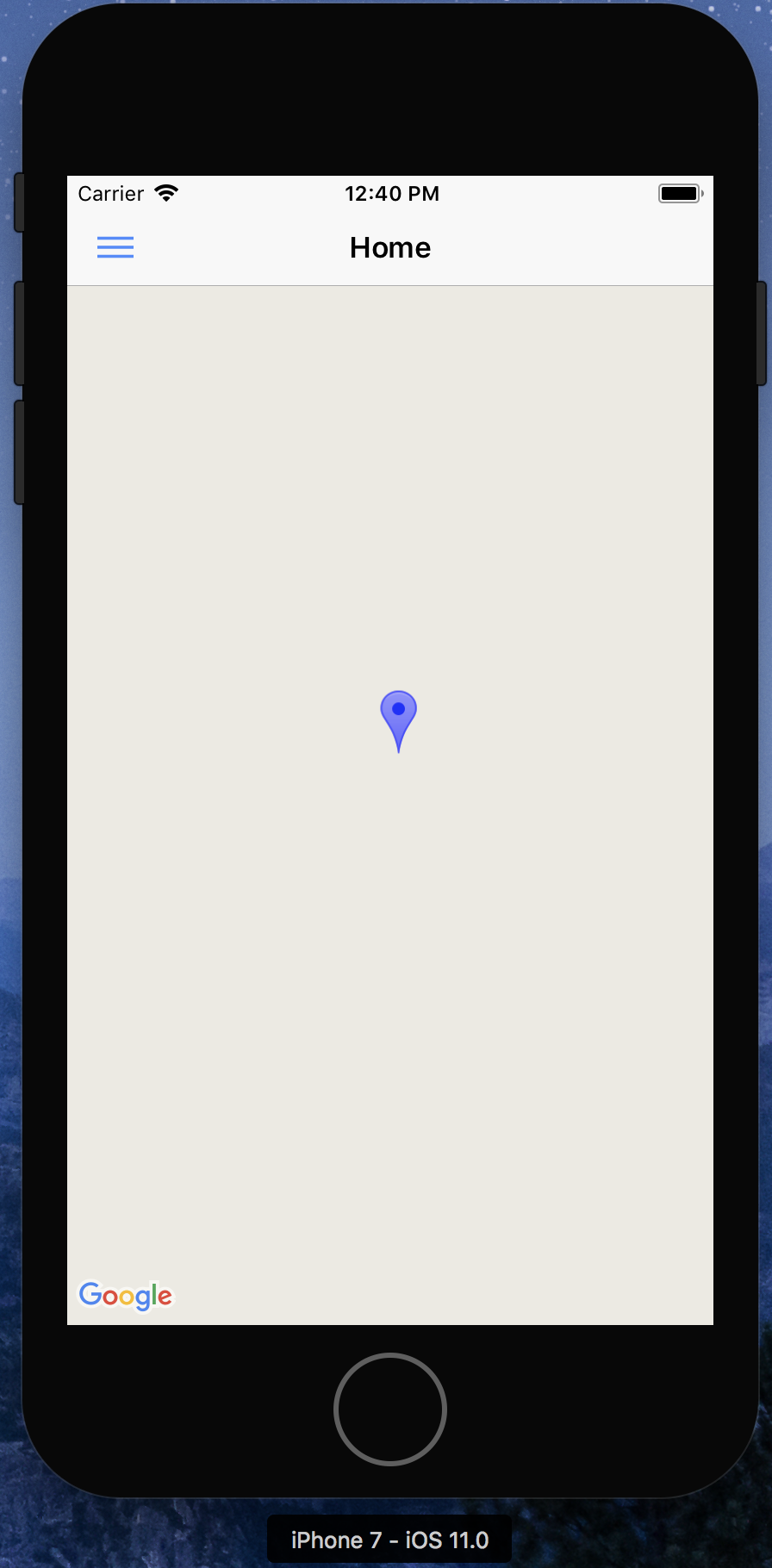
My code
import { Component } from '@angular/core';
import { NavController, Platform } from 'ionic-angular';
import {
  GoogleMaps,
  GoogleMap,
  GoogleMapsEvent,
  GoogleMapOptions,
  CameraPosition,
  MarkerOptions,
  Marker
} from '@ionic-native/google-maps';

@Component({
  selector: 'page-home',
  templateUrl: 'home.html'
})
export class HomePage {
  map: GoogleMap;
  constructor(private googleMaps: GoogleMaps, private platform: Platform) {
    platform.ready().then(()=>{
      this.loadMap();
    });
  }

  loadMap() {
    let mapOptions: GoogleMapOptions = {
      camera: {
        target: {
          lat: 43.0741904,
          lng: -89.3809802
        },
        zoom: 18,
        tilt: 30
      }
    };

    this.map = this.googleMaps.create('map_canvas', mapOptions);

    // Wait the MAP_READY before using any methods.
    this.map.one(GoogleMapsEvent.MAP_READY)
    .then(() => {
      console.log('Map is ready!');
      // Now you can use all methods safely.
      this.map.addMarker({
        title: 'Ionic',
        icon: 'blue',
        animation: 'DROP',
        position: {
          lat: 43.0741904,
          lng: -89.3809802
        }
      })
      .then(marker => {
        marker.on(GoogleMapsEvent.MARKER_CLICK)
        .subscribe(() => {
          alert('clicked');
        });
      });
    });
  }
}
I do not write the log, because I have not found any errors.
In your opinion, what can I do? Tell me if you need more information!
best regards.
 likedo
on 6 Jan 2018
likedo
on 6 Jan 2018
Blank map is your problem.
https://github.com/mapsplugin/cordova-plugin-googlemaps-doc/blob/master/v1.4.0/TroubleShooting/Blank-Map/README.md
wf9a5m75
on 6 Jan 2018
Related issues
 nakulkundaliya
·
5Comments
nakulkundaliya
·
5Comments
 TimothyFehr
·
5Comments
TimothyFehr
·
5Comments
 ahmadkam72
·
3Comments
ahmadkam72
·
3Comments
 lakano
·
4Comments
lakano
·
4Comments
 javi124
·
5Comments
javi124
·
5Comments
Most helpful comment
As imI said above, your api key is wrong, or something.