Cordova-plugin-firebasex: App crash setting default icon (Didn't find class com.google.firebase.messaging.default_notification_icon on path DexPathList...)
I try to set my notification icon following these steps: https://github.com/dpa99c/cordova-plugin-firebasex#android-notification-icons
This is my android platform config:
<platform name="android">
    <edit-config file="app/src/main/AndroidManifest.xml" mode="merge" target="/manifest/application" xmlns:android="http://schemas.android.com/apk/res/android">
        <application android:networkSecurityConfig="@xml/network_security_config" />
        <application android:layout_width="match_parent" />
        <application android:layout_height="match_parent" />
    </edit-config>
    <config-file mode="merge" parent="/*" target="AndroidManifest.xml" xmlns:android="http://schemas.android.com/apk/res/android">
        <uses-permission android:name="android.permission.FOREGROUND_SERVICE" />
        <uses-permission android:name="android.permission.WRITE_EXTERNAL_STORAGE" />
    </config-file>
    <config-file target="AndroidManifest.xml" parent="/manifest/application" xmlns:android="http://schemas.android.com/apk/res/android">
        <meta-data android:name="com.google.firebase.messaging.default_notification_icon" android:resource="@drawable/notification_icon" />
    </config-file>
    <feature name="SocialSharing">
        <param name="android-package" value="nl.xservices.plugins.SocialSharing" />
    </feature>
    <resource-file src="resources/android/xml/network_security_config.xml" target="app/src/main/res/xml/network_security_config.xml" />
    <resource-file src="google-services.json" target="app/google-services.json" />
    <resource-file src="resources/android/icon/drawable-mdpi-icon.png" target="app/src/main/res/drawable-mdpi/notification_icon.png" />
    <resource-file src="resources/android/icon/drawable-hdpi-icon.png" target="app/src/main/res/drawable-hdpi/notification_icon.png" />
    <resource-file src="resources/android/icon/drawable-xhdpi-icon.png" target="app/src/main/res/drawable-xhdpi/notification_icon.png" />
    <resource-file src="resources/android/icon/drawable-xxhdpi-icon.png" target="app/src/main/res/drawable-xxhdpi/notification_icon.png" />
    <resource-file src="resources/android/icon/drawable-xxxhdpi-icon.png" target="app/src/main/res/drawable-xxxhdpi/notification_icon.png" />
    <allow-intent href="market:*" />
    <icon background="resources/android/icon/ldpi-background.png" density="ldpi" foreground="resources/android/icon/ldpi-foreground.png" src="resources/android/icon/drawable-ldpi-icon.png" />
    <icon background="resources/android/icon/mdpi-background.png" density="mdpi" foreground="resources/android/icon/mdpi-foreground.png" src="resources/android/icon/drawable-mdpi-icon.png" />
    <icon background="resources/android/icon/hdpi-background.png" density="hdpi" foreground="resources/android/icon/hdpi-foreground.png" src="resources/android/icon/drawable-hdpi-icon.png" />
    <icon background="resources/android/icon/xhdpi-background.png" density="xhdpi" foreground="resources/android/icon/xhdpi-foreground.png" src="resources/android/icon/drawable-xhdpi-icon.png" />
    <icon background="resources/android/icon/xxhdpi-background.png" density="xxhdpi" foreground="resources/android/icon/xxhdpi-foreground.png" src="resources/android/icon/drawable-xxhdpi-icon.png" />
    <icon background="resources/android/icon/xxxhdpi-background.png" density="xxxhdpi" foreground="resources/android/icon/xxxhdpi-foreground.png" src="resources/android/icon/drawable-xxxhdpi-icon.png" />
    <splash density="land-ldpi" src="resources/android/splash/drawable-land-ldpi-screen.png" />
    <splash density="land-mdpi" src="resources/android/splash/drawable-land-mdpi-screen.png" />
    <splash density="land-hdpi" src="resources/android/splash/drawable-land-hdpi-screen.png" />
    <splash density="land-xhdpi" src="resources/android/splash/drawable-land-xhdpi-screen.png" />
    <splash density="land-xxhdpi" src="resources/android/splash/drawable-land-xxhdpi-screen.png" />
    <splash density="land-xxxhdpi" src="resources/android/splash/drawable-land-xxxhdpi-screen.png" />
    <splash density="port-ldpi" src="resources/android/splash/drawable-port-ldpi-screen.png" />
    <splash density="port-mdpi" src="resources/android/splash/drawable-port-mdpi-screen.png" />
    <splash density="port-hdpi" src="resources/android/splash/drawable-port-hdpi-screen.png" />
    <splash density="port-xhdpi" src="resources/android/splash/drawable-port-xhdpi-screen.png" />
    <splash density="port-xxhdpi" src="resources/android/splash/drawable-port-xxhdpi-screen.png" />
    <splash density="port-xxxhdpi" src="resources/android/splash/drawable-port-xxxhdpi-screen.png" />
</platform>
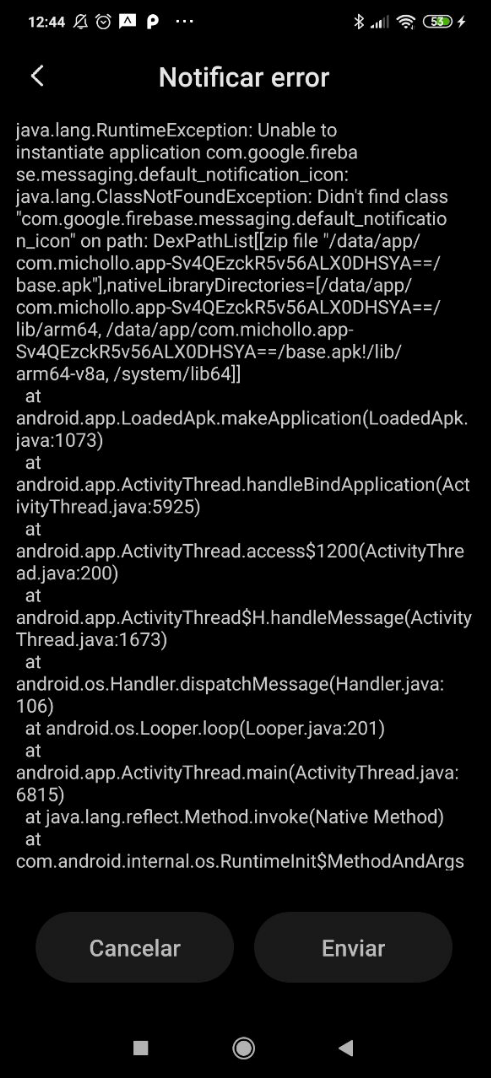
The resource's paths are correct but i recieve this error opening the app:
Cordova Firebasex: 7.0.1
Cordova: 9.0.0 ([email protected])
Android: 8.1.0
Node: v12.13.0
 50l3r
50l3r
All 11 comments
I see that you have multiple <edit-config>/<config-file> blocks operating on AndroidManifest.xml.
Cordova has some race conditions around this that can cause some elements to be omitted from the resulting AndroidManifest.xml - see #94.
I would check that all the elements specified in your config.xml are actually appearing in AndroidManifest.xml.
You can verify that setting the default icon for Android works properly in this plugin by building and running the example project which uses a <custom-config-file> block via cordova-custom-config to ensure its config is injected into AndroidManifest.xml.
 dpa99c
on 3 Dec 2019
dpa99c
on 3 Dec 2019
I have an error setting this:
<custom-config-file parent="./application" target="AndroidManifest.xml">
    <meta-data android:name="com.google.firebase.messaging.default_notification_icon" android:resource="@drawable/notification_icon" />
</custom-config-file>
Adding "xmlns:android="http://schemas.android.com/apk/res/android" builds correctly:
<custom-config-file parent="./application" target="AndroidManifest.xml" xmlns:android="http://schemas.android.com/apk/res/android">
    <meta-data android:name="com.google.firebase.messaging.default_notification_icon" android:resource="@drawable/notification_icon" />
</custom-config-file>
I see in the topbar:
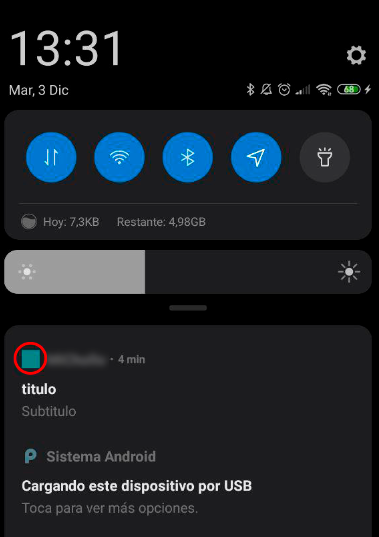
But not in notification:
50l3r
on 3 Dec 2019
i check platforms\android\app\src\mainAndroidManifest.xml and it appears
<meta-data android:name="com.google.firebase.messaging.default_notification_icon" android:resource="@drawable/notification_icon"/>
I use Xiaomi mi9 se
50l3r
on 3 Dec 2019
Please try building and running the example project and confirm if the custom icon works correctly on your device in the example app.
dpa99c
on 3 Dec 2019
i found the problem.
All works fine, but accent color override all icon and painting with this green color. I try to set ANDROID_ICON_ACCENT with #ffffff00 but it doesnt work jeje
If i use a monochrome icon it works :)
50l3r
on 3 Dec 2019
As outlined in the documentation:
The icons should be monochrome transparent PNGs
Android only supports monochrome icons for the default (small notification) icon.
Only large notification icons support polychromatic icons but since FCM does not currently support large icons, these can only be used in foreground notifications generated by this plugin when the app is in the foreground.
dpa99c
on 3 Dec 2019
Much thanks for all :)
50l3r
on 3 Dec 2019
i found the problem.
All works fine, but accent color override all icon and painting with this green color. I try to set ANDROID_ICON_ACCENT with #ffffff00 but it doesnt work jeje
If i use a monochrome icon it works :)
Hi 50l3r,
and what was the problem? Im facing the same issue.
I've put the part of the meta data into my edit-config file and added the proper notification icons in my project:
    <edit-config file="app/src/main/AndroidManifest.xml" mode="merge" target="/manifest/application" xmlns:android="http://schemas.android.com/apk/res/android">
        <application android:networkSecurityConfig="@xml/network_security_config" />
        <meta-data android:name="com.google.firebase.messaging.default_notification_icon" android:resource="@drawable/notification_icon" />
    </edit-config>
On installation and start of my app the app crashes with the following error: "unable to instantiate application (...) Didn't find class com.google.firebase.messaging.default_notification_icon on path DexPathList"
@50l3r
 urlexnilz
on 2 Jan 2020
urlexnilz
on 2 Jan 2020
Install this plugin https://github.com/dpa99c/cordova-custom-config and try to set this:
<custom-config-file parent="./application" target="AndroidManifest.xml" xmlns:android="http://schemas.android.com/apk/res/android">
    <meta-data android:name="com.google.firebase.messaging.default_notification_icon" android:resource="@drawable/notification_icon" />
</custom-config-file>
@50l3r Wow! Awesome! Worked.. Thanks! ;) I suppose it has something to do with the Cordova race conditions dpa99c mentioned earlier.
urlexnilz
on 2 Jan 2020
Facing the same issue, tried everything suggested above but still no luck, but I find alternative way.
Finally added an icon property in notification payload at server side and added #<resource-file > in config.xmlfor that particular icon.
Hope this helps people (I wasted half day for this)
 vishal38-isharani
on 26 Nov 2020
vishal38-isharani
on 26 Nov 2020
Related issues
 AndrewBargan
·
7Comments
AndrewBargan
·
7Comments
 zmoshansky
·
6Comments
zmoshansky
·
6Comments
 tux240
·
3Comments
dpa99c
·
4Comments
tux240
·
3Comments
dpa99c
·
4Comments
 osamasado
·
6Comments
osamasado
·
6Comments
Most helpful comment
As outlined in the documentation:
Android only supports monochrome icons for the default (small notification) icon.
Only large notification icons support polychromatic icons but since FCM does not currently support large icons, these can only be used in foreground notifications generated by this plugin when the app is in the foreground.