Cordova-plugin-background-geolocation: BackgroundGeolocation is not defined
- Plugin version: last
- Platform: Android
- OS version: 6.0.0
- Device manufacturer and model: Samsung Galaxy s7
- Cordova version (
cordova -v): 8.0.0
cordova-android-play-services-gradle-release 1.4.2 "cordova-android-play-services-gradle-release"
cordova-plugin-device 2.0.2 "Device"
cordova-plugin-facebook4 2.1.0 "Facebook Connect"
cordova-plugin-geolocation 4.0.1 "Geolocation"
cordova-plugin-googlemaps 2.3.2 "cordova-plugin-googlemaps"
cordova-plugin-inappbrowser 3.0.0 "InAppBrowser"
cordova-plugin-ionic-keyboard 2.1.2 "cordova-plugin-ionic-keyboard"
cordova-plugin-ionic-webview 1.2.1 "cordova-plugin-ionic-webview"
cordova-plugin-mauron85-background-geolocation 2.3.5 "CDVBackgroundGeolocation"
cordova-plugin-request-location-accuracy 2.2.3 "Request Location Accuracy"
cordova-plugin-splashscreen 5.0.2 "Splashscreen"
cordova-plugin-whitelist 1.3.3 "Whitelist"
cordova.plugins.diagnostic 4.0.8 "Diagnostic"
I am trying to use this plugin for IONIC1 and use the code provided in the "README" of this page. when I compile and tested on my galaxy s7, I am getting this error:

I am using this code:
app.controller('loginController', function($scope,$timeout) {
function onDeviceReady() {
BackgroundGeolocation.configure({
locationProvider: BackgroundGeolocation.ACTIVITY_PROVIDER,
desiredAccuracy: BackgroundGeolocation.HIGH_ACCURACY,
stationaryRadius: 50,
distanceFilter: 50,
notificationTitle: 'Background tracking',
notificationText: 'enabled',
debug: true,
interval: 10000,
fastestInterval: 5000,
activitiesInterval: 10000,
url: 'http://192.168.81.15:3000/location',
httpHeaders: {
'X-FOO': 'bar'
},
// customize post properties
postTemplate: {
lat: '@latitude',
lon: '@longitude',
foo: 'bar' // you can also add your own properties
}
});
  BackgroundGeolocation.on('location', function(location) {
    // handle your locations here
    // to perform long running operation on iOS
    // you need to create background task
    BackgroundGeolocation.startTask(function(taskKey) {
      // execute long running task
      // eg. ajax post location
      // IMPORTANT: task has to be ended by endTask
      BackgroundGeolocation.endTask(taskKey);
    });
  });

  BackgroundGeolocation.on('stationary', function(stationaryLocation) {
    // handle stationary locations here
  });

  BackgroundGeolocation.on('error', function(error) {
    console.log('[ERROR] BackgroundGeolocation error:', error.code, error.message);
  });

  BackgroundGeolocation.on('start', function() {
    console.log('[INFO] BackgroundGeolocation service has been started');
  });

  BackgroundGeolocation.on('stop', function() {
    console.log('[INFO] BackgroundGeolocation service has been stopped');
  });

  BackgroundGeolocation.on('authorization', function(status) {
    console.log('[INFO] BackgroundGeolocation authorization status: ' + status);
    if (status !== BackgroundGeolocation.AUTHORIZED) {
      // we need to set delay or otherwise alert may not be shown
      setTimeout(function() {
        var showSettings = confirm('App requires location tracking permission. Would you like to open app settings?');
        if (showSetting) {
          return BackgroundGeolocation.showAppSettings();
        }
      }, 1000);
    }
  });

  BackgroundGeolocation.on('background', function() {
    console.log('[INFO] App is in background');
    // you can also reconfigure service (changes will be applied immediately)
    BackgroundGeolocation.configure({ debug: true });
  });

  BackgroundGeolocation.on('foreground', function() {
    console.log('[INFO] App is in foreground');
    BackgroundGeolocation.configure({ debug: false });
  });

  BackgroundGeolocation.checkStatus(function(status) {
    console.log('[INFO] BackgroundGeolocation service is running', status.isRunning);
    console.log('[INFO] BackgroundGeolocation services enabled', status.locationServicesEnabled);
    console.log('[INFO] BackgroundGeolocation auth status: ' + status.authorization);

    // you don't need to check status before start (this is just the example)
    if (!status.isRunning) {
      BackgroundGeolocation.start(); //triggers start on start event
    }
  });

  // you can also just start without checking for status
  // BackgroundGeolocation.start();

  // Don't forget to remove listeners at some point!
  // BackgroundGeolocation.events.forEach(function(event) {
  //   return BackgroundGeolocation.removeAllListeners(event);
  // });
}

document.addEventListener('deviceready', onDeviceReady, false);

});
What am I missing or what am I doing wrong?
thanks
 YeisonVelez11
All 13 comments
I believe this is because the plugin is actually listed with a lower-case "b" - backgroundGeolocation
Though, when I change all instances of "BackgroundGeolocation" to "backgroundGeolocation" in the example script, I get some XCode errors on if (isNotNull(config[@"stationaryRadius"])) {
Hmm...
 willmero
on 26 Jun 2018
willmero
on 26 Jun 2018
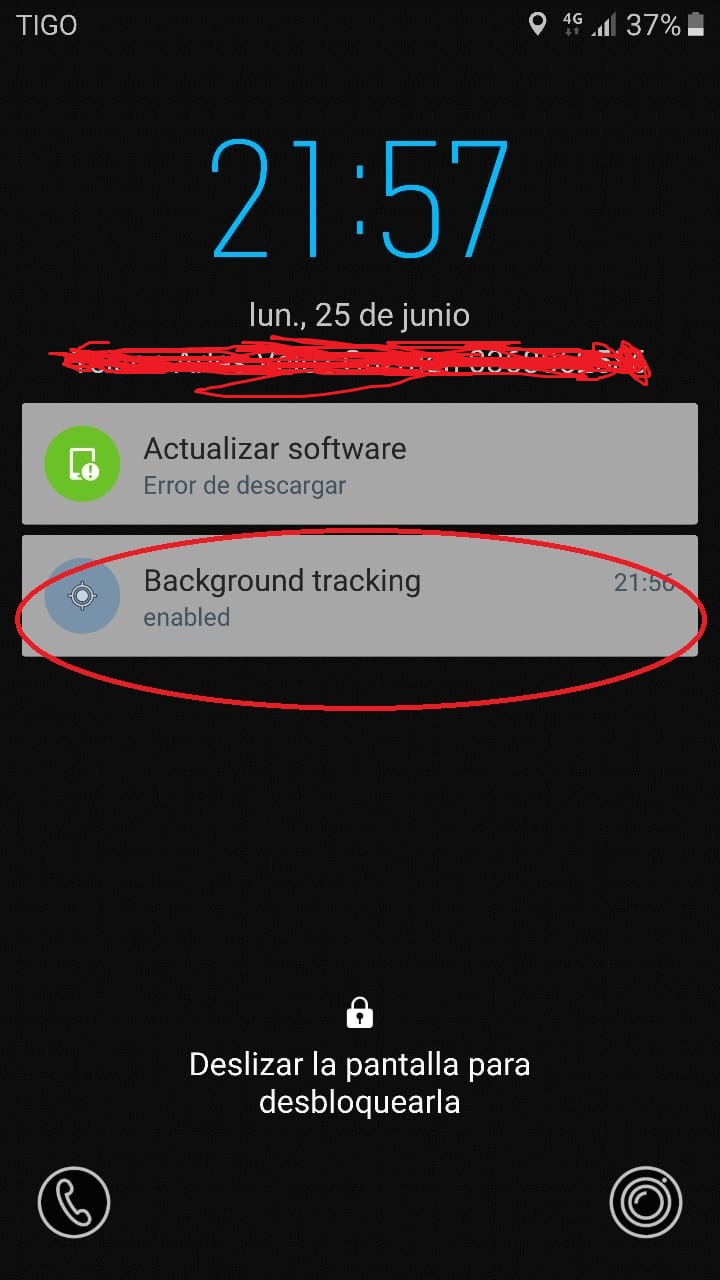
@willmero @mauron85 Do you know how to remove this notification and the message that appears to me?

YeisonVelez11
on 26 Jun 2018
 rafwell
on 3 Jul 2018
rafwell
on 3 Jul 2018
Any update here on the initial issue with BackgroundGeoLocation not being defined? This seems like a serious bug.
willmero
on 5 Jul 2018
Have BackgroundGeolocation is undefined too. Any workaround?
plugin version 2.3.5
 xodock
on 8 Jul 2018
xodock
on 8 Jul 2018
You're reading documentation for plugin version 3. But installed plugin version 2. There is big notice at the very top of README.md.
Documentation has been updated to v3. Documentation for version 2.x can be found here.
 mauron85
on 9 Jul 2018
mauron85
on 9 Jul 2018
Also please don't use Plugin version: last as this can mean one version and another week later. Use exact version number instead.
mauron85
on 9 Jul 2018
@mauron85 When installing this plug-in using cordova-cli it installs v2.3.5, I'm curious as to why you decided to change the documentation without changing the stable version?
I just had the same issue as described above...
 HarelM
on 21 Aug 2018
HarelM
on 21 Aug 2018
There is literally big disclaimer at very top of the README.md.

mauron85
on 21 Aug 2018
I know, and I saw it, But intuitively I thought that this is intended for people using an old version and not the latest stable, i.e. I got to this repository and read this and said to myself: "hmm, this is interesting, but I'm using latest stable so this is probably not intended for me", and continued to using it and then failing and then finding this issue...
HarelM
on 21 Aug 2018
In my opinion the 3.x branch is so more stable than that. And, really, is very confused and hard to install the latest 3.x branch, or I have did it on wrong way.
rafwell
on 22 Aug 2018
Sorry for the confusion. Maybe it's time to make 3.x stable.
mauron85
on 22 Aug 2018
@mauron85 I actually get this error on version 2.3.6 whilst using the example from the v2 guide
<plugin name="cordova-plugin-mauron85-background-geolocation" spec="^2.3.6">
The error is:
ReferenceError: backgroundGeolocation is not defined
Cordova 8.0.0
Cordova plugins
cordova-plugin-compat 1.2.0 "Compat"
cordova-plugin-device 1.1.7 "Device"
cordova-plugin-dialogs 1.3.4 "Notification"
cordova-plugin-file 4.3.3 "File"
cordova-plugin-geolocation 2.4.3 "Geolocation"
cordova-plugin-globalization 1.0.9 "Globalization"
cordova-plugin-inappbrowser 1.7.2 "InAppBrowser"
cordova-plugin-mauron85-background-geolocation 2.3.6 "CDVBackgroundGeolocation"
cordova-plugin-network-information 1.3.4 "Network Information"
cordova-plugin-splashscreen 5.0.2 "Splashscreen"
cordova-plugin-whitelist 1.3.3 "Whitelist"
Code
document.addEventListener('deviceready', onDeviceReady, false);

function onDeviceReady () {

    /**
    * This callback will be executed every time a geolocation is recorded in the background.
    */
    var callbackFn = function(location) {
        console.log('[js] BackgroundGeolocation callback:  ' + location.latitude + ',' + location.longitude);

        // Do your HTTP request here to POST location to your server.
        // jQuery.post(url, JSON.stringify(location));

        /*
        IMPORTANT:  You must execute the finish method here to inform the native plugin that you're finished,
        and the background-task may be completed.  You must do this regardless if your HTTP request is successful or not.
        IF YOU DON'T, ios will CRASH YOUR APP for spending too much time in the background.
        */
        backgroundGeolocation.finish();
    };

    var failureFn = function(error) {
        console.log('BackgroundGeolocation error');
    };

    try {
        // BackgroundGeolocation is highly configurable. See platform specific configuration options
        backgroundGeolocation.configure(callbackFn, failureFn, {
            desiredAccuracy: 10,
            stationaryRadius: 20,
            distanceFilter: 30,
            interval: 60000
        });

        // Turn ON the background-geolocation system.  The user will be tracked whenever they suspend the app.
        backgroundGeolocation.start();
    } catch(e) {
        console.log("Exception during config or start");
        console.log(e);
    }

    // If you wish to turn OFF background-tracking, call the #stop method.
    // backgroundGeolocation.stop();
}
 StevenMapes
on 8 Nov 2018
StevenMapes
on 8 Nov 2018
Related issues
 sasiadstar
·
4Comments
sasiadstar
·
4Comments
 MKHSKY
·
7Comments
MKHSKY
·
7Comments
 mahmed-ntd
·
10Comments
mahmed-ntd
·
10Comments
 sudinmondal19
·
6Comments
mauron85
·
4Comments
sudinmondal19
·
6Comments
mauron85
·
4Comments
Most helpful comment
Sorry for the confusion. Maybe it's time to make 3.x stable.