Copy-webpack-plugin: Watch mode not working correctly for certain filetypes
- Operating System: Windows 10
- Node Version: 10.12.0
- NPM Version: 6.4.1
- webpack Version: 4.29.6
- copy-webpack-plugin Version: 5.0.0
Expected Behavior
- Files that are copied by this plugin should be watched & recopied when they are modified.
- Copied directories should watch for new/deleted files
- Globs should watch for new files matching it. The
copy-and-watchnpm module does this already by watching the parent directory and copying any files that match the glob. (Linking to a specific commit in my own fork because it actually works there, and in my opinion it's more readable before I had to reformat because of lint settings.)
Actual Behavior
At first I thought copied files weren't watched at all, but after some headaches I found out that it's just files without a webpack loader. json files are copied, ejs files aren't.
To add salt to injury, in my own project these "no-loader" files got copied sometimes when I modified another file that did have a loader first and if they were copied by a glob, and then it still only worked once for some reason. However I wasn't able to reproduce this behavior in my reproducing-repository (it might have something to do with the context option). For now I think we should focus on making it work in a not-complicated environment, if the issue persists after that I'll look into it more extensively.
As far as I can tell the copyUnmodified option doesn't change anything.
Code
I've created a reproducing repository here, for my own project is private.
How Do We Reproduce?
- Clone aforementioned repository
- Run
npx webpack --watch - Modify one of the
ejsfiles or create a new file in theassetsdirectory - Observe the absence of a build trigger
 HoldYourWaffle
All 84 comments
in my project php files are not copied.
 gewisser
on 2 Mar 2019
gewisser
on 2 Mar 2019
@gewisser what do you mean, problem above not related to php
 alexander-akait
on 4 Mar 2019
alexander-akait
on 4 Mar 2019
@HoldYourWaffle I can't find loaders (what you mean says loaders?) in you reproducible test repo, you don't need use loader and CopyPlugin together, this plugin should be used only for static assets
alexander-akait
on 4 Mar 2019
(Disclaimer: I know close to nothing about how webpack works internally, I'm just applying my limited knowledge from using it here)
Let me word it in a different way: copied files I expect to be watched (.ejs files in my case) aren't, by which I mean that editing them does not trigger any kind of copy or build operation.
During my testing I found out that certain filetypes are watched properly, I observed this with .css, .js and .json. As far as I know these are filetypes that webpack already knows about, so I figured that would be the issue (which is supported by @gewisser's comment). I'm not trying to do anything with loaders here, I just assumed that the issue would be related to it.
Even though my guess at what could cause this was probably wrong, the issue remains the same: certain filetypes aren't watched & recopied when they should.
HoldYourWaffle
on 4 Mar 2019
@HoldYourWaffle can't install reproducible test repo, no package.json
alexander-akait
on 4 Mar 2019
Just clarify, all files which have loaders should be ignored (you should setup ignore)
alexander-akait
on 4 Mar 2019
Oh that's weird. I'll push it when I get home.
HoldYourWaffle
on 4 Mar 2019
@evilebottnawi Done.
HoldYourWaffle
on 4 Mar 2019
@HoldYourWaffle can't reproduce you problem
alexander-akait
on 6 Mar 2019
All files copies (modified and new created)
alexander-akait
on 6 Mar 2019
Looks you provide not full reproducible test repo
alexander-akait
on 6 Mar 2019
So problem not in copy-webpack-plugin, double check you configuration. Also we have logLevel option you can look what is happens.
alexander-akait
on 6 Mar 2019
I re-cloned the repository I made, and I can with 100% certainty say that it does reproduce the issue on my machine. Perhaps it's a platform specific issue?
I checked with logLevel: trace and found the following:
- The file does get 'added for tracking content changes`
- But this does not actually work. Modifying the file does not trigger any log message.
I would upload the log, but I don't think you're going to see anything exciting (mainly the lack of messages).
@gewisser Are you able to reproduce the issue with the repository I provided?
HoldYourWaffle
on 6 Mar 2019
@HoldYourWaffle what is your platform? Please provide log, maybe it is help
alexander-akait
on 6 Mar 2019
@HoldYourWaffle Also can you test this on previous version (4)? Just ensure what it is not regression (maybe problem in some deps)
alexander-akait
on 6 Mar 2019
I listed my platform in the original comment.
Using v4.6.0 of this plugin didn't help. I have added the logs to the repository (logLevel = trace on v5, debug = debug on v4).
After examining the logs I found out 3 things:
- I was wrong about the change not generating any new log output. The new text was the same as the old text, causing the text in my console not to change visibly. Whoops.
- It seems like forward- and backward-slashes are mixed. I can imagine this causing issues on windows (my os).
- Because of the slash-mixing I thought that maybe the file that was copied by glob (which had the correct backward-slashes in the log) would behave correctly. This is however not the case, it behaves exactly the same as the other files as far as I can tell.
I think I spotted a 'skipping xxx because it was not modified' somewhere that shouldn't have been skipped, but that may very well be a misread from me.
HoldYourWaffle
on 6 Mar 2019
@HoldYourWaffle please provide information about you platform, it can't reproduced on windows, macos, linux, CI (include all previously os) and freebsd, so i don't think problem in plugin
alexander-akait
on 7 Mar 2019
I can reproduce the bug on Windows 10 using HoldYourWaffle's example repository. When I run npx webpack -w, all files are copied. However, all changes that I do at runtime are ignored.
I'm using almost the same system as HoldYourWaffle:
- Operating System: Windows 10 (Version: 1607, Build: 14393.2759)
- Node Version: 10.15.0
- NPM Version: 6.4.1
@evilebottnawi What further information could help?
 pmwmedia
on 7 Mar 2019
pmwmedia
on 7 Mar 2019
Thanks, investigate
alexander-akait
on 7 Mar 2019
@pmwmedia
However, all changes that I do at runtime are ignored.
Do you mean changed file doesn't copied to dist directory, right?
alexander-akait
on 7 Mar 2019
@evilebottnawi
Yes, you are right. The changed files are not copied to dist\assets, when modified at runtime.
pmwmedia
on 7 Mar 2019
gewisser
on 7 Mar 2019
I did some more experimenting, and I can confirm that the file gets skipped "because content hasn't changed" (even though it definitely has).
I thought that maybe it was caused by https://www.cygwin.com/, but using the normal cmd commandline resulted in the same behavior.
HoldYourWaffle
on 7 Mar 2019
@gewisser thanks for good video, it is really strange, because i was do same on windows 10 using virtual box image and can't reproduce problem, i have only one idea, PHPStorm doesn't write content, we should check it, can you looks source code of php files after change their in PHPStorm (using any other editor, example notepad)
@HoldYourWaffle working good on cygwin and standard cmd
Also we have tests on CI for this and all tests passed, also this package uses in many popular boilerplate and if it will be global problem, we have many issues and :+1: here, so i think problem in IDE
/cc @HoldYourWaffle @gewisser @pmwmedia you are using PHPStorm?
alexander-akait
on 11 Mar 2019
I tested it in Visual Studio Code & Notepad++.
I don't think the problem lies in the files not being written due to some cache because the actual file system trigger does happen (as shown in the log), the log just says the files get skipped because they 'weren't modified'. This makes me think that the issue lies somewhere in this 'has this file changed' logic. Maybe the file system trigger happens before the changed contents are actually written to the file system? That wouldn't explain why it only happens with certain filetypes though...
Either way I'm pretty sure that there's something wrong with the 'has this changed' logic, because the files get deliberately skipped and the copyUnmodified option doesn't change this behavior.
HoldYourWaffle
on 11 Mar 2019
@HoldYourWaffle Can you create video too with reproducible test repo (https://github.com/HoldYourWaffle/webpack-copy-issue)?
alexander-akait
on 11 Mar 2019
In theory problem can be on webpack side (i.e. https://github.com/webpack/watchpack, webpack uses this module for watching, maybe you can add console.log or add breakpoints on events, onChange event https://github.com/webpack/watchpack/blob/v1.6.0/lib/DirectoryWatcher.js#L259)
alexander-akait
on 11 Mar 2019
I don't see how my video would be different from gewisser's, but if you really want me to I'll do it when I get home.
I wouldn't be surprised if this issue is on the webpack side, it would explain why certain filetypes do get watched correctly (see my loader theory).
HoldYourWaffle
on 11 Mar 2019
@HoldYourWaffle yep, will be great if you make video, i don't know what is issue and it is very strange issue, any additional information and video will be help
alexander-akait
on 11 Mar 2019
@evilebottnawi, if I change the file in notepad, then there is no reaction either ...
More details:
If I roll back to the version on copy-webpack-plugin 4.6.0, then everything works fine for me.
4.6.0:

5.0.1:

-
Confused that in 4.6.0 there are 2 more folders:
- mail_template\
- pp\
... and different slashes in the path to the folder/file
gewisser
on 11 Mar 2019
I tried to change the slashes to those that are inherent in the Windows OS for the directory and guess ... everything worked for me
      for (const contextDependency of contextDependencies) {
        if (compilation.contextDependencies.has(contextDependency)) {
          logger.debug(`not adding '${contextDependency}' to change tracking, because it's already tracked`);
        } else {
            let sl_replace = contextDependency.replace(/\//img, "\\"); // find: '/', to repace: '\'

            logger.debug(`adding '${sl_replace}' to change tracking`);
          compilation.contextDependencies.add(sl_replace);
        }
      }
So my theory about the slashes was correct after all...
I think this could just be solved by adding path normalization in some places?
HoldYourWaffle
on 11 Mar 2019
I was a little surprised not finding path.normalize in the project. Sooner or later it should have caused problems.
gewisser
on 11 Mar 2019
I would create a PR to try and fix this, but I really don't have the time at the moment.
HoldYourWaffle
on 11 Mar 2019
@gewisser @HoldYourWaffle it is very strange, because chokidar always normalize path to linux way so it doesn't make sense when you use linux slashes instead of windows, anyway feel free to send a PR (i will investigate this in future)
alexander-akait
on 12 Mar 2019
/cc @gewisser
Confused that in 4.6.0 there are 2 more folders:
mail_template\
pp\
... and different slashes in the path to the folder/file
It is fix, now we add upper directory to watch (context + base of from), mail_template and pp directories inside include so it doesn't have sense
alexander-akait
on 12 Mar 2019
After updating the plugin to 5.0.1 it sometimes works for files that are copied by glob, but it's definitely not consistent. Sometimes it takes a long time for the file to be actually written, sometimes it doesn't get written at all. I stand corrected, Notepad++ was acting weird.
As far as I can tell there's no difference in the copying behavior for files that are copied differently. Perhaps chokidar doesn't always normalize paths everywhere correctly? There's definitely variation in the paths it outputs in the debug log.
By the way there's currently no log output for when this plugin copies files, maybe it would be a good idea to add those? Having a nice little COPIED src/.../... message everytime you save would (I think) be a good message to the user that their action has in fact been picked up on (especially since modifying JSON files seems to trigger the whole webpack build).
HoldYourWaffle
on 12 Mar 2019
@HoldYourWaffle so after 5.0.1 only glob works fine? We use same library normalize-path (https://github.com/paulmillr/chokidar/blob/master/index.js#L583). Also can you investigate do you use fsevents (https://github.com/paulmillr/chokidar/blob/master/lib/fsevents-handler.js) or nodefs (https://github.com/paulmillr/chokidar/blob/master/lib/nodefs-handler.js) handler using (just add console.log to testing)?
alexander-akait
on 12 Mar 2019
I'm not sure what you want me to do, how would I be using fsevents/nodefs?
HoldYourWaffle
on 12 Mar 2019
@HoldYourWaffle it is do chokidar automatically, just add console.log(FsEventsHandler.canUse()) in node_modules/chokidar/index.js here https://github.com/paulmillr/chokidar/blob/master/index.js#L727 and put here output
alexander-akait
on 12 Mar 2019
Also why we use / instead \\ forward slashes https://github.com/paulmillr/chokidar/issues/777
alexander-akait
on 12 Mar 2019
It prints undefined.
HoldYourWaffle
on 12 Mar 2019
@HoldYourWaffle I don't know where is problem :disappointed: Do you have other os/virtual machines/computers and can test repo on these?
alexander-akait
on 12 Mar 2019
I'll try it on my laptop.
Is there a way in which you can track why it thinks a file hasn't been modified? I wouldn't be surprised if this is an issue somwhere in the webpack logic.
HoldYourWaffle
on 12 Mar 2019
@HoldYourWaffle only deep debug with breakpoints or console.log, it is instesting what using windows 10 in virtual box i can't reproduce problem, so it is hard to debug for me
alexander-akait
on 12 Mar 2019
@HoldYourWaffle Just clarify, watching doesn't work for all pattens (https://github.com/HoldYourWaffle/webpack-copy-issue/blob/master/webpack.config.js#L15)?
alexander-akait
on 12 Mar 2019
@evilebottnawi I can allow TeamViewer to log into my computer to investigate the problem ...
gewisser
on 12 Mar 2019
As far as I can see everything works perfect on my Ubuntu 18.04.2 laptop.
Sadly I probably won't have any time to debug the issue in the near future.
As I said in my first post, certain filetypes exhibit this weird behavior (by which I mean either not getting copied at all or only sometimes), in my case ejs files and in @gewisser's case it's php files. JSON files for example do get copied correctly, and I suspect this has something to do with webpack having certain rules about JSON files built-in.
HoldYourWaffle
on 12 Mar 2019
@gewisser don't have TeamViewer and can't use due legal problem in y country :disappointed:
@HoldYourWaffle @gewisser I have some ideas in potential problem places and do PR, somebody can test this on own/reproducable repo to ensure we fix it?
alexander-akait
on 12 Mar 2019
That could work I think
HoldYourWaffle
on 12 Mar 2019
@HoldYourWaffle In my case, not only php. Everything in the "include" directory. But as soon as I turn, slashes, all files and all directories begin to be tracked ...
gewisser
on 12 Mar 2019
Hmmm that's weird. Did you switch the slashes / → \\ or the other way around?
HoldYourWaffle
on 12 Mar 2019
As it was in 4.6.0:
gewisser
on 12 Mar 2019
Let't do try this branch https://github.com/webpack-contrib/copy-webpack-plugin/pull/355 branch
@gewisser Возможно на русском мы решим эту проблему быстрее, основная причина использования / вместо \\ в баге на стороне chokidar (я указал ее выше), у многих пользователей watch просто не работал, поэтому мы преобразуем все в линукс разделители. Как я верно понимаю у вас тоже windows 10? Я пытался воспроизвести проблему на двух компьютерах и виртуальной машине и ничего не вышло, возможно потому что там стоит последняя и обновленная версия windows. Возможное решение состоит в дебаге chokidar. Предлагаю начать с простого, создать файл
var chokidar = require('chokidar');

chokidar.watch('you/path_or_glob', {ignored: /(^|[\/\\])\../}).on('all', (event, path) => {
  console.log(event, path);
});
и заместо you/path_or_glob попробовать вставить собственные glob с / и \\.
Возможно проблема на их стороне, также возможна проблема на стороне nodejs, внутренний модуль path должен всегда приобразовывать / в \\ и обратно.
Сообщите мне о результатах. Также я попробую сейчас переписать кое что еще и мы можем попробовать другую ветку возможно она поможет найти проблему.
alexander-akait
on 12 Mar 2019
https://youtu.be/40xqzoeF85w
Работает с / и \\
gewisser
on 12 Mar 2019
@gewisser как я и говорил ранее не имеет значения используем мы / или \\, довольно странно что это изменения помогло решить проблему https://github.com/webpack-contrib/copy-webpack-plugin/issues/347#issuecomment-471678957 , я работаю над PR давайте его протестируем, я отправлю его в ближейшие 5-10 минут и помещу ссылку здесь
alexander-akait
on 12 Mar 2019
@gewisser https://github.com/webpack-contrib/copy-webpack-plugin/pull/355 давай протестируем эту ветку, я просто удалил все normalize-path, нужно окончательно убедиться что проблема не в слешах (или наоборот в них)
Кое что забыл отправить, используйте последнюю версию
alexander-akait
on 12 Mar 2019
/cc @HoldYourWaffle can you test this branch https://github.com/webpack-contrib/copy-webpack-plugin/pull/355 too?
alexander-akait
on 12 Mar 2019
Also maybe help if you provide console.log(process)
alexander-akait
on 12 Mar 2019
/cc @HoldYourWaffle @gewisser Right now i am try this on windows XP, windows 7, windows 8 and windows 10, can't reproduce, all works as expected :disappointed: Any ideas how we can create minimum reproducible test repo?
alexander-akait
on 12 Mar 2019
@evilebottnawi #355. У меня проблема исчезла. / Problem I have is gone.
gewisser
on 12 Mar 2019
As far as I can tell the new branch fixes the issue 😄
The extra log output would be a nice addition, but the bug is fixed.
HoldYourWaffle
on 12 Mar 2019
hm, great, i will try to add more tests on this PR and release this as patch version in near future
alexander-akait
on 13 Mar 2019
/cc @HoldYourWaffle @gewisser
After investigate we can't remove normalize-path, it is break plugin in many cases. I think problem in windows version or environment, windows supports / https://superuser.com/questions/176388/why-does-windows-use-backslashes-for-paths-and-unix-forward-slashes/176395#176395. I done tests on multiple machines with difference windows version and always it is works as expected.
Please provide more information. We can't merge PR above because it is break other use cases.
Maybe you can will do deeply debug, it is not difficult, just add breakpoints or simple console.log on chokidar side. We should investigate why event doesn't happens.
I think it is bug in chokidar (https://github.com/paulmillr/chokidar).
alexander-akait
on 13 Mar 2019
@evilebottnawi в коммите #355 только 3 файла были модифицированы? У меня ещё изменён и index.js
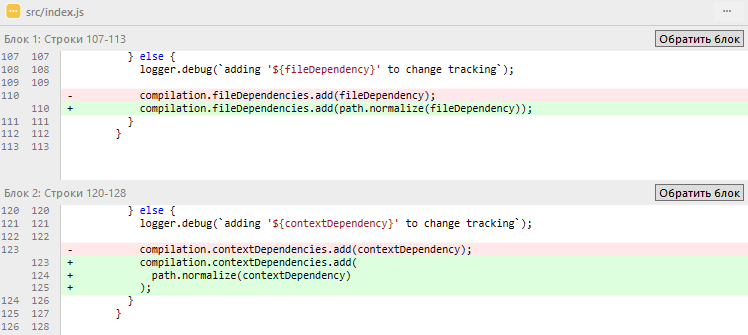
gewisser
on 13 Mar 2019
I'm not sure the failing of the test is related to the PR, the failing test fails on the master branch too.
unable to locate 'nonexistent.txt' at '*snip*\copy-webpack-plugin\test\helpers\nonexistent.txt'
    console.error node_modules/webpack-log/src/loglevel/PrefixFactory.js:55
      × 「copy-webpack-plugin」: path "from" cannot be empty string
    console.error node_modules/webpack-log/src/loglevel/PrefixFactory.js:55
      × 「copy-webpack-plugin」
@HoldYourWaffle @gewisser problem not in plugin, so we don't fix it here, windows support / and \\, also it is not reproducible on many windows and pass CI on windows, problem in your environment, maybe old version of package in deps or need update windows, please debug code, it is easy and very fast
alexander-akait
on 14 Mar 2019
Download https://developer.microsoft.com/en-us/microsoft-edge/tools/vms/ any machines and try to reproduce problem (i can't, all works as expected)
alexander-akait
on 14 Mar 2019
The problem still persist. Changes made by d80865741471bcd22361a5373550478047b33547 didn't help.
Chokidar exoneration
Surprisingly, chokidar (v2.1.2) is working well for me. It detects all changes made to desired files.
I'm using a non-standard web-server configuration which utilizes webpack's nodejs api compiler.watch() and discovered the same issue in both programmatic and cli modes ($ webpack --watch ...) where plugin fails to emit files on changes being made.
The obvious solution is to attempt to combine chokidar with webpack's compiler.invalidate() function in order to force it to work automatically, just like this :
        const   sources = chokidar.watch(`./src/folder_with_files_to_watch/**.*`)
        sources.on(`ready`, function() {
          sources.on(`all`, function() {
            // ...
            webpackWatch.invalidate();
          })
        })
But it turns out it doesn't force plugin to re-emit files once bundle is invalidated so I have concluded that the problem is somewhere between chokidar and webpack itself.
Platform and setup:
- Windows 10 Pro x64 (the latest version 1803, update: link)
- Node Version: v11.10.0
- NPM Version: 6.7.0
- webpack Version: 4.29.6
- copy-webpack-plugin Version: d80865741471bcd22361a5373550478047b33547
- chokidar (v2.1.2)
 hinell
on 15 Mar 2019
hinell
on 15 Mar 2019
@hinell maybe you can create minimum reproducible test repo?
alexander-akait
on 15 Mar 2019
@evilebottnawi I think I have narrowed down the problem. It turns out that it derives from difference in treatment of folders and files in patterns.
Here is an example. I have configured the plugin approximately in the following way:
new CopyPlugin([
  { from: `./src/public/`,  },
   ...
])
It fails to see any changes and here is why
The Problem
As you can see in the example above the directory ./src/public/ doesn't contain any a glob patterns. If you run wepback and edit files in that subfolder webpack will not rebuild.
According to the following lines of the source code all non-glob patterns are excluded from watching.
    if (pattern.fromType === 'glob') {
      fileDependencies.add(file.absoluteFrom);
    }
If you follow the source code up and find
pattern.fromType = 'glob';
assignment you can see that it is primarily assigned for glob-patterns only. Checkout the sources here and here (mentions are found only in preProcessPattern.js file). So it turns out the plugin actually doesn't add for watching any files neither from subfolders nor files specified in patterns directly.
Try out for example the following:
new CopyPlugin([
  { from: `./path/to/myfile.json`, to: `myfile.json`  },
])
Run webpack in watchmode and then edit the file. Webpack will not rebuild.
The Solution
Just add glob pattern like path/**.* and use flatten option and specify explicitly to: destination where files are expected to be:
new CopyPlugin([
  { from: `./src/public/**.*`, to: `subFolder/`, flatten: true  },
])
Additionally it would be nice if docs clarify how exactly files are watched and how to configure it properly until problem with non-glob files and directories is fixed.
hinell
on 16 Mar 2019
@evilebottnawi Скачал по указанной тобой ссылке: https://developer.microsoft.com/en-us/microsoft-edge/tools/vms/ образ виртуальной машины.
Перенес проект, npm install..., и вот что получилось:
https://youtu.be/VV4q0hsJAfs
gewisser
on 16 Mar 2019
@gewisser очень интересно, можете ли вы создать минимальный вопроизводимый репозиторий, может быть чтото в конфигурации webpack? Или какой то другой плагин все ломает?
Также укажите какой конкретно образ скачали (IE10/IE11) ?
alexander-akait
on 18 Mar 2019

Я залил на гугл диск этот скаченный образ уже со своим проектом (на видео выше). Могу дать ссылку...
gewisser
on 18 Mar 2019
@gewisser Будет отлично, посмотрю сегодня вечером в чем же проблема
alexander-akait
on 18 Mar 2019
@evilebottnawi Отправил на почту [email protected]
gewisser
on 19 Mar 2019
@gewisser can't run you image, anyway i reproduce problem using this repo https://github.com/webpack-contrib/copy-webpack-plugin/issues/358, investigate
alexander-akait
on 20 Mar 2019
Find a bug https://github.com/webpack/watchpack/blob/v1.6.0/lib/DirectoryWatcher.js#L260, webpack stores watching files in array as is we send (i.e. if we send C:/path/to/file.txt, webpack stores this value as is), but on change event from chokidar always emit path in platform specific (i.e. C:\path\to\file.txt) so webpack doesn't find emitted file in array watching files and doesn't trigger event.
alexander-akait
on 20 Mar 2019
To solve this you'd simply need to add path normalization right?
HoldYourWaffle
on 20 Mar 2019
And yes and no, WIP on this
alexander-akait
on 21 Mar 2019
Done in https://github.com/webpack-contrib/copy-webpack-plugin/pull/359, feel free to test and feedback
alexander-akait
on 21 Mar 2019
In my tests the PR solved the issue perfectly 😄
HoldYourWaffle
on 21 Mar 2019
I can also report that the PR fixes the instance I reported in the duplicate issue #358.
 fefrei
on 22 Mar 2019
fefrei
on 22 Mar 2019
Great, release today
alexander-akait
on 22 Mar 2019
Related issues
 kimgysen
·
3Comments
kimgysen
·
3Comments
 nickenchev
·
3Comments
nickenchev
·
3Comments
 padinko
·
3Comments
padinko
·
3Comments
 stq
·
5Comments
stq
·
5Comments
 lewayjack
·
5Comments
lewayjack
·
5Comments