Copilot-cli: Changing VPC network placement took down environment
Hey there, I added the following override to my manifest:
environments:
  staging:
    network:
      vpc:
        placement: private
When I then attempted to deploy my environment, I received this error:
- Updating the infrastructure for stack pigeon-staging-api                    [update rollback in progress]  [46.6s]
  The following resource(s) failed to update: [EnvControllerAction].
  - Update your environment's shared resources                                [update failed]                [37.0s]
    Received response status [FAILED] from custom resource. Message return
    ed: Resource is not in the state stackUpdateComplete (RequestId: 674eb
    c69-106c-46b7-8c8c-b503c6376d09)
  - An ECS service to run and maintain your tasks in the environment cluster  [not started]
  - An ECS task definition to group your containers and run them on ECS       [not started]
After the rollback, I am unable to access my endpoint. I tried running another deploy with the manifest change reverted. I get the following response:
- Updating the infrastructure for stack pigeon-staging-api                    [update rollback complete]  [29.7s]
  The following resource(s) failed to update: [Service].
  - An ECS service to run and maintain your tasks in the environment cluster  [update complete]           [2.1s]
    Resource handler returned message: "Invalid request provided: UpdateSe
    rvice error: The target group with targetGroupArn arn:aws:elasticloadb
    alancing:us-east-2:***:targetgroup/pigeo-Targe-1RIU1OUKE0G7E/
    eea0592bd7155fe1 does not have an associated load balancer. (Service:
    AmazonECS; Status Code: 400; Error Code: InvalidParameterException; Re
    quest ID: a9142aed-9499-4597-beec-039cc3396f24; Proxy: null)" (Request
    Token: 7ae9c03e-5557-f209-e2c9-b76f7bc51c5e, HandlerErrorCode: Invalid
    Request)
It looks like the initial update took out the LB, does anyone know how to properly revert this and create a load balanced environment with a NAT gateway?
 j3lev
j3lev
All 16 comments
Oh no ! 🙇
@j3lev did you create an environment with the default configuration or did you import an existing VPC? If imported how many public/private subnets were imported?
It's super weird that the Load Balancer would get removed from your environment 💭
Would you sharing with us the parameters of your environment stack?
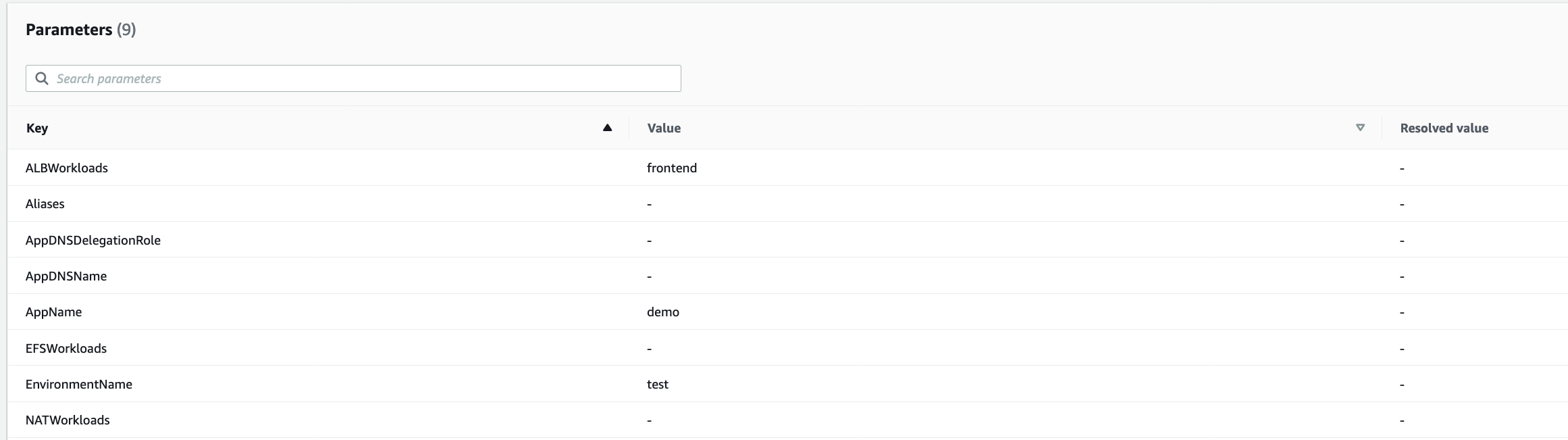
For example, in the above I can see that ALBWorkloads is set for my "frontend" service but there is no services for NATWorkloads. That should give us an idea to see if the necessary resources were supposed to be created
 efekarakus
on 24 Jun 2021
efekarakus
on 24 Jun 2021
Hey @efekarakus I appreciate the quick response! I set up the environment with the default configuration using v1.7.0. These are the parameters of my stack:
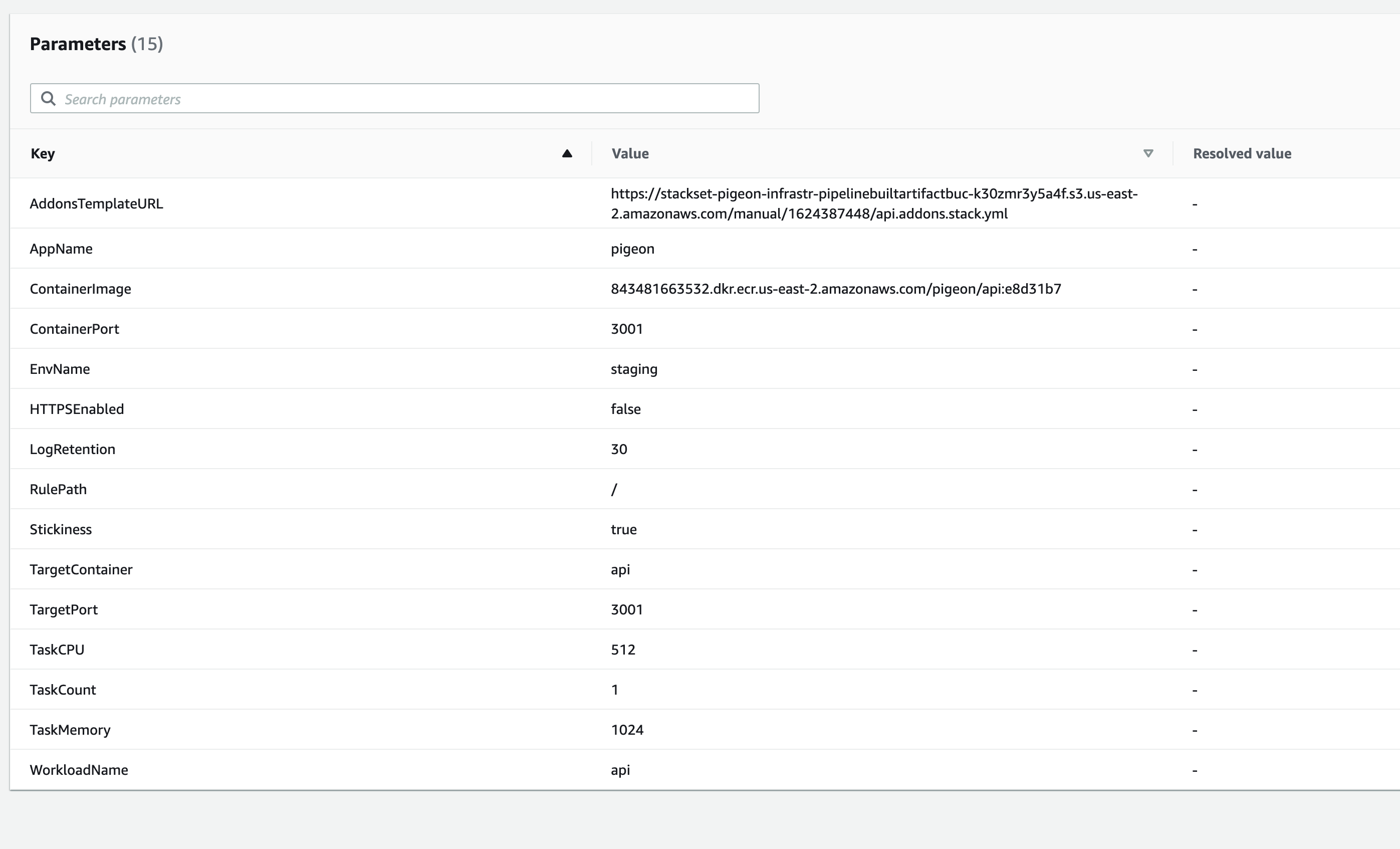
j3lev
on 24 Jun 2021
Thanks @j3lev! Would you mind sending a screenshot for the env stack as well pigeon-staging should be the stack name 🙏 ?
efekarakus
on 24 Jun 2021
Also we released v1.8.1 and I wonder if upgrading to the latest version would fix any of these problems? I don't think it should be it's worth a shot
efekarakus
on 24 Jun 2021
Oops, i sent the wrong stack yeah. here's the env stack:
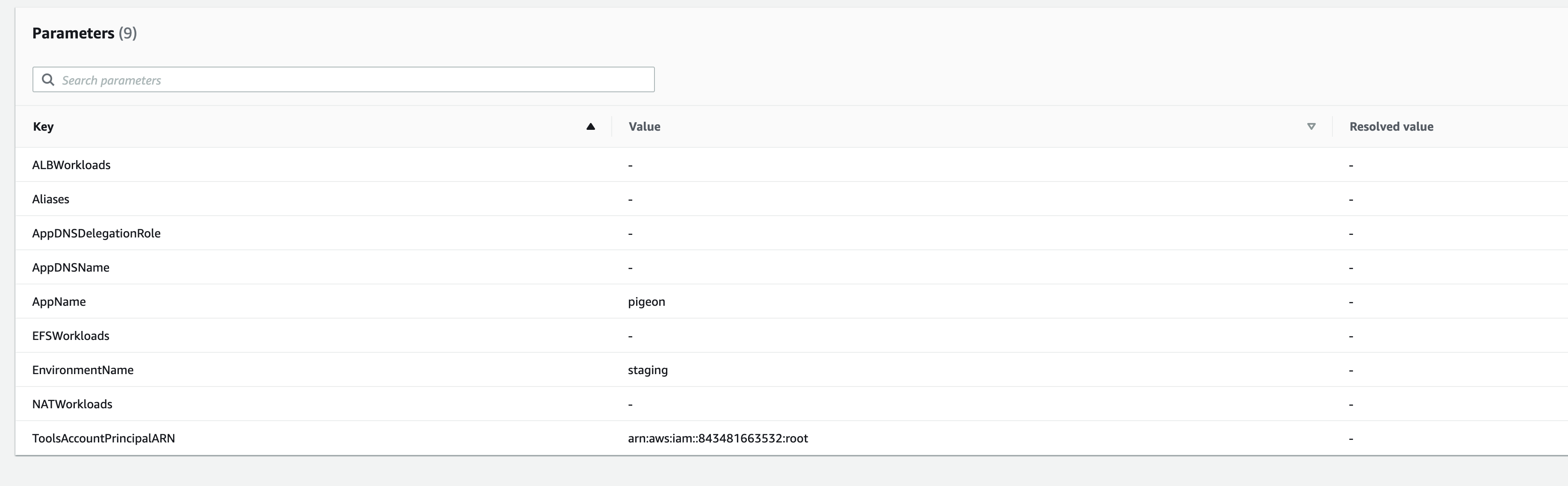
j3lev
on 24 Jun 2021
OK yes, somehow your api service got removed from the "ALBWorkloads" parameter which caused the load balancer to get deleted @_@.
For mitigating the issue:
- Would you mind clicking on
Updatefor the environment stack
Use current template- Manually add
apias a value to both theALBWorkloadsandNATWorkloadsparameters.
That should cause the environment stack to create a load balancer for you and NAT gateways.
- Then try running
copilot deployagain with aplacement: 'private'.
In the mean time to help us find out the root cause, would you mind:
- Navigating to CloudWatch logs: "/aws/lambda/pigeon-staging-api-EnvControllerFunction-XXXXXXX" and see if there are any error logs in there? 🙏
efekarakus
on 24 Jun 2021
Yup! I see this:
2021-06-24T15:41:59.582Z d6379849-149a-4d42-bf95-e48267461c17 INFO Caught error ResourceNotReady: Resource is not in the state stackUpdateComplete.
@efekarakus I tried to follow those instructions but the update failed:

j3lev
on 24 Jun 2021
Ah it looks like I reached the maximum number of EIP addresses
j3lev
on 24 Jun 2021
OOhhhhh wow!
efekarakus
on 24 Jun 2021
@efekarakus Everything is working now after I released unused elastic IPs! I really appreciate your help and guidance. So as a post mortem: the original issue was that I was at the limit for elastic IP addresses and thusly the NAT gateway creation was failing. On a subsequent deployment with the manifest change reverted, the load balancer was erroneously deleted. Luckily this happened in our staging environment 😅 . We do need to have the NAT gateway in our production environment and I'm a bit worried about the LB being deleted in that environment. Do you have any ideas on why that might've happened and can I provide you with any more info to help inform those ideas?
j3lev
on 24 Jun 2021
Do you have any ideas on why that might've happened and can I provide you with any more info to help inform those ideas?
I do not _yet_, but I'll try to reproduce the issue and get back to you!
efekarakus
on 25 Jun 2021
OK I can also reproduce the issue after allocating multiple EIPs and then triggering a deployment!
We will fix this from our end, and do a patch release ASAP 🙇 .
Mitigation
We do need to have the NAT gateway in our production environment and I'm a bit worried about the LB being deleted in that environment.
While waiting for a fix from our end, one way of alleviating the concern for the prod environment can be:
- To allocate one EIP ahead of time to ensure you have enough space,
- Then delete it,
- Finally do the deployment with
copilot deploy. This way we can ensure that the deployment will succeed!
Root Cause Analysis
Context
First some background on Lambda backed Custom Resources: https://aws.amazon.com/premiumsupport/knowledge-center/best-practices-custom-cf-lambda/
The physical ID associated with a custom resource is super important. If you change the physical ID of a resource, then this behavior happens (emphasis for rollback):
However, the old resource is not implicitly removed to allow a rollback if necessary. When the stack update is completed successfully, a Delete event request is sent with the old physical ID as an identifier. If the stack update fails and a rollback occurs, the new physical ID is sent in the Delete event.
What happened here?
When the EnvController failed to create the NAT gateway, then the following statement threw an exception:
https://github.com/aws/copilot-cli/blob/8402e67710d83fb2440936bcd1cf8e794d704368/cf-custom-resources/lib/env-controller.js#L223-L224
which causes us to go inside the catch-block:
https://github.com/aws/copilot-cli/blob/8402e67710d83fb2440936bcd1cf8e794d704368/cf-custom-resources/lib/env-controller.js#L250-L259
Note that because the promise failed, we never got to set the physicalResourceId to the existing physical resource ID: https://github.com/aws/copilot-cli/blob/8402e67710d83fb2440936bcd1cf8e794d704368/cf-custom-resources/lib/env-controller.js#L233-L234
Instead in case of a failure the physicalResourceId becomes undefined and then inside report it gets set to:
https://github.com/aws/copilot-cli/blob/8402e67710d83fb2440936bcd1cf8e794d704368/cf-custom-resources/lib/env-controller.js#L43
Therefore we end up changing the physical resource ID for the controller! 🔔
Since this resource ends up failing then, a DELETE event gets sent to this new physical resource telling it to remove all existing parameters:
2021-06-25T00:23:51.458Z 587ba194-310c-4d30-9dac-23b667904256 INFO event type is: Delete and parameters are: ["ALBWorkloads","Aliases","NATWorkloads"]
How to fix it?
Luckily fixing this isn't too bad, we just need to move physicalResourceId = event.PhysicalResourceId; as the first statement inside the UPDATE and DELETE cases. We'll fix this as soon as possible.
efekarakus
on 25 Jun 2021
I was able to deploy to my production environment without a hitch and everything went smoothly! Looks like I hit an unlucky edge case! Thank you for your quick help on this issue!
j3lev
on 25 Jun 2021
PR #2524 should fix this issue so that in case of an error we don't accidentally remove the parameters!
efekarakus
on 25 Jun 2021
Heya we fixed this in our latest release v1.8.2. Thank you for reporting this issue ❤️
 iamhopaul123
on 30 Jun 2021
iamhopaul123
on 30 Jun 2021
Related issues
 sundarnarasiman
·
3Comments
sundarnarasiman
·
3Comments
 kohidave
·
4Comments
iamhopaul123
·
3Comments
kohidave
·
4Comments
iamhopaul123
·
3Comments
 efe-selcuk
·
3Comments
efe-selcuk
·
3Comments
 fullstackdev-online
·
3Comments
fullstackdev-online
·
3Comments
Most helpful comment
@efekarakus Everything is working now after I released unused elastic IPs! I really appreciate your help and guidance. So as a post mortem: the original issue was that I was at the limit for elastic IP addresses and thusly the NAT gateway creation was failing. On a subsequent deployment with the manifest change reverted, the load balancer was erroneously deleted. Luckily this happened in our staging environment 😅 . We do need to have the NAT gateway in our production environment and I'm a bit worried about the LB being deleted in that environment. Do you have any ideas on why that might've happened and can I provide you with any more info to help inform those ideas?