Copilot-cli: How to configure security groups in Load Balancer Web Service
Hi, there.
I would like to set my custom security group to ECS tasks, so I add network configuration to manifest.yml as documented here.
name: rails
type: Load Balanced Web Service
...
network:
  vpc:
    security_groups: ['sg-09ce2df3852b84be9']
And deploy these commands.
$ copilot version
version: v1.7.0, built for darwin

$ copilot svc deploy -e dev -n rails
In AWS Management Console, sg-09ce2df3852b84be9 is not set to ECS tasks. Only the security group set with Copilot by default is configured for the ECS tasks.
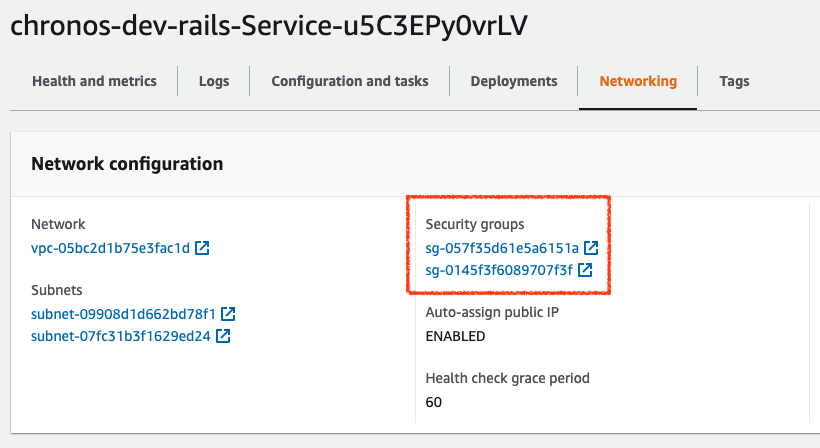
It seemed that the security group set in manifest.yml was not set in the CloudFormation template as well.
$ copilot svc package -e dev -n rails
...
Service:
    Metadata:
      'aws:copilot:description': 'An ECS service to run and maintain your tasks in the environment cluster'
    Type: AWS::ECS::Service
    DependsOn: WaitUntilListenerRuleIsCreated
    Properties:
      Cluster:
        Fn::ImportValue:
          !Sub '${AppName}-${EnvName}-ClusterId'
      TaskDefinition: !Ref TaskDefinition
      DesiredCount: !Ref TaskCount
      DeploymentConfiguration:
        DeploymentCircuitBreaker:
          Enable: true
          Rollback: true
        MinimumHealthyPercent: 100
        MaximumPercent: 200
      PropagateTags: SERVICE
      EnableExecuteCommand: true
      LaunchType: FARGATE
      NetworkConfiguration:
        AwsvpcConfiguration:
          AssignPublicIp: ENABLED
          Subnets:
            - Fn::Select:
              - 0
              - Fn::Split:
                - ','
                - Fn::ImportValue: !Sub '${AppName}-${EnvName}-PublicSubnets'
            - Fn::Select:
              - 1
              - Fn::Split:
                - ','
                - Fn::ImportValue: !Sub '${AppName}-${EnvName}-PublicSubnets'
          SecurityGroups:
            - Fn::ImportValue: !Sub '${AppName}-${EnvName}-EnvironmentSecurityGroup'
            - Fn::GetAtt: [AddonsStack, Outputs.railsclusterSecurityGroup]
...
Any suggestion would be appreciated.
Thanks in advance!
 shgtkshruch
All 6 comments
hello @shgtkshruch. Sorry for the problem you are having. I tried to reproduce the issue but my setting was rendered correctly
network:
  vpc:
    security_groups: ['sg-08f6e058262e38835']
          SecurityGroups:
            - Fn::ImportValue: !Sub '${AppName}-${EnvName}-EnvironmentSecurityGroup'
            - sg-08f6e058262e38835
Maybe could you try to update the CLI to our latest released version v1.7.1 and try to deploy again to see if the security group is set correctly?
Edit: or the manifest configuration for network.vpc.security_groups is malformed. Could you check the indentation/spacing as well? Thank you!
 iamhopaul123
on 4 Jun 2021
iamhopaul123
on 4 Jun 2021
@iamhopaul123 Thank you quick response!
I update copilot, and try to deploy again, but my custom security group is not set.
$ copilot --version
copilot version: v1.7.1

$ copilot svc deploy -n rails -e dev
My manifest file is here.
# The manifest for the "rails" service.
# Read the full specification for the "Load Balanced Web Service" type at:
#  https://aws.github.io/copilot-cli/docs/manifest/lb-web-service/

# Your service name will be used in naming your resources like log groups, ECS services, etc.
name: rails
type: Load Balanced Web Service

# Distribute traffic to your service.
http:
  # Requests to this path will be forwarded to your service.
  # To match all requests you can use the "/" path.
  path: '/'
  # You can specify a custom health check path. The default is "/".
  healthcheck:
    path: '/'
    healthy_threshold: 2
    unhealthy_threshold: 2
    interval: 5s
    timeout: 2s

  # ロードバランサーのターゲットコンテナは Service のコンテナの代わりにサイドカーの`nginx`を指定
  targetContainer: 'nginx'

# Configuration for your containers and service.
image:
  location: 123456789101.dkr.ecr.ap-northeast-1.amazonaws.com/chronos/rails:364027b85ffeea190c398dc83cc4de9dbf28727b
  # Port exposed through your container to route traffic to it.
  port: 3000

cpu: 256       # Number of CPU units for the task.
memory: 512    # Amount of memory in MiB used by the task.
count: 1       # Number of tasks that should be running in your service.

exec: true     # Enable running commands in your container.

network:
  vpc:
    security_groups: ['sg-09ce2df3852b84be9']

sidecars:
  nginx:
    image: 123456789101.dkr.ecr.ap-northeast-1.amazonaws.com/chronos/nginx:latest
    port: 80
    variables:
      RAILS_HOST: http://localhost:3000
  # https://docs.datadoghq.com/integrations/ecs_fargate/?tab=fluentbitandfirelens#trace-collection
  datadog-agent:
    image: datadog/agent:latest
    port: 8126
    secrets:
      DD_API_KEY: /copilot/chronos/dev/secrets/DATADOG_API_KEY
    variables:
      ECS_FARGATE: true
      DD_APM_ENABLED: true
      DD_SERVICE: chronos-rails
      DD_DOCKER_ENV_AS_TAGS: true

logging:
  destination:
    Name: datadog
    Host: http-intake.logs.datadoghq.com
    TLS: 'on'
    dd_service: chronos-rails
    dd_source: chronos-rails
    provider: ecs
  secretOptions:
    apikey: /copilot/chronos/dev/secrets/DATADOG_API_KEY

# Optional fields for more advanced use-cases.
#
variables:                    # Pass environment variables as key value pairs.
  RAILS_LOG_TO_STDOUT: true

secrets:       # Pass secrets from AWS Systems Manager (SSM) Parameter Store.
# GITHUB_TOKEN: GITHUB_TOKEN  # The key is the name of the environment variable, the value is the name of the SSM parameter.

# You can override any of the values defined above by environment.
environments:
  dev:
    sidecars:
      datadog-agent:
        variables:
          DD_ENV: dev
    secrets:
      RAILS_MASTER_KEY: /copilot/chronos/dev/secrets/RAILS_MASTER_KEY
  staging:
    sidecars:
      datadog-agent:
        variables:
          DD_ENV: staging
    secrets:
      RAILS_MASTER_KEY: /copilot/chronos/staging/secrets/RAILS_MASTER_KEY
Hello @shgtkshruch sorry for the late reply. I tried to use your manifest file and ran copilot svc package using Copilot 1.7.1. This is part of the CFN template generated by Copilot
...
  Service:
    Metadata:
      'aws:copilot:description': 'An ECS service to run and maintain your tasks in the environment cluster'
    Type: AWS::ECS::Service
    DependsOn: WaitUntilListenerRuleIsCreated
    Properties:
      Cluster:
        Fn::ImportValue:
          !Sub '${AppName}-${EnvName}-ClusterId'
      TaskDefinition: !Ref TaskDefinition
      DesiredCount: !Ref TaskCount
      DeploymentConfiguration:
        DeploymentCircuitBreaker:
          Enable: true
          Rollback: true
        MinimumHealthyPercent: 100
        MaximumPercent: 200
      PropagateTags: SERVICE
      EnableExecuteCommand: true
      LaunchType: FARGATE
      NetworkConfiguration:
        AwsvpcConfiguration:
          AssignPublicIp: ENABLED
          Subnets:
            - Fn::Select:
              - 0
              - Fn::Split:
                - ','
                - Fn::ImportValue: !Sub '${AppName}-${EnvName}-PublicSubnets'
            - Fn::Select:
              - 1
              - Fn::Split:
                - ','
                - Fn::ImportValue: !Sub '${AppName}-${EnvName}-PublicSubnets'
          SecurityGroups:
            - Fn::ImportValue: !Sub '${AppName}-${EnvName}-EnvironmentSecurityGroup'
            - sg-09ce2df3852b84be9
...
I tried to include an addon file with SG output and it still worked for me (though it shouldn't affect). Could you try to run svc package to see the output and make sure you are using the manifest you pasted in this issue? Thank you!
iamhopaul123
on 8 Jun 2021
Thank you response @iamhopaul123 ! I found a pattern of when a security group could be attached and when it could not.
If I don't specify the environments in manifest.yml, I can now configure the security group.
name: rails
type: Load Balanced Web Service

http:
  path: '/'
  healthcheck:
    path: '/healthcheck'
    healthy_threshold: 2
    unhealthy_threshold: 2
    interval: 5s
    timeout: 2s
  targetContainer: 'nginx'

image:
  location: 12345678910.dkr.ecr.ap-northeast-1.amazonaws.com/chronos/rails:<image_tag>
  port: 3000

cpu: 256
memory: 512
count: 1

exec: true

network:
  vpc:
    security_groups: ['sg-09ce2df3852b84be9']

sidecars:
  nginx:
    image: 12345678910.dkr.ecr.ap-northeast-1.amazonaws.com/chronos/nginx:latest
    port: 80
    variables:
      RAILS_HOST: http://localhost:3000
  datadog-agent:
    image: datadog/agent:latest
    port: 8126
    secrets:
      DD_API_KEY: /copilot/chronos/dev/secrets/DATADOG_API_KEY
    variables:
      ECS_FARGATE: true
      DD_APM_ENABLED: true
      DD_SERVICE: chronos-rails
      DD_DOCKER_ENV_AS_TAGS: true

logging:
  destination:
    Name: firehose
    region: ap-northeast-1
    delivery_stream: chronos-rails-datadog

variables:
  RAILS_LOG_TO_STDOUT: true

# Comment out `environments` to work `network.vcp.securiy_groups` configuration
# environments:
#   dev:
#     sidecars:
#       datadog-agent:
#         variables:
#           DD_ENV: dev
#     secrets:
#       RAILS_MASTER_KEY: /copilot/chronos/dev/secrets/RAILS_MASTER_KEY
Alternatively, setting the security group in the environments also worked.
name: rails
type: Load Balanced Web Service

http:
  path: '/'
  healthcheck:
    path: '/healthcheck'
    healthy_threshold: 2
    unhealthy_threshold: 2
    interval: 5s
    timeout: 2s
  targetContainer: 'nginx'

image:
  location: 12345678910.dkr.ecr.ap-northeast-1.amazonaws.com/chronos/rails:<image_tag>
  port: 3000

cpu: 256
memory: 512
count: 1

exec: true

sidecars:
  nginx:
    image: 12345678910.dkr.ecr.ap-northeast-1.amazonaws.com/chronos/nginx:latest
    port: 80
    variables:
      RAILS_HOST: http://localhost:3000
  datadog-agent:
    image: datadog/agent:latest
    port: 8126
    secrets:
      DD_API_KEY: /copilot/chronos/dev/secrets/DATADOG_API_KEY
    variables:
      ECS_FARGATE: true
      DD_APM_ENABLED: true
      DD_SERVICE: chronos-rails
      DD_DOCKER_ENV_AS_TAGS: true

logging:
  destination:
    Name: firehose
    region: ap-northeast-1
    delivery_stream: chronos-rails-datadog

variables:
  RAILS_LOG_TO_STDOUT: true

environments:
  dev:
    # Set security groups settings in `environments`
    network:
      vpc:
        security_groups: ['sg-09ce2df3852b84be9']
    sidecars:
      datadog-agent:
        variables:
          DD_ENV: dev
    secrets:
      RAILS_MASTER_KEY: /copilot/chronos/dev/secrets/RAILS_MASTER_KEY
In both patterns, I was able to set up security groups in the CloudFormation template.
$ copilot svc package --name rails --env dev
...
  Service:
    Metadata:
      'aws:copilot:description': 'An ECS service to run and maintain your tasks in the environment cluster'
    Type: AWS::ECS::Service
    DependsOn: WaitUntilListenerRuleIsCreated
    Properties:
      Cluster:
        Fn::ImportValue:
          !Sub '${AppName}-${EnvName}-ClusterId'
      TaskDefinition: !Ref TaskDefinition
      DesiredCount: !Ref TaskCount
      DeploymentConfiguration:
        DeploymentCircuitBreaker:
          Enable: true
          Rollback: true
        MinimumHealthyPercent: 100
        MaximumPercent: 200
      PropagateTags: SERVICE
      EnableExecuteCommand: true
      LaunchType: FARGATE
      NetworkConfiguration:
        AwsvpcConfiguration:
          AssignPublicIp: ENABLED
          Subnets:
            - Fn::Select:
              - 0
              - Fn::Split:
                - ','
                - Fn::ImportValue: !Sub '${AppName}-${EnvName}-PublicSubnets'
            - Fn::Select:
              - 1
              - Fn::Split:
                - ','
                - Fn::ImportValue: !Sub '${AppName}-${EnvName}-PublicSubnets'
          SecurityGroups:
            - Fn::ImportValue: !Sub '${AppName}-${EnvName}-EnvironmentSecurityGroup'
            - sg-09ce2df3852b84be9
            - Fn::GetAtt: [AddonsStack, Outputs.railsclusterSecurityGroup]
...
Is there something wrong with my original manifest file?
shgtkshruch
on 9 Jun 2021
Ohhh @shgtkshruch thanks for the info! That definitely sounds like a bug, where if you specify:
network:
  vpc:
    security_groups: ['sg-09ce2df3852b84be9']
environments:
  dev:
     count: 1
then for dev it looks like we override vpc.security_groups to be empty, instead of leaving it as is. We'll try to reproduce this and prioritize the bug.
 efekarakus
on 9 Jun 2021
efekarakus
on 9 Jun 2021
Hi @shgtkshruch ! The PR #2442 should fix the issue. Thank you for reporting it to us 🙇
efekarakus
on 11 Jun 2021
Related issues
 kohidave
·
4Comments
kohidave
·
4Comments
 shrasool
·
4Comments
shrasool
·
4Comments
 noahjahn
·
3Comments
noahjahn
·
3Comments
 fullstackdev-online
·
3Comments
fullstackdev-online
·
3Comments
 bpottier
·
3Comments
bpottier
·
3Comments
Most helpful comment
Hi @shgtkshruch ! The PR #2442 should fix the issue. Thank you for reporting it to us 🙇