Copilot-cli: allowed_source_ip and additional security groups not working when launching tasks in private subnets
We are not able to secure the LB service to the allowed_source_ips: ["CIDR IP addresses permitted to access your service."] and additional security groups specified in the copilot manifest.yaml
Sample manifest.yaml:
# The manifest for the "sample-service" service.
# Read the full specification for the "Load Balanced Web Service" type at:
#  https://aws.github.io/copilot-cli/docs/manifest/lb-web-service/

# Your service name will be used in naming your resources like log groups, ECS services, etc.
name: sample-service
type: Load Balanced Web Service

# Distribute traffic to your service.
http:
  # Requests to this path will be forwarded to your service.
  # To match all requests you can use the "/" path.
  path: '/'
  # You can specify a custom health check path. The default is "/".
  healthcheck:
    path: '/index.html'
    success_codes: '200,301'
    healthy_threshold: 3
    unhealthy_threshold: 2
    interval: 15s
    timeout: 10s
  stickiness: false
  allowed_source_ips: ["149.142.224.0/23"]

# Configuration for your containers and service.
image:
  # Docker build arguments. For additional overrides: https://aws.github.io/copilot-cli/docs/manifest/lb-web-service/#image-build
  build: Dockerfile
  # Port exposed through your container to route traffic to it.
  port: 80

cpu: 256       # Number of CPU units for the task.
memory: 512    # Amount of memory in MiB used by the task.
count: 1       # Number of tasks that should be running in your service.
exec: true     # Enable running commands in your container.

# Enable deploying to private subnets and specifying additional security groups
network:
  vpc:
    placement: 'private'
    security_groups: ["sg-070e01f5390b89252"]

# Optional fields for more advanced use-cases.
#
#variables:                    # Pass environment variables as key value pairs.
#  LOG_LEVEL: info

#secrets:                      # Pass secrets from AWS Systems Manager (SSM) Parameter Store.
#  GITHUB_TOKEN: GITHUB_TOKEN  # The key is the name of the environment variable, the value is the name of the SSM parameter.

# You can override any of the values defined above by environment.
#environments:
#  test:
#    count: 2               # Number of tasks to run for the "test" environment.
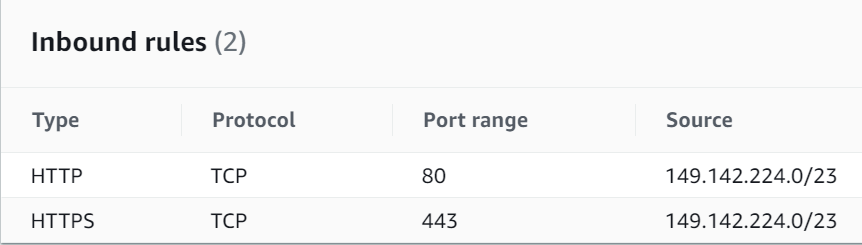
Note: The _sg-070e01f5390b89252_ in the manifest.yaml contains the following inbound rules:
Steps used to build and deploy the AWS Copilot Sample Service:
Create a new application with an existing domain name in Amazon Route53.
copilot app init --domain 5ff4efa0.dev.r53.aws.it.ucla.edu
Setup the application
copilot init
Creates an environment with imported VPC resources.
copilot env init --name test --profile default --app aws-copilot --import-vpc-id vpc-0c320aebbb4f93f15 --import-public-subnets subnet-0480dacff87ac6932,subnet-0aed8ada636724d0e --import-private-subnets subnet-097eb9653eb3d0182,subnet-00687a87031bba52e
Deploys a service to an environment
copilot svc deploy --name sample-service --env test
Sample output:
Environment test is already on the latest version v1.3.1, skip upgrade.
failed to get console mode for stdin: The handle is invalid.
[+] Building 44.7s (7/7) FINISHED
 => [internal] load build definition from Dockerfile                                                                            0.1s
 => => transferring dockerfile: 125B                                                                                            0.0s
 => [internal] load .dockerignore                                                                                               0.1s
 => => transferring context: 2B                                                                                                 0.0s
 => [internal] load metadata for public.ecr.aws/nginx/nginx:1.19                                                                2.9s
 => [internal] load build context                                                                                               0.1s
 => => transferring context: 3.23kB                                                                                             0.0s
 => [1/2] FROM public.ecr.aws/nginx/nginx:1.19@sha256:1c4a6a3a0a742ca28a84cf524defb81c7ef5f1c8839e6a195c7209525ab60158         41.3s
 => => resolve public.ecr.aws/nginx/nginx:1.19@sha256:1c4a6a3a0a742ca28a84cf524defb81c7ef5f1c8839e6a195c7209525ab60158          0.0s
 => => sha256:1c4a6a3a0a742ca28a84cf524defb81c7ef5f1c8839e6a195c7209525ab60158 743B / 743B                                      0.0s
 => => sha256:f0b8a9a541369db503ff3b9d4fa6de561b300f7363920c2bff4577c6c24c5cf6 7.74kB / 7.74kB                                  0.0s
 => => sha256:5f97dc5d71ab2675126dba76dbe161c839043fb3e3ccaaf58ba78b394cdd37b0 602B / 602B                                      1.2s
 => => sha256:eba373a0620f68ffdc3f217041ad25ef084475b8feb35b992574cd83698e9e3c 1.57kB / 1.57kB                                  0.0s
 => => sha256:69692152171afee1fd341febc390747cfca2ff302f2881d8b394e786af605696 27.15MB / 27.15MB                               23.6s
 => => sha256:49f7d34d62c18a321b727d5c05120130f72d1e6b8cd0f1cec9a4cca3eee0815c 26.58MB / 26.58MB                               39.7s
 => => sha256:cfcd0711b93a41eb07234fa93b0c2ce39be93a71a743dd76766e67a0133163e8 894B / 894B                                      1.7s
 => => sha256:be6172d7651be2625df008a2bb6cbaf2139cbf1e50ae16256791e54e8dde8449 666B / 666B                                      2.3s
 => => sha256:de981387034241b38875f3151654b3bd9ef4afe396eec23dce7cb73134d2867b 1.39kB / 1.39kB                                  2.6s
 => => extracting sha256:69692152171afee1fd341febc390747cfca2ff302f2881d8b394e786af605696                                       1.1s
 => => extracting sha256:49f7d34d62c18a321b727d5c05120130f72d1e6b8cd0f1cec9a4cca3eee0815c                                       0.8s
 => => extracting sha256:5f97dc5d71ab2675126dba76dbe161c839043fb3e3ccaaf58ba78b394cdd37b0                                       0.0s
 => => extracting sha256:cfcd0711b93a41eb07234fa93b0c2ce39be93a71a743dd76766e67a0133163e8                                       0.0s
 => => extracting sha256:be6172d7651be2625df008a2bb6cbaf2139cbf1e50ae16256791e54e8dde8449                                       0.0s
 => => extracting sha256:de981387034241b38875f3151654b3bd9ef4afe396eec23dce7cb73134d2867b                                       0.0s
 => [2/2] COPY index.html /usr/share/nginx/html                                                                                 0.1s
 => exporting to image                                                                                                          0.1s
 => => exporting layers                                                                                                         0.1s
 => => writing image sha256:407ae9d4cb2d0c000f53f1ab6c25a2fae177971ea560e2b2467018910cb27124                                    0.0s
 => => naming to **********.dkr.ecr.us-west-2.amazonaws.com/aws-copilot/sample-service                                        0.0s

Use 'docker scan' to run Snyk tests against images to find vulnerabilities and learn how to fix them
Login Succeeded
Using default tag: latest
The push refers to repository [**********.dkr.ecr.us-west-2.amazonaws.com/aws-copilot/sample-service]
8b70b47a1da8: Pushed
f0f30197ccf9: Pushed
eeb14ff930d4: Pushed
c9732df61184: Pushed
4b8db2d7f35a: Pushed
431f409d4c5a: Pushed
02c055ef67f5: Pushed
latest: digest: sha256:c371d08add006d13566f701c609a137f586b0e0875f0e9bfa5606d2057432183 size: 1778
√ Proposing infrastructure changes for stack aws-copilot-test-sample-service
- Creating the infrastructure for stack aws-copilot-test-sample-service           [create complete]  [281.2s]
  - Service discovery for your services to communicate within the VPC             [create complete]  [1.5s]
  - Update your environment's shared resources                                    [update complete]  [145.6s]
    - A security group for your load balancer allowing HTTP and HTTPS traffic     [create complete]  [2.6s]
    - An Application Load Balancer to distribute public traffic to your services  [create complete]  [122.2s]
  - An IAM Role for the Fargate agent to make AWS API calls on your behalf        [create complete]  [18.9s]
  - A CloudWatch log group to hold your service logs                              [create complete]  [1.5s]
  - An ECS service to run and maintain your tasks in the environment cluster      [create complete]  [65.1s]
    Deployments
               Revision  Rollout      Desired  Running  Failed  Pending
      PRIMARY  1         [completed]  1        1        0       0
  - A target group to connect the load balancer to your service                   [create complete]  [0.0s]
  - An ECS task definition to group your containers and run them on ECS           [create complete]  [1.8s]
  - An IAM role to control permissions for the containers in your tasks           [create complete]  [22.6s]
√ Deployed sample-service, you can access it at https://sample-service.test.aws-copilot.5ff4efa0.dev.r53.aws.it.ucla.edu.
Expected result: The sample-service should only be accessible from the CIDR IP addresses permitted to access the service.
 henryc
All 10 comments
Hello @henryc it seems like allowed_source_ips this field doesn't work for HTTPS listener right now which should be fixed by us. However, can the other IP addresses access the LB endpoint even if you also controlled the inbound traffic through sg-070e01f5390b89252?
 iamhopaul123
on 18 May 2021
iamhopaul123
on 18 May 2021
Yes. I am able to access the LB endpoint even if I am controlling the inbound traffic through the sg-070e01f5390b89252.
henryc
on 18 May 2021
Sorry for the inconvenience. I am able to reproduce the issue. Hopefully my explanation below can help clarify a little bit.
The current behavior for Copilot is when you import a security group, the security group will be used to control traffic for your ECS service (instead of the load balancer) along with the default environment security group Copilot creates. The reason why it doesn't help either to set the inbound rule in sg-070e01f5390b89252 is because as shown in the picture below,

the default env security group already allows all ingress from the public ALB and other containers in this security group. One workaround for now is to disassociate or modify the Copilot env security group. As for allowed_source_ip as I mentioned before we need to fix it so that it can work for HTTPS.
iamhopaul123
on 18 May 2021
We're aware of the workaround. Is there an ETA when HTTPS will be fixed?
henryc
on 18 May 2021
I can send out a quick fix for it but we are releasing very soon so it won't be included until the one after this release (which will be in about one or two weeks). So sorry about that.
iamhopaul123
on 18 May 2021
It stills broken in copilot 1.7
henryc
on 19 May 2021
That's because it didn't catch the release yesterday. It will be included in the next release.
iamhopaul123
on 19 May 2021
That's because it didn't catch the release yesterday. It will be included in the next release.
Thank you @iamhopaul123 !
 sharepointoscar
on 19 May 2021
sharepointoscar
on 19 May 2021
Hi folks! thanks for the patience 🙇 The fix is now out in v1.7.1: https://github.com/aws/copilot-cli/releases/tag/v1.7.1!
 efekarakus
on 21 May 2021
efekarakus
on 21 May 2021
It's working now. Thank you all!
henryc
on 4 Jun 2021
Related issues
 srrengar
·
3Comments
srrengar
·
3Comments
 bpottier
·
3Comments
iamhopaul123
·
3Comments
bpottier
·
3Comments
iamhopaul123
·
3Comments
 camilosantana
·
3Comments
camilosantana
·
3Comments
 aidansteele
·
3Comments
aidansteele
·
3Comments
Most helpful comment
That's because it didn't catch the release yesterday. It will be included in the next release.