Copilot-cli: How to deploy service with Aurora Serverless to custom environment?
Hi! I think AWS Copilot is a great tool that makes containers easy to use.
Thank you for developing such a useful and wonderful tool.
When I create a service with Aurora Serverless, I get an error message and cannot deploy the service.
# create application with name `chronos`
$ copilot app init
Application name: chronos
✔ Created the infrastructure to manage services and jobs under application chronos.

✔ The directory copilot will hold service manifests for application chronos.

Recommended follow-up actions:
- Run `copilot init` to add a new service or job to your application.

# create environment with name `dev`
$ copilot env init
What is your environment's name? dev
Which credentials would you like to use to create dev? [profile default]
Would you like to use the default configuration for a new environment?
    - A new VPC with 2 AZs, 2 public subnets and 2 private subnets
    - A new ECS Cluster
    - New IAM Roles to manage services and jobs in your environment
 Yes, use default.
✔ Linked account 123456789101 and region ap-northeast-1 to application chronos.

✔ Proposing infrastructure changes for the chronos-dev environment.
...

# create Rails service with Load Balanced Web Service
$ copilot svc init
Note: It's best to run this command in the root of your workspace.
Service type: Load Balanced Web Service
Service name: rails
Dockerfile: ./Dockerfile.prod
no EXPOSE statements in Dockerfile ./Dockerfile.prod
Port: 3000
✔ Manifest file for service rails already exists at copilot/rails/manifest.yml, skipping writing it.
Your manifest contains configurations like your container size and port (:3000).

✔ Created ECR repositories for service rails.

Recommended follow-up actions:
- Update your manifest copilot/rails/manifest.yml to change the defaults.
- Run `copilot svc deploy --name rails --env test` to deploy your service to a test environment.

# create storage with Aurora Serverless
$ copilot storage init
Only found one workload, defaulting to: rails
Storage type: Aurora Serverless
Storage resource name: rails-cluster
Database engine: MySQL
Initial database name: app_production

# Deploy service
$ copilot svc deploy
Only found one service, defaulting to: rails
Only found one environment, defaulting to: dev
Environment dev is already on the latest version v1.3.1, skip upgrade.
...
# build docker image
# push docker image to ECR
...
✘ Proposing infrastructure changes for stack chronos-dev-rails
✘ deploy service: change set with name copilot-6012e83b-fa5a-4c90-a93d-b9f1e616b9ab for stack chronos-dev-rails has no changes
After deleting the addons directory, I can deploy Rails service.
rm -rf copilot/rails/addons

# successfully deploy
copilot svc deploy
But, i can deploy test environment that created by copilot init instruction even if not delete addons directory.
How can i deploy service to custom environment (ex. dev, staging) with Aurora Serverless.
 shgtkshruch
All 8 comments
Hello shgtkshruch!
This is weird. The Aurora addon should be able to deploy to a non-test environment. I am sorry for the confusion!
To help us reproduce the issue, could you please describe other steps that you had taken, if there is any? For example, customizing the addon template, deploying and deleting the service, etc.
I've tried to deploy a service following your steps (i.e. 1. create an app, 2. create an env named "dev", 3. create and deploy a service with an Aurora addon) but I was not able to reproduce the error.
Meanwhile, I have one guess but it could be wrong:
I've seen this error caused by a malformed addon template. Could you please run aws cloudformation validate-template --template-body file://copilot/rails/addons/rails-cluster.yml (note that file:// is necessary) to see if there is anything wrong with the template?
 Lou1415926
on 3 May 2021
Lou1415926
on 3 May 2021
Hi, @Lou1415926! Thanks, quickly response!
As mentioned previous comment, I have created the Application, Environment, Service, and Storage. After creating the Storage, I edited parameter group in copilot/rails/addons/rails-cluster.yml to be able to store Japanese text to Aurora Serverless.
My pull request is here.
$ copilot app init chronos
$ copilot env init --name dev --profile default --default-config
$ copilot storage init -n rails-cluster -t Aurora --engine MySQL --initial-db app_production
# Edit `copilot/rails/addons/rails-cluster.yml`
$ copilot svc init -n rails --svc-type "Load Balanced Web Service" --dockerfile ./Dockerfile.prod --port 3000
$ copilot svc deploy -n rails -e dev
✘ Proposing infrastructure changes for stack chronos-dev-rails
✘ deploy service: change set with name copilot-1a7d6f93-035a-4661-af38-b24f66ad1ec6 for stack chronos-dev-rails has no changes
I run aws cloudformation validate-template command, but there doesn't seem to be an error to me.
$ aws cloudformation validate-template --template-body file://copilot/rails/addons/rails-cluster.yml

{
    "Parameters": [
        {
            "ParameterKey": "App",
            "NoEcho": false,
            "Description": "Your application's name."
        },
        {
            "ParameterKey": "railsclusterDBName",
            "DefaultValue": "app_production",
            "NoEcho": false,
            "Description": "The name of the initial database to be created in the DB cluster."
        },
        {
            "ParameterKey": "railsclusterDBAutoPauseSeconds",
            "DefaultValue": "1000",
            "NoEcho": false,
            "Description": "The duration in seconds before the cluster pauses."
        },
        {
            "ParameterKey": "Env",
            "NoEcho": false,
            "Description": "The environment name your service, job, or workflow is being deployed to."
        },
        {
            "ParameterKey": "Name",
            "NoEcho": false,
            "Description": "The name of the service, job, or workflow being deployed."
        }
    ]
}
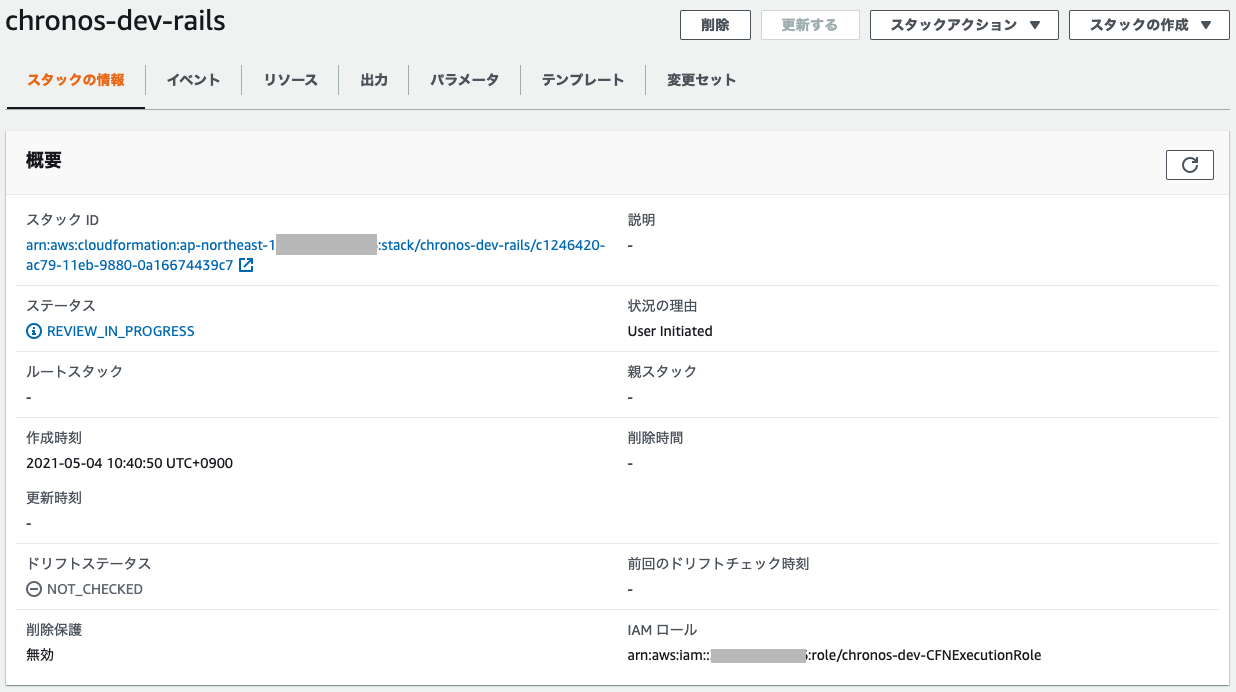
After I run copilot svc deploy -n rails -e dev, I check the CloudFormation screen in the AWS Management Console, it is stuck at REVIEW_IN_PROGRESS 🤔
shgtkshruch
on 4 May 2021
Thank you @shgtkshruch so much for providing these information!!
I was still unable to reproduce the issue following the steps 😔😔. Your modification of the template seems perfectly fine to me!
While I continue investigating the problem - if you haven't done this, would you mind give this a try ⬇️ ?
- First run
copilot svc delete --env dev --name railsto delete the service fromdev. - Then it'll just be the same as what you've done fore! That is, run
copilot svc init,copilot storage init, modify the template, and thencopilot svc deploy.
You mentioned that the deployment worked for "test" environment but not for "dev". I suspect that some interruptions (e.g. premature termination of the program) caused the "chronos-dev-rails"stack to hang, resulting in a weird state.
Therefore, it might be worth trying to run copilot svc delete to clean up your hanging stack, so that you can try deploying the service with a clean slate.
Again I apologize for the inconvenience 🙇♀️!
Lou1415926
on 5 May 2021
Hello @shgtkshruch. To add one more question to @Lou1415926's response: could you tell us what version of Copilot are you using now?
 iamhopaul123
on 5 May 2021
iamhopaul123
on 5 May 2021
@Lou1415926 Sorry, the reproduction procedure I wrote was not accurate 🙇
The error will probably be reproduced with this procedure.
$ copilot app init chronos
$ copilot env init --name test --profile default --default-config
$ copilot svc init -n rails --svc-type "Load Balanced Web Service" --dockerfile ./Dockerfile.prod --port 3000
$ copilot storage init -n rails-cluster -t Aurora --engine MySQL --initial-db app_production
# deploy success
$ copilot svc deploy -n rails -e test

$ copilot env init --name dev --profile default --default-config
# deploy fails
$ copilot svc deploy -n rails -e dev
✘ Proposing infrastructure changes for stack chronos-dev-rails
✘ deploy service: change set with name copilot-5a0859fc-75cc-4594-8fe1-c308642d907c for stack chronos-dev-rails has no changes
Once I deleted addons/rails-cluster.yml and ran copilot storage init, I got the following diff. (I ran it with only the dev environment.)
$ git diff copilot/rails/addons/rails-cluster.yml
diff --git a/copilot/rails/addons/rails-cluster.yml b/copilot/rails/addons/rails-cluster.yml
index ee6dbbf..922ae7b 100644
--- a/copilot/rails/addons/rails-cluster.yml
+++ b/copilot/rails/addons/rails-cluster.yml
@@ -20,8 +20,8 @@ Parameters:
     Description: The duration in seconds before the cluster pauses.
     Default: 1000
 Mappings:
-  railsclusterEnvScalingConfigurationMap:
-    test:
+  railsclusterEnvScalingConfigurationMap:
+    dev:
       "DBMinCapacity": 1 # AllowedValues: [1, 2, 4, 8, 16, 32, 64, 128, 256]
       "DBMaxCapacity": 8 # AllowedValues: [1, 2, 4, 8, 16, 32, 64, 128, 256]
 Resources:
@@ -72,11 +72,7 @@ Resources:
       Description: !Ref 'AWS::StackName'
       Family: 'aurora-mysql5.7'
       Parameters:
-        character_set_client: 'utf8mb4'
-        character_set_connection: 'utf8mb4'
-        character_set_database: 'utf8mb4'
-        character_set_results: 'utf8mb4'
-        character_set_server: 'utf8mb4'
+        character_set_client: 'utf8'
   railsclusterDBCluster:
     Type: 'AWS::RDS::DBCluster'
     Properties:
@@ -88,10 +84,6 @@ Resources:
       Engine: 'aurora-mysql'
       EngineVersion: '5.7.mysql_aurora.2.07.1'
       EngineMode: serverless
-      StorageEncrypted: true
-      KmsKeyId:
-        Fn::ImportValue:
-          !Sub '${App}-ArtifactKey'
       DBClusterParameterGroupName: !Ref railsclusterDBClusterParameterGroup
       DBSubnetGroupName: !Ref railsclusterDBSubnetGroup
       VpcSecurityGroupIds:
I think the error occurred when I deployed to the dev environment using the copilot/rails/addons/rails-cluster.yml created in copilot storage init with only the test environment.
so, I recreate copilot/rails/addons/rails-cluster.yml after create dev environment by copilot env init -n dev, deployment success! 🎉
If I create the environment after running copilot storage init, do I need to recreate the addons?
Hello, @iamhopaul123. Probably, when I first ran copilot storage init, I was using copilot version 1.5.0. But now, I am using version 1.6.0.
$ copilot version
version: v1.6.0, built for darwin
@shgtkshruch It's so great to hear that it worked!! 🎊
When you run storage init, we grab all your existing environments, and for each existing environment (let's say we currently have test, prod, gamma environments), we write to the addon template:
{{.YourClusterName}}EnvScalingConfigurationMap:
   test:
       "DBMinCapacity": 1 # AllowedValues: [1, 2, 4, 8, 16, 32, 64, 128, 256]
       "DBMaxCapacity": 8 # AllowedValues: [1, 2, 4, 8, 16, 32, 64, 128, 256]
   prod:
       "DBMinCapacity": 1 # AllowedValues: [1, 2, 4, 8, 16, 32, 64, 128, 256]
       "DBMaxCapacity": 8 # AllowedValues: [1, 2, 4, 8, 16, 32, 64, 128, 256]
   gamma:
       "DBMinCapacity": 1 # AllowedValues: [1, 2, 4, 8, 16, 32, 64, 128, 256]
       "DBMaxCapacity": 8 # AllowedValues: [1, 2, 4, 8, 16, 32, 64, 128, 256]
 ...
These values are then read when creating {{.YourClusterName}}DBCluster:
MinCapacity: !FindInMap [{{.YourClusterName}}EnvScalingConfigurationMap, !Ref Env, DBMinCapacity]
MaxCapacity: !FindInMap [{{.YourClusterName}}EnvScalingConfigurationMap, !Ref Env, DBMaxCapacity]
The intention is to make it easier for customers to customize the value of DBMinCapacity and DBMaxCapacity for different environment. For example, we might want a smaller DBMaxCapacity for a test environment than for a dev environment.
Since your dev environment is created after storage init, it doesn't know that it exists, and hence not written in the template, causing the error.
To answer your question:
If I create the environment after running copilot storage init, do I need to recreate the addons?
It is not necessary to recreate the addons, you can add
<The new environment you just created>:
       "DBMinCapacity": <your preferred value>
       "DBMaxCapacity": <your preferred value>
To the {{.YourClusterName}}EnvScalingConfigurationMap block. Then it'll be good to go!
Lou1415926
on 5 May 2021
@Lou1415926 Thank you for the detailed explanation!
I was able to deploy after setting DBMinCapacity and DBMaxCapacity for each environment.
AWS Copilot is a tool that makes containers easy to use, so I will keep using it.
Thanks!
shgtkshruch
on 6 May 2021
This is now fixed in v1.7.0!! 🥳 https://github.com/aws/copilot-cli/releases/tag/v1.7.0
 efekarakus
on 19 May 2021
efekarakus
on 19 May 2021
Related issues
 aidansteele
·
3Comments
aidansteele
·
3Comments
 tachyonics
·
3Comments
iamhopaul123
·
3Comments
tachyonics
·
3Comments
iamhopaul123
·
3Comments
 kohidave
·
4Comments
kohidave
·
4Comments
 noahjahn
·
3Comments
noahjahn
·
3Comments
Most helpful comment
@Lou1415926 Thank you for the detailed explanation!
I was able to deploy after setting
DBMinCapacityandDBMaxCapacityfor each environment.AWS Copilot is a tool that makes containers easy to use, so I will keep using it.
Thanks!