Copilot-cli: `app logs` initial experience design
Experience Design
The help menu
Displays logs of a deployed application.

Usage
  ecs-preview app logs [flags]

Flags
      --end-time string     Optional. Shows logs before a specific date (format: RFC 3339. Example: 2006-01-02T15:04:05+07:00). Cannot be used with --follow flag.
  -e, --env string          Name of the environment.
      --follow              Optional. Specifies if the logs should be streamed.
  -h, --help                help for logs
      --json                Optional. Output in JSON format.
      --limit int           Optional. The maximum number of log events returned. (default 10)
  -n, --name string         Name of the application.
  -p, --project string      Name of the project.
      --since int           Optional. Shows logs newer than a relative duration in minutes. Can not be used with --start-time.
      --start-time string   Optional. Shows logs after a specific date (format: RFC 3339. Example: 2006-01-02T15:04:05+07:00). Cannot be used with --since flag.

Examples
  Displays logs of the application "my-app" in environment "test"
  `$ ecs-preview app logs -n my-app -e test`
The interactive experience
Background
  Project           my-project
  Name              my-app
  Type              Load Balanced Web App

Configurations

  Environment       Tasks               CPU (vCPU)          Memory (MiB)        Port
  prod              1                   0.25                512                 5000
  test              1                   0.25                512                 5000

Routes

  Environment       URL                                                              Path
  prod              my-pr-Publi-1WQNAAO7IJ2EM-514385438.us-west-2.elb.amazonaws.com  *
  test              my-pr-Publi-BBUA4VBBZSTC-1125390578.us-west-2.elb.amazonaws.com  *

Variables

  Name                      Environment         Value
  ECS_CLI_APP_NAME          prod                my-app
  -                         test                -
  ECS_CLI_ENVIRONMENT_NAME  prod                prod
  -                         test                test
  ECS_CLI_LB_DNS            prod                my-pr-Publi-1WQNAAO7IJ2EM-514385438.us-west-2.elb.amazonaws.com
  -                         test                my-pr-Publi-BBUA4VBBZSTC-1125390578.us-west-2.elb.amazonaws.com
  ECS_CLI_PROJECT_NAME      prod                my-project
  -                         test                -
In a workspace
Example 1
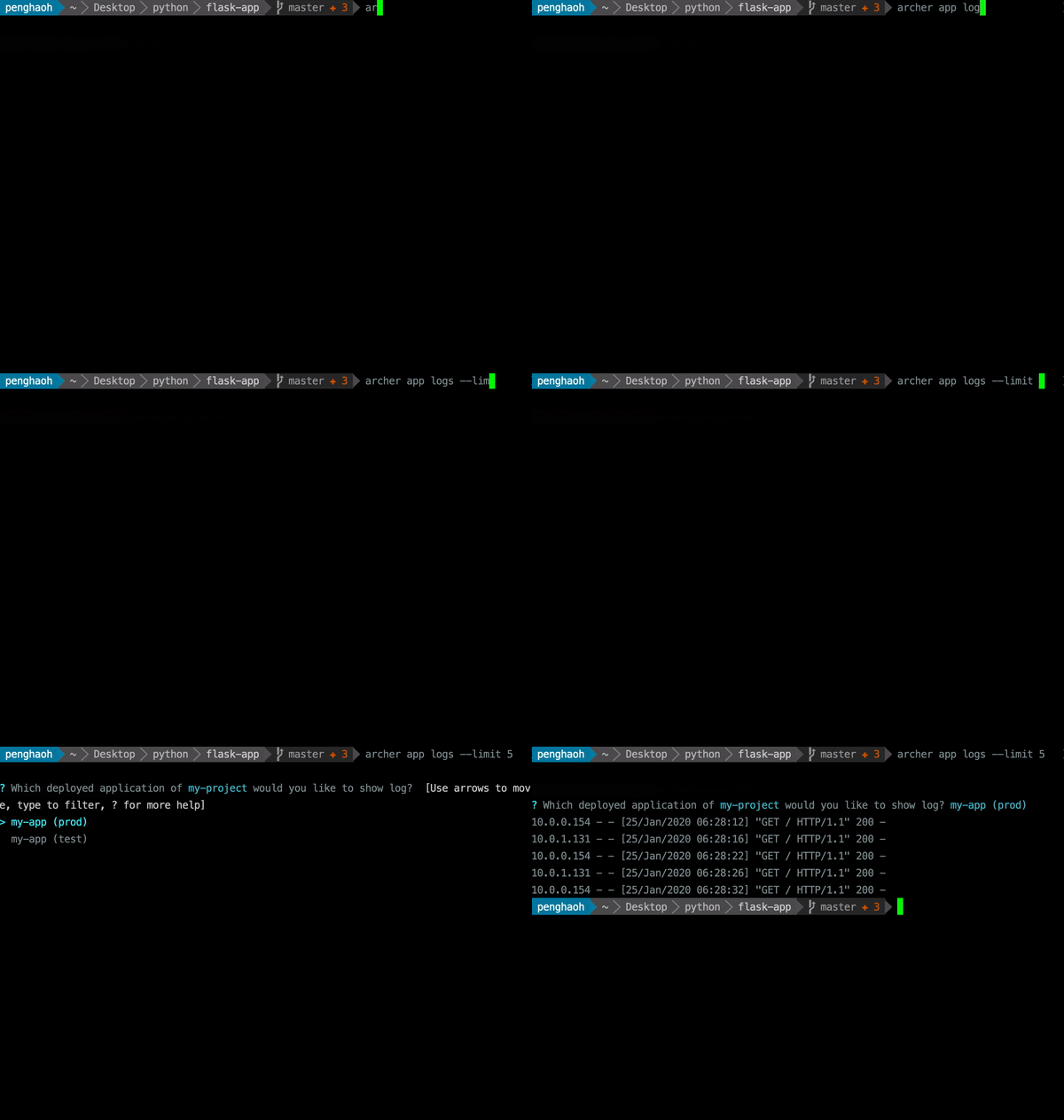
Example 2
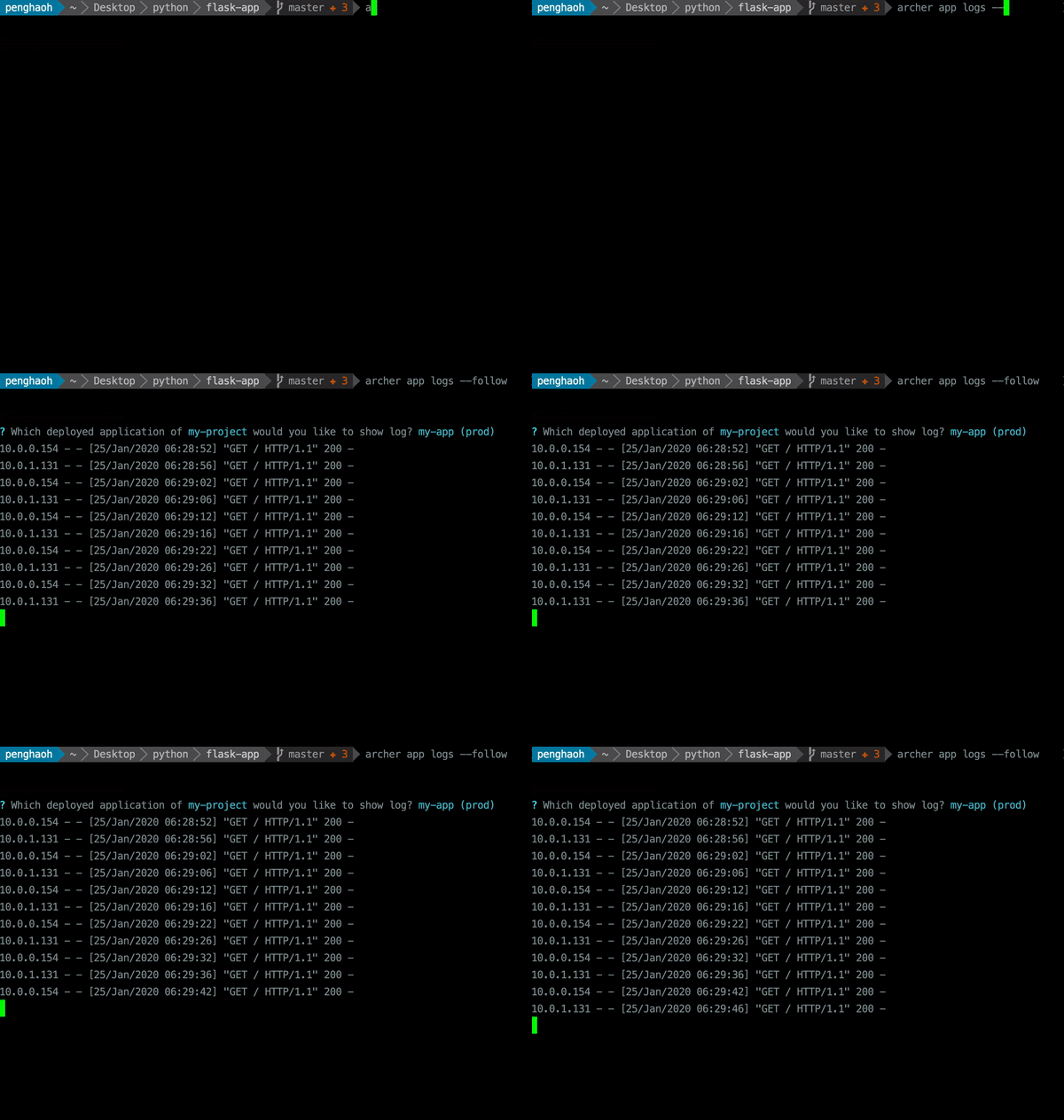
Example 3
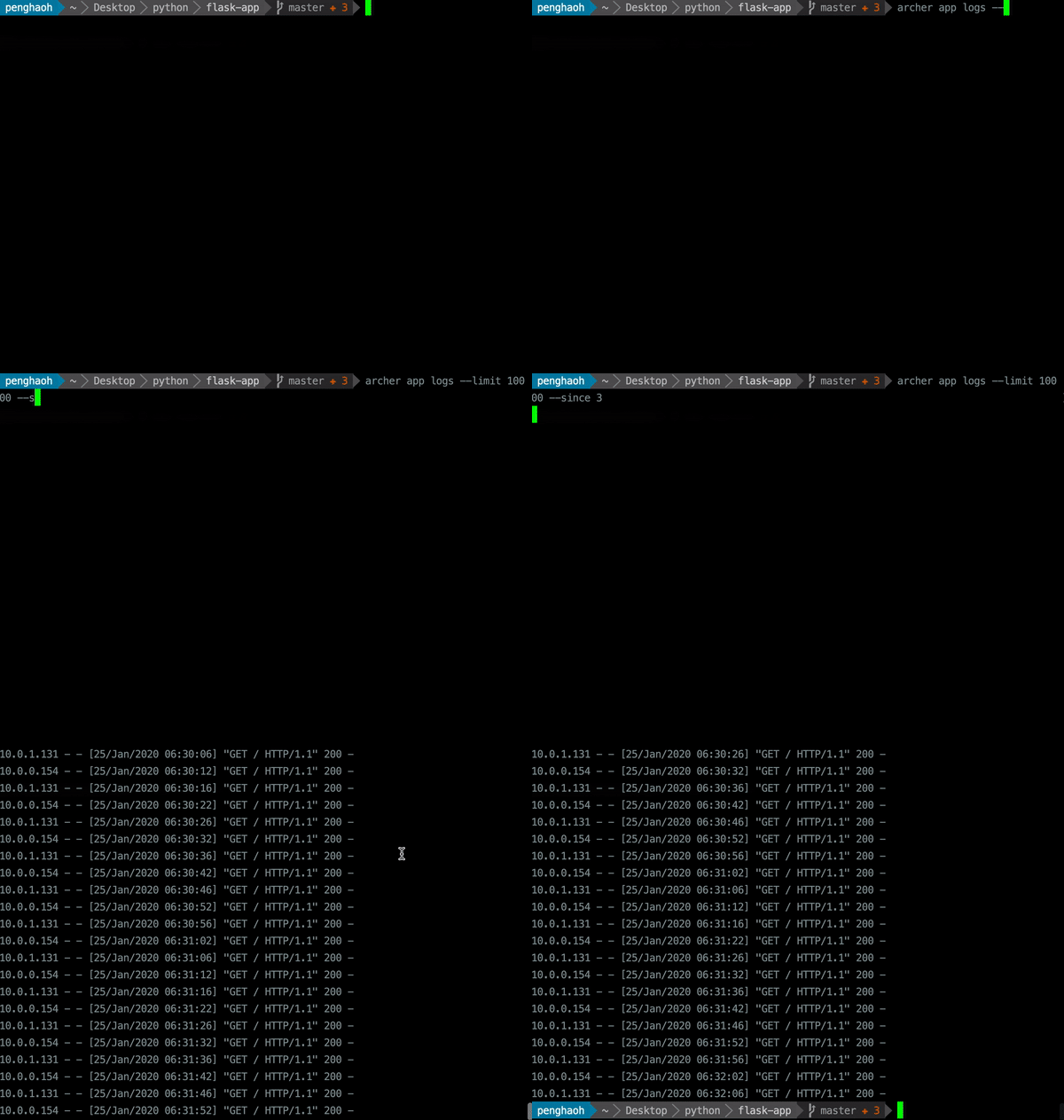
Not in a workspace
Example 4
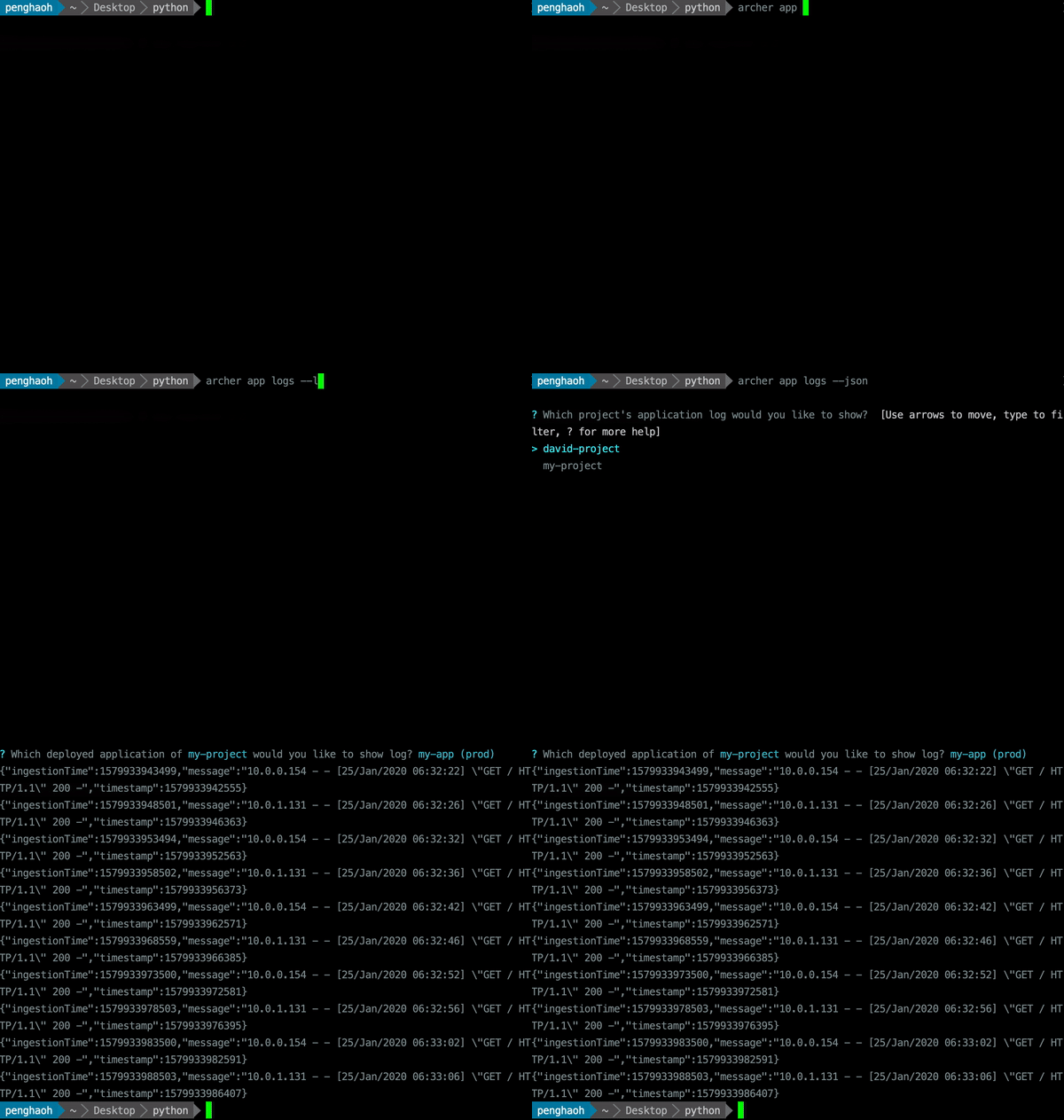
 iamhopaul123
All 5 comments
Had a discussion with @kohidave, and would be better to make "detached mode" to be default and change "detached" flag to "follow".
iamhopaul123
on 24 Jan 2020
Long term, I'd recommend adding some more flags that the CLI V1 has. Filtering logs per task, and seeing all logs after a timestamp (--since in v1) are most important IMO:
$ ecs-cli logs --help
NAME:
   ecs-cli logs - Retrieves container logs from CloudWatch logs. Assumes your Task Definition uses the awslogs driver and has a log stream prefix specified.

USAGE:
   ecs-cli logs [command options] [arguments...]

OPTIONS:
   --region value, -r value   [Optional] Specifies the AWS region to use. Defaults to the region configured using the configure command
   --ecs-profile value        [Optional] Specifies the name of the ECS profile configuration to use. Defaults to the default profile configuration. [$ECS_PROFILE]
   --aws-profile value        [Optional] Use the AWS credentials from an existing named profile in ~/.aws/credentials. [$AWS_PROFILE]
   --cluster-config value     [Optional] Specifies the name of the ECS cluster configuration to use. Defaults to the default cluster configuration.
   --cluster value, -c value  [Optional] Specifies the ECS cluster name to use. Defaults to the cluster configured using the configure command
   --task-id value            Print the logs for this ECS Task.
   --task-def value           [Optional] Specifies the name or full Amazon Resource Name (ARN) of the ECS Task Definition associated with the Task ID. This is only needed if the Task is using an inactive Task Definition.
   --follow                   [Optional] Specifies if the logs should be streamed.
   --filter-pattern value     [Optional] Substring to search for within the logs.
   --container-name value     [Optional] Prints the logs for the given container. Required if containers in the Task use different log groups
   --since value              [Optional] Returns logs newer than a relative duration in minutes. Can not be used with --start-time (default: 0)
   --start-time value         [Optional] Returns logs after a specific date (format: RFC 3339. Example: 2006-01-02T15:04:05+07:00). Cannot be used with --since flag
   --end-time value           [Optional] Returns logs before a specific date (format: RFC 3339. Example: 2006-01-02T15:04:05+07:00). Cannot be used with --follow
   --timestamps, -t           [Optional] Shows timestamps on each line in the log output.
 PettitWesley
on 24 Jan 2020
PettitWesley
on 24 Jan 2020
Looks good! Some nits:
Anything besides --name, --env and --project should be optional, and start with "Optional. " in its description.
What I'd like to see as a delighter in the future is coloring the words like "FATA", "FATAL", "fatal", "ERR", "ERROR", "error" in red.
"WARN", ... in yellow.
 efekarakus
on 27 Jan 2020
efekarakus
on 27 Jan 2020
One interesting thing about that, Effizle - if customers have their logs emitted with colors, won't they be already colorized when we emit them?
 kohidave
on 27 Jan 2020
kohidave
on 27 Jan 2020
yeah, that's true but I don't think it's common to have escape codes in your logs? I think most logging solutions omit colors if the output fd is not a tty but I might be wrong.
efekarakus
on 27 Jan 2020
Related issues
iamhopaul123
·
3Comments
 srrengar
·
3Comments
srrengar
·
3Comments
 efe-selcuk
·
3Comments
iamhopaul123
·
3Comments
efe-selcuk
·
3Comments
iamhopaul123
·
3Comments
 bvtujo
·
3Comments
bvtujo
·
3Comments