Cookie-autodelete: Issue #44 update: Local Storage Support Now Possible on Chrome
This is an update for Issue #44. The time has finally come.
@zero77 Technically there is "Clear localstorage for this domain" in the "Clean" dropdown menu of the popup. This does not require an API since CAD injects a content script, so it works in Chrome.
I also doubt that this bug will be resolved anytime soon.
https://bugs.chromium.org/p/chromium/issues/detail?id=78093
_Originally posted by @mrdokenny in https://github.com/Cookie-AutoDelete/Cookie-AutoDelete/issues/44#issuecomment-363655195_
The Chromium bug #78093, opened on 2011, was fixed on March 06, 2019. I believe that it is now possible to clean local storage using what the merge #868f5aa introduced.
Thanks for this great extension!
 vinismarques
All 31 comments
Adding refs to the documentation (since I looked them up):
https://developer.chrome.com/extensions/browsingData#method-remove
https://developer.chrome.com/extensions/browsingData#type-RemovalOptions
The functionality is available since Chrome 74 (already released).
 giorgiga
on 21 May 2019
giorgiga
on 21 May 2019
Can't wait for this :)
 swg0101
on 4 Jun 2019
swg0101
on 4 Jun 2019
Wish this can be implemented for localstorage/indexeddb, as have to go chrome://settings/siteData to clear it manually myself every time. Can't wait!
 stevenxxiu
on 29 Sep 2019
stevenxxiu
on 29 Sep 2019
You guys are in luck - Here's the first experimental version for Chrome Localstorage cleanup. Please try it out and let me know if it works for that particular site with localstorage usage.
Those looking into the 'inspect' of background page will see console.info line with what hostnames are being sent to removeLocalStorage function. I had to tack on http:// and https:// for each hostname as Chrome would complain it wasn't a valid origin otherwise.
 kennethtran93
on 26 Mar 2020
kennethtran93
on 26 Mar 2020
for that particular site
Which one?
 PF4Public
on 26 Mar 2020
PF4Public
on 26 Mar 2020
Tried it against http://www.sharonminsuk.com/code/storage-test.html - but it doesn't seem like it is working... The manual "clear localstorage for this domain" continues to work fine, but not the automatic cleanup.
swg0101
on 26 Mar 2020
Can confirm, that manually clearing works.
Also, clearing logs do not work.
PF4Public
on 26 Mar 2020
Activity Logs / Cleaning Logs only shows cookies cleanup at this time as there's no way to undo localstorage cleanup.
kennethtran93
on 26 Mar 2020
Only way to tell is to look at the storage inspector
kennethtran93
on 26 Mar 2020
In Chrome's case it would be F12 -> Application tab -> Storage sidemenu.
kennethtran93
on 26 Mar 2020
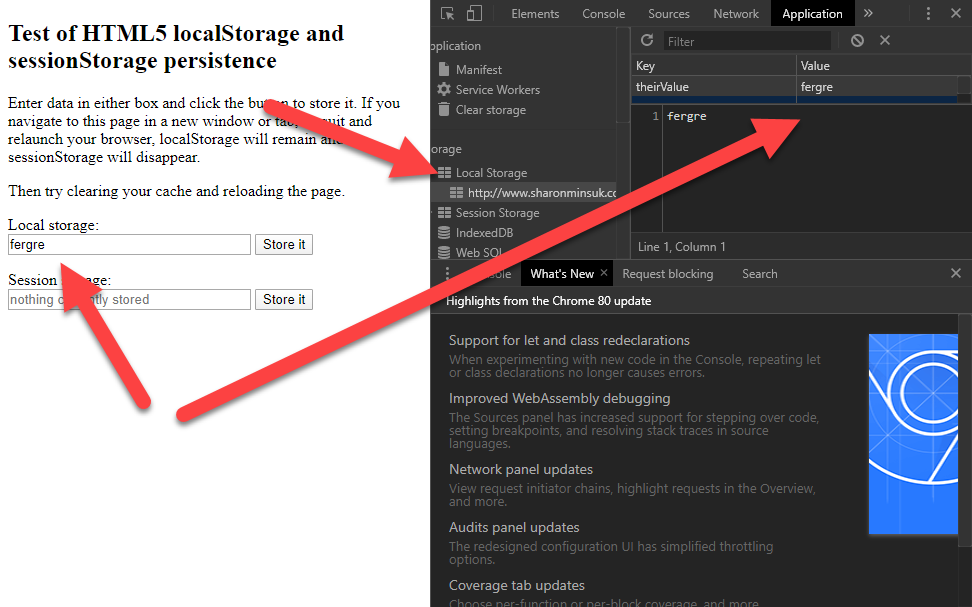
No go...
swg0101
on 26 Mar 2020
Yup I'm actually looking into it right now.
Chrome actually requires the exact URL i.e. http://www.sharonminsuk.com in order for it to be cleared as I've just tested it.
kennethtran93
on 26 Mar 2020
Ah, thanks! I am guessing we should probably do both http and https?
swg0101
on 26 Mar 2020
I'll need to rework the backend somehow as it may be the case of FIrefox as well.
kennethtran93
on 26 Mar 2020
Yes I'll plan for that. Aside from http and https, should file be added in? any other protocol I should take note of?
kennethtran93
on 26 Mar 2020
I don't think so since ftp support was phased out (and not like it can set cookies anyways)...
swg0101
on 26 Mar 2020
Alright new experimental versions. There was a localstorage bug with the Firefox one too (it didn't complain function wise, but localstorage wasn't properly removed by hostname either).
Cookie-AutoDelete_Chrome_Dev_200326_1616.zip
Cookie-AutoDelete_Firefox_Dev_200326_1616.zip
kennethtran93
on 27 Mar 2020
Latest one works fine! Thanks!
swg0101
on 27 Mar 2020
Awesome, thank you!
 cryzed
on 7 Apr 2020
cryzed
on 7 Apr 2020
3.2.0 has been compiled and ready for use in GitHub Releases. Official release platforms are all under review at this time and will auto update when approved.
kennethtran93
on 23 Apr 2020
Chrome actually requires the exact URL i.e. http://www.sharonminsuk.com in order for it to be cleared as I've just tested it.
Does it mean, that there is no way of deleting Local Storage of all websites by default, only adding them in rules?
For some reason, some websites are not affected by Local Storage cleaning on Chromium. Youtube for example does keep Local Storage no matter what.
PF4Public
on 7 May 2020
For some reason, some websites are not affected by Local Storage cleaning on Chromium. Youtube for example does keep Local Storage no matter what.
Is there a storage inspector screenshot with the localstorage in action on youtube? Is this from a fresh/empty localstorage (i.e. toggle localstorage cleanup setting).
kennethtran93
on 8 May 2020
Sure:
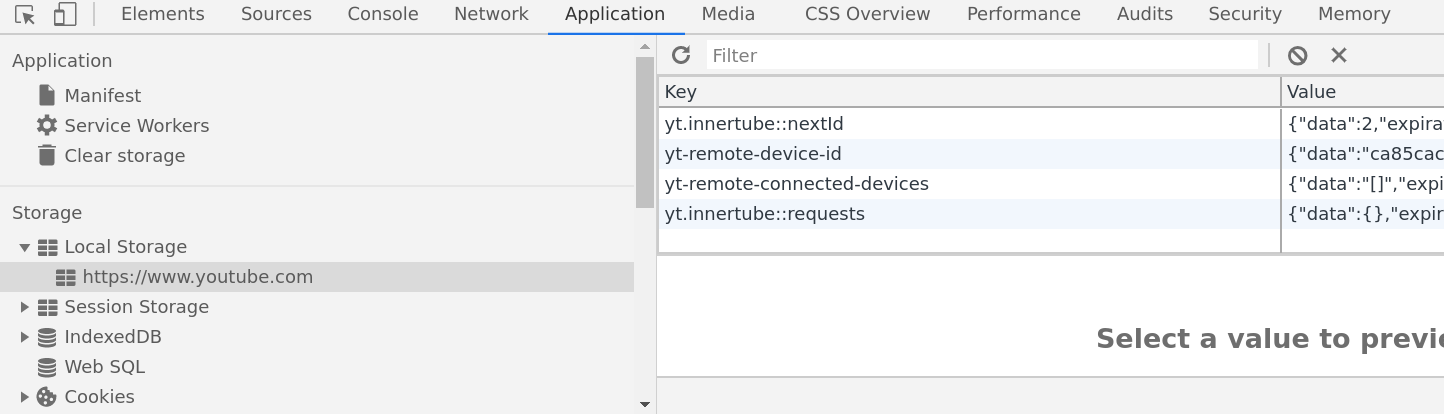
This storage is persisted across tab closing. Only manually deleting could it be cleaned. I presume that's the case because this is the only way to make device-id value to change.
Is this from a fresh/empty localstorage (i.e. toggle localstorage cleanup setting).
I tried toggling settings, but no changes. The mentioned sharonminsuk website behaves properly. That is, its local storage is cleaned. But not for youtube.
Could it be some undocumented feature of chromium? Cleaning others localstorage, but keeping youtube's…
PF4Public
on 8 May 2020
Have a try at using the latest alpha build at #713. There's debug mode as well so if you're comfortable with browser extension console you can see a lot more details including the domains that gets passed to localstorage cleaning.
Toggling the localstorage option is supposed to clear all localstorage items as we put it in as removeLocalStorage({since: 0}) which should mean all.
By the way you'll need to get the inspector to reload it again by pressing the reload button just above the key header, so I suspect it is actually cleared...
kennethtran93
on 8 May 2020
Strange...I've tested the toggling of localstorage cleanup setting and it seems to clear it...at least on the alpha build and chrome beta.
Oh, by toggling the localstorage setting I meant the global extension setting, just to make sure we're on the right page.
Just making sure that if you do have the domain on a list to check the localstorage setting.
kennethtran93
on 9 May 2020
Strange...I've tested the toggling of localstorage cleanup setting and it seems to clear it...at least on the alpha build and chrome beta.
Including youtube?
PF4Public
on 11 May 2020
Just fixed a bug regarding cookie stores in chrome, in addition to localstorage cleanup on browser restart. try these build:
Cookie-AutoDelete_Dev_20200511_211217_Chrome.zip
Cookie-AutoDelete_Dev_20200511_211217_Firefox.zip
As a side note, YouTube uses indexedDB and service workers, so if you're seeing site data size after cleanup, it may be from those two.
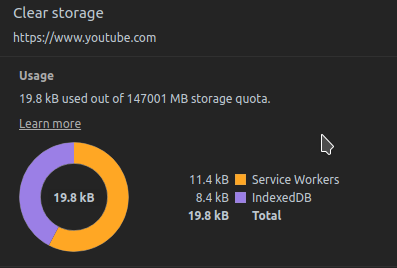
Course I could be wrong about the size thing too...
kennethtran93
on 11 May 2020
try these build:
Looks like this version does clean youtube local storage properly.
PF4Public
on 15 May 2020
Good to know. Thanks. Once locales are more or less finalized I'll start the release version procedures.
kennethtran93
on 16 May 2020
I have updated CAD to 3.3.1 and tried testing local storage cleanup again. But it didn't work. I tried changing options and enabled cleanup log and popup, nothing worked at all! Then I tried enabling debug and opening extension's console. There were a number of entries about type errors. Unfortunately I didnt take a screenshot and just restarted my browser. After that everything works fine. And youtube is properly cleaned.
@kennethtran93 Thanks for your efforts and patience.
PF4Public
on 24 May 2020
Interesting. Nothing like a restart to resolve most problems :D
kennethtran93
on 24 May 2020
Related issues
 dacav
·
7Comments
dacav
·
7Comments
 gwarser
·
5Comments
gwarser
·
5Comments
 tedomedo
·
3Comments
tedomedo
·
3Comments
 claudiopolis
·
5Comments
gwarser
·
7Comments
claudiopolis
·
5Comments
gwarser
·
7Comments
Most helpful comment
Can't wait for this :)