Controllerx: RGB Genie ZB-3009 for Zigbee2MQTT
New Device Support
Device Information
- Device Model: ZB-3009
- Device Description: ZB-3009 RGB Genie
- Device Manufacturer: RGB Genie
Integrations
If possible, provide the event mappings for the different actions that can be performed on the controller. Specify the integration.
If you can provide mappings for multiple integrations, copy the section below as many times as needed.
Integration: z2m
Actions
See events here
Notes
We would like to get the xy color from the MQTT message and use it to change the color of the light bulb.
 xaviml
All 17 comments
Please note the model number for this device is RGBgenie ZB-3009. Let me know if you need anymore information to proceed.
 whoisdecoy
on 31 Jan 2021
whoisdecoy
on 31 Jan 2021
Hi @whoisdecoy,
Thank you for the correction. I got confused with the ZGRC-KEY-013 because it looks similar in Z2M. Just to be clear, this is the device page in z2m: https://www.zigbee2mqtt.io/devices/ZB-3009.html
Regards,
Xavi M.
xaviml
on 6 Feb 2021
Very similar to that device, but again it is unique.
On Sat, Feb 6, 2021 at 04:00 Xavi Moreno notifications@github.com wrote:
Hi @whoisdecoy https://github.com/whoisdecoy,
Thank you for the correction. I got confused with the ZB-309 because it
looks the same in Z2M. Just to be clear, this is the device page in z2m:
https://www.zigbee2mqtt.io/devices/ZGRC-KEY-013.htmlRegards,
Xavi M.—
You are receiving this because you were mentioned.
Reply to this email directly, view it on GitHub
https://github.com/xaviml/controllerx/issues/237#issuecomment-774448210,
or unsubscribe
https://github.com/notifications/unsubscribe-auth/AJSF4JYB7HM53RTUSUXGLTTS5UOMHANCNFSM4W3GDHOA
.
whoisdecoy
on 6 Feb 2021
you are correct. https://www.zigbee2mqtt.io/devices/ZB-3009.html is this device.
I mentioned they have the wrong image on the first comment of the zigbee2mqtt new device issue.
whoisdecoy
on 6 Feb 2021
The support for this controller has been added to a pre-release v4.6.0b0.
@whoisdecoy would you be able to install it and give feedback of the integration? I would like to confirm from someone that owns the controller before releasing the stable version.
Thank you,
Xavi M.
xaviml
on 6 Feb 2021
Thank you for adding this! As this is my first appdaemon app please allow some time to get it all running. I have just updated the app to v4.6.0b0
whoisdecoy
on 6 Feb 2021
No problem @whoisdecoy, if you need help with the setup, just let me know. Happy to help :)
xaviml
on 6 Feb 2021
Xavi,
Here is the code I added to apps.yaml and it is somewhat working. I am able to turn on/off and dim up/down. I was not able to get any function out of the other buttons. For example, S1/S2/S3, 3 circle, and play/pause did not show anything in AD logs. I added info level debug to AD and have some results below. I do believe it is because they are not reporting on the action entity.
basement_rgb_controller:
  module: controllerx
  class: ZB3009LightController
  controller: sensor.rgbwallpanel_basment_bedroom_action
  integration: z2m
  light:
    name: light.basement_bedroom_leds
    color_mode: xy_color
AppDaemon Logs
while holding brightness button
2021-02-06 23:22:11.668261 INFO basement_rgb_controller: 🤖 Service: light.turn_on
2021-02-06 23:22:11.672152 INFO basement_rgb_controller:   - entity_id: light.basement_bedroom_leds
2021-02-06 23:22:11.675458 INFO basement_rgb_controller:   - brightness: 229.60
2021-02-06 23:22:11.678613 INFO basement_rgb_controller:   - transition: 0.35
2021-02-06 23:22:12.218534 INFO basement_rgb_controller: 🤖 Service: light.turn_on
2021-02-06 23:22:12.221490 INFO basement_rgb_controller:   - entity_id: light.basement_bedroom_leds
2021-02-06 23:22:12.224382 INFO basement_rgb_controller:   - brightness: 255.00
2021-02-06 23:22:12.227283 INFO basement_rgb_controller:   - transition: 0.35
while pressing color wheel, R/G/B/W
2021-02-06 23:22:53.011249 INFO basement_rgb_controller: 🎮 Button event triggered: `color_move`
2021-02-06 23:22:53.019026 INFO basement_rgb_controller: 🏃 Running `Predefined (xycolor_from_controller)` now
2021-02-06 23:22:53.022619 WARNING basement_rgb_controller: No event data present
2021-02-06 23:22:57.842263 INFO basement_rgb_controller: 🎮 Button event triggered: `color_move`
2021-02-06 23:22:57.852248 INFO basement_rgb_controller: 🏃 Running `Predefined (xycolor_from_controller)` now
2021-02-06 23:22:57.855555 WARNING basement_rgb_controller: No event data present
2021-02-06 23:23:02.709679 INFO basement_rgb_controller: 🎮 Button event triggered: `color_move`
2021-02-06 23:23:02.716294 INFO basement_rgb_controller: 🏃 Running `Predefined (xycolor_from_controller)` now
2021-02-06 23:23:02.732252 WARNING basement_rgb_controller: No event data present
2021-02-06 23:23:03.208257 INFO basement_rgb_controller: 🎮 Button event triggered: `color_move`
2021-02-06 23:23:03.214631 INFO basement_rgb_controller: 🏃 Running `Predefined (xycolor_from_controller)` now
2021-02-06 23:23:03.217965 WARNING basement_rgb_controller: No event data present
while pressing on/off button
2021-02-06 23:23:27.951947 INFO basement_rgb_controller: 🎮 Button event triggered: `off`
2021-02-06 23:23:27.967937 INFO basement_rgb_controller: 🏃 Running `Predefined (toggle)` now
2021-02-06 23:23:27.992024 INFO basement_rgb_controller: 🤖 Service: light.toggle
2021-02-06 23:23:28.000383 INFO basement_rgb_controller:   - entity_id: light.basement_bedroom_leds
Zigbee2Mqtt Logs
z2m counterpart when selecting color _I believe it is because the event data is not in the /action, but in the following line_
Zigbee2MQTT:info  2021-02-06 15:23:02: MQTT publish: topic 'zigbee2mqtt/RGBWallPanel_Basment_Bedroom/action', payload 'color_move'
Zigbee2MQTT:info  2021-02-06 15:23:03: MQTT publish: topic 'zigbee2mqtt/RGBWallPanel_Basment_Bedroom', payload '{"action":"color_move","action_color":{"x":0.205,"y":0.264},"action_group":22785,"action_transition_time":0,"linkquality":162}'
Zigbee2MQTT:info  2021-02-06 15:23:03: MQTT publish: topic 'zigbee2mqtt/RGBWallPanel_Basment_Bedroom', payload '{"action":"","linkquality":162}'
Zigbee2Mqtt Button Press Logs for Reference
on/off
Zigbee2MQTT:info  2021-01-27 14:39:09: MQTT publish: topic 'zigbee2mqtt/0x000d6f0014cbe75d', payload '{"action":"off","linkquality":123}
Zigbee2MQTT:info  2021-01-27 14:39:09: MQTT publish: topic 'zigbee2mqtt/0x000d6f0014cbe75d', payload '{"action":"on","linkquality":123}

scene 1, 2, 3
Zigbee2MQTT:info  2021-01-27 15:35:26: MQTT publish: topic 'zigbee2mqtt/0x000d6f0014cbe75d', payload '{"action":"recall_1","action_group":22785,"linkquality":125}'
Zigbee2MQTT:info  2021-01-27 15:35:26: MQTT publish: topic 'zigbee2mqtt/0x000d6f0014cbe75d', payload '{"action":"recall_2","action_group":22785,"linkquality":125}'
Zigbee2MQTT:info  2021-01-27 15:35:26: MQTT publish: topic 'zigbee2mqtt/0x000d6f0014cbe75d', payload '{"action":"recall_3","action_group":22785,"linkquality":125}'

red (add or remove red channel)
Zigbee2MQTT:info  2021-01-27 16:21:53: MQTT publish: topic 'zigbee2mqtt/RGBWallPanel_Basment_Bedroom', payload '{"action":"color_move","action_color":{"x":0.734,"y":0.265},"action_group":22785,"action_transition_time":0,"linkquality":126}'

blue (add or remove blue channel)
Zigbee2MQTT:info  2021-01-27 16:21:55: MQTT publish: topic 'zigbee2mqtt/RGBWallPanel_Basment_Bedroom', payload '{"action":"color_move","action_color":{"x":0.166,"y":0.009},"action_group":22785,"action_transition_time":0,"linkquality":126}'

green (add or remove green channel)
Zigbee2MQTT:info  2021-01-27 16:21:58: MQTT publish: topic 'zigbee2mqtt/RGBWallPanel_Basment_Bedroom', payload '{"action":"color_move","action_color":{"x":0.273,"y":0.717},"action_group":22785,"action_transition_time":0,"linkquality":126}'

three rings (toggle through white warmth)
Zigbee2MQTT:info  2021-01-27 16:24:46: MQTT publish: topic 'zigbee2mqtt/RGBWallPanel_Basment_Bedroom', payload '{"action":"color_move","action_color":{"x":0.486,"y":0.425},"action_group":22785,"action_transition_time":0,"linkquality":126}'

brightness button (hold - down action)
Zigbee2MQTT:info  2021-01-27 16:25:41: MQTT publish: topic 'zigbee2mqtt/RGBWallPanel_Basment_Bedroom', payload '{"action":"brightness_move_down","action_group":22785,"action_rate":50,"linkquality":126}'

brightness button (hold - stop action)
Zigbee2MQTT:info  2021-01-27 16:25:42: MQTT publish: topic 'zigbee2mqtt/RGBWallPanel_Basment_Bedroom', payload '{"action":"brightness_stop","action_group":22785,"linkquality":126}'

brightness button (hold - up action)
Zigbee2MQTT:info  2021-01-27 16:26:02: MQTT publish: topic 'zigbee2mqtt/RGBWallPanel_Basment_Bedroom', payload '{"action":"brightness_move_up","action_group":22785,"action_rate":50,"linkquality":126}'

Play/pause button (for presets)
Zigbee2MQTT:info  2021-01-27 16:26:18: MQTT publish: topic 'zigbee2mqtt/RGBWallPanel_Basment_Bedroom', payload '{"action":"hue_move","action_group":22785,"linkquality":126}'

hold play button
max
Zigbee2MQTT:debug 2021-01-27 16:33:47: Received Zigbee message from 'RGBWallPanel_Basment_Bedroom', type 'commandMoveHue', cluster 'lightingColorCtrl', data '{"movemode":1,"rate":85}' from endpoint 1 with groupID 22785
min
Zigbee2MQTT:debug 2021-01-27 16:33:02: Received Zigbee message from 'RGBWallPanel_Basment_Bedroom', type 'commandMoveHue', cluster 'lightingColorCtrl', data '{"movemode":1,"rate":2}' from endpoint 1 with groupID 22785

pressing white circle
Zigbee2MQTT:info  2021-01-27 16:36:33: MQTT publish: topic 'zigbee2mqtt/RGBWallPanel_Basment_Bedroom', payload '{"action":"color_temperature_move","action_color_temperature":304,"action_group":22785,"action_transition_time":0,"linkquality":127}'
Zigbee2MQTT:info  2021-01-27 16:36:35: MQTT publish: topic 'zigbee2mqtt/RGBWallPanel_Basment_Bedroom', payload '{"action":"color_temperature_move","action_color_temperature":450,"action_group":22785,"action_transition_time":0,"linkquality":127}'
Zigbee2MQTT:info  2021-01-27 16:36:38: MQTT publish: topic 'zigbee2mqtt/RGBWallPanel_Basment_Bedroom', payload '{"action":"color_temperature_move","action_color_temperature":155,"action_group":22785,"action_transition_time":0,"linkquality":127}'


holding white circle (no release stop)
Zigbee2MQTT:info  2021-01-30 15:06:13: MQTT publish: topic 'zigbee2mqtt/RGBWallPanel_Basment_Bedroom', payload '{"action":"color_temperature_move_down","action_group":22785,"action_maximum":450,"action_minimum":155,"action_rate":60,"linkquality":209}'
Zigbee2MQTT:info  2021-01-30 15:06:13: MQTT publish: topic 'zigbee2mqtt/RGBWallPanel_Basment_Bedroom', payload '{"action":"","linkquality":209}'
Zigbee2MQTT:info  2021-01-30 15:06:13: MQTT publish: topic 'zigbee2mqtt/RGBWallPanel_Basment_Bedroom/action', payload 'color_temperature_move_down

Zigbee2MQTT:info  2021-01-30 15:06:22: MQTT publish: topic 'zigbee2mqtt/RGBWallPanel_Basment_Bedroom', payload '{"action":"color_temperature_move_up","action_group":22785,"action_maximum":450,"action_minimum":155,"action_rate":60,"linkquality":209}'
Zigbee2MQTT:info  2021-01-30 15:06:22: MQTT publish: topic 'zigbee2mqtt/RGBWallPanel_Basment_Bedroom', payload '{"action":"","linkquality":209}'
Zigbee2MQTT:info  2021-01-30 15:06:22: MQTT publish: topic 'zigbee2mqtt/RGBWallPanel_Basment_Bedroom/action', payload 'color_temperature_move_up'


color wheel
Zigbee2MQTT:info  2021-01-27 16:39:55: MQTT publish: topic 'zigbee2mqtt/RGBWallPanel_Basment_Bedroom', payload '{"action":"color_move","action_color":{"x":0.28,"y":0.06},"action_group":22785,"action_transition_time":0,"linkquality":127}'
Zigbee2MQTT:info  2021-01-27 16:39:55: MQTT publish: topic 'zigbee2mqtt/RGBWallPanel_Basment_Bedroom', payload '{"action":"color_move","action_color":{"x":0.28,"y":0.06},"action_group":22785,"action_transition_time":8,"linkquality":127}'
Zigbee2MQTT:info  2021-01-27 16:39:51: MQTT publish: topic 'zigbee2mqtt/RGBWallPanel_Basment_Bedroom', payload '{"action":"color_move","action_color":{"x":0.169,"y":0.029},"action_group":22785,"action_transition_time":8,"linkquality":127}'
Here is a description of the function for each button from the manual.
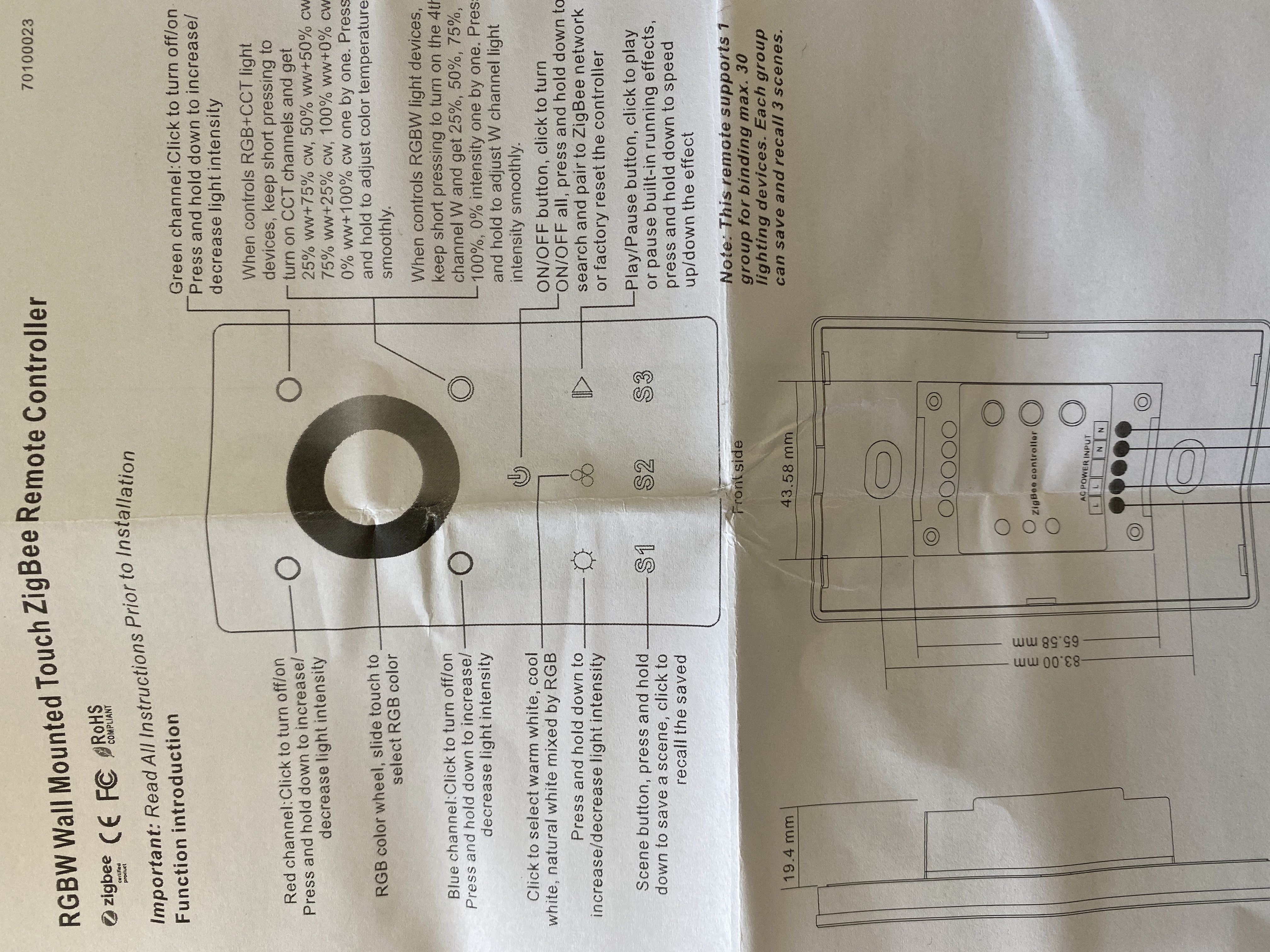
whoisdecoy
on 6 Feb 2021
Hi @whoisdecoy,
First of all, it is normal that the following button did not respond:
- scene buttons
- play/pause button
They were not added to the default mapping since they are custom buttons that users can define with mapping attribute. Read more about it here.
Secondly, you will need to setup the mqtt broker in the appdaemon.yaml file. This will allow AppDaemon to read from the MQTT and get the MQTT data. Right now you set it up as a sensor, and that data is not being sent. You can read about the setup in here.
Basically, you need to change your /config/appdaemon/appdaemon.yaml to be something like:
---
secrets: /config/secrets.yaml
appdaemon:
  latitude: X.XXXXXXX
  longitude: X.XXXXXXX
  elevation: XXXX
  time_zone: XXXXXXXX
  # You can add `missing_app_warnings` if you don't want any
  # warning spam from ControllerX when starting AppDaemon
  missing_app_warnings: 1
  plugins:
    HASS:
      type: hass
    MQTT:
      type: mqtt
      namespace: mqtt # This is important
      client_host: <Host without indicating the port (e.g. 192.168.1.10)>
      client_user: XXXXX
      client_password: XXXXX
http:
  url: http://127.0.0.1:5050
admin:
api:
hadashboard:
And then your ControllerX configuration should change to:
basement_rgb_controller:
  module: controllerx
  class: ZB3009LightController
  controller: RGBWallPanel_Basment_Bedroom
  integration:
    name: z2m
    listen_to: mqtt
  light:
    name: light.basement_bedroom_leds
    color_mode: xy_color
Note that if you change the appdaemon.yaml, or update ControllerX (not the config, but the version), you need to restart the AppDaemon server/addon.
Regards,
Xavi M.
xaviml
on 7 Feb 2021
You are beautiful and this app is so well thought-out - it's amazing! I updated the apps.yaml and appdaemon.yaml as suggested with my details and the colors work flawlessly. I will work on mapping the scenes and play/pause. All of the other buttons work as intended.
The white circle button (bottom right of color wheel) seems to function the same as the three circles button. Is there a way to do as the manual says and adjust the white channel only?
While I work on that, I would like to also modify the brightness steps. Though, I believe that would be in the Z2M configuration.
whoisdecoy
on 7 Feb 2021
Hi @whoisdecoy,
Glad you got it working now :)
The white circle button (bottom right of color wheel) seems to function the same as the three circles button. Is there a way to do as the manual says and adjust the white channel only?
The white button fires color_temperature_move (with a color temp), and the three rings fire color_move (with an xy color). They both should be doing different things. Could you please provide the logs when pressing both several times?
While I work on that, I would like to also modify the brightness steps. Though, I believe that would be in the Z2M configuration.
You can change that in the ControllerX config as well :) You can use automatic_steps and delay for this. According to documentation:
automatic_steps: Number of steps to go from min to max when smoothing. If the value is 2 with one click you will set the light to 50% and with another one to 100%. Default is 10.delay: Delay in milliseconds that takes between sending the instructions to the light (for the smooth functionality). Note that if leaving to 0, you might get uncommon behavior. Default is 350.
Regards,
Xavi M.
xaviml
on 7 Feb 2021
Three circles pressed four times, to wrap around:
Zigbee2MQTT:info  2021-02-06 17:21:39: MQTT publish: topic 'zigbee2mqtt/RGBWallPanel_Basment_Bedroom', payload '{"action":"color_move","action_color":{"x":0.486,"y":0.425},"action_group":22785,"action_transition_time":0,"linkquality":166}'
Zigbee2MQTT:info  2021-02-06 17:21:39: MQTT publish: topic 'zigbee2mqtt/RGBWallPanel_Basment_Bedroom', payload '{"action":"","linkquality":166}'
Zigbee2MQTT:info  2021-02-06 17:21:39: MQTT publish: topic 'zigbee2mqtt/RGBWallPanel_Basment_Bedroom/action', payload 'color_move'
Zigbee2MQTT:info  2021-02-06 17:21:41: MQTT publish: topic 'zigbee2mqtt/RGBWallPanel_Basment_Bedroom', payload '{"action":"color_move","action_color":{"x":0.388,"y":0.373},"action_group":22785,"action_transition_time":0,"linkquality":166}'
Zigbee2MQTT:info  2021-02-06 17:21:41: MQTT publish: topic 'zigbee2mqtt/RGBWallPanel_Basment_Bedroom', payload '{"action":"","linkquality":166}'
Zigbee2MQTT:info  2021-02-06 17:21:41: MQTT publish: topic 'zigbee2mqtt/RGBWallPanel_Basment_Bedroom/action', payload 'color_move'
Zigbee2MQTT:info  2021-02-06 17:21:42: MQTT publish: topic 'zigbee2mqtt/RGBWallPanel_Basment_Bedroom', payload '{"action":"color_move","action_color":{"x":0.333,"y":0.333},"action_group":22785,"action_transition_time":0,"linkquality":166}'
Zigbee2MQTT:info  2021-02-06 17:21:42: MQTT publish: topic 'zigbee2mqtt/RGBWallPanel_Basment_Bedroom', payload '{"action":"","linkquality":166}'
Zigbee2MQTT:info  2021-02-06 17:21:42: MQTT publish: topic 'zigbee2mqtt/RGBWallPanel_Basment_Bedroom/action', payload 'color_move'
Zigbee2MQTT:info  2021-02-06 17:21:44: MQTT publish: topic 'zigbee2mqtt/RGBWallPanel_Basment_Bedroom', payload '{"action":"color_move","action_color":{"x":0.486,"y":0.425},"action_group":22785,"action_transition_time":0,"linkquality":166}'
Zigbee2MQTT:info  2021-02-06 17:21:44: MQTT publish: topic 'zigbee2mqtt/RGBWallPanel_Basment_Bedroom', payload '{"action":"","linkquality":166}'
Zigbee2MQTT:info  2021-02-06 17:21:44: MQTT publish: topic 'zigbee2mqtt/RGBWallPanel_Basment_Bedroom/action', payload 'color_move'
2021-02-06 17:30:13.611900 INFO basement_rgb_controller: 🎮 Button event triggered: `color_move`
2021-02-06 17:30:13.635905 INFO basement_rgb_controller: 🏃 Running `Predefined (xycolor_from_controller)` now
2021-02-06 17:30:13.668059 INFO basement_rgb_controller: 🤖 Service: light.turn_on
2021-02-06 17:30:13.675238 INFO basement_rgb_controller:   - entity_id: light.basement_bedroom_leds
2021-02-06 17:30:13.679239 INFO basement_rgb_controller:   - xy_color: (0.388, 0.373)
2021-02-06 17:30:13.683038 INFO basement_rgb_controller:   - transition: 0.30
2021-02-06 17:30:14.667164 INFO basement_rgb_controller: 🎮 Button event triggered: `color_move`
2021-02-06 17:30:14.692293 INFO basement_rgb_controller: 🏃 Running `Predefined (xycolor_from_controller)` now
2021-02-06 17:30:14.709897 INFO basement_rgb_controller: 🤖 Service: light.turn_on
2021-02-06 17:30:14.715042 INFO basement_rgb_controller:   - entity_id: light.basement_bedroom_leds
2021-02-06 17:30:14.719692 INFO basement_rgb_controller:   - xy_color: (0.333, 0.333)
2021-02-06 17:30:14.722999 INFO basement_rgb_controller:   - transition: 0.30
2021-02-06 17:30:15.478529 INFO basement_rgb_controller: 🎮 Button event triggered: `color_move`
2021-02-06 17:30:15.497684 INFO basement_rgb_controller: 🏃 Running `Predefined (xycolor_from_controller)` now
2021-02-06 17:30:15.520685 INFO basement_rgb_controller: 🤖 Service: light.turn_on
2021-02-06 17:30:15.527081 INFO basement_rgb_controller:   - entity_id: light.basement_bedroom_leds
2021-02-06 17:30:15.530745 INFO basement_rgb_controller:   - xy_color: (0.486, 0.425)
2021-02-06 17:30:15.536067 INFO basement_rgb_controller:   - transition: 0.30
2021-02-06 17:30:16.356833 INFO basement_rgb_controller: 🎮 Button event triggered: `color_move`
2021-02-06 17:30:16.387901 INFO basement_rgb_controller: 🏃 Running `Predefined (xycolor_from_controller)` now
2021-02-06 17:30:16.399952 INFO basement_rgb_controller: 🤖 Service: light.turn_on
2021-02-06 17:30:16.404123 INFO basement_rgb_controller:   - entity_id: light.basement_bedroom_leds
2021-02-06 17:30:16.411479 INFO basement_rgb_controller:   - xy_color: (0.388, 0.373)
2021-02-06 17:30:16.416946 INFO basement_rgb_controller:   - transition: 0.30


md5-a439ad09038c56229160181534b4550d


Zigbee2MQTT:info  2021-02-06 17:22:13: MQTT publish: topic 'zigbee2mqtt/RGBWallPanel_Basment_Bedroom', payload '{"action":"color_temperature_move","action_color_temperature":185,"action_group":22785,"action_transition_time":0,"linkquality":166}'
Zigbee2MQTT:info  2021-02-06 17:22:13: MQTT publish: topic 'zigbee2mqtt/RGBWallPanel_Basment_Bedroom', payload '{"action":"","linkquality":166}'
Zigbee2MQTT:info  2021-02-06 17:22:13: MQTT publish: topic 'zigbee2mqtt/RGBWallPanel_Basment_Bedroom/action', payload 'color_temperature_move'
Zigbee2MQTT:info  2021-02-06 17:22:14: MQTT publish: topic 'zigbee2mqtt/RGBWallPanel_Basment_Bedroom', payload '{"action":"color_temperature_move","action_color_temperature":230,"action_group":22785,"action_transition_time":0,"linkquality":166}'
Zigbee2MQTT:info  2021-02-06 17:22:14: MQTT publish: topic 'zigbee2mqtt/RGBWallPanel_Basment_Bedroom', payload '{"action":"","linkquality":166}'
Zigbee2MQTT:info  2021-02-06 17:22:14: MQTT publish: topic 'zigbee2mqtt/RGBWallPanel_Basment_Bedroom/action', payload 'color_temperature_move'
Zigbee2MQTT:info  2021-02-06 17:22:15: MQTT publish: topic 'zigbee2mqtt/RGBWallPanel_Basment_Bedroom', payload '{"action":"color_temperature_move","action_color_temperature":304,"action_group":22785,"action_transition_time":0,"linkquality":166}'
Zigbee2MQTT:info  2021-02-06 17:22:15: MQTT publish: topic 'zigbee2mqtt/RGBWallPanel_Basment_Bedroom', payload '{"action":"","linkquality":166}'
Zigbee2MQTT:info  2021-02-06 17:22:15: MQTT publish: topic 'zigbee2mqtt/RGBWallPanel_Basment_Bedroom/action', payload 'color_temperature_move'
Zigbee2MQTT:info  2021-02-06 17:22:16: MQTT publish: topic 'zigbee2mqtt/RGBWallPanel_Basment_Bedroom', payload '{"action":"color_temperature_move","action_color_temperature":450,"action_group":22785,"action_transition_time":0,"linkquality":166}'
Zigbee2MQTT:info  2021-02-06 17:22:16: MQTT publish: topic 'zigbee2mqtt/RGBWallPanel_Basment_Bedroom', payload '{"action":"","linkquality":166}'
Zigbee2MQTT:info  2021-02-06 17:22:16: MQTT publish: topic 'zigbee2mqtt/RGBWallPanel_Basment_Bedroom/action', payload 'color_temperature_move'
Zigbee2MQTT:info  2021-02-06 17:22:18: MQTT publish: topic 'zigbee2mqtt/RGBWallPanel_Basment_Bedroom', payload '{"action":"color_temperature_move","action_color_temperature":155,"action_group":22785,"action_transition_time":0,"linkquality":166}'
Zigbee2MQTT:info  2021-02-06 17:22:18: MQTT publish: topic 'zigbee2mqtt/RGBWallPanel_Basment_Bedroom', payload '{"action":"","linkquality":166}'
Zigbee2MQTT:info  2021-02-06 17:22:18: MQTT publish: topic 'zigbee2mqtt/RGBWallPanel_Basment_Bedroom/action', payload 'color_temperature_move'
Zigbee2MQTT:info  2021-02-06 17:23:58: MQTT publish: topic 'zigbee2mqtt/RGBWallPanel_Basment_Bedroom', payload '{"action":"color_temperature_move","action_color_temperature":185,"action_group":22785,"action_transition_time":0,"linkquality":166}'
Zigbee2MQTT:info  2021-02-06 17:23:58: MQTT publish: topic 'zigbee2mqtt/RGBWallPanel_Basment_Bedroom', payload '{"action":"","linkquality":166}'
Zigbee2MQTT:info  2021-02-06 17:23:58: MQTT publish: topic 'zigbee2mqtt/RGBWallPanel_Basment_Bedroom/action', payload 'color_temperature_move'


md5-f7c84b48399eb31dbcd9727722198c28


2021-02-06 17:30:34.888627 INFO basement_rgb_controller: 🎮 Button event triggered: `color_temperature_move`
2021-02-06 17:30:34.909391 INFO basement_rgb_controller: 🏃 Running `Predefined (colortemp_from_controller)` now
2021-02-06 17:30:34.924245 INFO basement_rgb_controller: 🤖 Service: light.turn_on
2021-02-06 17:30:34.928588 INFO basement_rgb_controller:   - entity_id: light.basement_bedroom_leds
2021-02-06 17:30:34.933010 INFO basement_rgb_controller:   - color_temp: 230
2021-02-06 17:30:34.936642 INFO basement_rgb_controller:   - transition: 0.30
2021-02-06 17:30:35.905778 INFO basement_rgb_controller: 🎮 Button event triggered: `color_temperature_move`
2021-02-06 17:30:35.923376 INFO basement_rgb_controller: 🏃 Running `Predefined (colortemp_from_controller)` now
2021-02-06 17:30:35.943627 INFO basement_rgb_controller: 🤖 Service: light.turn_on
2021-02-06 17:30:35.946816 INFO basement_rgb_controller:   - entity_id: light.basement_bedroom_leds
2021-02-06 17:30:35.949475 INFO basement_rgb_controller:   - color_temp: 304
2021-02-06 17:30:35.952659 INFO basement_rgb_controller:   - transition: 0.30
2021-02-06 17:30:36.709887 INFO basement_rgb_controller: 🎮 Button event triggered: `color_temperature_move`
2021-02-06 17:30:36.733273 INFO basement_rgb_controller: 🏃 Running `Predefined (colortemp_from_controller)` now
2021-02-06 17:30:36.747593 INFO basement_rgb_controller: 🤖 Service: light.turn_on
2021-02-06 17:30:36.751431 INFO basement_rgb_controller:   - entity_id: light.basement_bedroom_leds
2021-02-06 17:30:36.755079 INFO basement_rgb_controller:   - color_temp: 450
2021-02-06 17:30:36.758383 INFO basement_rgb_controller:   - transition: 0.30
2021-02-06 17:30:37.507764 INFO basement_rgb_controller: 🎮 Button event triggered: `color_temperature_move`
2021-02-06 17:30:37.527749 INFO basement_rgb_controller: 🏃 Running `Predefined (colortemp_from_controller)` now
2021-02-06 17:30:37.544945 INFO basement_rgb_controller: 🤖 Service: light.turn_on
2021-02-06 17:30:37.553262 INFO basement_rgb_controller:   - entity_id: light.basement_bedroom_leds
2021-02-06 17:30:37.556780 INFO basement_rgb_controller:   - color_temp: 155
2021-02-06 17:30:37.560659 INFO basement_rgb_controller:   - transition: 0.30
2021-02-06 17:30:38.305826 INFO basement_rgb_controller: 🎮 Button event triggered: `color_temperature_move`
2021-02-06 17:30:38.321376 INFO basement_rgb_controller: 🏃 Running `Predefined (colortemp_from_controller)` now
2021-02-06 17:30:38.335046 INFO basement_rgb_controller: 🤖 Service: light.turn_on
2021-02-06 17:30:38.339412 INFO basement_rgb_controller:   - entity_id: light.basement_bedroom_leds
2021-02-06 17:30:38.343271 INFO basement_rgb_controller:   - color_temp: 185
2021-02-06 17:30:38.347197 INFO basement_rgb_controller:   - transition: 0.30
2021-02-06 17:30:39.217983 INFO basement_rgb_controller: 🎮 Button event triggered: `color_temperature_move`
2021-02-06 17:30:39.238221 INFO basement_rgb_controller: 🏃 Running `Predefined (colortemp_from_controller)` now
2021-02-06 17:30:39.251312 INFO basement_rgb_controller: 🤖 Service: light.turn_on
2021-02-06 17:30:39.255513 INFO basement_rgb_controller:   - entity_id: light.basement_bedroom_leds
2021-02-06 17:30:39.261860 INFO basement_rgb_controller:   - color_temp: 230
2021-02-06 17:30:39.264699 INFO basement_rgb_controller:   - transition: 0.30


md5-64a3a0bcc499a11a8b7355f5593b53c7


Zigbee2MQTT:info  2021-02-06 17:24:57: MQTT publish: topic 'zigbee2mqtt/RGBWallPanel_Basment_Bedroom', payload '{"action":"color_temperature_move_down","action_group":22785,"action_maximum":450,"action_minimum":155,"action_rate":60,"linkquality":166}'
Zigbee2MQTT:info  2021-02-06 17:24:57: MQTT publish: topic 'zigbee2mqtt/RGBWallPanel_Basment_Bedroom', payload '{"action":"","linkquality":166}'
Zigbee2MQTT:info  2021-02-06 17:24:57: MQTT publish: topic 'zigbee2mqtt/RGBWallPanel_Basment_Bedroom/action', payload 'color_temperature_move_down'


md5-7fc38e7bf15a9bfb96db8a4c99178647


Zigbee2MQTT:info  2021-02-06 17:25:17: MQTT publish: topic 'zigbee2mqtt/RGBWallPanel_Basment_Bedroom', payload '{"action":"color_temperature_move_up","action_group":22785,"action_maximum":450,"action_minimum":155,"action_rate":60,"linkquality":166}'
Zigbee2MQTT:info  2021-02-06 17:25:17: MQTT publish: topic 'zigbee2mqtt/RGBWallPanel_Basment_Bedroom', payload '{"action":"","linkquality":166}'
Zigbee2MQTT:info  2021-02-06 17:25:17: MQTT publish: topic 'zigbee2mqtt/RGBWallPanel_Basment_Bedroom/action', payload 'color_temperature_move_up'


md5-7fc38e7bf15a9bfb96db8a4c99178647


Zigbee2MQTT:info  2021-02-06 17:25:29: MQTT publish: topic 'zigbee2mqtt/RGBWallPanel_Basment_Bedroom', payload '{"action":"color_temperature_move_down","action_group":22785,"action_maximum":450,"action_minimum":155,"action_rate":60,"linkquality":166}'
Zigbee2MQTT:info  2021-02-06 17:25:29: MQTT publish: topic 'zigbee2mqtt/RGBWallPanel_Basment_Bedroom', payload '{"action":"","linkquality":166}'
Zigbee2MQTT:info  2021-02-06 17:25:29: MQTT publish: topic 'zigbee2mqtt/RGBWallPanel_Basment_Bedroom/action', payload 'color_temperature_move_down'


md5-72ddb8b52b57b16ce52df37db5bc1647


2021-02-06 17:28:03.631620 WARNING basement_rgb_controller: ------------------------------------------------------------
2021-02-06 17:28:03.633888 WARNING basement_rgb_controller: Traceback (most recent call last):
  File "/usr/lib/python3.8/site-packages/appdaemon/threading.py", line 838, in async_worker
    await funcref(args["event"], data, self.AD.events.sanitize_event_kwargs(app, args["kwargs"]))
  File "/config/appdaemon/apps/controllerx/cx_core/integration/z2m.py", line 61, in event_callback
    await self.controller.handle_action(payload[action_key], extra=payload)
  File "/config/appdaemon/apps/controllerx/cx_core/controller.py", line 260, in handle_action
    await self.call_action(action_key, extra=extra)
  File "/config/appdaemon/apps/controllerx/cx_core/controller.py", line 333, in call_action
    await self.action_timer_callback({"action_key": action_key, "extra": extra})
  File "/config/appdaemon/apps/controllerx/cx_core/controller.py", line 346, in action_timer_callback
    await task
  File "/config/appdaemon/apps/controllerx/cx_core/controller.py", line 364, in call_action_types
    await action_type.run(extra=extra)
  File "/config/appdaemon/apps/controllerx/cx_core/action_type/predefined_action_type.py", line 41, in run
    await action(*args)
  File "/config/appdaemon/apps/controllerx/cx_core/controller.py", line 54, in _action_impl
    await method(controller, *args, **kwargs)
  File "/config/appdaemon/apps/controllerx/cx_core/type/light_controller.py", line 568, in click
    self.value_attribute = await self.get_value_attribute(attribute, direction)
  File "/config/appdaemon/apps/controllerx/cx_core/type/light_controller.py", line 528, in get_value_attribute
    raise ValueError(
ValueError: Value for `color_temp` attribute could not be retrieved from `light.basement_bedroom_leds`. Check the FAQ to know more about this error: https://xaviml.github.io/controllerx/faq
2021-02-06 17:28:03.634606 WARNING basement_rgb_controller: ------------------------------------------------------------


md5-fe36c1150305db3e4e0ea878f09f7fec


            # "hue_move": "",  # Play/pause button
            # "recall_1": "",  # Scene 1
            # "recall_3": "",  # Scene 2
            # "recall_2": "",  # Scene 3


md5-126301c48c96640ea104189cc1c8ff03


basement_rgb_controller:
  module: controllerx
  class: ZB3009LightController
  controller: RGBWallPanel_Basment_Bedroom
  integration:
    name: z2m
    listen_to: mqtt
  light:
    name: light.basement_bedroom_leds
    color_mode: xy_color
  automatic_steps: 5
  delay: 350
  merge_mapping:
    "recall_1":
      - service: wled.preset
        data:
          entity_id: light.basement_bedroom_leds
          preset: 1
    "recall_2":
      - service: wled.preset
        data:
          entity_id: light.basement_bedroom_leds
          preset: 2
    "recall_3":
      - service: wled.preset
        data:
          entity_id: light.basement_bedroom_leds
          preset: 3


md5-46c2c665207642e4d7bb34b6d810caf3


service: wled.effect
data:
  entity_id: light.wled
  effect: "{{ state_attr('light.wled', 'effect_list') | random }}"


md5-f7c84b48399eb31dbcd9727722198c28


2021-02-06 17:50:47.475807 INFO basement_rgb_controller: 🎮 Button event triggered: `hue_move`
2021-02-06 17:50:47.503014 INFO basement_rgb_controller: 🏃 Running `Service (wled.effect)` now
2021-02-06 17:50:47.505466 INFO basement_rgb_controller: 🤖 Service: wled.effect
2021-02-06 17:50:47.507836 INFO basement_rgb_controller:   - entity_id: light.basement_bedroom_leds
2021-02-06 17:50:47.510767 INFO basement_rgb_controller:   - effect: {{ state_attr('light.basement_bedroom_leds', 'effect_list') | random }}
They are definitely doing different things. However, since I am using a RGBW strip I would expect the behavior to be different. If you look at the button function of the manual it appears to be function correctly for a RGB+CCT light. However for a RGBW light it should be adding or subtracting the white channel. I'm not sure if this can be added somehow.
I see, I understand what the problem is. Just to be clear, you expected a different behaviour for the white button, correct? The problem is that the controller is sending color temperature values and not white_values. You can probably do something with the white_value predefined actions, such as click or hold, but not sure how that would work with your controller. I will add a new predefined action to change white_value from controller, but it will not work as expected since controller is sending color temperature. This is why you get an error about your light not supporting color_temp.
As for the mapping... I see you added the comments for reference.
Correct. This will also be in the documentation, but since I am only hosting one page, I cannot show development documentation and stable documentation, sorry for that.
Is it possible to do some sort of templating or wrap around of a certain service call?
No, sorry for that. It is something I would like to work on in the next releases. In fact, there is a ticket about it: #108.
Regards,
Xavi M.
xaviml
on 7 Feb 2021
By the way, thank you for the very detailed explanation of the errors with the corresponding logs. It was easy for me to figure out what was going on. :)
xaviml
on 7 Feb 2021
Edit:
I wasn't able to get the multple click functionality working. However, I think this is a good compromise:
    "color_temperature_move": click_white_value_up
    "color_temperature_move_up": on_min_white_value
    "color_temperature_move_down": on_min_white_value
You are able to step up the white value (manual_steps: 5) and hold to reset to 0 white value.
For the play/pause button I created a script:
alias: Random Basement Bedroom Effect
sequence:
  - service: wled.effect
    data:
      effect: '{{ state_attr(''light.basement_bedroom_leds'', ''effect_list'') | random }}'
    entity_id: light.basement_bedroom_leds
mode: single
Then I mapped the button to the script service call:
    "hue_move":
      - service: script.random_basement_bedroom_effect
I think this will work, correct? Is there a way to have the first line wrap around?
    "color_temperature_move": click_white_value_up
    "color_temperature_move_down": on_min_white_value
    "color_temperature_move_up": on_full_white_value
With the following also specified.
manual_steps: 5
Is it possible to do this?
    "color_temperature_move"$1: click_white_value_up
    "color_temperature_move"$2: click_white_value_down

multiple_click_delay: 500 # default
If wrap around is not possible, I believe WLED has wrap around built into the API calls. Although, only if incrementing by 1...
{wled.ip.address}/win&W=~
{wled.ip.address}/win&W=~51 #5 steps to 255
Looking forward to templating! I have dabbled in coding so I know it's certainly helpful to have good documentation.
whoisdecoy
on 7 Feb 2021
Hi @whoisdecoy,
Glad you got it working with an HA script, that is what I recommend to people to do while templates are not yet available. Regarding the multiple click, this is how to add double click functionality for color_temperature_move:
"color_temperature_move": click_white_value_up
"color_temperature_move$2": click_white_value_down
"color_temperature_move_down": on_min_white_value
"color_temperature_move_up": on_full_white_value
You can add $1 to the first one, but it is the same since it already detects there is a $2, so it assumes that the top one is $1.
If it does not work, play around with multiple_click_delay to make it work properly. I recommend setting up to 1000 if it doesn't work and keep going down until it works as desired.
Regards,
Xavi M.
xaviml
on 7 Feb 2021
This device has been added to ControllerX v4.6.0
xaviml
on 7 Feb 2021
Related issues
 fribse
·
6Comments
fribse
·
6Comments
 e9henrik
·
9Comments
e9henrik
·
9Comments
 EPMatt
·
8Comments
EPMatt
·
8Comments
 silbats
·
10Comments
fribse
·
6Comments
silbats
·
10Comments
fribse
·
6Comments