Controllerx: [FEATURE REQUEST] Ability to specify 2 actions for the same button
Feature Request
Is your feature request related to a problem?
I have the same RGBW LED stripe like https://github.com/xaviml/controllerx/issues/93, and would like to link both hold_brightness_toggle and hold_white_value_toggle to the same button (https://xaviml.github.io/controllerx/controllers/WXKG12LM) in order to set Brightness up/down while button is hold. Default behavior only changes brightness, but white value should also change in order to accomplish the whole dimming effect.
To take into account: while brightness value goes from 1 to 100, the white value goes from 0 to 255
Describe the solution / feature you'd like
I think it would be great either a way to link both brightness and white values or a new mapping value. Something like hold_brightness_and_white_value_toggle or whatever better name you can make up.
Another option would be the ability to do something like:
  mapping:
    single: toggle
    double: on_full_white_value
    hold:
        - hold_brightness_toggle
        - hold_white_value_toggle
Describe alternatives you've considered
I've tried merge_mapping (https://github.com/xaviml/controllerx/issues/135) this way:
single_button_led_strip_controller:
  module: controllerx
  class: WXKG12LMLightController
  controller:
    - sensor.aqarabutton1_action
    - sensor.aqarabutton1_click
  integration: z2m
  light: light.led_strip1
  merge_mapping:
    hold: hold_white_value_toggle
but it overrides the hold action instead of merging it. IMHO I think the naming is a bit confusing and it could be called override_mapping instead.
Thank you so much in advance, and greetings.
 regystro
All 26 comments
Hi @regystro,
As of now, you can add a list of service calls, but not predefined actions. This is kind of done on purpose since there can only be just 1 hold action running at a time. So even if I implement this, it won't work because only 1 hold action can run at a time. This is because behind scenes ControllerX sends periodic calls to HA to change the attributes smoothly, if we were to add this, we might see unexpected behavior. The only solution I see that I could implement is to add an action like hold_brightness_and_white_value_toggle as you said, but this would add complexity to this addon for a very specific use case.
The only thing you can do for now is have 2 different configurations:
single_button_led_strip_controller_brightness:
  module: controllerx
  class: WXKG12LMLightController
  controller:
    - sensor.aqarabutton1_action
    - sensor.aqarabutton1_click
  integration: z2m
  light: light.led_strip1

single_button_led_strip_controller_white_value:
  module: controllerx
  class: WXKG12LMLightController
  controller:
    - sensor.aqarabutton1_action
    - sensor.aqarabutton1_click
  integration: z2m
  light: light.led_strip1
  mapping:
    hold: hold_white_value_toggle
This way each app will handle its hold-release actions, but you might experience unexpected behavior and laggy actions.
I will leave this ticket closed since it is something won't be implemented for the moment. However, thank you for opening the ticket and taking this into consideration :)
Regards,
Xavi M.
 xaviml
on 7 Nov 2020
xaviml
on 7 Nov 2020
Well, I'm afraid to tell you that suggested configuration doesn't work. Only brightness changes. Tested reloading AppDaemon and even restarting HA.
regystro
on 7 Nov 2020
Hi @regystro,
And does it change the white_value with just this config:
single_button_led_strip_controller_white_value:
  module: controllerx
  class: WXKG12LMLightController
  controller:
    - sensor.aqarabutton1_action
    - sensor.aqarabutton1_click
  integration: z2m
  light: light.led_strip1
  mapping:
    hold: hold_white_value_toggle
Regards,
Xavi M.
xaviml
on 7 Nov 2020
Yes it does.
regystro
on 7 Nov 2020
Sorry, I changed merge_mapping for mapping.
xaviml
on 7 Nov 2020
Could you try again with the mapping attribute and send the AppDaemon logs for when holding the button?
xaviml
on 7 Nov 2020
I know. I wrote it right because it was my initial configuration. I've been using merge_mapping always in my tests.
regystro
on 7 Nov 2020
Sorry Ii didn't answer you to this:
IMHO I think the naming is a bit confusing and it could be called override_mapping instead.
The thing is that mapping was the original one, and it is the one that overrides the whole mapping, then we added merge_mapping that merges default with specified mapping. So for backwards compatibility, I didn't want to change the name for mapping. Sorry if it is confusing.
Regards,
Xavi M.
xaviml
on 7 Nov 2020
Well, it kinda works right now, but with flaws. The different scale brightness (1-100) and white (0-255) makes it stop whenever one of the two arrives to max or min value.
I mean that if brightness = 100 and white = 255 and you press the button, brightness goes down to 1 but white value stops at 155.
regystro
on 7 Nov 2020
Hi @regystro,
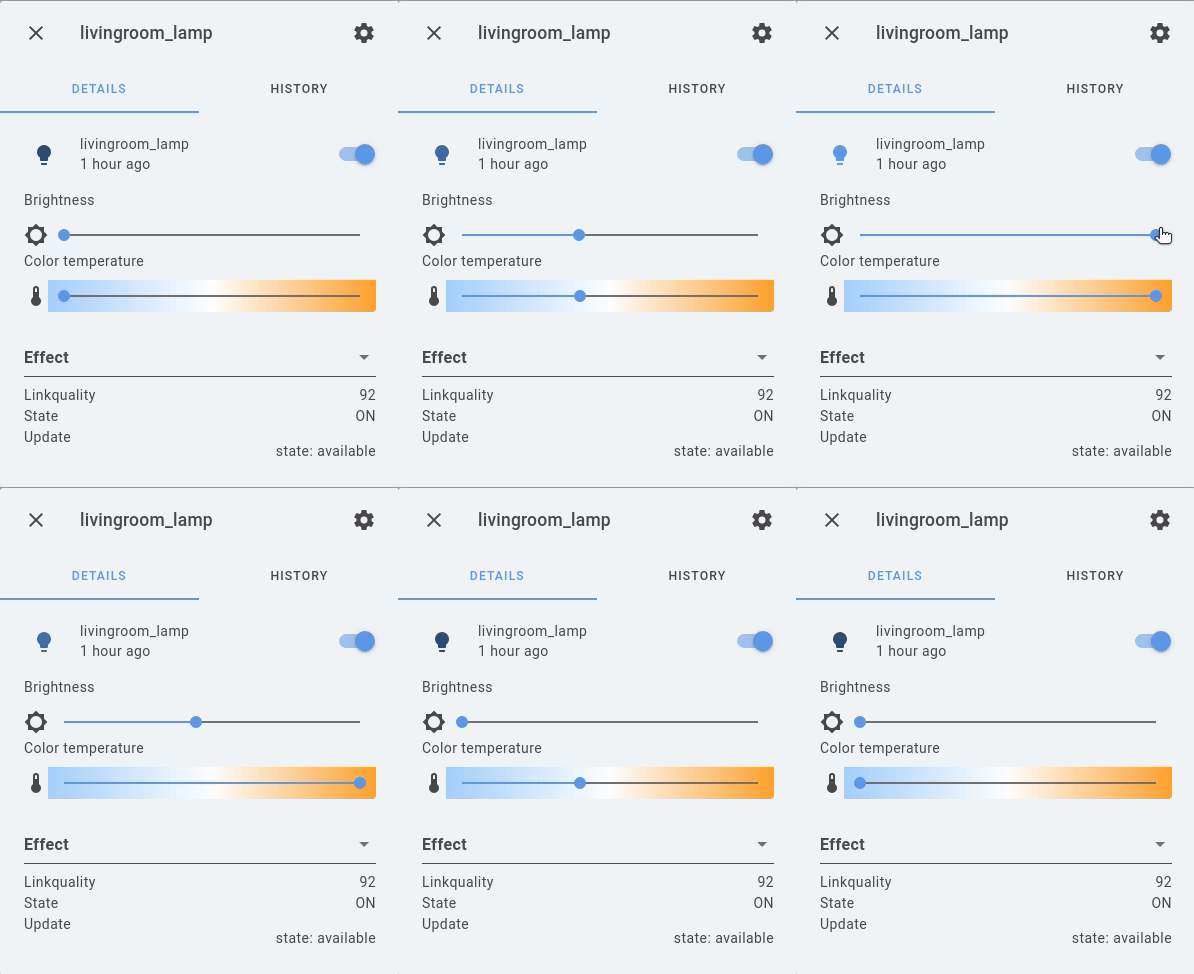
I just tried with my own setup with brightness (1-255) and color temp (153-500) and if brightness finishes first, color temperature keeps going, which is expected since they are different app configurations. Not only that, if I place color_temp and brightness to min, and then hold the button, I see in HA that both bars go in synced together even though they are in different scales.
Make sure to keep holding the button when one of them reaches the end and share the logs in here to see what is happening.
This is the config I used:
example_app_brightness:
  module: controllerx
  class: E1810Controller
  controller: livingroom_controller
  integration:
    name: z2m
    listen_to: mqtt
  light: light.livingroom_lamp
  merge_mapping:
    brightness_up_hold: hold_brightness_toggle

example_app_white_value:
  module: controllerx
  class: E1810Controller
  controller: livingroom_controller
  integration:
    name: z2m
    listen_to: mqtt
  light: light.livingroom_lamp
  merge_mapping:
    brightness_up_hold: hold_colortemp_toggle
You can see it in action here:
xaviml
on 7 Nov 2020
See mine:
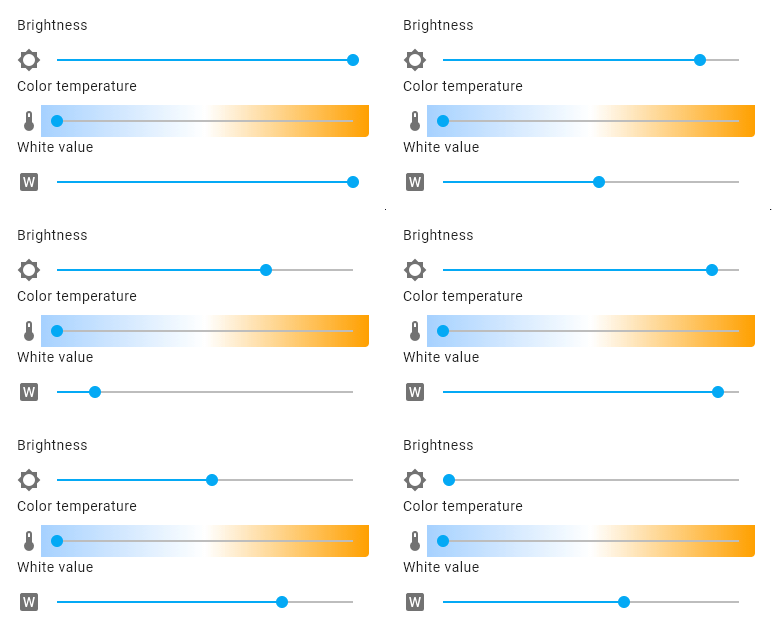
I keep pressing the button until it stops. It seems it randomly swaps to brightness or white value as constraint.
My config:
single_button_led_strip_controller:
  module: controllerx
  class: WXKG12LMLightController
  controller:
    - sensor.aquarabutton1_action
    - sensor.aquarabutton1_click
  integration: z2m
  light: light.led_strip1
  merge_mapping:
    hold: hold_brightness_toggle

single_button_led_strip_controller_white:
  module: controllerx
  class: WXKG12LMLightController
  controller:
    - sensor.aquarabutton1_action
    - sensor.aquarabutton1_click
  integration: z2m
  light: light.led_strip1
  merge_mapping:
    hold: hold_white_value_toggle
Hi @regystro ,
I think I know what is happening. There seems to be some lag from the light. Does the light strip have good connectivity coverage?
One thing you could do is change the delay and automatic_steps, so:
single_button_led_strip_controller:
  module: controllerx
  class: WXKG12LMLightController
  controller:
    - sensor.aquarabutton1_action
    - sensor.aquarabutton1_click
  integration: z2m
  light: light.led_strip1
  delay: 500
  automatic_steps: 8
  merge_mapping:
    hold: hold_brightness_toggle

single_button_led_strip_controller_white:
  module: controllerx
  class: WXKG12LMLightController
  controller:
    - sensor.aquarabutton1_action
    - sensor.aquarabutton1_click
  integration: z2m
  light: light.led_strip1
  delay: 500
  automatic_steps: 8
  merge_mapping:
    hold: hold_white_value_toggle
This way will send fewer requests to HA. The higher the delay, the fewer the requests and the lower the automatic_steps, the bigger the steps will be when changing the value.
Regards,
Xavi M.
xaviml
on 7 Nov 2020
Thanks now I can't but I'll try it later and post results.
regystro
on 7 Nov 2020
No problem. Happy to help! :)
xaviml
on 7 Nov 2020
Well, after more digging into it and testing it turns out that the integration is the one giving problems. It implements some value constraints involving brightness and white settings which affect RGBW lights, and there has been quite a debate about it.
I've been testing this custom component: https://github.com/CorneliousJD/Flux_LED and while it works as expected (brightness and white values don't stop changing when the other variable goes to min/max, as the core HA integration does), it doesn't work for my led stripe, since once turned off it won't turn on again pressing the button. I won't open an issue because that custom component is intended to fix some other firmware problems, but proves my point regarding core integration constraints.
Don't wanna waste more time on it, so I've ended up taking advantage of the shake action of my button this way:
single_button_led_strip_controller_remap:
  module: controllerx
  class: WXKG12LMLightController
  controller:
    - sensor.aquarabutton1_action
    - sensor.aquarabutton1_click
  integration: z2m
  light: light.leds_strip1
  delay: 500
  automatic_steps: 8
  merge_mapping:
    hold: hold_white_value_toggle
    double: on_full_brightness
    shake: on_min_brightness
Thus I can dim white_value and control brightness.
Thanks for your great app, your time and your help!! :)
regystro
on 8 Nov 2020
I have used that integration before and I didn't have a good experience. I recommend you to have a Zigbee network and buy the IKEA lightbulbs, they are cheap and of good quality.
Anyway, I am glad I could help you out. If you need anything else, just let me know :)
Regards,
Xavi M.
xaviml
on 8 Nov 2020
I will reopen this issue after rethinking it from #205
xaviml
on 22 Dec 2020
Idea: what if everything could be implemented using parameters? #78
mapping:
  # Simple action, no parameters. Could potentially be shortened to a string instead of a dict.
  single:
    - action: toggle
  # Two actions, one is a controllerx built-in, another is a service call.
  double:
    # Set two parameters to specific values when turning on.
    # This is currently impossible using the built-in action strings.
    # Also, for convenience, we could support values like 'min', 'max', and percentages.
    - action: on
      white_value: max
      brightness: 50%
    - action: service
      service: script.foobar
      data:
        foo: bar
  hold:
    # A single holding action could apply to multiple values.
    # As a bonus, we can also set the desired direction (opening up for #204).
    - action: hold
      hold: [brightness, white_value]
      direction: toggle
  another_button:
    # An idea for #204.
    - action: step
      step: white_value
      direction: up_wrap
The names in this example are the first thing that came to my mind. Please feel free to switch then to better, more intuitive, more consistent, and more future-proof names. Naming is hard.
 denilsonsa
on 23 Dec 2020
denilsonsa
on 23 Dec 2020
Hi @denilsonsa,
l like this idea. I did have a similar idea in mind to distinguish different types of actions. This will make the code simpler since the predefined actions (as described in #204) is growing more and more due to now having a way to input parameters to them.
I will keep you updated with it since this will need some testing due to breaking changes, in case you want to help with it.
Regards,
Xavi M.
xaviml
on 3 Jan 2021
in case you want to help with it.
While I always want to help, I'm learning to say "no" sometimes, because time has been extremely scarce for me. Sorry about that. 😞 And I fully understand this is a large change both in the codebase and in the configuration.
denilsonsa
on 6 Jan 2021
I totally understand @denilsonsa. It is totally fine, the help I meant was in case of giving feedback if this is something you are interested in.
Thank you anyway, you already helped by discussing about it :)
xaviml
on 6 Jan 2021
Feedback I can always give. It might take a while to find time, though. :)
denilsonsa
on 6 Jan 2021
Hi @denilsonsa,
ControllerX v4.4.0b1 has been released in case you want to try it out, or check if your setup (if any) is working with the new version. Just to be clear, this is purely informative, there is no compromise, and I am not expecting anything in return.
Regards,
Xavi M.
xaviml
on 10 Jan 2021
Since the documentation is not live yet, here is the markdown for action types:
Action types
_This page assumes you already know how the mapping attribute works._
An action type is reduced version of Script Syntax from Home Assistant. It allows to one or a sequence of actions to execute when an event is fired. The available action types are predefined action, call service, scene activation and delay.
...
mapping: # or merge_mapping
  ## Predefined actions
  # `toogle` is a light predefined action
  event:
    action: toggle

  # The previous action type can be reduced as:
  event: toggle

  ## Call services
  # Call any service the same way as it is done through `Developer Tools > Services` in HA
  event:
    service: script.my_script
    data:
      attr1: 42
      attr2: foo

  # `entity_id` can be passed directly like this or through `data`
  event:
    service: light.turn_on
    entity_id: light.my_light

  ## Scene activation
  # Activate any HA Scene
  event:
    scene: scene.my_scene

  ## Delay
  # `delay` is usefull when defining a list of actions, and you want
  # an action to be triggered after some defined time.
  # The value of the attribute only accepts seconds.
  event:
    - on_min_brightness # predefined action
    - delay: 5 # wait 5 seconds
    - on_full_brightness # predefined action
_The event key is the event from your controller and integration._
If an action is still executing (most likely because of a delay in place), and another of the same type gets fired, the previous one will be cancelled and a new one will be executed. This is not configurable and it works the same as mode: restart from Home Assistant automations.
xaviml
on 10 Jan 2021
This feature has been partially added to ControllerX v4.4.0.
xaviml
on 12 Jan 2021
Related issues
 oscfor
·
7Comments
oscfor
·
7Comments
 terle
·
3Comments
terle
·
3Comments
 chbndrhnns
·
11Comments
chbndrhnns
·
11Comments
 silbats
·
10Comments
silbats
·
10Comments
 Crocmagnon
·
4Comments
Crocmagnon
·
4Comments