Controllerx: Multiple Sonos speakers (group) can't be fully controlled without multiple ControllerX apps
Use of Sonos SINGLE speaker works with current beta without need for any 'tweaks' 👍😊
But as Sonos group behaviour is somewhat unique, control of grouped speakers will only work with use of extra controllers (apps)
Volume control of Sonos speakers is individual - EVEN if grouped !
So changing one grouped speakers volume, won't change volume for remaining speakers in group.
A manual created Sonos speakers group in HA can overcome this issue. But then ControllerX app has no way of reading a source_list and hence can't change in between these with left/right_arrow_hold key.
A source_list (Favourites. Could be playlists, radio stations, podcasts etc.) is present for each single entity in HA. First entry in this list is always the 'master' speaker, followed by the 'slave' speakers. This list is dynamic and will update if changes are made in Sonos app or throught HA's Sonos integration (join/unjoin service calls). If no group is active (all single speakers) then source_list will contain the individual speakers entity only. If group contains two speakers out of three, then the speaker not grouped will still contain own entity in source_list.
Change to new source from source_list on one grouped speaker, will affect ALL grouped speakers. It doesn't matter whether it's the 'master' or any 'slave' speakers that the change has been made on.
So this sums up to:
ControllerX needs to know a speaker entity in order to read the source_list. So if single Sonos entity is used as media_player in eg. class E1810MediaPlayerController, then source_list can be changed. But volume changes will ONLY affect that single speaker and NOT the whole group.
If HA Sonos group is used instead, then volume will be applied to all speakers in group. But ControllerX can't change inbetween entries in source_list, as list is not exposed through the manual HA Sonos group. One downside of this is also if speakers in group are changed, then volume changes will still be applied to the 'original' static HA Sonos group. This could be solved in HA though, as changes to groups can be made via group service calls.
For now I've overcome this issue, by separating the source_list changes (left/right clicks in my setup) from a MediaPlayerController to a CustomMediaPlayerController (see below).
This way I can (through MediaPlayerController) control volume for whole group (group is still a 'static' HA group) and use pause/play. Flipping back/forth in source_list is handled by the CustomMediaPlayerController.
Wish:
- Solution to fully control grouped Sonos speakers with MediaPlayerController class, without the need for extra apps.
- Applying dynamic handling of Sonos groups in MediaPlayerController.
- Generic solution that would work for other grouped speakers that are integrated in HA ?
Pheeww, hopefully the above description makes sence ?? 😉
Additional information
Devices involved:
Model: IKEA E1810 as MediaPlayerController
Integration: z2m
AppDaemon version: v4.0.1
ControllerX version: v2.3.0b6
HACS version: v0.21.5
Home Assistant Core version: v0.105.3
AppDaemon app configuration
sonos_media:
  module: controllerx
  class: E1810MediaPlayerController
  controller: sensor.0x90fd9ffffe0cbd69_action
  integration: z2m
  volume_steps: 20
  media_player: group.sonos_all
  actions:
    - toggle
    - brightness_up_click
    - brightness_down_click
  #  - arrow_left_click
  #  - arrow_right_click
  #  - arrow_left_hold
  #  - arrow_right_hold
    - brightness_up_hold
    - brightness_up_release
    - brightness_down_hold
    - brightness_down_release

sonos_source:
  module: controllerx
  class: CustomMediaPlayerController
  controller: sensor.0x90fd9ffffe0cbd69_action
  integration: z2m
  media_player: media_player.stue
  mapping:
    arrow_left_click: previous_source
    arrow_right_click: next_source
 htvekov
All 23 comments
Hi @htvekov ,
Thanks for the detailed behaviour on the issue. Can you tell me what is the behaviour when you call through HA media_player.select_source and change to a source calling to the group entity?
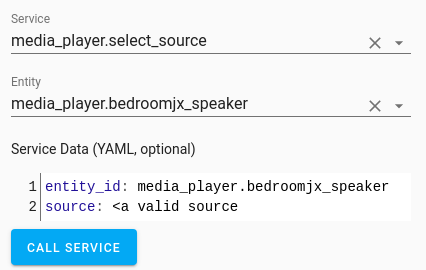
Also, can you show me your group configuration for the group.sonos_all? And tell me what is the master Sonos?
Last, if I understood well if you change the source to the master, it will change to the slaves as well?
Best,
Xavi M.
 xaviml
on 23 Feb 2020
xaviml
on 23 Feb 2020
Hi' Xavi.
You're very welcome 😊
I'm 'playing' with dynamics templates for groups and struggling with formatting of strings.
My skills in that area are somewhat hopeless... 😒
If media_player.select_source is called with an entity in group (master or slave - doesn't matter) and source is valid, then source will be changed for all speakers in the group.
Playing will also start if speakers was paused/idle.

My group is simple. Fours speakers in total. One set of Sonos Play:1 as stereo pair, which will present itself as one single speaker in Sonos app and in HA. So three entities:
sonos_all:
  name: sonos_all
  entities:
    - media_player.kokken # master
    - media_player.kitchen #slave1 (same room as master)
    - media_player.stue #slave2 (different room. Not always in group)
Yes, change of source to ANY entity in group, changes source for ALL entitys in group.
Media_player.media_play/media_player-media.pause follows same rules as select_source. All speakers in group will start playing or will be paused. Whether its the master or any slave entities in group. It doesn't matter.
Only volume setting is individual. So any volume setting on any speaker will NOT have effect on rest of the group. Same as the physical volume buttons on the speakers. It's only local volume, even if speaker belongs to a group. Strange behavour if you ask me when it comes to volume settings on a speaker that belongs to a group ?? But it must be like that for a reason.
Regards
Henning
htvekov
on 23 Feb 2020
Forgot to mention:
Volume settings can be applied to an idle/paused speaker without changing it's playing status.
If idle, it will remain idle afterwards.
htvekov
on 23 Feb 2020
So if you call media_player.select_source with the entity_id group.sonos_all and source: DR P5 (Pop), does it change the source?
The thing is that with ControllerX when a media player is a group, then the source list will be taken from the first media player from the entity group (in your case media_player.kokken) and then it will call media_player.select_source with the group entity, but with the source selected from the first entity from the group. This is the expected behaviour, so I am wondering if that works from HA.
xaviml
on 23 Feb 2020
Yep !
Source are changed on all entities in group.
Crap...
You're actually telling me that it's working as expected and indeed it is !
What a fuc¤%¤g idiot I am ! 🙄🙄🙄
I never noticed that CORRECT group behaviour on the original E1810MediaPlayerController, as I mapped out left/right click and hold. And I only did it because I thought it would be easier to test via click than on hold button.
Sorry, Xavi. Nothing wrong with your code as far as I can see, only with my head... 😒
E1810MediaPLayerController indeed handles the group as expected, with source_list and everything. And I didn't notice untill now... 😫😫
All I need now, is to somehow handle group changes via template in HA
It's not always i have/want all speakers in the group.
Anyway, THANK YOU for all the work you've done so far with this amazing piece of code, Xavi !
And SORRY for the wasted time searching for non existing errors/bugs.
Regards
Henning
htvekov
on 23 Feb 2020
Hmmm...
Never, ever, never betatest multiple controller types within the same app !! 😫
I've patched your key mapping in media_player_controller.py to 'flip' hold and click action on arrow keys now. This is a more convenient solution for my use, as my main use is source_lists (Radio channels) and not playlists.
Well, I'm off to bed now. Back to work in the morning.
Good night, Xavi ! 🥱😴
htvekov
on 23 Feb 2020
Glad to hear it is all working as expected then. Regarding the flipping functionality for the E1810 when working as Media Player controller, you can do it with CustomMediaPlayerController. Here it is how you can do it, so you do not have to change ControllerX code.
sonos_speaker:
  module: controllerx
  class: CustomMediaPlayerController
  controller: sensor.0x90fd9ffffe0cbd69_action
  integration: z2m
  media_player: group.sonos_all
  mapping:
    toggle: play_pause
    brightness_up_click: click_volume_up
    brightness_down_click: click_volume_down
    brightness_up_hold: hold_volume_up
    brightness_down_hold: hold_volume_down
    brightness_up_release: release
    brightness_up_release: release
    arrow_right_click: next_source
    arrow_left_click: previous_source
    arrow_right_hold: next_track
    arrow_left_hold: previous_track
I leave this issue closed.
xaviml
on 24 Feb 2020
Thanks, Xavi.
Much appreciated !! I'll test this. Can't see why it shouldn't work perfectly.
Much easier than patching your code on all updates 👍😉
Is it just me or shouldn't this small automation work to set my Sonos group dynamically when media_player.kitchen changes ?
The sensor.gruppe entity is actually just a copy of the media_player.kitchen sonos_group attribute.
It works when called from HA via service calls ??
I HATE templates... (Read: I have to learn much more on the subject 😒)
```- id: test_gruppeskift
alias: test_gruppeskift
trigger:
platform: state
entity_id: sensor.gruppe
action:
- service: group.set
data_template:
object_id: sonos_all
entity_id: "{{ state_attr('media_player.kitchen', 'sonos_group') }}"
```
htvekov
on 24 Feb 2020
Hi' Xavi.
The CustomMediaPlayerController example you made works perfectly.
No code patching aymore 😎 Thanks !! 😁
Perhaps you should include this as an working example for Sonos users in docs ?
Maybe including volume_step: 20, as default 10 is way to quick/coarse for Sonos use (in my opinion)
Regarding my attempt to make dynamic groups as automations, I still can't get it to work.
Found the 'obvious' error after quite a while (not entity id but entities in group.set calls)
But I still can't get this to work.
alias: test_gruppeskift
  trigger:
    platform: state
    entity_id: sensor.gruppe
  action:
  - service: group.set
    data_template:
      object_id: sonos_all
      entities: "{{ state_attr('media_player.kitchen', 'sonos_group') }}"
If entities: media_player.any_valid_entity is used in automation, then it works 😒
when I test the state_attr string in HA dev. templates, it seems to me, that it returns valid entities in the correct format ?
This YAML, Python, Jinja syntax is driving me crazy...
I would appreciate if you had a suggestion so a solution, Xavi 😊
Cheers
Henning
htvekov
on 25 Feb 2020
Hi @htvekov
Thanks for letting me know it works as expected. I will indeed add this in the example page of my documentation.
So, I guess your problem is with the action and not the trigger. The only thing that I see weird in there is that you are wrapping the template with ". This makes the list a string and entities should receive a list which is what state_attr('media_player.kitchen', 'sonos_group') is returning. So I would suggest you to try the following:
alias: test_gruppeskift
trigger:
  platform: state
  entity_id: sensor.gruppe
action:
  - service: group.set
    data_template:
      object_id: sonos_all
      entities: {{ state_attr('media_player.kitchen', 'sonos_group') }}
I hope this helps.
Best,
Xavi M.
xaviml
on 25 Feb 2020
Hi' Xavi
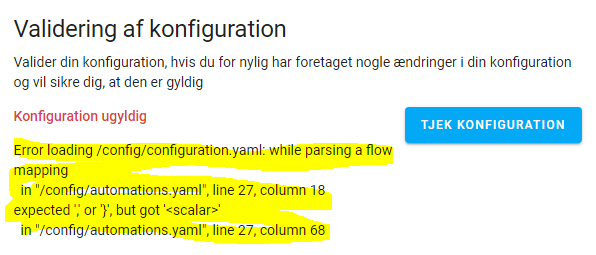
Also tried without the 'double quotes' as well, but this makes HA throw following error:
htvekov
on 25 Feb 2020
I am afraid then, I have no idea. If you try {{ state_attr('media_player.kitchen', 'sonos_group') }} this on the developer tools > template, does it return the expected?
xaviml
on 25 Feb 2020
I assume it's correct, but I'm not absolutely sure.
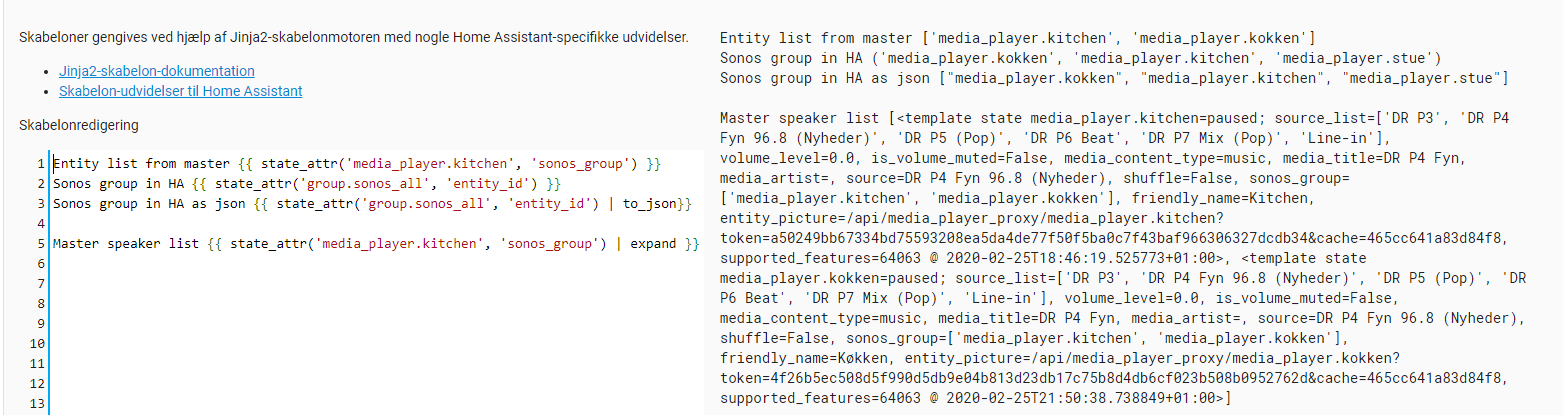
What I find strange is that if I copy/paste the exact output from Entity list from master ['media_player.kitchen',` 'media_player.kokken']
I can use this as input in a direct service call from HA - and it works ??
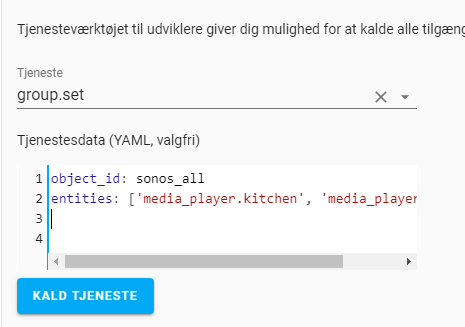
I might have to surrender and ask an expert in the community ? 🤔
htvekov
on 25 Feb 2020
Omg.. that is very weird. Maybe, could you try:
alias: test_gruppeskift
trigger:
  platform: state
  entity_id: sensor.gruppe
action:
  - service: group.set
    data_template:
      object_id: sonos_all
      entities: "{{ state_attr('media_player.kitchen', 'sonos_group') | join(',') }}"
If this does not work, mybe you will need to ask in the community forum, you will have more chances there to be helped.
xaviml
on 25 Feb 2020
Why the hell does THIS work, Xavi ??
I don't get it - but it WORKS !! 😎😎😎
Thanks a million (once again, Xavi) 👍🍻🍻
Thought that this small automation could also help other Sonos users, if they're using ControllerX with groups of Sonos players ?
When there's several members in a family, all playing during the day from their Sonos apps or Spotify, you NEVER know what the group settings actually are, when pushing the ControllerX button to play some Radio. With this automation, it doesn't matter 😁
Cheers
Henning
htvekov
on 25 Feb 2020
The thing is that since you wrapped the list as a string, you need to convert the list to string with a join. It was a very tricky bug. I am glad it worked then :)
xaviml
on 25 Feb 2020
So am I, Xavi.
Otherwise my ControllerX button in the kitchen wouldn't survive a week 😁
If I everyday had to explain the wife why some speakers suddenly were off or out of sync (not grouped) when using the Ikea ControllerX remote ?
You know it's the 'BUTTONS' fault it's not working properly, when non-tech wifes are involved 😉
Ciao !
htvekov
on 25 Feb 2020
Hi' Xavi.
Let me know, if you would like me to make a very brief 'dynamic Sonos group' documentation.
Just a small piece of text, explaining how a simple sensor in HA configuration and the group.set automation will make ControllerX a perfect remote for Sonos group as well.
Ciao !
htvekov
on 26 Feb 2020
We could add it to the FAQ. Can you write a text in here? I will add it there and if it is too long I will add it to a new page or on the examples page.
xaviml
on 26 Feb 2020
Hi' Xavi.
Here goes...
Hopefully you'll like it and can use it as documentation/'real life' examples.
Quite hard to make it comprehensive and at the same time keep it as short and concise as possible 😉
Feel free to alter/cut/paste at your liking, Xavi 😊
I'm off to bed ! 🥱🥱
Ciao !
SONOS/SYMFONISK single speaker
ControllerX can 'out of the box' control single speakers with following small app setup.
Supports:
- Toggle play/pause, volume up/down, previous/next song (in playlist) and previous/next favourites from Sonos app (source list).
This favourites list can consist of both radio stations, playlists, podcasts etc. Source list is 'circular'. Meaning that choosing next when at last source in list, will skip to first source in list - and vice versa.
office_sonos_controller:
  module: controllerx
  class: E1810MediaPlayerController
  controller: sensor.0x90fd9ffffe0cbd69_action
  integration: z2m
  volume_steps: 20 #default setting is 10. This will increase default steps to 20 from no volume to full volume
  media_player: media_player.office
SONOS/SYMFONISK groups
ControllerX supports Sonos groups as well. If _media_player_ in app is set to a group, then ControllerX will read the Sonos _source list_ from FIRST _entity_id_ in group. So this has to be your chosen _master_ speaker! This setup will work perfectly, if you only use _static_ groups that are never altered (via Sonos app/HA or otherwise). But if your Sonos group alters through the day (other family members redefines group speakers to their liking), you need a _dynamic_ group setting.
This can easily be achieved, adding only one sensor and one small automation to your HA configuration.
HA configuration.yaml
- platform: template
    sensors:
      sonos_master_group_entities:
        value_template: "{{ state_attr('media_player.office', 'sonos_group') }}" #MASTER speaker
HA automation.yaml
id: dynamic_sonos_groups
  alias: dynamic_sonos_groups
  trigger:
    platform: state
    entity_id: sensor.sonos_master_group_entities
  action:
  - service: group.set
    data_template:
      object_id: sonos_all  #name of sonos group in groups.yaml
      entities: "{{ state_attr('media_player.office', 'sonos_group') | join(',') }}" #MASTER speaker
HA groups.yaml
```sonos_all:
name: sonos_all
entities:
- media_player.office #this HAS to be your MASTER speaker
- media_player.kitchen #SLAVE speaker #1
- media_player.livingroom #SLAVE speaker #2
And with following ControllerX app, you will be able to control the _dynamic_ group in HA, which will be changed immediately if group is altered eg. from Sonos app. This app version below, has 'flipped' the _arrow_ functions. So _click_ will change source and _hold_ will change previous/next song in playlist. This behaviour will most likely fit better for users that primarily uses favourites (radio stations).

**Appdeamon apps.yaml**
sonos_group:
module: controllerx
class: CustomMediaPlayerController
controller: sensor.0x90fd9ffffe0cbd69_action
integration: z2m
volume_steps: 20
media_player: group.sonos_all #Sonos group in groups.yaml
mapping:
toggle: play_pause
brightness_up_click: click_volume_up
brightness_down_click: click_volume_down
brightness_up_hold: hold_volume_up
brightness_down_hold: hold_volume_down
brightness_up_release: release
brightness_up_release: release
arrow_right_click: next_source
arrow_left_click: previous_source
arrow_right_hold: next_track
arrow_left_hold: previous_track
```
htvekov
on 28 Feb 2020
Wow @htvekov
This is amazing! I will add it in a new page since it is a quite extended example. Thank very much!
xaviml
on 28 Feb 2020
Hi again @htvekov
I have added this inside the examples page: https://xaviml.github.io/controllerx/examples/sonos
You will see an Others section in here with your example linked.
Thanks again :)
xaviml
on 28 Feb 2020
Glad you liked it, Xavi 😉
I thought that it would really be a shame, if users never understood the full potential to actually control Sonos groups with you app. So I made an effort to describe how easy it can be done.
AFAIK there's NO other means accomplishing what ControllerX can do with lights/speakers - with just a small initial setup.
Have a lovely weekend ! 🍻😎😁
htvekov
on 28 Feb 2020
Related issues
 jeroenvansch
·
9Comments
jeroenvansch
·
9Comments
 mvjt
·
7Comments
mvjt
·
7Comments
 D-ominik
·
6Comments
xaviml
·
7Comments
D-ominik
·
6Comments
xaviml
·
7Comments
 e9henrik
·
9Comments
e9henrik
·
9Comments