Controllerx: Add Xiaomi single button switches as light controllers
Hi' Xavi.
HA automation for single button switches to do dimming is not impossible but quite complicated 🙄
As Xiaomi Aqara/Mija switches are of good quality and extremely well priced, you should consider to include dimming support for these as well. I believe that the Xiaomi buttons are widely known and used in the HA/Z2M community.
Typical single button Xiaomi devices are:
Xiaomi Aqara wireless switch WXKG12LM and Xiomi Mija wireless switch WXKG01LM
(I have both and can test code if needed 😊)
Both types supports single, double, long click etc. Both, I believe, up to quadruple clicks and the Aqara also supports shake control. So plenty of possibilities to do special actions on lights as well.
- Tap button should toggle light.
- Hold button (from off) should trigger 'smooth power on'
- Hold button should increase/decrease brightness in a continuous cycle (no stop at max/min
brightness) until button is released.
- If brightness is below 50% when button is held, then brightness should increase.
- If brightness is above 50% when button is held, then brightness should decrease.
Perhaps a timer should be implemented (10 sec. or so) in such a way that if button is released and held down again within timer period, then brightness 'direction' wont be changed (even if
brightness has passed the 50% threshold in any direction). - Example: Brightness is at 90% and I want to dim the light.
Button is held down and then released at 40%. After 3 seconds I realise that I want to dim just a bit more. Without timer function, brightness would increase again.
- Double click could set brightness at 100%
- Triple click at 50%
- Quadruple click at 25%
Let me know if you find this interesting and need help beta testing 😎
Regards
Henning
 htvekov
All 30 comments
Forgot to mention:
Yes, these devices do send 'release' 😁
Don't know why the hell the Aquara double key wireless switch (WXKG02LM) doesn't send 'release' when buttons are released. Perhaps Xiaomi forgot to implement the code ?
htvekov
on 17 Feb 2020
Hi @htvekov again!
Thank you for opening this, I can easily integrate this for you and you can test it to know if it works as expected. I believe that the double key wireless does not have release action because the pairing of the device is done by holding the button 10s, the same button that triggers the events.
However, I would make a small change in the holding behaviour you described. When I added support to the aqara double key wireless switch, I also added support to what I called toggle step. I created toggle steps to dim up/down single button controllers. The behaviour is much simple as the one you describe and it is copied from the behaviour I have seen with the shelly dimmer device. The behaviour is as simple as toggling the direction every time there is a change. So the behaviour would be that
if the light is at 90% (and the previous change was going up) and we hold the button, then it would go down until released, but if pressed again, it will go up and then down and then up, etc.
This behaviour has the downside that it is difficult to perfectly set the light to the brightness you want, but we would have the same problem with the behaviour you are mentioning since we might go down to 30%, but suddenly, we realised that we wanted a little bit brighter, so we will need to wait for those 10s to be able to go brighter. Since both implementations have their cons and pros, I will go for the simple implementation due to its simplicity (not only for coding it but the understanding as well).
Last but not least, could you confirm that the states that both controllers take are the ones described in the supports entry from the zigbee2mqtt page? (I imagine your set up is z2m, right?)
I will keep you updated as well with my changes :)
 xaviml
on 18 Feb 2020
xaviml
on 18 Feb 2020
Hi @htvekov ,
I have released a beta version v2.3.0b1 that integrates WXKG01LM and WXKG12LM. If I have put the states properly, this should work as I mentioned before. However, I also changed something that is more natural, which is double click for maximum brightness, triple for minimum brightness and quadruple for halfway.
Please, let me know if it works and if not, let me know what are the problems. Thank you for your help :)
xaviml
on 18 Feb 2020
Hi' Xavi.
That would be great to be able to use these single button switches without ridiculous complicated automations in HA 😎
I agree with your reasoning about controlling the brightness. Both versions has their pros and cons. The easiest implementation and understanding og how to control is most likely the best solution.
States for WXKG01LM are: single, double, triple, quadruple, many, long & long_release
States for WXKG12LM are: single, double, shake, hold, release
Regards
Henning
htvekov
on 18 Feb 2020
Arrrghh... Too late 😁
I'll test the beta and get back to you, Xavi
htvekov
on 18 Feb 2020
Tested the WXKG12LM now:
Hold dims up/down without any problems.
Shake dims to min. brightness.
Note that increase brightness after shake won't initially work (need two holds)
You might have to set brightness direction to 'up' when shake is called.
Single and double taps does absolutely nothing...
No callbacks are fired/executed for these two states ?
I'll check the 'round' version later.
Cheers
htvekov
on 18 Feb 2020
Smoooooooooth sailing with the WXKG01LM - everything (almost) works as expected 😎
Default autostep at 10, works nicely with Ikea bulbs. Take some 3 seconds or so from lowest to highest brightness.
One minor detail, as with the other Xiaomi switch. If double or triple taps has been registered, dimming after that won't always start on first 'hold' in the opposite direction. If direction was the 'wrong way' before dimming to min/max, then first hold won't do anything.
Last thing 😊 Could 'smooth power on' (states 'hold' from light off) be implemented as well ?
NICE WORK, XAVI (AGAIN!!) 👍👍🚀🚀🚀🚀🚀😎
htvekov
on 18 Feb 2020
Perfect! You are right on changing the direction when being on the minimum and maximum, so it does not need double hold to go down/up.
Single and double taps does absolutely nothing...
No callbacks are fired/executed for these two states ?
For WXKG12LMLightController, "single" is mapped to toggle the light and "double" is mapped to set the brightness to full. Could you show me the z2m logs when tapped and double-tapped?
I will keep you updated with the fix for the direction when set to min and max.
xaviml
on 18 Feb 2020
Yep !
Here's the log for WXKG12LM:
zigbee2mqtt:info 2020-02-18 21:11:39: MQTT publish: topic 'zigbee2mqtt/Xiaomi Switch', payload '{"battery":100,"voltage":3005,"linkquality":115,"click":"single"}'
zigbee2mqtt:info 2020-02-18 21:11:39: MQTT publish: topic 'zigbee2mqtt/Xiaomi Switch', payload '{"battery":100,"voltage":3005,"linkquality":115,"click":""}'
zigbee2mqtt:info 2020-02-18 21:11:44: MQTT publish: topic 'zigbee2mqtt/Xiaomi Switch', payload '{"battery":100,"voltage":3005,"linkquality":115,"click":"double"}'
zigbee2mqtt:info 2020-02-18 21:11:44: MQTT publish: topic 'zigbee2mqtt/Xiaomi Switch', payload '{"battery":100,"voltage":3005,"linkquality":115,"click":""}'
and the log for WXKG01LM:
zigbee2mqtt:info 2020-02-18 21:14:58: MQTT publish: topic 'zigbee2mqtt/Doorbell Utilitydoor', payload '{"battery":100,"voltage":3022,"linkquality":102,"click":"single"}'
zigbee2mqtt:info 2020-02-18 21:14:58: MQTT publish: topic 'zigbee2mqtt/Doorbell Utilitydoor', payload '{"battery":100,"voltage":3022,"linkquality":102,"click":""}'
zigbee2mqtt:info 2020-02-18 21:15:01: MQTT publish: topic 'zigbee2mqtt/Doorbell Utilitydoor', payload '{"battery":100,"voltage":3022,"linkquality":126,"click":"double"}'
zigbee2mqtt:info 2020-02-18 21:15:01: MQTT publish: topic 'zigbee2mqtt/Doorbell Utilitydoor', payload '{"battery":100,"voltage":3022,"linkquality":126,"click":""}'
I don't get it... 🤔
htvekov
on 18 Feb 2020
Hi @htvekov,
I released a new version v2.3.0b2 with a fix to the bug related to the hold after setting it to max or min.
Check it out and let me know if it works as expected now. Thanks :)
xaviml
on 18 Feb 2020
Could you share the app configuration for the WXKG12LMLightController? So single and double do not work but shake, hold and release do?
xaviml
on 18 Feb 2020
Argghhh.... 🙄
WXKG12LM has both a 'click' AND a 'action' sensor exposed in HA.
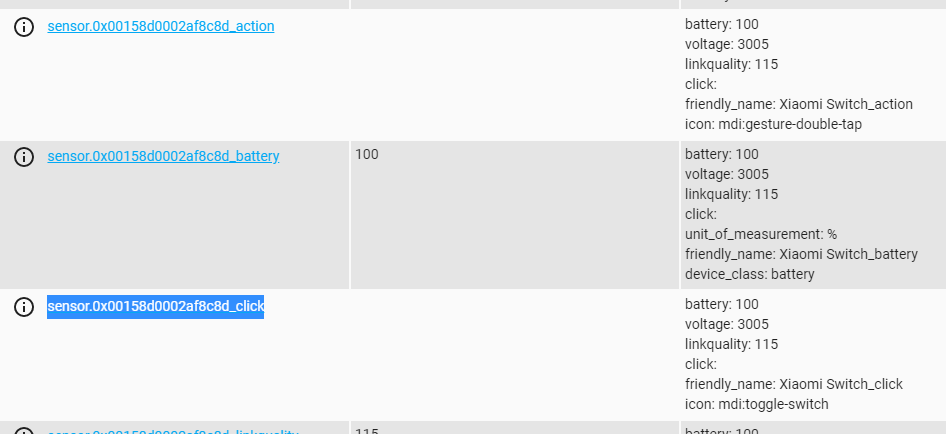
With the 'action' sensor in config, the 'hold' functions works.
With the 'click' sensor in config, the 'click' functions obsiously works to.
Wasn't aware of the 'split' sensors for this switch, sorry
htvekov
on 18 Feb 2020
Now everything works 😎😎😁
office2_controller:
module: controllerx
class: WXKG12LMLightController
controller:
- sensor.0x00158d0002af8c8d_click
- sensor.0x00158d0002af8c8d_action
integration: z2m
#smooth_power_on: true
light: light.kontor_loft
htvekov
on 18 Feb 2020
Just tried the new beta v2.3.0b2.
Can't see any difference on the 'double hold' needed for dimming up/down after double/triple taps.
htvekov
on 18 Feb 2020
I did not know either there were two sensors for that. I will that in the documentation.
xaviml
on 18 Feb 2020
Just tried the new beta v2.3.0b2.
Can't see any difference on the 'double hold' needed for dimming up/down after double/triple taps.
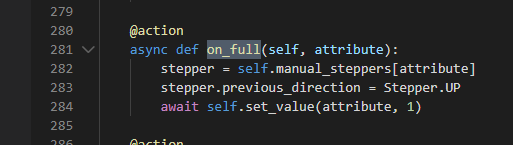
Can you find the light_controller.py and copy&paste the function called on_full?
xaviml
on 18 Feb 2020
I'm on Hassio on a Raspberry3B+
I don't think I can access 'core' folders from Windows via Samba share.
And my Linux knowledge is close to 0%, I'm afraid 🙄
I'm from that generation (born 1969) that spend my teenage years coding Z80 machinecode 24/7 on Spectrum/Amstrad home computers (Google it !! 😁😁)
htvekov
on 18 Feb 2020
Oh wow! I did google that. I always wished to have been born between the 50s and 70s and have observed this technology evolution with my own eyes.
No worries, you do not have to access to 'core' folder, all the appdaemon apps are installed inside the config folder. So this file is in: /config/appdaemon/apps/controllerx/core/type/light_controller.py Then you can just ctrl + F for def on_full and then copy and paste the whole function in here. This is to make sure it donwloaded the right code. Also, did you restarted AppDaemon addon?
xaviml
on 18 Feb 2020
I will try the code tomorrow to see how to fix it. I did not try the changes in a real example, I just tested them.
xaviml
on 18 Feb 2020
No problem,then 😊
@action
    async def on_full(self, attribute):
        stepper = self.manual_steppers[attribute]
        stepper.previous_direction = Stepper.UP
        await self.set_value(attribute, 1)
Why does pasted code look like this ??
I'll paste a picture instead:
Yes, those were the days!! 😉
Coding in all my sparetime for years (until girls and beer took over 👩🍻😁)
Internet was not invented yet. Home computers had 16KB to 128KB RAM at that time, 8 bit processors and anything but machine code was extremely slow (BASIC interpreters etc.)
It was REAL fun when I was 14-19 years old and the technological evolution at that time was beyond anything you can imagine today...
htvekov
on 18 Feb 2020
Home computers had 16KB to 128KB RAM at that time, 8 bit processors and anything but machine code was extremely slow.
Imagine running HA on that :stuck_out_tongue_closed_eyes: Have you used punched cards, though? That had to be fun to debug haha
I'll paste a picture instead:
Thanks. I see you have the latest code. I will then set up an example with one of my controllers to see the behavior and debug. I will keep you updated @htvekov :)
xaviml
on 18 Feb 2020
Hi @htvekov ,
Indeed, you were right, it was not working. I did create a test for it, but just a unit test. It happened something like this: https://twitter.com/erinfranmc/status/1148986961207730176
Anyway, I created a real setup and I spotted the mistake, you can try it out on v2.3.0b3.Reinstall after updating, I saw that not everything updated with just click "update" on HACS. And then, as always, restart the appdaemon addon.
Thanks @htvekov :)
xaviml
on 19 Feb 2020
Hi' Xavi.
Just tested - everything works as expected now 😁
No brightness direction problems anymore - Brilliant ! 😎
Nice job - again, Xavi ! 👍
Could 'smooth power on' be implemented easily for these switches as well ?
Regards
Henning
htvekov
on 19 Feb 2020
Doesn't the smooth_power_on work? It should work when the light is off and then the button is hold
xaviml
on 19 Feb 2020
Nope... ?
Callbacks are fired on hold (from off), but does not turn on light.
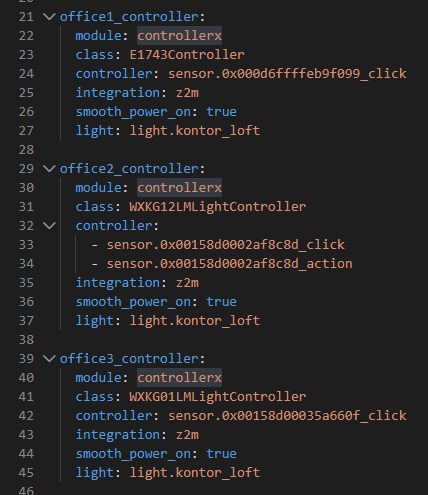
Only Ikea E1743 controller invokes smooth-power_on ?
htvekov
on 19 Feb 2020
Indeed, that was another bug related to smooth_power_on and toggling directions. It got fixed on v2.3.0b4. Try it out when you can and let me know if when smooth_power_on is true and the button is held while the light is off, it turns in minimum brightness without brightening it up.
Also, the next direction after the light is turned on with smooth power on it should always be UP, so no need to double hold to make the light bright up.
Thanks again @htvekov :)
xaviml
on 20 Feb 2020
Hi' Xavi.
I believe that everything checks out now 😊😎
Direction up after 'smooth power on' also tested ok.
Once again, thank you Xavi for all your work 👍
I'll test your new custom controller this weekend, to see if I can split Sonos control easily between your app and HA automation, so I can use next/previous buttons to skip between Sonos favourites, when not in a playlist. Haven't any idea how to acieve that at the moment ? I have to learn how to write automation/script to skip in between Sonos source list exposed in HA

htvekov
on 20 Feb 2020
If you want to just select a specific source, you can follow the example I gave you on the closed issue (#27). If what you want is to go to the next source available in the list, you cannot do it with ControllerX, but I planned to do it. If you want to di it, the best way is either python scripts or appdaemon.
xaviml
on 20 Feb 2020
Hi' Xavi.
Just found out that you've written on issue#27.
See my comments there.
htvekov
on 20 Feb 2020
All done here (I believe), Xavi 😊
I think you can close this issue now.
htvekov
on 23 Feb 2020
Related issues
 bobbynobble
·
5Comments
bobbynobble
·
5Comments
 EPMatt
·
8Comments
EPMatt
·
8Comments
 jeroenvansch
·
9Comments
jeroenvansch
·
9Comments
 D-ominik
·
6Comments
xaviml
·
7Comments
D-ominik
·
6Comments
xaviml
·
7Comments