Content: Issue with "<input type="month" pattern="[0-9]{4}-[0-9]{2}>": (not compatible with firefox)
MDN URL: https://developer.mozilla.org/en-US/docs/Web/HTML/Element/input/month
What information was incorrect, unhelpful, or incomplete?
<form>
  <div>
    <label for="month">What month would you like to visit us? (Summer months only, yyyy-mm)</label>
    <input id="month" type="month" name="month"
           min="2017-06" max="2017-09" required
           pattern="[0-9]{4}-[0-9]{2}">
    <span class="validity"></span>
  </div>
  <div>
      <input type="submit" value="Submit form">
  </div>
</form>
Specific section or headline?
https://developer.mozilla.org/en-US/docs/Web/HTML/Element/input/month#handling_browser_support
Handling browser support
What did you expect to see?
compatibility with firefox
Did you test this? If so, how?
MDN Content page report details
- Folder:
en-us/web/html/element/input/month - MDN URL: https://developer.mozilla.org/en-US/docs/Web/HTML/Element/input/month
- GitHub URL: https://github.com/mdn/content/blob/main/files/en-us/web/html/element/input/month/index.html
- Last commit: https://github.com/mdn/content/commit/2a14c0eac061493b1160076a3e72ec8e346d2223
- Document last modified: 2021-02-19T18:56:36.000Z
 Codefeak
All 3 comments
I believe there's no problem in the article.
The article says that Firefox does not yet support <input type="month">:
only Chrome/Opera and Edge support it on desktop
The workaround provided (using pattern) works as intended for me in FF 86.0.1.
 Leokuma
on 21 Mar 2021
Leokuma
on 21 Mar 2021
The compatibility information on the page is correct - Firefox does not support the month input type. You can see this by comparing FF and Chrome on the example on the page you point to. FF (the top item below) does not support the input so you have to enter text, while chrome does, so you have a date picker. I also checked bugzilla and there are open bug reports against this.
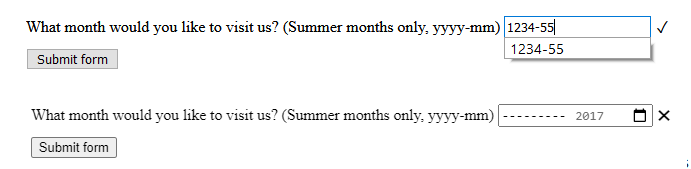
Thank @Leokuma for confirming this. Closing.
 hamishwillee
on 22 Mar 2021
hamishwillee
on 22 Mar 2021
Thank You @hamishwillee & @Leokuma for the clarification. I thought using pattern I will be able to have date picker too. :cry:
Codefeak
on 23 Mar 2021
Related issues
 vinyldarkscratch
·
4Comments
vinyldarkscratch
·
4Comments
 jakseb
·
3Comments
jakseb
·
3Comments
 sideshowbarker
·
4Comments
sideshowbarker
·
4Comments
 tjcchen
·
3Comments
sideshowbarker
·
3Comments
tjcchen
·
3Comments
sideshowbarker
·
3Comments
Most helpful comment
Thank You @hamishwillee & @Leokuma for the clarification. I thought using pattern I will be able to have date picker too. :cry: