Content: How to get only the content of a json file?
Tried
return await this.$content('settings').fetch()
Result
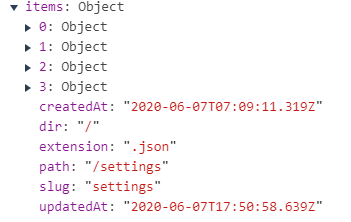
Expected only the content of the file and not the meta information
 Rednas83
All 3 comments
Hi there !
I've seen nothing about this in the docs. A workaround could be using a function to make this automatic with delete operator ?
    const test = await $content("/", "test").fetch();
    delete test.createdAt;
    delete test.dir;
    delete test.extension;
    delete test.path;
    delete test.slug;
    delete test.updatedAt;
Or, if you know you will always have items in the root of your JSON, you can use the only('items') method. It's more specific so it won't work with any JSON, but it's more simple :
return await this.$content('settings').only('items').fetch()
Third option, you can use the nodeJS require method :
const test = await require("~/content/test.json");
It's not a function from the JS API, but nodeJS. So you will only be able to use it on the server. I don't know the limitations of require so maybe this option wouldn't be recommanded, for some reason I don't know :
const test = await require("~/content/test.json");
 mathieunicolas
on 14 Jun 2020
mathieunicolas
on 14 Jun 2020
Only delete and require worked for me to get the content.
        // return await this.$content('settings').fetch() // => returns content and meta information
        // return await this.$content('settings').only('items').fetch() // => returns Object (empty)
        // return await this.$content('settings').only(['items']).fetch() // => returns Object (empty)
        return await require('../content/settings.json') // => Returns content
        // // eslint-disable-next-line no-var
        // var result = await this.$content(iTable).fetch()
        // delete result.createdAt
        // delete result.dir
        // delete result.extension
        // delete result.path
        // delete result.slug
        // delete result.updatedAt
        // return result
Hey @Rednas83
As @mathieunicolas mentioned you can use only to select a subset of fields: https://content.nuxtjs.org/fetching#onlykeys.
 benjamincanac
on 15 Jun 2020
benjamincanac
on 15 Jun 2020
Related issues
 pangxieju
·
4Comments
pangxieju
·
4Comments
 thely
·
4Comments
thely
·
4Comments
 adrianschubek
·
4Comments
adrianschubek
·
4Comments
 LukaszRados
·
3Comments
LukaszRados
·
3Comments
 hason
·
3Comments
hason
·
3Comments
Most helpful comment
Hi there !
I've seen nothing about this in the docs. A workaround could be using a function to make this automatic with
deleteoperator ?Or, if you know you will always have
itemsin the root of your JSON, you can use theonly('items')method. It's more specific so it won't work with any JSON, but it's more simple :return await this.$content('settings').only('items').fetch()Third option, you can use the nodeJS
requiremethod :const test = await require("~/content/test.json");
It's not a function from the JS API, but nodeJS. So you will only be able to use it on the server. I don't know the limitations of
requireso maybe this option wouldn't be recommanded, for some reason I don't know :const test = await require("~/content/test.json");