Contao: Weisses Fenster im Contao-Installtool nach Upgrade auf 4.8.5
Beim Upgrade von C4.4.45 auf Contao 4.8.5 via CM bin ich an einem weissen Fenster im Installtool gestrandet. Wie sich nach längerem hin und her herausgestellt hat wird der Fehler durch zuwenig RAM verursacht. Nachdem All-inkl das auf 512 MB erhöht lief es durch. Leider gibt es da keinerlei Logeinträge weder am Server noch im var/log.
Spooky hatte mich gebeten das nochmals auf Github zur Diskussion zu stellen.
Mehr Details dazu sind hier zu fnden
https://community.contao.org/de/showthread.php?76450-Weisses-Fenster-im-Installtool-nach-Upgrade-auf-C-4-8&p=514551#post514551
Randbedingungen:
All-inkl Premium mit 256 MB RAM
PHP 7.2
Contao 4.8.5
Isotope 2.6.3
Codefog Mobile-Menu 2.7
DB-Sicherung 1.3
 bear30
All 51 comments
@frontendschlampe Is this the same issue we talked about some time ago?
 m-vo
on 12 Nov 2019
m-vo
on 12 Nov 2019
It seems to be the same issue as we discussed in Slack, yes.
 fritzmg
on 12 Nov 2019
fritzmg
on 12 Nov 2019
IIRC we pinpointed the problem to be within the cache warmup stage.
m-vo
on 12 Nov 2019
@frontendschlampe Is this the same issue we talked about some time ago?
Yes ... I think so ...
 frontendschlampe
on 12 Nov 2019
frontendschlampe
on 12 Nov 2019
Would you mind sharing your findings here? 😉
 leofeyer
on 20 Nov 2019
leofeyer
on 20 Nov 2019
Would you mind sharing your findings here? 😉
Do you mean my findings? I can't explain exactly. What I can say: when I make an update via console, there's no problem with RAM within the install tool. When I make an update via Contao Manager I have to increase the RAM. The discussion on Slack is here https://contao.slack.com/archives/CK4J0KNDB/p1571316354128400 and the ticket is https://github.com/terminal42/contao-notification_center/issues/194 ... I don't know, what's the problem but it seems, that many users have it.
frontendschlampe
on 21 Nov 2019
How do I reproduce this?
leofeyer
on 10 Dec 2019
Take a Webspace with lower RAM (128 MB) and make an install of Contao 4.8 with Contao Manager. After that install the Notification Center and make a DB Update via Install Tool.
If I make the install and update via console there're no problems.
frontendschlampe
on 10 Dec 2019
IIRC we pinpointed the problem to be within the cache warmup stage.
During today's Mumble call we were able to identify that it does not seem to be related to the cache warmup stage.
 Toflar
on 16 Jan 2020
Toflar
on 16 Jan 2020
I make some more tests and if you reload the white page again and again it will work after a few times without increasing the RAM.
frontendschlampe
on 23 Jan 2020
Interestingly I also noticed this problem recently in a Contao 4.4.46 installation, _without using the Contao Manager_ at all. After a package update, the Install Tool responded with a white screen (without any logged error anywhere) right before listing the SQL queries that should be executed later. After refreshing, the Install Tool worked normally and showed me the list of SQL queries.
fritzmg
on 23 Jan 2020
Anything new here?
leofeyer
on 9 Mar 2020
It still exist, but I can't debug it.
frontendschlampe
on 9 Mar 2020
Hallo, ich antworte mal auf deutsch ... ist einfacher. Ich sehe den Fehler (bei All-inkl) immer noch dauernd beim Updaten/Upgraden. Auch die 4.9.1 hat das Problem. Das war bisher bei mir immer dem php_limit von 256 geschuldet. Meist helfen 512 MB, manchmal aber auch erst 1024, manchmal auch erst ein Telefonat mit All-inkl. Cache löschen vor dem Updaten bringt manchmal den letzten Kick damit es läuft. Bisher habe ich es immer irgendwie hin bekommen ... das ist die Hauptsache!
bear30
on 9 Mar 2020
Someone on slack has possibliy linked it to the opcache? https://contao.slack.com/archives/CJT61P8R1/p1584006638097800
Since the install tool clears the Symfony cache (not sure when and how), may be rebuilding that + the opcache will sometimes cause a lot of memory consumption.
fritzmg
on 13 Mar 2020
Ich hatte das Problem ebenfalls mehrfach bei All-Inkl. Der Support wollte mir nicht helfen…
Ich konnte das DB-Update unter Contao 4.9 mit contao-console contao:migrate durchführen. Bei Contao 4.4 hab ich da allerdings keine Idee…
 contaoacademy
on 24 Mar 2020
contaoacademy
on 24 Mar 2020
Nachtrag
Durch Ändern der PHP-Version im Backend des Hosters + Anpassung der .htaccess konnte ich das Installtool aufrufen.
Das Problem sollte trotzdem analysiert werden.
contaoacademy
on 24 Mar 2020
Hallo zusammen,
ich habe das gleiche Problem. Ebenfalls bei All-Inkl. Gibt es hier schon Neuigkeiten?
Das Installtool bräuchte ich nicht zwingend, aber ich kann keine Benutzergruppen mehr anlegen. Das lässt sich schlecht per consolen-command machen :-)
Danke und Grüße
 xprojects-de
on 5 May 2020
xprojects-de
on 5 May 2020
Hallo,
ja füge in die htaccess im web-Verzeichnis ganz oben ein:
php_value memory_limit 1G
Und dann Cache löschen. Damit läuft es bei mir.
bear30
on 5 May 2020
top danke! Funzt!
xprojects-de
on 5 May 2020
Wir haben das Problem erneut im Slack diskutiert https://contao.slack.com/archives/CK4J0KNDB/p1589958261278300 und konnten nun feststellen, dass es wohl mit dem opcache zusammenhängt. Bei All-Inkl. kann der Cache mit folgendem Eintrag in der .htaccess deaktiviert werden:
php_flag opcache.enable Off
Vielleicht kann man es jetzt irgendwie lösen, ohne dass man den Cache deaktivieren muss?
Danke an @MDevster für die Idee!
frontendschlampe
on 25 May 2020
Well, the cache must be cleared after changing files (opcache_reset();) - this is usually done as part of the deployment chain.
@aschempp Does the manager do this, too?
m-vo
on 25 May 2020
@m-vo the Install Tool already executes that (if available).
fritzmg
on 25 May 2020
Ah, yeah, I see.
(But that's another problem then for the CLI where this strategy would not work, right?)
m-vo
on 25 May 2020
The error only occurs in the Contao Install Tool.
Personally, I have never incorporated opcache_reset() in my deployment chain. Am I really supposed to?
fritzmg
on 25 May 2020
The error only occurs in the Contao Install Tool.
Yes, that's unrelated to this issue. If the opcache rebuilding is part of the problem this is something the hosters need to take care of, I guess?
Personally, I have never incorporated opcache_reset() in my deployment chain. Am I really supposed to?
I thought so. I had experienced some weird behavior without and since then never questioned it again. :smile: (let's discuss this tangent on slack maybe).
m-vo
on 25 May 2020
I think, clearing the opcache via Install Tool just takes to many memory, that's why the memory should be increased to 512 M and more ...
frontendschlampe
on 25 May 2020
@frontendschlampe you could try to disable line 264 and 293 of the InstallationController to test that (with a previously clear reproduction).
fritzmg
on 25 May 2020
Where can I find the InstallationController?
frontendschlampe
on 25 May 2020
https://github.com/contao/contao/blob/4.9/installation-bundle/src/Controller/InstallationController.php » vendor/contao/installation-bundle/src/Controller/InstallationController.php
fritzmg
on 25 May 2020
thx ... I've tried and I come to overview of database updates without any problems (no white screen). After clicking the update button I come to a white screen. Reloading a few times I come to success screen of Install Tool.
frontendschlampe
on 25 May 2020
@aschempp Does the manager do this, too?
The Manager does a lot of things 😉
https://github.com/contao/contao-manager/search?q=opcache&unscoped_q=opcache
 aschempp
on 25 May 2020
aschempp
on 25 May 2020
This seems to be an issue with the way All-Inkl. configures their OPcache. We now have multiple reports of similar behaviour (not only in the Install Tool, basically everywhere). At some point, PHP just stops running because it hits max memory usage.
However, we have no such reports from any other hoster, it's always All-Inkl.
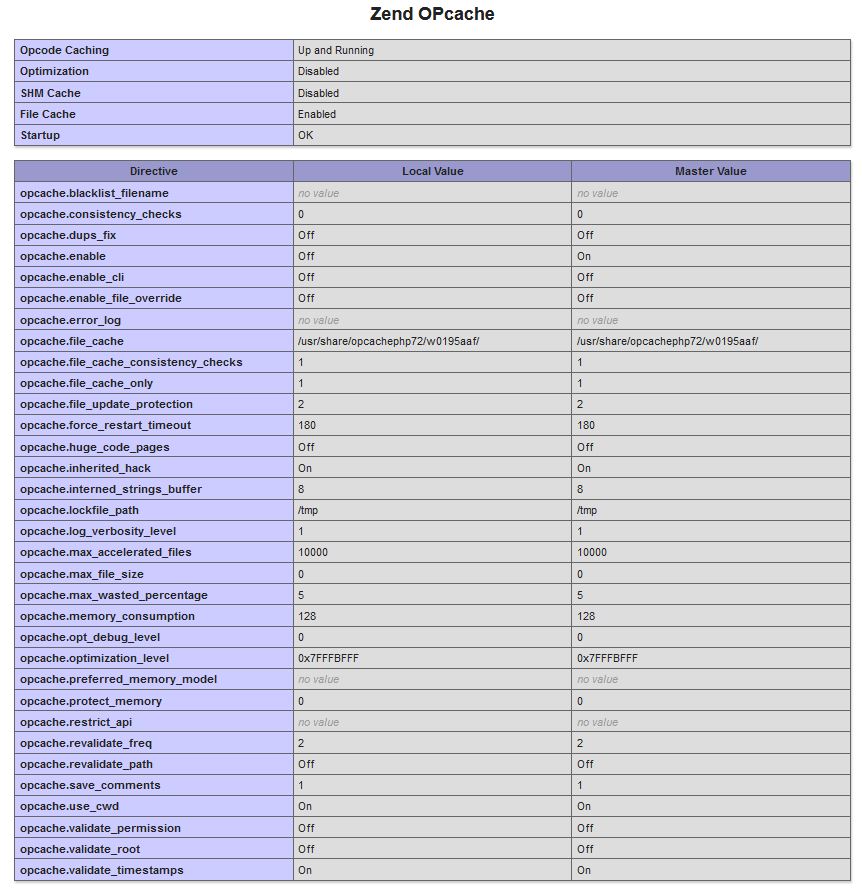
Can anybody share the opcache configuration settings from their php info?
Toflar
on 29 May 2020
 bibib
on 29 May 2020
bibib
on 29 May 2020
@Toflar Ich kann dir auch gern ein Unterkonto mit SSH usw. zukommen lassen 🙂
 MDevster
on 29 May 2020
MDevster
on 29 May 2020
Ich find's sehr seltsam, dass man einen Shared Memory Cache so konfiguriert, dass er kein Shared Memory nutzt...
@Toflar Ich kann dir auch gern ein Unterkonto mit SSH usw. zukommen lassen 🙂
Nicht nötig, da muss All-Inkl. aktiv werden, nicht wir.
Toflar
on 29 May 2020
Ich hab bei all-inkl. gefragt, warum die opcache-Einstellungen so sind, wie sie sind. Antwort vom Support: "Den RAM-basierten Opcache bieten wir nur auf Managed Servern an. Bei Shared Servern mit SSD ist hingegen aus technischen und operativen Gründen nur der Datei-basierte Cache aktiv."
bibib
on 29 May 2020
Deren Business-Entscheidung, das ist auch erlaubt und hat uns nicht zu interessieren. Aber scheinbar ist ja trotzdem was nicht in Ordnung, wenn die Setups mit deaktiviertem OPcache normal laufen und mit aktiviertem OPcache in PHP Memory Limits laufen. Denn eigentlich zählt das OPcache Memory Limit nicht zu dem von PHP.
Aber ggf. gibt's da einen Bug in PHP selbst, den sonst bisher keiner bemerkt hat (ich denke, die wenigsten werden OPcache so konfigurieren, dass er kein Memory benutzen darf). Theoretisch wäre es sogar denkbar, dass All-Inkl. eigene Anpassungen an PHP vornimmt und angepasste Versionen installiert. PHP ist ja OSS...von daher, keine Ahnung.
Deswegen sag ich: Ich glaube nicht, dass wir da irgendwas tun können, ausser All-Inkl. mit den Informationen zu versorgen, die sie brauchen und konstruktiv zu agieren.
Wenn sie denn überhaupt Interesse daran zeigen, eine Lösung für das Problem zu finden...
Toflar
on 29 May 2020
Okay - soll ich dem Support die Info einfach so weitergeben? Oder einen Link hierhier schicken? Oder besser, jemand mit mehr technischem Verständnis, der dort auch Kunde ist, schreibt die an? Mir wird dort vermutlich nicht allzuviel Aufmerksamkeit geschenkt werden.
bibib
on 29 May 2020
🤷♂️ Du kannst den Link schon schicken, aber ich denk die wollen einen Use Case haben, wo sich das Problem reproduzieren lässt.
Oder besser, jemand mit mehr technischem Verständnis, der dort auch Kunde ist, schreibt die an?
Auch das wäre sicher von Vorteil.
Toflar
on 29 May 2020
🤷♂️ Du kannst den Link schon schicken, aber ich denk die wollen einen Use Case haben, wo sich das Problem reproduzieren lässt.
Ich hatte ihnen gestern schon einen Backend-Zugang zur Testseite (die wir auf Slack diskutiert haben) mit Screenshots und detaillierter Problembeschreibung geschickt - heute früh hab ich aber nicht gesehen, dass sich jemand tatsächlich eingeloggt hätte. Stattdessen hat man versucht, mich mit einer 08/15-Antwort abzuspeisen. Naja. Vielleicht findet sich ja jemand, den sie ernster nehmen, ansonsten versuch ich es einfach nochmal. :)
bibib
on 29 May 2020
Hallo zusammen,
ich bin auch bei ALL-Inkl und konnte ein bisschen mehr rausfinden. Der Fehler tritt jedenfalls bei mir immer an der selben Stelle in den PHP-Scripten auf wenn ich den contao/install-Path aufrufe (nach Login!):
ssh-xxx@xxx:/www/htdocs/xxx$ cat errorlog.txt
[29-May-2020 22:25:13 Europe/Berlin] PHP Fatal error: Allowed memory size of 268435456 bytes exhausted (tried to allocate 1531904 bytes) in /www/htdocs/xxx/DOMAIN/var/cache/prod/ContainerJFegKaP/appContao_ManagerBundle_HttpKernel_ContaoKernelProdContainer.php on line 512
[29-May-2020 22:25:13 Europe/Berlin] PHP Fatal error: Allowed memory size of 268435456 bytes exhausted (tried to allocate 1531904 bytes) in /www/htdocs/xxx/DOMAIN/vendor/composer/ClassLoader.php on line 444
Auszüge aus dem Code:
appContao_ManagerBundle_HttpKernel_ContaoKernelProdContainer.php on line 512
public function getRemovedIds(): array {
// this is Line 512
return require $this->containerDir.\DIRECTORY_SEPARATOR.'removed-ids.php';
}
ClassLoader.php on line 444
`/**
Scope isolated include.
Prevents access to $this/self from included files.
*/
function includeFile($file)
{
// this is line 444
include $file;
}`
Das Memory-Limit liegt per Default bei 256MB was ich eigentlich gar nicht mal sooo schlampig finde! ... und hier scheint das Array der removed-ids den "Überlauf" zu verursachen.
Bei mir funktioniert es dann erst wenn ich wirklich auf 1GB gehe! Das finde ich ehrlich gesagt schon sehr massiv. Komme aus der Hochsprachenprogrammierung (Java und C++ bei Bosch) und sehe solche emensen Memoryanforderungen eigentlich eher selten in Hochsprachen!
Das Ganze tritt hier ja bei der DependencyInjection auf. Eventuell hat da ja vielleicht der eigens erstellte Contao-HTTP-Kernel noch ein Problem? Mit DI haben wir uns auch schon rumgeschlagen :-) .. Möglicherweise verursachen die vielen "includes" der Files aber auch solche Memory-Lasten!?
Vielleicht hilft die Info ja weiter!!
Danke für euren Einsatz!
Grüße
xprojects-de
on 29 May 2020
Noch ein Nachtrag:
Hatte gerade nochmals Kontakt mit einem qualifizierten Mitarbeiter von All-Inkl :-) und es ist wohl so dass hier keine Anpassungen am PHP gemacht werden (keine eigene Kompilierung) und auch der OPCache wohl nichts mit dem Memorylimit zu tun haben soll! Das scheint getrennt zu sein. Somit betrifft dieser Fehler nur das normale Memory-PHP-Limit uns scheint nichts mit dem OpCache zu tun zu haben, so laut All-Inkl!
xprojects-de
on 30 May 2020
Ich sag ja, dass das getrennte Werte sind.
Nur scheinbar läuft alles „normal“ (langsamer aber ohne Memory-Probleme) wenn die User OPcache deaktivieren.
Und das ist nur bei All-Inkl der Fall - sonst gibt‘s keinerlei solcher Reports.
Toflar
on 30 May 2020
Hallo zusammen,
ich habe nun versucht bei All-Inkl was herauszufinden und leider konnten die nicht wirklich was in ihrer Konfiguration finden. Es scheint alles nach Standard konfiguriert zu sein und der Fehler soll anscheinend nichts mit dem OpCache zu tun haben sondern mit dem allgemein zur Verfügung stehenden RAM!
Lassen wir mal so stehen.
Habe mal per printf-Debugging (macht Spass :-( ) die ganze Kette versucht (nach bestem Gewissen) nachzuvollziehen und die Implementierung schaut sauber aus! Haste\Model\Relation kommt beim Installtool mit einigen Hooks daher was dann wahrscheinlich den Fehler hervorruft, aber prinzipiell sollte das nicht sein! Die Implementierung schaut hier auch gut aus!
Ich habe mal ein bisschen rumgespielt und folgendes herausgefunden:
1)
Der Fehler kommt bei mir NUR wenn per DcaLoader ALLE Tables per loadDcaFiles() ($blnNoCache=false) geladen werden => Das passiert bei mir NUR beim InstallTool und beim Erstellen und Editieren der Benutzergruppen. Hier werden ja logischerweise alle DCAs geladen und geparsed!
Der "include" der *.php passiert auch nur einmalig und dann wird es per Cache aus dem Array geladen. Denke passt!
2)
Das Script-Verhalten ist strange! Prinzipiell "baut" sich das Script auf und steigt dann immer an einer späteren Stelle aus bis es dann nach 5-10 maliger Wiederholung erfolgreich war. Sprich: Es werden mit jedem Aufruf immer mehr DCAs geladen bis letzendlich alle geladen werden und dann läuft das Script erfolgreich durch! Erfolgreich ist das Script dann ca. 4-5 mal. Wartet man dann ein paar Sekunden geht das Spiel von vorne los!
3)
Mit deaktiviertem OpCache geht es immer, aber das Script läuft sichtbar langsamer und mit printf-Debugging sieht man auch dass sich die Ausgaben nachvollziehbar langsamer aufbauen!
Mit aktivierem OpCache geht alles viel schneller, bricht aber dann ab!
Fazit:
Die Implementierung ist denke ich trotz vieler Events und Hooks sauber!
Meiner Meinung nach scheint es was mit dem Script-Cache oder RAM bei All-inkl zu tun zu haben! Nach einer gewissen Zeit scheinen die Scripte aus einem Cache oder RAM zu "fallen" und dann geht die Problematik los bis alle Scripte wieder kurzzeitig im Cache oder RAM liegen!
Frage:
Kann es sein dass bei deaktiviertem Opcache die Interpretationsgeschwindigkeit so "langsam" ist dass quasi der "Garbage" aus dem Script-Cache (memory_limit) oder RAM "geworfen" wird und deswegen der RAM ausreicht, unabhängig vom Opcache!? Im Gegenzug scheint bei aktiviertem Opcache der "include" ja trotzdem auf den Script-Cache oder auf dem RAM zu gehen und der reicht dann nicht aus? Was meint ihr dazu? Das würde doch dafür sprechen dass sich das Script quasi immer mehr "aufbaut" und nach etlichen Versuchen dann zum Erfolg führt!?
Vielleicht kennt sich da jemand besser aus!?
Danke und Grüße
xprojects-de
on 4 Jun 2020
Ach, das ultralangsame Filesystem war doch auch bei All-Inkl 😄 Siehe meine ausführlichen Befunde im anderen Ticket.
Deren Filesystem ist katastrophal langsam bis es sich warmgelaufen hat und es wird dann wieder linear langsamer, weil scheinbar die Dateien wieder aus dem lokalen Filecache geschmissen werden.
Kein Wunder ist der OPcode-Cache auch im Eimer, wenn er so konfiguriert ist, dass er nur das Dateisystem nutzen soll. Dann ist alles quasi doppelt langsam.
Toflar
on 5 Jun 2020
Aber in diesem Fall ist es halt nicht langsam sondern verbraucht aus irgendeinem Grund mehr vom PHP memory_limit. Das muss All-Inkl. profilen.
fritzmg
on 5 Jun 2020
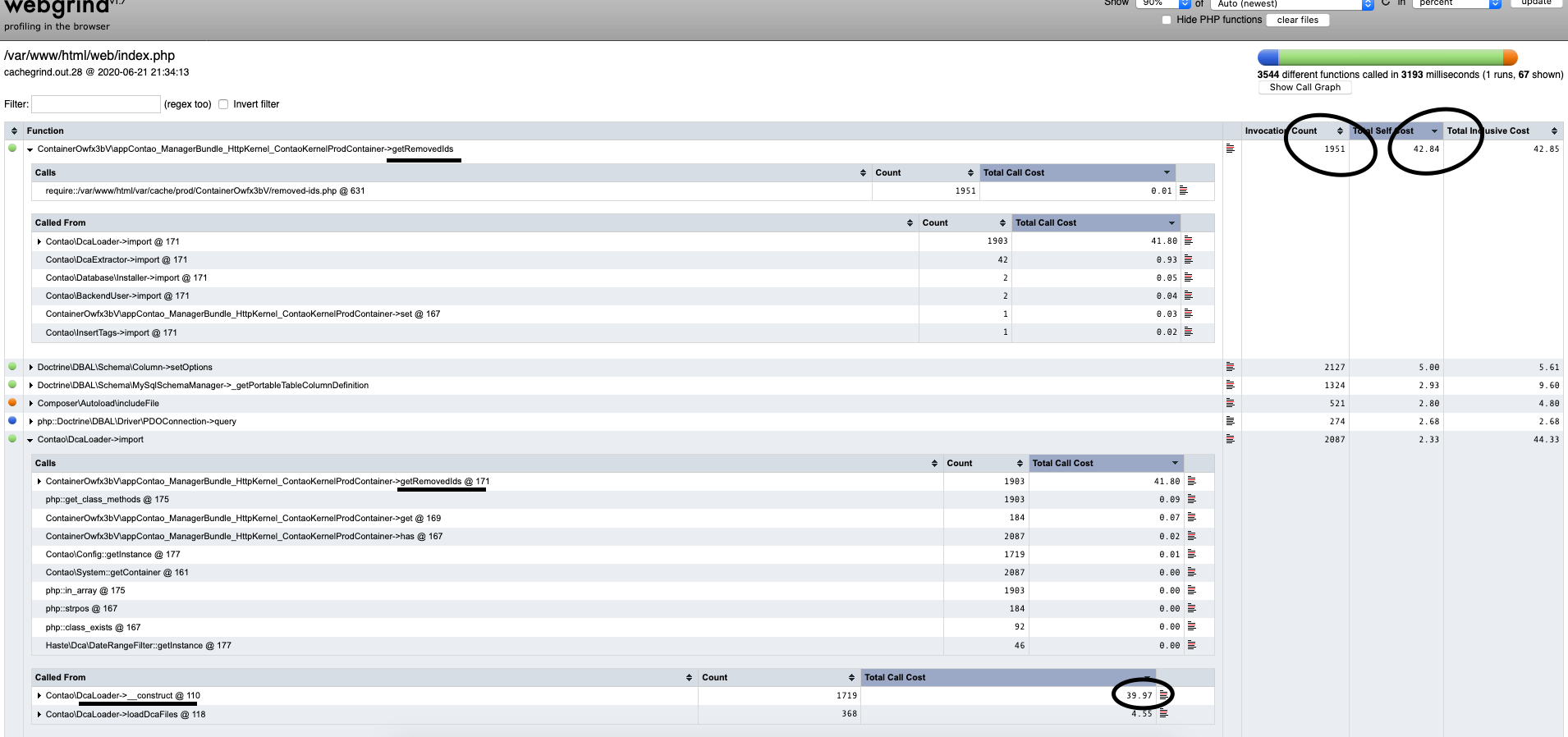
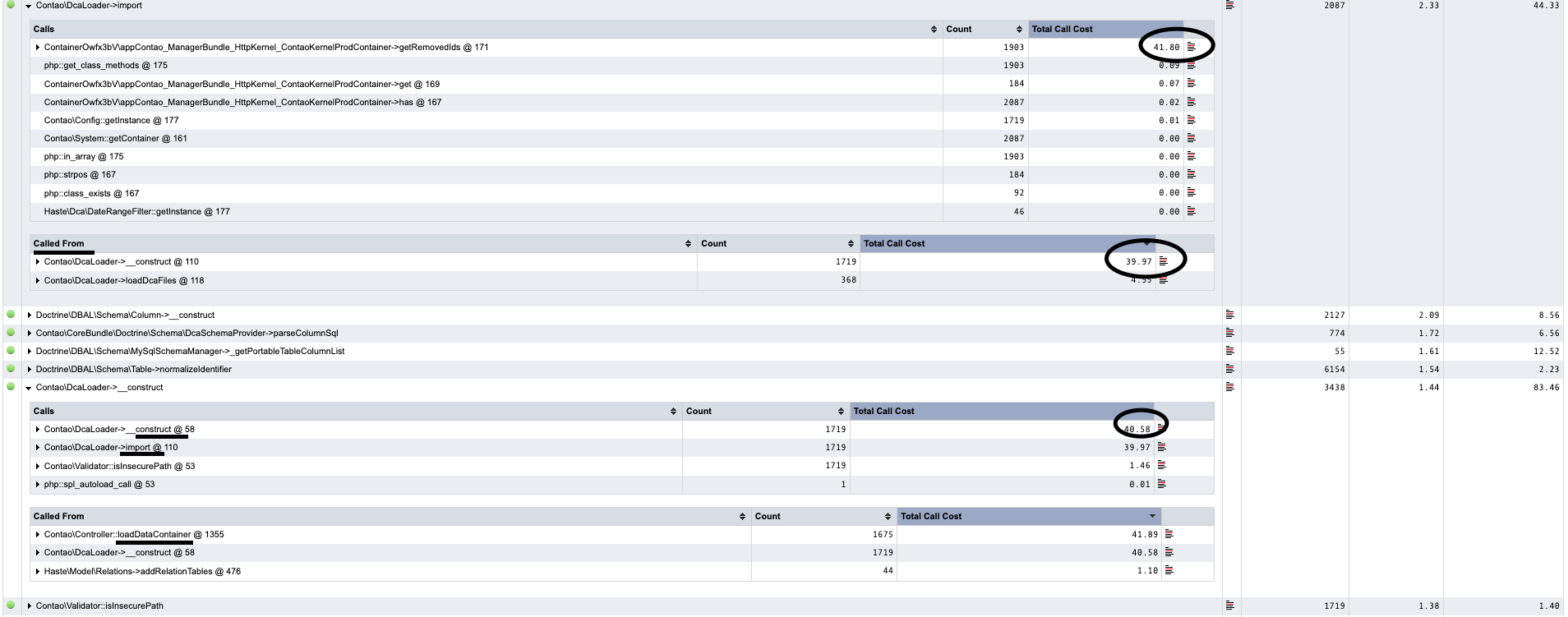
Hallo zusammen,
ich habe gerade ein Bundle auf meinem Testserver geprofiled und dann dachte ich mir dass ich dieses Problem ja auch mal nachstellen kann! :-) Im Anhang die Files!
Wie schon vermutet scheint es sich hier wirklich um ein Speicherproblem zu handel. Auslöser scheint "getRemovedIds" zu sein welches jedesmal beim Contao\DcaLoader (beim Konstruktor und auch beim import) immer wieder in den Speicher gelesen wird! Da der Fileinhalt bei der "RemovedIds" zeimlich große ist und es jedesmal wieder geladen wird kommt es denke ich zum Speicherüberlauf!
Frage: Wäre hier vielleicht ein cache bzw eine static Variable im DCALoader möglich welcher dieses umgeht? Kann man das anderweitig optimieren?
Vielelicht hilf es ja!?
Danke und Grüße
xprojects-de
on 21 Jun 2020
It seems the getRemovedIds calls can also be a problem on All-Inkl in the file manager, if you have a lot of files there. See https://contao.slack.com/archives/CK4J0KNDB/p1590592212361400 (if still available).
fritzmg
on 21 Jun 2020
I already found this issue last week and this is going to be fixed in the next 4.9. See https://github.com/contao/contao/pull/1840.
But the real problem here - again - are slow filesystem accesses. I could only notice it on systems that had open.base_dir enabled in which case PHP's realpath cache gets disabled and thus no file information can be cached. That's a considerable performance loss (I'm talking about seconds in e.g. the file manager).
Toflar
on 22 Jun 2020
Hallo zusammen,
kurzes Feedback:
Nach Update auf 4.9.4 funktioniert alles wunderbar (auch bei ALL-Inkl! :-)) Nun ist keine Erhöhung des PHP-Limits mehr von Nöten (siehe Fix in https://github.com/contao/contao/pull/1840 )
Danke an das Core-Team!
Grüße
xprojects-de
on 9 Jul 2020
Related issues
 madmaharaja
·
25Comments
madmaharaja
·
25Comments
 schnudd31do3
·
56Comments
schnudd31do3
·
56Comments
 Funbug
·
32Comments
Funbug
·
32Comments
 tabcontao
·
34Comments
leofeyer
·
49Comments
tabcontao
·
34Comments
leofeyer
·
49Comments
Most helpful comment
I already found this issue last week and this is going to be fixed in the next 4.9. See https://github.com/contao/contao/pull/1840.
But the real problem here - again - are slow filesystem accesses. I could only notice it on systems that had
open.base_direnabled in which case PHP's realpath cache gets disabled and thus no file information can be cached. That's a considerable performance loss (I'm talking about seconds in e.g. the file manager).