Containers-roadmap: Unusual/Complex ECS CloudFormation rollback behavior
The rollback procedure that ECS uses when a CloudFormation update is cancelled seems confusing and unnecessarily complex to me.
Here is a scenario where I have a CloudFormation update that I need to cancel because the new task definition has a bug and keeps failing to start:
Expected behavior
0) I manually cancel the CF template update and the rollback begins
1) ECS stops attempting to deploy the new (bad) task definition
2) All other CloudFormation resources get rolled back
3) My original (good) task definition is still running fine, so there was no downtime
Actual behavior
0) I manually cancel the CF template update and the rollback begins
1) ECS stops attempting to deploy the new (bad) task definition
2) ECS deploys a second copy of the old (good) task definition (WHY!?!?)
3) ECS stops the first copy of my old (good) task definition (WHY!?!?)
4) All other CloudFormation resources get rolled back
This might seem innocuous enough, however because of how I manage my container instances it creates a considerable amount of churn. Here is what actually happens
Initial state: ECS Task Definition 1 is currently running on Container Instance 1
1) I update the CF template which triggers the creation of Task Definition 2 and a new AutoScaling Group
2) The new ASG launches Container Instance 2 so that the new ECS Service/Task has somewhere to be deployed
3) ECS attempts to deploy Task Definition 2 on Container Instance 2 but the new task has a bug so it keeps failing
4) I manually cancel the CF template update and the rollback begins
5) ECS stops attempting to deploy Task Definition 2
6) ECS deploys a second copy of Task Definition 1 on Container Instance 2 (WHY!?!?)
7) ECS stops Task Definition 1 on Container Instance 1 (WHY!?!?)
8) CloudFormation starts rolling back all other resources so it attempts to delete the new ASG and Container Instance 2
9) Thankfully, I have a lifecycle hook which pauses termination and marks Container Instance 2 as DRAINING
10) ECS sees that Task Definition 1 is on a DRAINING instance so it starts Task Definition 1 on Container Instance 1 (again) and stops the copy that is running on Container Instance 2
11) The lifecycle hook completes once all tasks are stopped on Container Instance 2 and the instance is shut down
12) All other CloudFormation resources get rolled back
Thanks to my lifecycle hook, no downtime actually happens, but it still seems like an unnecessarily complex sequence, and I had to jump through a lot of hoops to get the lifecycle hook working in this scenario.
Is this the expected behavior? Is there any way to trigger the simpler approach?
 talawahtech
All 3 comments
Hi @talawahtech, thank you for the detailed issue!
There's two different expected behaviors at play here that explains what happens in steps 6 and 7 in your example:
- CloudFormation always does the same thing on rollback as it does on stack update: it calls ECS.UpdateService with the task definition specified in your stack.
- Calling ECS UpdateService replaces the current deployment with a new deployment, regardless of the state of the current deployment (in your case, failing to launch). ECS does not have an equivalent of "stop" or "cancel" deployment, only "replace with new deployment" by calling ECS UpdateService API with a different task definition. Since the service config was updated to "Task Definition 2" and that deployment was in-progress, ECS started a new deployment when CFN rolled back and updated the service config to "Task Definition 1".
If you're concerned about the instance/container churn in step 8-10, would autoscaling policies on a single ASG would for you? You might also be interested in adding a +1 to #76, #42, and/or #105
 clareliguori
on 18 Jan 2019
clareliguori
on 18 Jan 2019
Hi @clareliguori, thanks for the detailed response, it really helps clear up what is going on under the hood, and confirms that I am not going crazy :). I think I have a better understanding of what is going on now.
Part of the reason that I am seeing so much churn in this scenario is because I am deliberately doing a 1:1 mapping between instances and tasks. It makes things simpler for me conceptually and in terms of efficiency, but man do I have to jump through a lot of hoops for things to work automatically with CloudFormation/ECS/ASG.
Solving the autoscaling issue would definitely simplify things so that I could remove some of my current "immutable deployment" hacks. I guess it could also reduce some of the "instance churn" in a rollback situation if at step 8 ECS was smart enough to terminate the same instance where it just terminated the task. It wouldn't really solve the core "task/container churn" issue though.
Ultimately the behavior that I am looking for is similar to what happens when you call ECS.UpdateService on a stable ACTIVE deployment without changing the task definition or anything else...it just keeps that task and doesn't update the deployment at all.
Unfortunately as you have pointed out, when you do the same thing on top of another failing PRIMARY deployment, it doesn't currently recognize that the ACTIVE deployment has the same task definition as the new deployment so it gets rid of the bad one, but it also creates a new one. What I am looking for is for it to just get rid of the bad one, and recognize that it doesn't need to create a new task with the same definition as the ACTIVE deployment (I hope I am making sense here).
P.S. I want to just say how much I appreciate the effort that the Containers group at AWS is making to provide additional transparency and listen to broader customer feedback. It really makes a difference.
talawahtech
on 19 Jan 2019
Hi,
i have to agree the way CFN deals with task updates is not very good and needs some improvements.
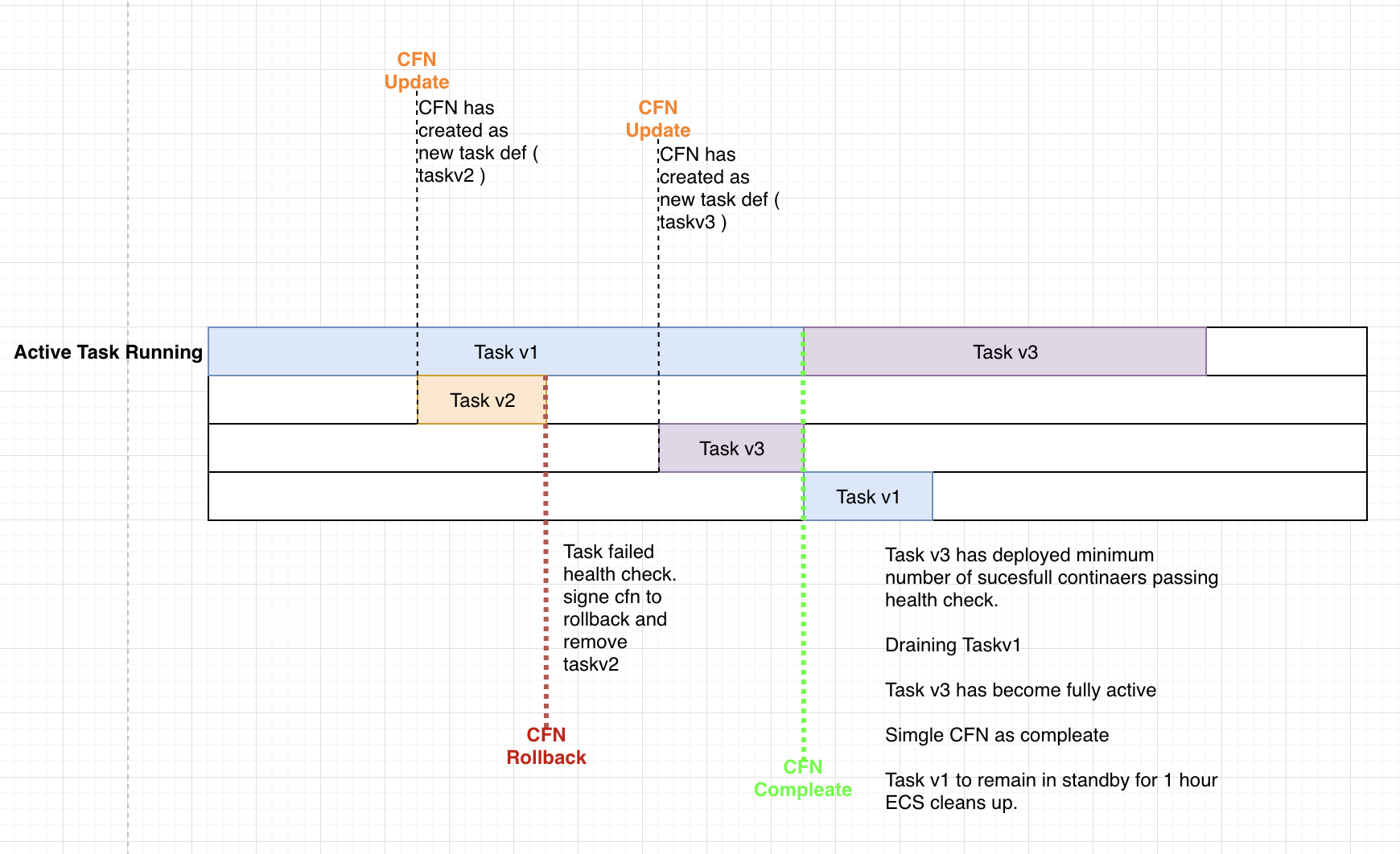
basically we need quick feedback from CFN if a new task has failed a health-check and the rollback should be to use the existing task without all the silliness of redeploying the current good one.
the new task should run in parallel of the the good old one so if there is an issue the rollback just removes the new task it was deploying. the rollback process should take less than 60sec. put a small graph of how i think the flow should go. defiantly think needs needs to be given a higher priority and looked at ASAP. i have spoken to several people on this subject and we all agree that ECS support in CFN is problematic.
 ghost
on 1 Mar 2019
ghost
on 1 Mar 2019
Related issues
 groodt
·
3Comments
groodt
·
3Comments
 mineiro
·
3Comments
mineiro
·
3Comments
 pauldougan
·
3Comments
pauldougan
·
3Comments
 AndrewMcFarren
·
3Comments
AndrewMcFarren
·
3Comments
 ORESoftware
·
3Comments
ORESoftware
·
3Comments
Most helpful comment
Hi,
i have to agree the way CFN deals with task updates is not very good and needs some improvements.
basically we need quick feedback from CFN if a new task has failed a health-check and the rollback should be to use the existing task without all the silliness of redeploying the current good one.
the new task should run in parallel of the the good old one so if there is an issue the rollback just removes the new task it was deploying. the rollback process should take less than 60sec. put a small graph of how i think the flow should go. defiantly think needs needs to be given a higher priority and looked at ASAP. i have spoken to several people on this subject and we all agree that ECS support in CFN is problematic.