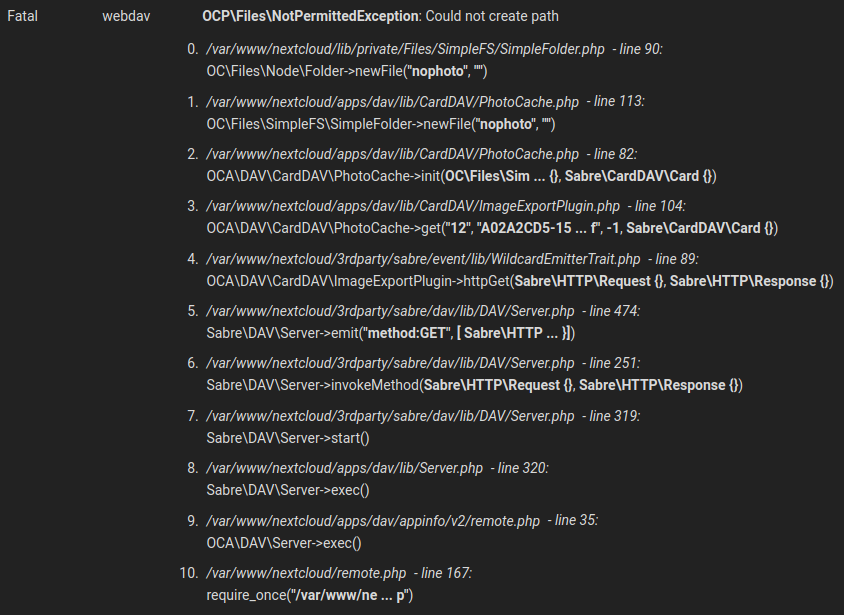
Contacts: Every contact produce a fatal error [OCP\Files\NotPermittedException: Could not create path] in nextcloud.log when open the app
Hello,
i'm a user of the NextcloudPi server image since nextcloud version 18 in april. So i'm not shure if this is the right place to open this issue, but it is just contacts app related. I also didn't found a issue that matches with mine.
This weekend i tried to sync my phone contacts with the cloud and it works fine. But in the nextcloud.log there where a lot fatal errors that says, that for some action there is no permission and i tried out how to reproduce.
So it happens every time i open the contacts app and there are new contact entries. Sometimes the log entry also appears if i just open the app and there is no new entry. Therefore it doesn't matter if they are synced or created in the app itself. I tried both. I tried also contact entries with a picture. In the app it needs a short moment to load but this feels normal. So i recognize it only in the logs.
Maybe it is not realy a bug, because as user you did not recognize anything. But when i look into the logs, there are a lot of fatal error entries.
......
......
To Reproduce
Example Steps to reproduce the behavior:
- Go to the nextcloud contact app in the Browser
- Create a contact, so you have a minimum of one contacts (or sync your phone contacts with CardDAV)
- As admin go to the logs in the settings
- See the fatal error "OCPFiles\NotPermittedException: Could not create path" there for mostly every contact
- Mostly it happens again if you restart the contact app
Expected behavior
Nothing to mention in the log entries.
Actual behavior
In the nextcloud.log file is a fatal error entry
Screenshots

Server configuration
Operating system: Issue-Template output: Linux 5.4.72-v7l+ #1356 SMP Thu Oct 22 13:57:51 BST 2020 armv7l
Raspbian GNU/Linux 10
(Debian 10.6)
Web server: Apache (fpm-fcgi)
Database: mysql 10.3.25
PHP version: 7.3.19-1~deb10u1
Modules loaded: Core, date, libxml, openssl, pcre, zlib, filter, hash, Reflection, SPL, session, sodium, standard, cgi-fcgi, mysqlnd, PDO, xml, bcmath, bz2, calendar, ctype, curl, dom, mbstring, fileinfo, ftp, gd, gettext, gmp, iconv, igbinary, imagick, intl, json, ldap, exif, mysqli, pdo_mysql, Phar, posix, readline, redis, shmop, SimpleXML, smbclient, sockets, sysvmsg, sysvsem, sysvshm, tokenizer, wddx, xmlreader, xmlwriter, xsl, zip, libsmbclient, Zend OPcache
Nextcloud version: 19.0.4 - 19.0.4.2
NextcloudPi version: v1.31.0
NextcloudPi image: NextCloudPi_03-28-20
Contacts version: 3.4.1
Updated from an older Nextcloud or fresh install: first installation was nextcloud 18
Signing status:
No errors have been found.
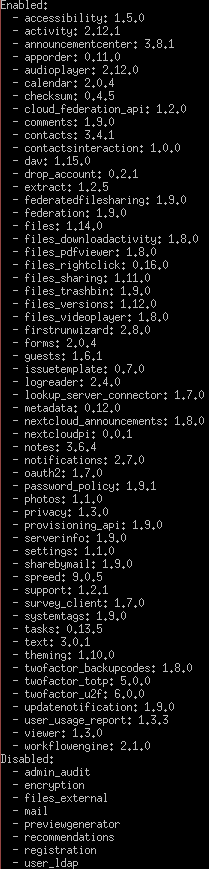
List of activated apps:
Nextcloud configuration:
{
    "passwordsalt": "***REMOVED SENSITIVE VALUE***",
    "secret": "***REMOVED SENSITIVE VALUE***",
    "trusted_domains": {
        "0": "localhost",
        "5": "nextcloudpi.local",
        "7": "nextcloudpi",
        "8": "nextcloudpi.lan",
        "11": ***REMOVED SENSITIVE VALUE***,
        "1": ***REMOVED SENSITIVE VALUE***,
        "12": ***REMOVED SENSITIVE VALUE***
    },
    "datadirectory": "***REMOVED SENSITIVE VALUE***",
    "dbtype": "mysql",
    "version": "19.0.4.2",
    "overwrite.cli.url": ***REMOVED SENSITIVE VALUE***,
    "dbname": "***REMOVED SENSITIVE VALUE***",
    "dbhost": "***REMOVED SENSITIVE VALUE***",
    "dbport": "",
    "dbtableprefix": "oc_",
    "mysql.utf8mb4": true,
    "dbuser": "***REMOVED SENSITIVE VALUE***",
    "dbpassword": "***REMOVED SENSITIVE VALUE***",
    "installed": true,
    "instanceid": "***REMOVED SENSITIVE VALUE***",
    "memcache.local": "\\OC\\Memcache\\Redis",
    "memcache.locking": "\\OC\\Memcache\\Redis",
    "redis": {
        "host": "***REMOVED SENSITIVE VALUE***",
        "port": 0,
        "timeout": 0,
        "password": "***REMOVED SENSITIVE VALUE***"
    },
    "tempdirectory": "\/media\/Daten\/data\/tmp",
    "mail_smtpmode": "smtp",
    "mail_smtpauthtype": "LOGIN",
    "mail_from_address": "***REMOVED SENSITIVE VALUE***",
    "mail_domain": "***REMOVED SENSITIVE VALUE***",
    "preview_max_x": "2048",
    "preview_max_y": "2048",
    "jpeg_quality": "60",
    "overwriteprotocol": "https",
    "loglevel": "2",
    "log_type": "file",
    "htaccess.RewriteBase": "\/",
    "default_language": "de",
    "default_locale": "de_DE",
    "remember_login_cookie_lifetime": 86400,
    "session_lifetime": 10800,
    "maintenance": false,
    "trashbin_retention_obligation": "auto, 30",
    "versions_retention_obligation": "auto, 30",
    "logfile": "\/media\/Daten\/data\/nextcloud.log",
    "mail_sendmailmode": "smtp",
    "mail_smtphost": "***REMOVED SENSITIVE VALUE***",
    "mail_smtpport": "587",
    "mail_smtpauth": 1,
    "mail_smtpname": "***REMOVED SENSITIVE VALUE***",
    "mail_smtppassword": "***REMOVED SENSITIVE VALUE***",
    "mail_smtpsecure": "tls",
    "share_folder": "\/Geteiltes",
    "theme": "",
    "has_rebuilt_cache": true
Client configuration
Browser:
Google Chrome Version 86.0.4240.183 (Offizieller Build) (64-Bit)
Issue-Template output: Mozilla/5.0 (X11; Linux x86_64) AppleWebKit/537.36 (KHTML, like Gecko) Chrome/86.0.4240.183 Safari/537.36
Operating system:
Linux Mint 20
Linux 5.4.0-52-generic #57-Ubuntu SMP Thu Oct 15 10:57:00 UTC 2020 x86_64 x86_64 x86_64 GNU/Linux
CardDAV-clients:
On phone DAVx5 3.3.5-ose
Logs
Web server error log
Insert your webserver log here
Nextcloud log
data/nextcloud.log
-> screenshot above
 dorpauli
All 34 comments
Hey! :)
Please check your data and data/appdata have correct permissions and owners.
 skjnldsv
on 9 Nov 2020
skjnldsv
on 9 Nov 2020
Thanks for the fast help! :)
I looked into my data directory and every entry there is www-data:www-data also the appdata an the next subfolders.
dorpauli
on 9 Nov 2020
Can you do a ls -la data/appdata_*/dav-photocache/43C07B19* and copy/paste the results here please?
skjnldsv
on 9 Nov 2020
There is no 43c07... directory in the folder anymore. Maybe because i tried it with new contacts and the directorys changed.
Edit: I also recognize, that the entry under point 3 in the logs (43C07B19...) is a vcf-file. Maybe this helps...
I used the command ls -Rla data/appdata_*/dav-photocache and this was the output:
data/appdata_ocrnfg5r4p1o/dav-photocache:
insgesamt 0
drwxr-xr-x 1 www-data www-data 768 Nov  9 13:33 .
drwxr-xr-x 1 www-data www-data 202 Apr  8  2020 ..
drwxr-xr-x 1 www-data www-data  42 Apr  4  2020 054c2636fe0b809404cb38d87e7915bd
drwxr-xr-x 1 www-data www-data  42 Nov  7 14:30 3f2458cfca16e8df763675d8eae6ade9
drwxr-xr-x 1 www-data www-data  14 Nov  9 09:24 6d6883d35865d0d8e05972b2cab3a04d
drwxr-xr-x 1 www-data www-data  14 Nov  9 09:24 79a1dae7d2012fb3ce709f87e15a26a2
drwxr-xr-x 1 www-data www-data  66 Nov  2 14:32 7d1cb4e6d1ad5ffbb086a0862cf5b25d
drwxr-xr-x 1 www-data www-data  66 Nov  2 14:32 857448fada12a32ebbc184c2fa9af19a
drwxr-xr-x 1 www-data www-data  14 Nov  9 09:24 8d22cebed9e96b69aed39f7acb183090
drwxr-xr-x 1 www-data www-data  14 Nov  9 09:24 a56980dce2d7589e2360170af09559ee
drwxr-xr-x 1 www-data www-data  14 Nov  9 09:24 bbfb3003a420f84dcdd5762afdcc8614
drwxr-xr-x 1 www-data www-data  18 Nov  9 09:24 bd6fa5dbf1530f63d6e08c79ba7983b4
drwxr-xr-x 1 www-data www-data  18 Nov  9 09:24 efbab48e41e8b7909d3f29d1809d9119
drwxr-xr-x 1 www-data www-data  66 Nov  2 14:32 f25996ee4770718c1ea2095b330c5b72

data/appdata_ocrnfg5r4p1o/dav-photocache/054c2636fe0b809404cb38d87e7915bd:
insgesamt 12
drwxr-xr-x 1 www-data www-data   42 Apr  4  2020 .
drwxr-xr-x 1 www-data www-data  768 Nov  9 13:33 ..
-rw-r--r-- 1 www-data www-data  250 Apr  4  2020 photo.32.png
-rw-r--r-- 1 www-data www-data 6682 Apr  4  2020 photo.png

data/appdata_ocrnfg5r4p1o/dav-photocache/3f2458cfca16e8df763675d8eae6ade9:
insgesamt 12
drwxr-xr-x 1 www-data www-data   42 Nov  7 14:30 .
drwxr-xr-x 1 www-data www-data  768 Nov  9 13:33 ..
-rw-r--r-- 1 www-data www-data  283 Nov  7 14:30 photo.32.png
-rw-r--r-- 1 www-data www-data 6706 Nov  7 14:30 photo.png

data/appdata_ocrnfg5r4p1o/dav-photocache/6d6883d35865d0d8e05972b2cab3a04d:
insgesamt 0
drwxr-xr-x 1 www-data www-data  14 Nov  9 09:24 .
drwxr-xr-x 1 www-data www-data 768 Nov  9 13:33 ..
-rw-r--r-- 1 www-data www-data   0 Nov  9 13:52 nophoto

data/appdata_ocrnfg5r4p1o/dav-photocache/79a1dae7d2012fb3ce709f87e15a26a2:
insgesamt 0
drwxr-xr-x 1 www-data www-data  14 Nov  9 09:24 .
drwxr-xr-x 1 www-data www-data 768 Nov  9 13:33 ..
-rw-r--r-- 1 www-data www-data   0 Nov  9 13:52 nophoto

data/appdata_ocrnfg5r4p1o/dav-photocache/7d1cb4e6d1ad5ffbb086a0862cf5b25d:
insgesamt 16
drwxr-xr-x 1 www-data www-data   66 Nov  2 14:32 .
drwxr-xr-x 1 www-data www-data  768 Nov  9 13:33 ..
-rw-r--r-- 1 www-data www-data  251 Sep 28 09:32 photo.32.png
-rw-r--r-- 1 www-data www-data  400 Nov  2 14:32 photo.64.png
-rw-r--r-- 1 www-data www-data 6685 Sep 28 09:32 photo.png

data/appdata_ocrnfg5r4p1o/dav-photocache/857448fada12a32ebbc184c2fa9af19a:
insgesamt 28
drwxr-xr-x 1 www-data www-data    66 Nov  2 14:32 .
drwxr-xr-x 1 www-data www-data   768 Nov  9 13:33 ..
-rw-r--r-- 1 www-data www-data   547 Apr  4  2020 photo.32.png
-rw-r--r-- 1 www-data www-data  1009 Nov  2 14:32 photo.64.png
-rw-r--r-- 1 www-data www-data 18458 Apr  4  2020 photo.png

data/appdata_ocrnfg5r4p1o/dav-photocache/8d22cebed9e96b69aed39f7acb183090:
insgesamt 0
drwxr-xr-x 1 www-data www-data  14 Nov  9 09:24 .
drwxr-xr-x 1 www-data www-data 768 Nov  9 13:33 ..
-rw-r--r-- 1 www-data www-data   0 Nov  9 13:52 nophoto

data/appdata_ocrnfg5r4p1o/dav-photocache/a56980dce2d7589e2360170af09559ee:
insgesamt 0
drwxr-xr-x 1 www-data www-data  14 Nov  9 09:24 .
drwxr-xr-x 1 www-data www-data 768 Nov  9 13:33 ..
-rw-r--r-- 1 www-data www-data   0 Nov  9 13:52 nophoto

data/appdata_ocrnfg5r4p1o/dav-photocache/bbfb3003a420f84dcdd5762afdcc8614:
insgesamt 0
drwxr-xr-x 1 www-data www-data  14 Nov  9 09:24 .
drwxr-xr-x 1 www-data www-data 768 Nov  9 13:33 ..
-rw-r--r-- 1 www-data www-data   0 Nov  9 13:52 nophoto

data/appdata_ocrnfg5r4p1o/dav-photocache/bd6fa5dbf1530f63d6e08c79ba7983b4:
insgesamt 4
drwxr-xr-x 1 www-data www-data   18 Nov  9 09:24 .
drwxr-xr-x 1 www-data www-data  768 Nov  9 13:33 ..
-rw-r--r-- 1 www-data www-data 3502 Nov  9 09:24 photo.jpg

data/appdata_ocrnfg5r4p1o/dav-photocache/efbab48e41e8b7909d3f29d1809d9119:
insgesamt 4
drwxr-xr-x 1 www-data www-data   18 Nov  9 09:24 .
drwxr-xr-x 1 www-data www-data  768 Nov  9 13:33 ..
-rw-r--r-- 1 www-data www-data 3323 Nov  9 09:24 photo.jpg

data/appdata_ocrnfg5r4p1o/dav-photocache/f25996ee4770718c1ea2095b330c5b72:
insgesamt 24
drwxr-xr-x 1 www-data www-data    66 Nov  2 14:32 .
drwxr-xr-x 1 www-data www-data   768 Nov  9 13:33 ..
-rw-r--r-- 1 www-data www-data   419 Apr  4  2020 photo.32.png
-rw-r--r-- 1 www-data www-data   844 Nov  2 14:32 photo.64.png
-rw-r--r-- 1 www-data www-data 15183 Apr  4  2020 photo.png
There is no 43c07... directory in the folder anymore. Maybe because i tried it with new contacts and the directorys changed.
Edit: I also recognize, that the entry under point 3 in the logs (43C07B19...) is a vcf-file. Maybe this helps...
Well, it is a vcf yep, but then the folder should exists.
Can you run an occ files:scan-app-data please?
skjnldsv
on 9 Nov 2020
I did it right after your comment and this was the output:
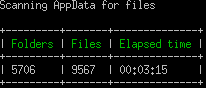
Since that about 20 mins ago my server have a cpu load of 100% and i can't access the logs in the browser.
dorpauli
on 9 Nov 2020
Let it rest a bit. It was maybe a very expensive task for it.
I assume it should have fixed your issue. I don't know how you got stuck to this point. It seems your filecache had a mismatch between the appdata filesystem :shrug:
Keep me updated :)
skjnldsv
on 9 Nov 2020
After a while i got nervous, because it seemed to get worse. So i reboot the server and ran the command again. This time there where less folders and files in the output and it was faster.
Then i opened the contacts app and after that the logs. There was no new entry, so i thought that was it.
But than i created a new contact and the same behavior occurred.
I checked directly if the directory mentioned in the log entry exists. But it dosen't...
dorpauli
on 9 Nov 2020
@skjnldsv This morning i tested further and my presumption was confirmed again. I found out that if i created a new account the error occur. Now if i open the contacts app again and again there is a big chance a new error will be written to the logs. If i run the command you told me to, this behavior is gone. Then there will be no new entry if i start the contact's app. But if i create a new contact it starts all over again.
dorpauli
on 10 Nov 2020
Is this the default nextcloudpi config?
Or did you changed some stuff?
You definitely have an appdata cache issue.
Can you try to disable memcache from your config?
skjnldsv
on 10 Nov 2020
I did some small changes in the nextcloud config, but nothing about the caching. The nextcloudpi-config is so far default, that i only did settings in the web panel.
It is also strange that everything else works very fine.
I don't know much about caching and am therefore rather careful about such changes. Is it enough to comment out the corresponding lines from the config? And is it easy to undo that?
dorpauli
on 10 Nov 2020
Is it enough to comment out the corresponding lines from the config? And is it easy to undo that?
Yes, just comment the memcache lines, try it again and uncoment them back after you tried
skjnldsv
on 10 Nov 2020
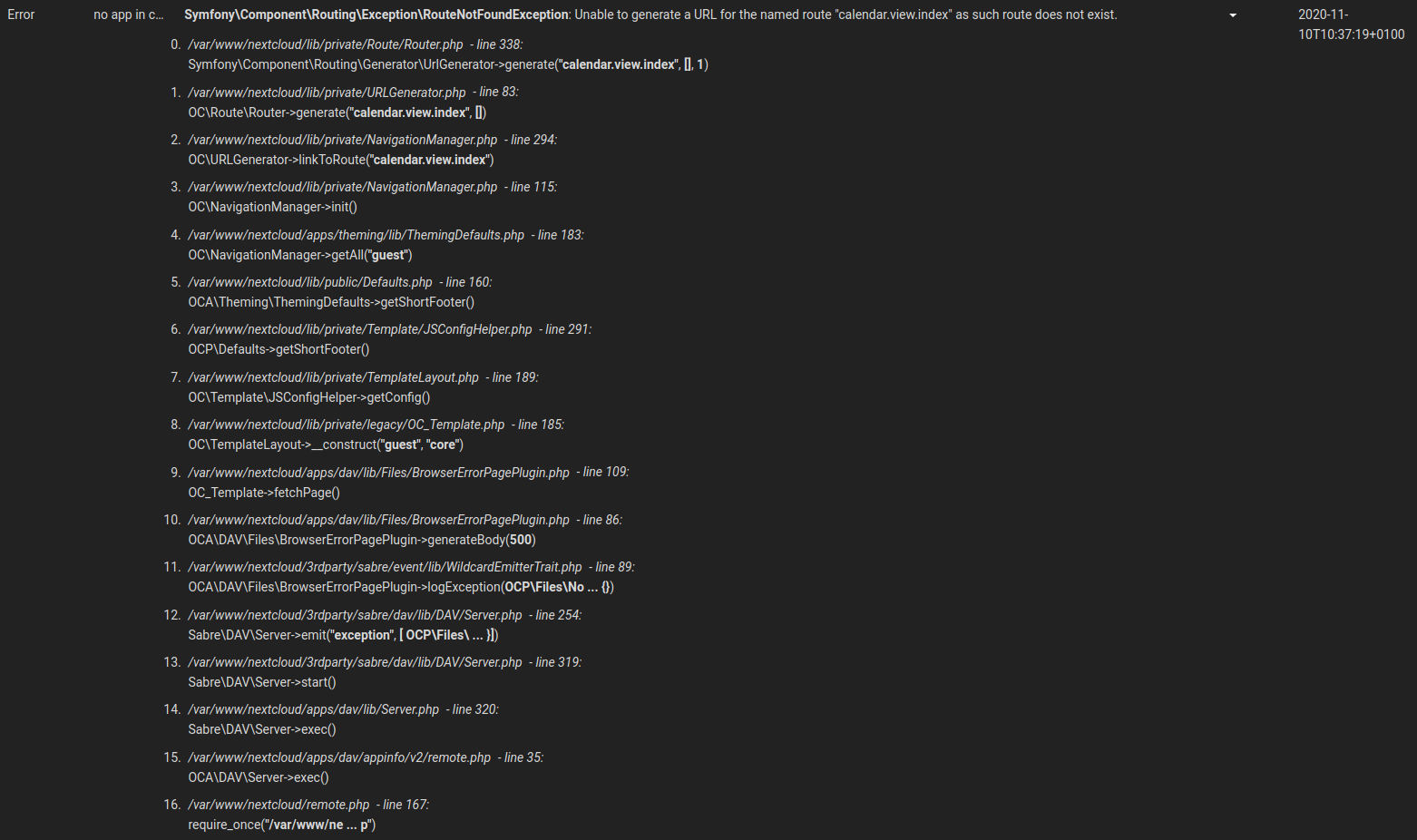
Ok i think i will turn it back again quickly. It is the same behavior for this issue after deactivating the redis cache in the config.php. New log entry:
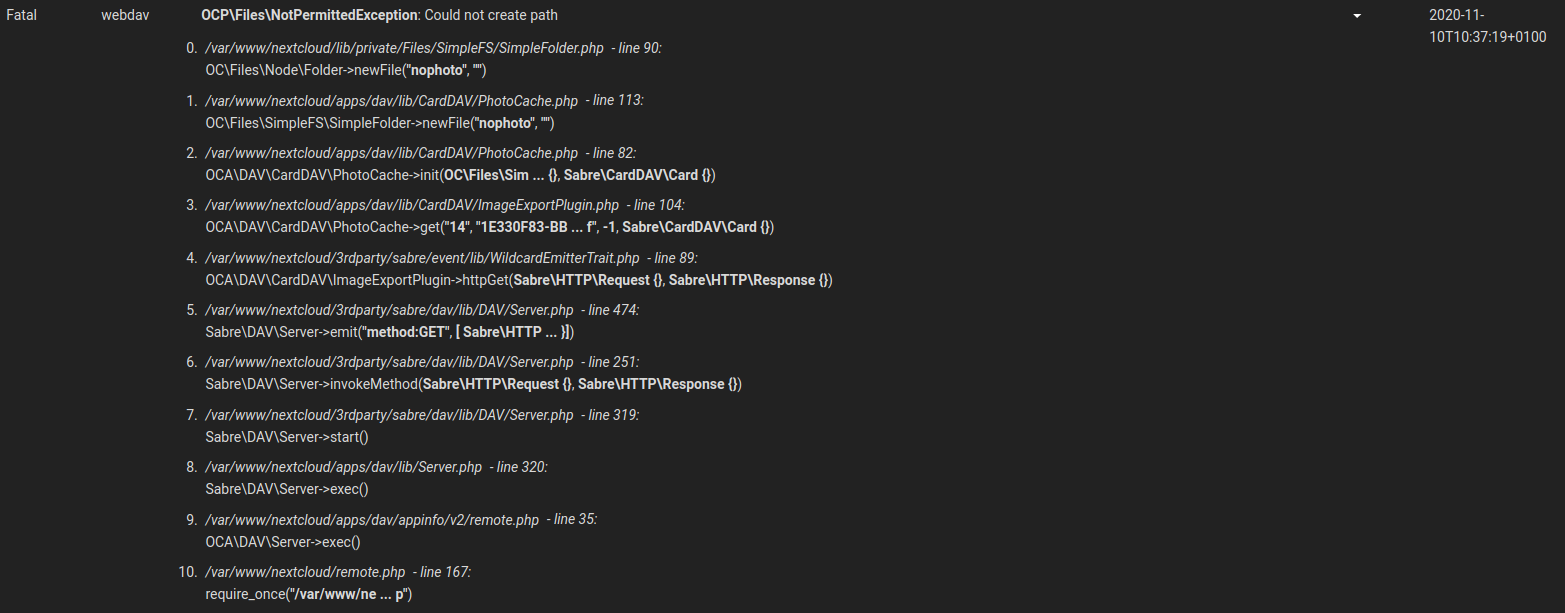
There are also a lot new issues like this:
dorpauli
on 10 Nov 2020
Hello @skjnldsv,
this morning i did a fresh install of nextcloudpi on a clean VM with the latest Debian AMD 64. For that i used the curl installer. After installation the first thing i did was to create a new contact.
I did not expect that, but the same error occured even there. It shows, that it is not related to my raspberry pi.
So if you want to reproduce it, you can do on any debian machine with the curl installer of nextcloudpi. It took me about 20 mins.
dorpauli
on 11 Nov 2020
What is the curl installer?
What Webserver did you choose?
skjnldsv
on 11 Nov 2020
I choose the latest Debian with smallest installation. You have to run
curl -sSL https://raw.githubusercontent.com/nextcloud/nextcloudpi/master/install.sh | bash
to automatically install the complete nextcloudpi configuration with apache. Its mostly like the configuration i mentioned in this issue.
After this you just have to type https://{ip-address-of-vm} in a browser from a pc in the same network (or you could also choose a desktop environment for debian an it should work with localhost from there), save both login data and activate it. Then you should enter the nextcloud instance via browser and can login with the ncp user and password.
Here's the link where the installation is described:
dorpauli
on 11 Nov 2020
Okay, so my question is why using nextcloudpi on your vm64 debian setup?
Keep in mind that nextcloudpi is not officially supported, and sinc I cannot reproduce your bug on a standard install, I'm more and more leaning toward this :thinking:
skjnldsv
on 11 Nov 2020
Are you storing your data on external hard drive?
If so, what is the filesystem format?
skjnldsv
on 11 Nov 2020
Pinging @nachoparker, does that ring a bell to you?
There is a mistmatch between the fs and the filecache. When creating a folder, the filecache register it but it doesn't exists on the FS, so of course writing onto it fails.
skjnldsv
on 11 Nov 2020
My real nextcloud setup is a raspberry pi 4, so i use the nextcloudpi image. I just wanted to test on a fresh installation.
Yes, in the raspberry pi data and database is stored on external btrfs hdd, but in the test on debian, everything runs on the virtual hard drive.
dorpauli
on 11 Nov 2020
Thanks for the debugging btw, really appreciate it :)
Redis is on the same machine, right? the host have been obfuscated in your config :ghost:
skjnldsv
on 11 Nov 2020
Redis runs locally on the same machine, yes. :)
No problem, I am really enthusiastic about nextcloud since i run my own server, but mostly don't have much time for it. I think about change to a mini server device so i can use the 64-bit architecture, but i don't know what device is best for it :D
dorpauli
on 11 Nov 2020
but i don't know what device is best for it
I personally am really fond of those optiplex micro/lenovo thinkcentre tiny., They idle at ~5w and can be upgraded to high end i5 cpu with m2 ssd ;)
I got 4 of them, and it's running awesomely!
skjnldsv
on 11 Nov 2020
Thank's for that advice, i'll have a look at that! :)
dorpauli
on 11 Nov 2020
Are you storing your data on external hard drive?
If so, what is the filesystem format?
Now something else came in my mind. I also used BTRFS in the VM. Maybe it's no problem in standard ext4 or another FS.
dorpauli
on 11 Nov 2020
bug doesn't reappear on NextCloud 20. Sorry for the noise!
This issue happens on our installation (Debian, Apache2, FPM, no Raspberry, Contacts 3.4.2) as well:
{
  "reqId": "X7vyIbzMN2OoCjNr7NFoXQAAAEo",
  "level": 4,
  "time": "2020-11-23T17:32:17+00:00",
  "remoteAddr": "2003:e3:7f0f::xxx",
  "user": "admin",
  "app": "webdav",
  "method": "GET",
  "url": "/remote.php/dav/addressbooks/users/admin/contacts/EA14AD51-C155-469A-B335-251146C4C413.vcf?photo",
  "message": {
    "Exception": "OCP\\Files\\NotPermittedException",
    "Message": "Could not create path",
    "Code": 0,
    "Trace": [
      {
        "file": "/var/www/nextcloud/htdocs/nextcloud/lib/private/Files/SimpleFS/SimpleFolder.php",
        "line": 90,
        "function": "newFile",
        "class": "OC\\Files\\Node\\Folder",
        "type": "->",
        "args": [
          "nophoto",
          ""
        ]
      },
      {
        "file": "/var/www/nextcloud/htdocs/nextcloud/apps/dav/lib/CardDAV/PhotoCache.php",
        "line": 113,
        "function": "newFile",
        "class": "OC\\Files\\SimpleFS\\SimpleFolder",
        "type": "->",
        "args": [
          "nophoto",
          ""
        ]
      },
      {
        "file": "/var/www/nextcloud/htdocs/nextcloud/apps/dav/lib/CardDAV/PhotoCache.php",
        "line": 82,
        "function": "init",
        "class": "OCA\\DAV\\CardDAV\\PhotoCache",
        "type": "->",
        "args": [
          {
            "__class__": "OC\\Files\\SimpleFS\\SimpleFolder"
          },
          {
            "__class__": "Sabre\\CardDAV\\Card"
          }
        ]
      },
      {
        "file": "/var/www/nextcloud/htdocs/nextcloud/apps/dav/lib/CardDAV/ImageExportPlugin.php",
        "line": 104,
        "function": "get",
        "class": "OCA\\DAV\\CardDAV\\PhotoCache",
        "type": "->",
        "args": [
          "50",
          "EA14AD51-C155-469A-B335-251146C4C413.vcf",
          -1,
          {
            "__class__": "Sabre\\CardDAV\\Card"
          }
        ]
      },
      {
        "file": "/var/www/nextcloud/htdocs/nextcloud/3rdparty/sabre/event/lib/WildcardEmitterTrait.php",
        "line": 89,
        "function": "httpGet",
        "class": "OCA\\DAV\\CardDAV\\ImageExportPlugin",
        "type": "->",
        "args": [
          {
            "__class__": "Sabre\\HTTP\\Request"
          },
          {
            "__class__": "Sabre\\HTTP\\Response"
          }
        ]
      },
      {
        "file": "/var/www/nextcloud/htdocs/nextcloud/3rdparty/sabre/dav/lib/DAV/Server.php",
        "line": 474,
        "function": "emit",
        "class": "Sabre\\DAV\\Server",
        "type": "->",
        "args": [
          "method:GET",
          [
            {
              "__class__": "Sabre\\HTTP\\Request"
            },
            {
              "__class__": "Sabre\\HTTP\\Response"
            }
          ]
        ]
      },
      {
        "file": "/var/www/nextcloud/htdocs/nextcloud/3rdparty/sabre/dav/lib/DAV/Server.php",
        "line": 251,
        "function": "invokeMethod",
        "class": "Sabre\\DAV\\Server",
        "type": "->",
        "args": [
          {
            "__class__": "Sabre\\HTTP\\Request"
          },
          {
            "__class__": "Sabre\\HTTP\\Response"
          }
        ]
      },
      {
        "file": "/var/www/nextcloud/htdocs/nextcloud/3rdparty/sabre/dav/lib/DAV/Server.php",
        "line": 319,
        "function": "start",
        "class": "Sabre\\DAV\\Server",
        "type": "->",
        "args": []
      },
      {
        "file": "/var/www/nextcloud/htdocs/nextcloud/apps/dav/lib/Server.php",
        "line": 320,
        "function": "exec",
        "class": "Sabre\\DAV\\Server",
        "type": "->",
        "args": []
      },
      {
        "file": "/var/www/nextcloud/htdocs/nextcloud/apps/dav/appinfo/v2/remote.php",
        "line": 35,
        "function": "exec",
        "class": "OCA\\DAV\\Server",
        "type": "->",
        "args": []
      },
      {
        "file": "/var/www/nextcloud/htdocs/nextcloud/remote.php",
        "line": 167,
        "args": [
          "/var/www/nextcloud/htdocs/nextcloud/apps/dav/appinfo/v2/remote.php"
        ],
        "function": "require_once"
      }
    ],
    "File": "/var/www/nextcloud/htdocs/nextcloud/lib/private/Files/Node/Folder.php",
    "Line": 192,
    "CustomMessage": "--"
  },
  "userAgent": "Mozilla/5.0 (Windows NT 10.0; Win64; x64; rv:83.0) Gecko/20100101 Firefox/83.0",
  "version": "19.0.5.2"
}
AppData was scanned again (with no changes), linux filesystem permissions are correct, APCu has been disabled, there's no directory for the mentioned UID existing (find ~/priv/nextcloud-data/appdata_ocwwan6xpw2k/ -name EA14AD51\* turns up no result).
I've debugged this down to a permission topic: PERMISSION_CREATE seems to be missing, but I don't see how this bug can be resolved.
Anybody else having an idea?
 antondollmaier
on 23 Nov 2020
antondollmaier
on 23 Nov 2020
@antondollmaier Do you use BTRFS-Filesystem for the data directory instead of ext4? Maybe it got something to do with it like you can see in the posts above.
@skjnldsv Could you reproduce the error so far?
dorpauli
on 24 Nov 2020
I have this same issue, Nextcloud 19.0.6 running in Docker, data on a Nextcloud code and userdata on a ZFS filesystem.
 cvandesande
on 9 Dec 2020
cvandesande
on 9 Dec 2020
@skjnldsv Could you reproduce the error so far?
I can't :(
skjnldsv
on 18 Dec 2020
Hi,
@antondollmaier Do you use BTRFS-Filesystem for the data directory instead of ext4? Maybe it got something to do with it like you can see in the posts above.
Not really: ext4 on dedicated server at Hetzner.
But: issue didn't re-appear on NC20, so ... solved? :)
antondollmaier
on 18 Dec 2020
So yeah, i also upgraded to nc 20 and the problem doesn't appear again.
But the issue is still there in version 19.0.6 like @cvandesande wrote, so i think i can't close it. Version 19 is still supported.
dorpauli
on 29 Dec 2020
If it helps, I just re-tested. Still running 19.0.6 (and contacts 3.4.2). I just tried to create a new contact called "Test" and my logs were spammed with messages like this
[webdav] Fatal: OCP\Files\NotPermittedException: Could not create path at <<closure>>

 0. /usr/share/nginx/html/nextcloud/lib/private/Files/SimpleFS/SimpleFolder.php line 90
    OC\Files\Node\Folder->newFile("nophoto", "")
 1. /usr/share/nginx/html/nextcloud/apps/dav/lib/CardDAV/PhotoCache.php line 113
    OC\Files\SimpleFS\SimpleFolder->newFile("nophoto", "")
 2. /usr/share/nginx/html/nextcloud/apps/dav/lib/CardDAV/PhotoCache.php line 82
    OCA\DAV\CardDAV\PhotoCache->init(OC\Files\SimpleFS\SimpleFolder {}, Sabre\CardDAV\Card {})
 3. /usr/share/nginx/html/nextcloud/apps/dav/lib/CardDAV/ImageExportPlugin.php line 104
    OCA\DAV\CardDAV\PhotoCache->get(3, "A0F7A8FF-EA53-4 ... f", -1, Sabre\CardDAV\Card {})
 4. /usr/share/nginx/html/nextcloud/3rdparty/sabre/event/lib/WildcardEmitterTrait.php line 89
    OCA\DAV\CardDAV\ImageExportPlugin->httpGet(Sabre\HTTP\Request {}, Sabre\HTTP\Response {})
 5. /usr/share/nginx/html/nextcloud/3rdparty/sabre/dav/lib/DAV/Server.php line 474
    Sabre\DAV\Server->emit("method:GET", [Sabre\HTTP\Requ ... }])
 6. /usr/share/nginx/html/nextcloud/3rdparty/sabre/dav/lib/DAV/Server.php line 251
    Sabre\DAV\Server->invokeMethod(Sabre\HTTP\Request {}, Sabre\HTTP\Response {})
 7. /usr/share/nginx/html/nextcloud/3rdparty/sabre/dav/lib/DAV/Server.php line 319
    Sabre\DAV\Server->start()
 8. /usr/share/nginx/html/nextcloud/apps/dav/lib/Server.php line 320
    Sabre\DAV\Server->exec()
 9. /usr/share/nginx/html/nextcloud/apps/dav/appinfo/v2/remote.php line 35
    OCA\DAV\Server->exec()
10. /usr/share/nginx/html/nextcloud/remote.php line 167
    require_once("/usr/share/ngin ... p")

GET /remote.php/dav/addressbooks/users/cvandesande/contacts/A0F7A8FF-EA53-458A-B754-6227ABD738B5.vcf?photo
from 2001:bb6:95dd:9700:6d34:b092:70e5:7531 by cvandesande at 2020-12-29T18:16:20+00:00
hello, this situation still appears with a fresh 19.0.8 version released yesterday and installed today.
also on 19.0.7 btw.
as last users said just above :
- a fresh nextcloud 19-fpm default install with docker
- go on contact page as a simple user, create a new contact, and get fatal error in logs.
- also happens on some other installations where we upgraded from nc18 to nc19, we did not face this before, but just after a nc19 upgrade, contact cards of all our users flood the logs with this error, not only for new contact created, but also for all other already existing contact in the contact app
 diroots
on 26 Jan 2021
diroots
on 26 Jan 2021
This issue has been automatically marked as stale because it has not had recent activity and seems to be missing some essential information. It will be closed if no further activity occurs. Thank you for your contributions.
![nextcloud-stale[bot] picture](https://avatars.githubusercontent.com/in/32530?v=4&s=40) nextcloud-stale[bot]
on 25 Feb 2021
nextcloud-stale[bot]
on 25 Feb 2021
Related issues
 ArnY
·
5Comments
ArnY
·
5Comments
 Dennis1993
·
5Comments
Dennis1993
·
5Comments
 spoorun
·
3Comments
spoorun
·
3Comments
 RobertZenz
·
4Comments
RobertZenz
·
4Comments
 Spartachetto
·
3Comments
Spartachetto
·
3Comments