Contacts: Design improvements on "Update avatar from social media" feature
(Referring to get contact pictures from social networks #1580 which is still work in progress.)
Some feedback about the design and user experience:
Currently it seems that every contact has an entry "Update from social media" action in the avatar menu. This is very tedious to go through every person individually and check for updates.
What would be expected:
- Either a button "Update avatars from social media" in the bottom left settings which updates everyone’s avatars. Modal with progress feedback can be shown, just like on import.
- Or ideally it would be entirely automatic. Then we would have an opt-in checkbox in the bottom left settings saying "Automatically update avatars from social media". Works the same as the button, except that it regularly checks in the background and you don’t need to click anymore.
 jancborchardt
All 26 comments
cc @call-me-matt if you like to look into that later as well. :)
jancborchardt
on 21 Apr 2020
- Or ideally it would be entirely automatic. Then we would have an opt-in checkbox in the bottom left settings saying "Automatically update avatars from social media". Works the same as the button, except that it regularly checks in the background and you don’t need to click anymore.
With background job :+1:
We would have to make the user chose which social he prefers though. VCard supports setting a pref option (see #202), but we still don't support it :)
So how do you feel about NOT having automated sync until we can ser pref properties? Or would you see another way like take the first one if there is more than two? or something else?
 skjnldsv
on 21 Apr 2020
skjnldsv
on 21 Apr 2020
I am very happy you like the idea and I am looking forward to have this feature in the contacts app!
The ultimate target (for me), is to have regular background jobs to keep the contact pictures always up to date. The menu per contact is just a shortcut for manual updates (for example to test the profile id) or to have an instant update after adding a new contact. The menu item only shows up if the contact has entries of supported social networks, by the way.
Originally, I had an overview page per address book in mind, where you could see the status - and update all contacts at once, too. But after reflection with @skjnldsv I aggree that this was a little too much and a background job is perfect. If possible, though, It would be nice to have a notification (activatable in the settings?) when new avatars are synced.
Currently the search order for profile pictures in different social networks is static, the order could be configurable in the settings. The first found picture is then taken. The pref option is very interesting, but I personally would not wait for that.
Another question: should we allow to exclude certain contacts (with social profile) from background updates? (In my opinion, an "all or none" option is sufficient.)
 call-me-matt
on 21 Apr 2020
call-me-matt
on 21 Apr 2020
Could it be an admin setting?

edit after reflection: probably a notification is better than an email to communicate the status report
call-me-matt
on 26 Apr 2020
Since Contacts are something very personal, this would be better in the bottom left settings of the app as said in the spec above :)
The first line looks good, we can just put that in the Contacts settings as a section
Status report is not really needed at all, too much info. :)
jancborchardt
on 6 May 2020
There still should be an admin setting to completely disable this feature though :)
Lots of instances might not want this :wink:
skjnldsv
on 6 May 2020
This is completely up to the users, no? In Mail you have the ability to get the avatars from Gravatar, and this is purely a user setting. Never had anyone ask for an admin setting and it’s not needed.
jancborchardt
on 6 May 2020
This is completely up to the users, no? In Mail you have the ability to get the avatars from Gravatar, and this is purely a user setting. Never had anyone ask for an admin setting and it’s not needed.
Not for the background sync. Admin should be able to disable this feature. They might want to not have connexions to any social apis, it might be blocked. They might consider this unprofessional... etc etc.
And getting avatar from gravatar is nothing compared to the cron sync of 10kusers having 200 contacts each. Just doesn't scale that well. Admins needs to be aware.
skjnldsv
on 7 May 2020
Ok, makes sense. Then we have a setting for Contacts in the groupware section, 1 only and specifically the on/off switch:
- [x] Allow updating avatars from social media
Your call whether it is enabled or disabled by default. I’d say enabled, cause if we disable it, no one is really going to find and use it.
jancborchardt
on 7 May 2020
You mean two settings still, right?
One for users like you wanted? "Disable auto syncing"
And one global switch for the admin on the instance settings page ? "Disable social syncing"
skjnldsv
on 7 May 2020
Yep, one setting for admins, one for users.
Sorry, in my comment I only referred to the admin setting and that we should only have one admin setting. :)
The wording should still be as I said though.
jancborchardt
on 7 May 2020
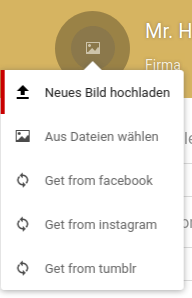
avatar menu:
_the entries are only shown if the contact has respective social media profiles and the admin allows for social media functions_
user setting:

and the admin setting:

what do you think?
call-me-matt
on 9 May 2020
Good stuff! Only minor things:
- [x] Brand names like "Facebook", "Instagram", "Tumblr" etc need to be written with a capital first letter in the action menu
- [x] The user setting in the bottom left should be at the top of the list. (Because the address book list and the input field "Name of address book" belong together.)
- [x] What happens if you have the "Update" setting enabled and there are contacts with multiple social networks set? Does it just take the first one? (I would expect it to be automatic and not need to do a choice. Either it takes the first one, or if you used the manual "Get from …" function before on a contact, get it from there for that contact.)
jancborchardt
on 9 May 2020
No problem.
If the background update is run, it will scan the contacts for social profiles in a predefined order. Currently that is instagram-facebook-tumblr. Instagram is first, because its more reliable than facebook (which only works with profile IDs and people might have entered usernames instead).
call-me-matt
on 9 May 2020
Currently that is instagram-facebook-tumblr.
Cool, thanks for the explanation! :) Just as detail, do you want to sort it in that order in the action menu as well? Then it’s symmetric to how the code works.
jancborchardt
on 10 May 2020
Also, maybe we should use the social logo instead of the sync icon?
skjnldsv
on 10 May 2020
Another note, I wouldn't use "checking weekly", but something like "Updated once a week"
skjnldsv
on 10 May 2020
Also, maybe we should use the social logo instead of the sync icon?
that's a good idea! I am not really happy with these sync-icons, as it might imply bi-directional data transfer. On the other hand, I am hesitating as I have no idea about copyrights when using their logos. Or do you mean to use the "social" logo from the contacts app - which is a heart?
call-me-matt
on 10 May 2020
On the other hand, I am hesitating as I have no idea about copyrights when using their logos.
Yep, not sure about this either. We did e.g. have to remove the Acrobat reader logo from our PDF filetype icon.
We could just use the icon-download for now as it doesn’t have the implication of sync, nor does it use a brand image.
jancborchardt
on 10 May 2020
I mean, every website uses the facebook/twitter... logo, we even do on our website? Let's ask Jos :)
skjnldsv
on 11 May 2020
Pinged him,
In the meantime: https://en.facebookbrand.com/facebookapp/assets/f-logo/
skjnldsv
on 11 May 2020
Answer from Jos
they want everyone to use their logo's to link to their services, so their trademark guidelines will allow that, and the logo's we use are open source or part of things like Font Awesome - which again, why would Font awesome be able to include it? Because they want their logo to be used ;-)
you can look up the details but I'm not worried about that at all
they have rules similar to ours - use the logo's as they are without modification or re-coloring, only to refer to their service, not to disparage them or share illegal data... etc etc etc
skjnldsv
on 11 May 2020
Alright, I have added this. All you need to do, is replace the svg in the img-folder to have the respective logos as icons.
call-me-matt
on 11 May 2020
I got pointed to this issue via our community chat. I like the feature but I would strongly suggest to make it opt-in. I couldn't read all the comments right now, so if we already decided for opt-in you can ignore the rest. 🙂
Our target audience are privacy aware people, sending their social graph by default to Facebook & Co to fetch some meta data like avatars send the complete wrong message.
Also think about a Enterprise environment which deploys Nextcloud Groupware and finds out that we send all the contacts periodically to Facebook and others.
This is a nice feature, we can also advertise it over a "Whats new" notification but please disable it by default and make it opt-in
 schiessle
on 17 May 2020
schiessle
on 17 May 2020
I got pointed to this issue via our community chat. I like the feature but I would strongly suggest to make it opt-in. I couldn't read all the comments right now, so if we already decided for opt-in you can ignore the rest.
Yes, background updates are opt-in for the users. Additionally, an admin setting allows to deactivate social functions completely.
And for sure, there are no details sent to facebook. No facebook account needed, neither. I'd say it is as data-minimising as it can be.
This is a nice feature, we can also advertise it over a "Whats new" notification
:champagne:
call-me-matt
on 17 May 2020
Yep:
- Admin setting should be on by default so people can use it if they like
- User setting should be off by default so data is not sent to these companies by default, and your pictures are not overwritten by default. But it can be decided on a personal preference.
jancborchardt
on 20 May 2020
Related issues
 despens
·
3Comments
despens
·
3Comments
 stvogel
·
3Comments
stvogel
·
3Comments
 Dennis1993
·
5Comments
Dennis1993
·
5Comments
 ArnY
·
5Comments
ArnY
·
5Comments
 spoorun
·
3Comments
spoorun
·
3Comments
Most helpful comment
Yep: