Contacts: When adding an Address object, the new element is a mirror of the old one
Describe the bug
It might just be my particular situation, but its worth reporting anyway.
These are the behaviors I'm experiencing and I think they are related to the same coding discrepancy:
- When I add a second address to a new contact that I'm building, the new address object and fields is basically a pointer to the existing first address for that contact. If I were to open a different contact and go back to the contact I was adding a second address to, I could edit it as expected. If instead, I stayed on that newly created contact, the newly instantiated second address object has the edits to one address appear in both addresses in real-time.
- If I add a second address to an existing contact, the new address object has its respective fields become persistent default data for a whole session in the browser on the Contacts app. If I were to open another existing contact and instantiate an additional address object, the fields would be prepopulated with the data from the last address object created. If I create a new contact, the address is prepopulated with the data entered before.
To Reproduce
Steps to reproduce behavior 1:
- Create a new contact
- Add content to the address block
- Click on + Add new property >
Address - Edit either address block
- See the changes happen in both address blocks
Steps to reproduce behavior 2:
- Go to an existing contact
- Click on + Add new property >
Address - Edit the new address block so there is some unique content in its fields
- Delete the newly created address block
- Either click on + Add new property >
Addresson the same contact or any other contact including a newly created contact - Observe the content created in step 3 is persistent now and is prepopulating the new address object
Expected behavior
The address blocks should point to different records in the database.
Actual behavior
Both address blocks rendered point to the same underlying record in the database.
System Report Link: https://cloud.ruppssites.com/index.php/s/bKGHrbKARwS6Egx
Password:
LvkCkJs0kjP5Yz75/lxa
Nextcloud version: 18.0.1 _(I just upgraded on the 10th and the problem was in 17 also)_
Operating system and version: Ubuntu Linux 18.04.1
Apache version: 2.4.41
PHP version(s): 7.3.15, 7.4.3, but I'm pretty sure the Nextcloud uses the 7.3 version.
Database Version: MySQL 5.7.29-0ubuntu0.16.04.1 (_data is on one server and software for NC is on another server inside the same LAN_)
Is this the first time you've seen this error? : No, been happening for a while, just noticed it last month because I put a bunch of addresses in all at once. Usually, I only have one to enter at a time, or only have one address change to do to an existing contact.
I think it's worth noting that this behavior was going on in NC 17 too. I'm not sure what details to give if this is a problem only I am having, but if I'm told what is needed I'll be happy to provide that type of detail.
 WNYmathGuy
All 9 comments
Hey :)
What is your Contacts app version?
 skjnldsv
on 13 Mar 2020
skjnldsv
on 13 Mar 2020
Hey :)
What is your Contacts app version?
@skjnldsv 3.2.0
WNYmathGuy
on 13 Mar 2020
Sorry abou tthe delay.
Does it do that with all properties? It is an old bug that is supposed to be fixed since a while. Also if you can, screencast of what is happening would be super great! :bowing_woman:
skjnldsv
on 23 Mar 2020
Does it do that with all properties? It is an old bug that is supposed to be fixed since a while. Also if you can, screencast of what is happening would be super great!
@skjnldsv I did notice it in the past doing it with all properties. Now it's just happening with the address field, which is a complex object compared to the other fields. I don't think their's another element in a contact that has multiple fields except for maybe the extended name object. I never thought to experiment with that.
I'll see about trying to record the actions today sometime and maybe get an isolated part of the log to make analysis easier. Unless you meant some live screen sharing with somebody? I could do that too, but I don't know how to initiate it. My federated handle would be [email protected] if that helps.
WNYmathGuy
on 23 Mar 2020
Hi,
I experience the same problem:
- create a new contact with address field information
- do anything else within the contacts app (keep browser session open!)
- create another new contact: address field is populated with information from 1.
It happens only with address field. All other default fields (name, tel, email. group) is empty on the second new contact (as expected)
contacts app version: 3.3.0
Nextcloud version: 18.0.4
PHP version(s): 7.3.17
Database Version: MySQL 5.7.29
 tdoerschel
on 4 May 2020
tdoerschel
on 4 May 2020
I can't reproduce the issue anymore, does anyone can?
skjnldsv
on 10 Nov 2020
Hi,
I can still reproduce it in contacts app 3.4.1
on both my instances:
NC 20.0.1 with PHP 7.4.12 and pqsql 11.9
NC 19.0.4 with PHP 7.3.24 and mysql 5.7.32
Happens also both with Chrome and Firefox both latest versions, all on Windows 10 Pro 64 bit.
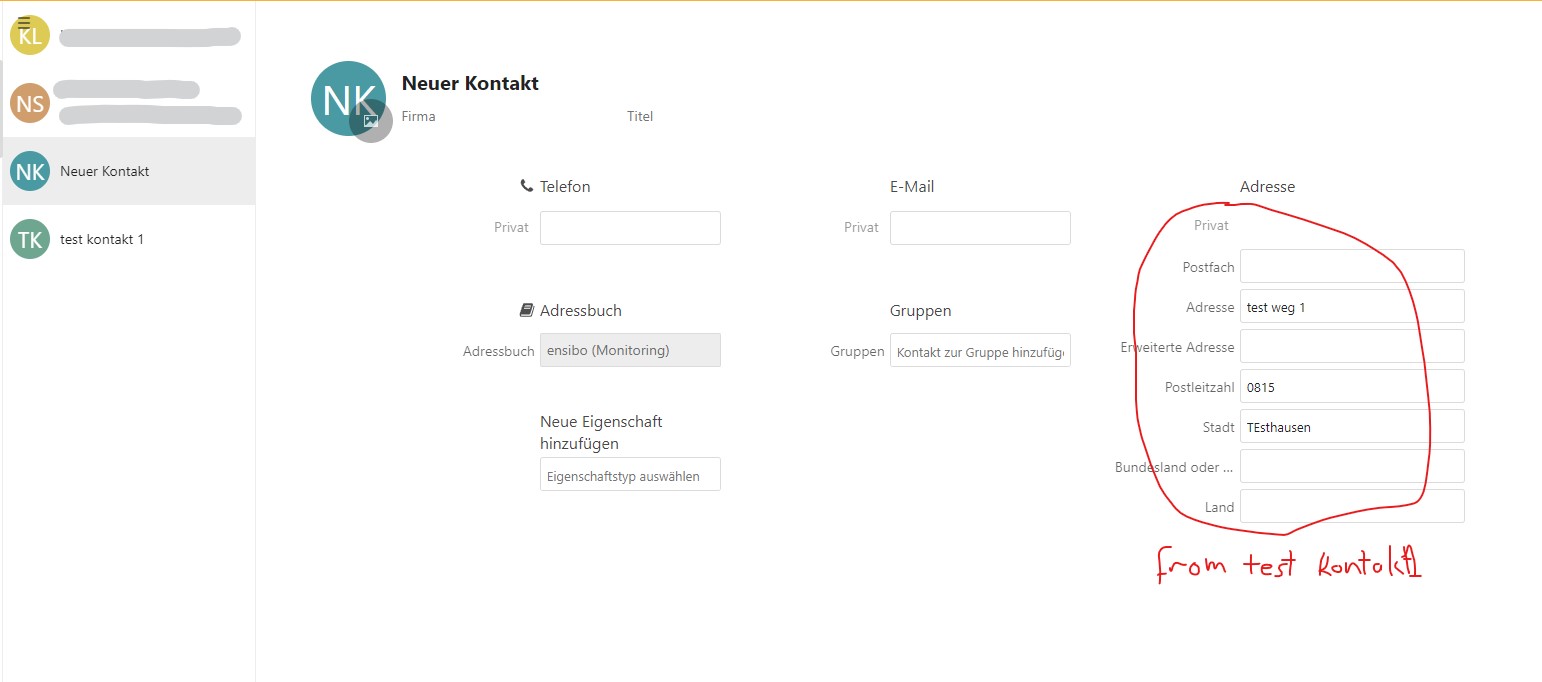
tdoerschel
on 10 Nov 2020
I can still reproduce it in contacts app 3.4.1
I must have tried it wrong :/
Thanks for he test again :)
skjnldsv
on 11 Nov 2020
FYI bug still exists in contacts 3.5.1 and both server versions 20.0.9 and 21.0.1, tested with Chrome 90
tdoerschel
on 28 Apr 2021
Related issues
 Dennis1993
·
5Comments
Dennis1993
·
5Comments
 despens
·
3Comments
despens
·
3Comments
 spoorun
·
5Comments
spoorun
·
5Comments
 ArnY
·
5Comments
ArnY
·
5Comments
 michaelletzgus
·
5Comments
michaelletzgus
·
5Comments