Contacts: Nextcloud 18 incompatibility warning
Nextcloud server 18 shows incompatibility warning
......
......
To Reproduce
Steps to reproduce the behavior:
- Install contacts 3.1.6
- Upgrade server to 18
- Contacts automatically gets disabled + shows warning + no available update
Expected behavior
Update contacts 3.1.7 should show which lists nextcloud 18 as compatible in info.xml
Actual behavior
No contacts 3.1.7 update available (I suspect this is due to #1388)
Server configuration
Nextcloud version: 18.0
Contacts version: 3.1.6
Updated from an older Nextcloud or fresh install: update from nextcloud 17
Signing status: No errors have been found.
 DidierLmn
All 9 comments
I ran into the same problem and found out that the Contacts app seems to have been published twice with a different support range. The installed app 3.1.6 contained the following max-version string:
<nextcloud min-version="15" max-version="17" />
I downloaded the app manually and first realized the following version discrepancy:
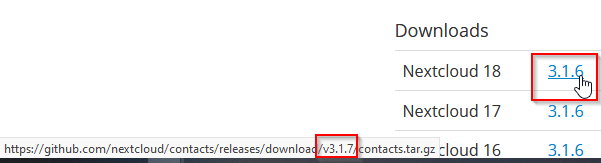
After extracting the downloaded files to the apps directory, the max-version string has been changed, although the original app version number hasn't been changed, and it was possible to activate the app again.
<version>3.1.6</version>
...
<nextcloud min-version="15" max-version="18" />
My assumption is, that the version number hasn't been updated after the change has been applied so that the update routine keeps the existing app version.
 j-ed
on 20 Jan 2020
j-ed
on 20 Jan 2020
Yes this is
 skjnldsv
on 21 Jan 2020
skjnldsv
on 21 Jan 2020
So how do I have to fix this in my install?
I rely on my contacts app, so there must nothing go wrong here!
 rubo77
on 22 Jan 2020
rubo77
on 22 Jan 2020
@rubo77 This is an easy task, manually download the app from the app store and extract the contacts folder and all files to the local apps directory. Make sure that the access rights are set correctly, navigate to the Apps menu and reactivate the app - that's all.
j-ed
on 22 Jan 2020
Where has this to be fixed? so the versionin 3.1.7 is shown correctly in the nextcloud webinterface?
I could wait a day until this is fixed...
rubo77
on 22 Jan 2020
Release is on its way
EDIT: when the store allows me to upload it :sob:
skjnldsv
on 22 Jan 2020
what is the problem while uploading?
rubo77
on 22 Jan 2020
@rubo77 appstore is having issues
skjnldsv
on 23 Jan 2020
Aaand released! :)
Thanks everyone!
skjnldsv
on 23 Jan 2020
Related issues
 Peque
·
3Comments
Peque
·
3Comments
 spoorun
·
5Comments
spoorun
·
5Comments
 brantje
·
5Comments
brantje
·
5Comments
 Dennis1993
·
5Comments
Dennis1993
·
5Comments
 kangaroo72
·
4Comments
kangaroo72
·
4Comments
Most helpful comment
Release is on its way
EDIT: when the store allows me to upload it :sob: