Contacts: Only first contact shown / no search possible
Steps to reproduce
Click on Contacts Tab
Expected behaviour
First contact is shown, when clicking on "hamburger" symbol (three horizontal lines) all other contacts should appear to the left of the first contact. Also when entering a name in the search box, matches should be shown.
Actual behaviour
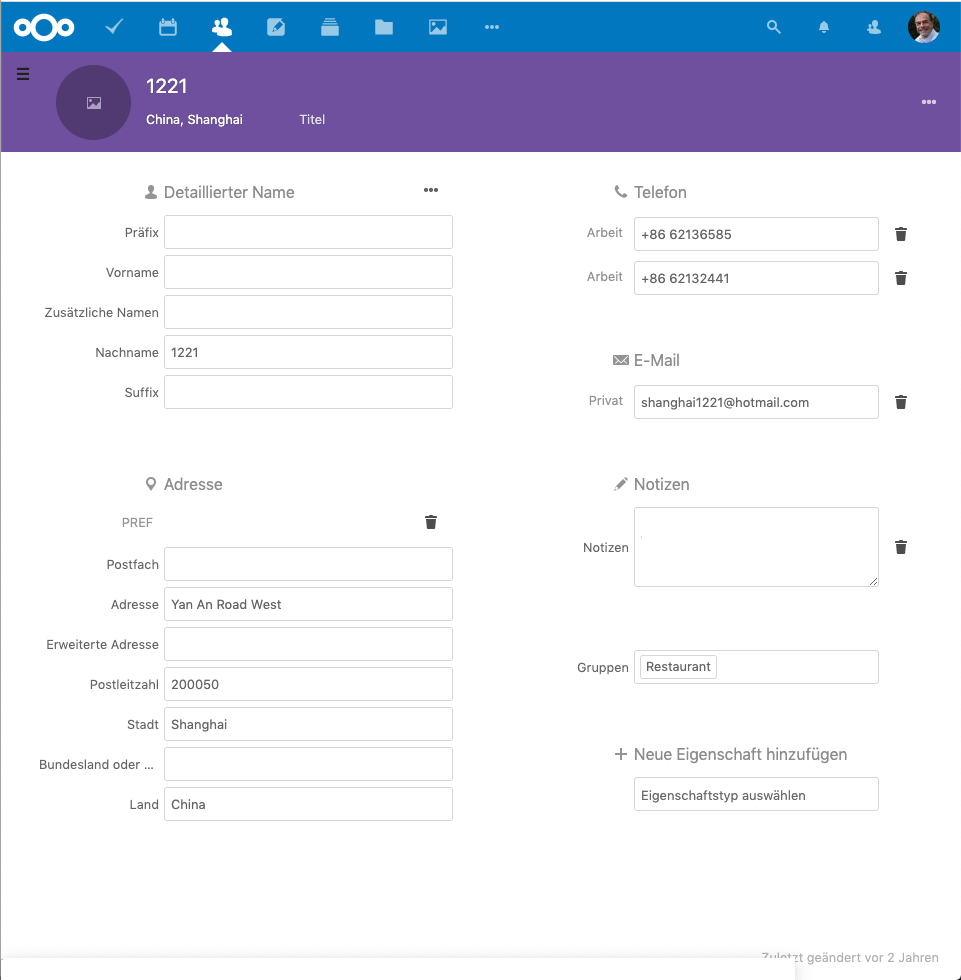
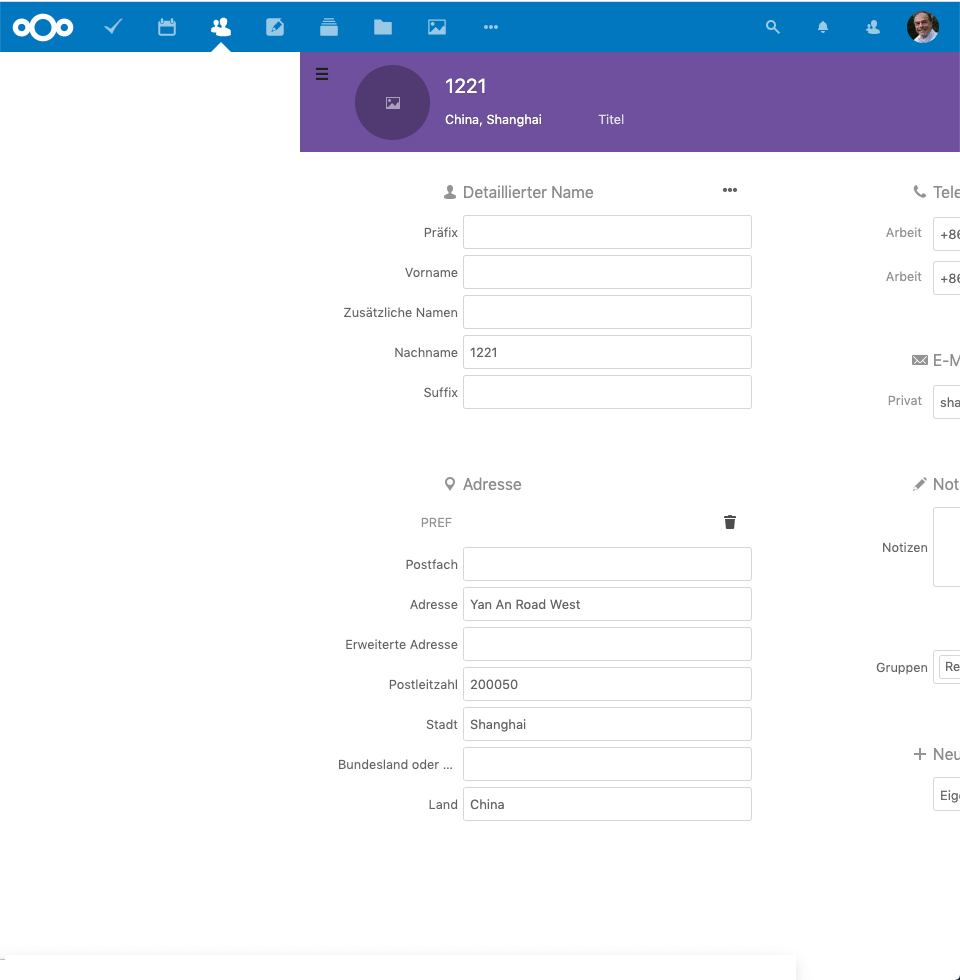
Only the first contact is shown. When clicking on "hamburger" symbol (three horizontal lines) an empty white column shows to the left of the first and only contact. Also when entering a text string in the search box nothing happens. All contacts except for the first one seems to have disappeared!
Server configuration detail
Operating system: Linux 4.4.0-165-generic #193-Ubuntu SMP Tue Sep 17 17:42:52 UTC 2019 x86_64
Webserver: Apache (fpm-fcgi)
Database: mysql 5.7.28
PHP version:
7.2.24-nmm1
Modules loaded: Core, date, libxml, openssl, pcre, zlib, bcmath, bz2, calendar, ctype, dom, hash, filter, ftp, gettext, SPL, iconv, json, mbstring, posix, Reflection, session, standard, shmop, SimpleXML, soap, exif, sysvsem, sysvshm, tokenizer, wddx, xml, xmlreader, xmlwriter, zip, cgi-fcgi, propro, raphf, http, mysqlnd, PDO, curl, dba, fileinfo, gd, gender, gmp, htscanner, imagick, imap, interbase, intl, ldap, mailparse, mongodb, mysqli, OAuth, odbc, pdo_dblib, pdo_mysql, PDO_ODBC, pdo_pgsql, pdo_sqlite, pgsql, Phar, pspell, recode, sodium, SourceGuardian, sqlite3, tidy, xsl, ionCube Loader
Nextcloud version: 17.0.2 - 17.0.2.1
Updated from an older Nextcloud/ownCloud or fresh install: Updated from 17.0.1 and earlier
Where did you install Nextcloud from: https://download.nextcloud.com/server/releases
Signing status
Array
(
)
List of activated apps
Enabled:
 - accessibility: 1.3.0
 - admin_audit: 1.7.0
 - apporder: 0.9.0
 - audioplayer: 2.8.4
 - bookmarks: 2.3.4
 - bruteforcesettings: 1.4.0
 - calendar: 1.7.1
 - checksum: 0.4.3
 - cloud_federation_api: 1.0.0
 - comments: 1.7.0
 - contacts: 3.1.6
 - dav: 1.13.0
 - deck: 0.7.0
 - drawio: 0.9.4
 - federatedfilesharing: 1.7.0
 - federation: 1.7.0
 - files: 1.12.0
 - files_markdown: 2.1.0
 - files_pdfviewer: 1.6.0
 - files_rightclick: 0.15.1
 - files_sharing: 1.9.0
 - files_trashbin: 1.7.0
 - files_versions: 1.10.0
 - files_videoplayer: 1.6.0
 - firstrunwizard: 2.6.0
 - gallery: 18.4.0
 - gpxpod: 4.1.0
 - issuetemplate: 0.6.0
 - logreader: 2.2.0
 - lookup_server_connector: 1.5.0
 - nextcloud_announcements: 1.6.0
 - notes: 3.0.3
 - notifications: 2.5.0
 - oauth2: 1.5.0
 - ownbackup: 19.9.0
 - password_policy: 1.7.0
 - privacy: 1.1.0
 - provisioning_api: 1.7.0
 - qownnotesapi: 19.9.0
 - recommendations: 0.5.0
 - serverinfo: 1.7.0
 - sharebymail: 1.7.0
 - support: 1.0.1
 - survey_client: 1.5.0
 - systemtags: 1.7.0
 - tasks: 0.11.3
 - text: 1.1.1
 - theming: 1.8.0
 - twofactor_backupcodes: 1.6.0
 - updatenotification: 1.7.0
 - viewer: 1.2.0
 - workflowengine: 1.7.0
Disabled:
 - activity
 - encryption
 - files_external
 - user_ldap
Configuration (config/config.php)
{
    "instanceid": "***REMOVED SENSITIVE VALUE***",
    "passwordsalt": "***REMOVED SENSITIVE VALUE***",
    "secret": "***REMOVED SENSITIVE VALUE***",
    "trusted_domains": [
        "***REMOVED SENSITIVE VALUE***"
    ],
    "datadirectory": "***REMOVED SENSITIVE VALUE***",
    "overwrite.cli.url": "https:\/\/nextcloud.xxxxx.de",
    "dbtype": "mysql",
    "version": "17.0.2.1",
    "dbname": "***REMOVED SENSITIVE VALUE***",
    "dbhost": "***REMOVED SENSITIVE VALUE***",
    "dbtableprefix": "oc_",
    "dbuser": "***REMOVED SENSITIVE VALUE***",
    "dbpassword": "***REMOVED SENSITIVE VALUE***",
    "logtimezone": "Europe\/Berlin",
    "installed": true,
    "tempdirectory": "\/www\/htdocs\/vxxxxxxx\/temp",
    "loglevel": 2,
    "updater.release.channel": "stable",
    "theme": "",
    "maintenance": false,
    "enabledPreviewProviders": [
        "OC\\Preview\\Image",
        "OC\\Preview\\MP3",
        "OC\\Preview\\TXT",
        "OC\\Preview\\MarkDown",
        "OC\\Preview\\Epub",
        "OC\\Preview\\PDF",
        "OC\\Preview\\FB2",
        "OC\\Preview\\MSOfficeDoc",
        "OC\\Preview\\MSOffice2003",
        "OC\\Preview\\MSOffice2007"
    ],
    "app_install_overwrite": [
        "tasks",
        "end_to_end_encryption"
    ]
}
Are you using external storage, if yes which one: no
Are you using encryption:
Are you using an external user-backend, if yes which one: no
Client configuration
Browser: Chrome 79.0.3945.88 (Official Build) (64-bit)
Operating system: macOS Mojave 10.14.6 (18G1012)
Logs
Web server error log
Insert your web server log here
Nextcloud log
Insert your Nextcloud log here
Browser log
Insert your browser log here, this could for example include:
a) The javascript console log
b) The network log
c) ...
 AS-dh
AS-dh
All 9 comments
Forgot to mention: Fortunately the addressbook information doesn't seem to be lost. I don't know the nextcloud contacts data model in detail but I can see through phpMyAdmin on the database in the oc_cards_properties table entries corresponding to the addresses not visible on the contacts app.
I disabled synchronization with Outlook just in case to avoid loosing data
AS-dh
on 23 Dec 2019
Hi, the oc_cards_properties table doen't contains the informations. They're stored in the oc_card table. The first one is for caching only and not used by the contacts app.
If you download your addressbook from the contacts app's settings, everything is in here?
 skjnldsv
on 23 Dec 2019
skjnldsv
on 23 Dec 2019
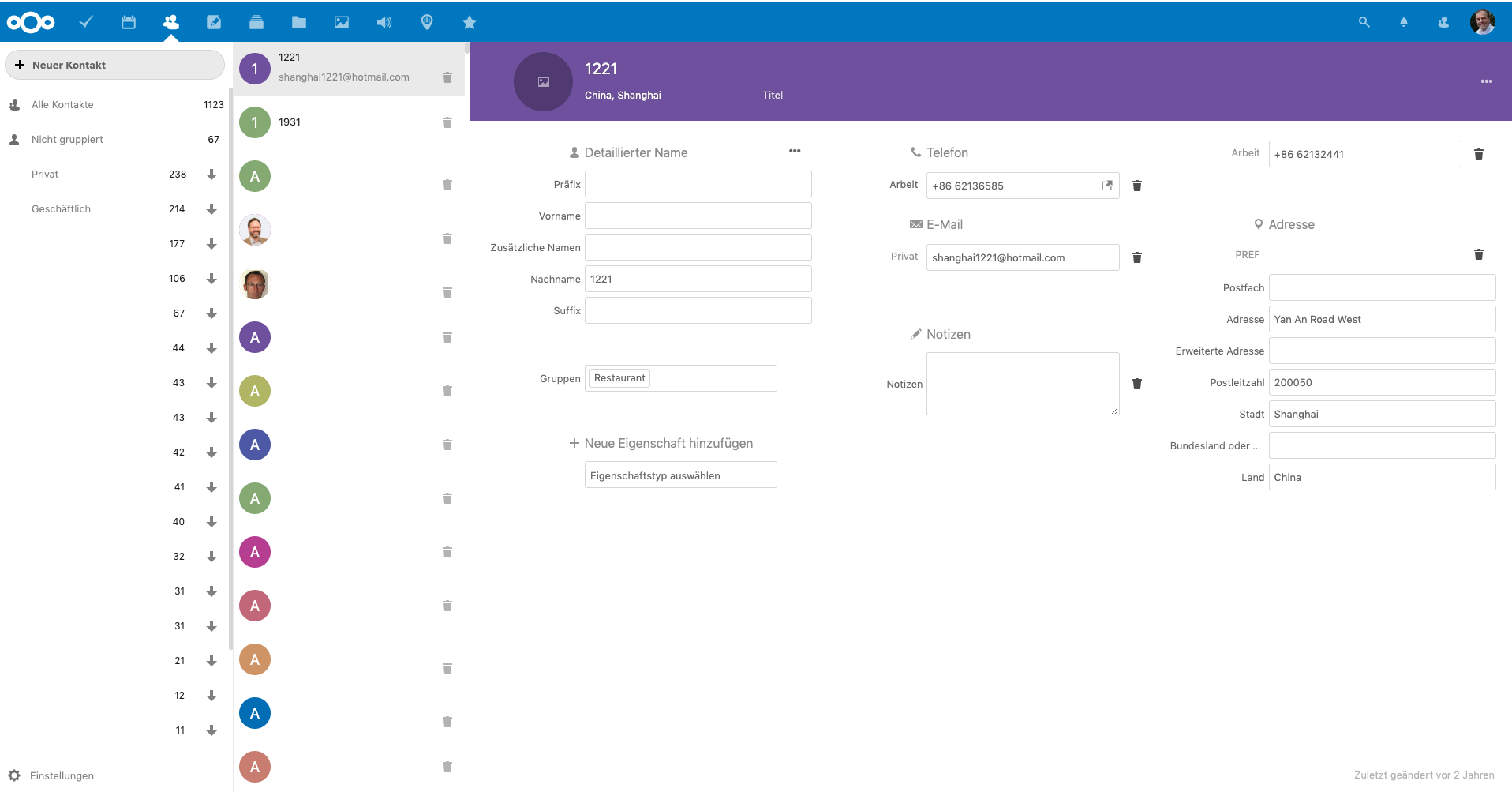
I just discovered by chance that it is a matter of not dealing correctly with the screen width! When maximising the browser to use the whole screen the missing columns appear. So it is still a bug, but not as serious as I thought...
I'm attaching now some screenshots to illustrate:
When clicking on the contacts tab:
After clicking on "hamburger"
The way it looks like on a fully expanded browser:
AS-dh
on 23 Dec 2019
Could you share your url (you can edit your domain), your screen width and a screenshot of what is happening? :)
Thanks!
skjnldsv
on 23 Dec 2019
The screen is a Dell U2414H with a screen resolution of 1920 x 1080 pixels. That is than also the width and height of the fully expanded browser. The browser screenshots where the app is not being responsive are half as wide, i.e., 960 x 1080 pixels. I've added the screenshots to the message above. The URL is
https://nextcloud.my.domain/index.php/apps/contacts/Alle%20Kontakte/token~Daniels%2520Kontakte
AS-dh
on 23 Dec 2019
I just discovered by chance that it is a matter of not dealing correctly with the screen width! When maximising the browser to use the whole screen the missing columns appear. So it is still a bug, but not as serious as I thought...
I'm attaching now some screenshots to illustrate:
When clicking on the contacts tab:
After clicking on "hamburger"
The way it looks like on a fully expanded browser:
Can confirm that this "fix" temporarily resolves the issue. Anything less than full screen reproduces the issue.
`name: nextcloud
summary: Nextcloud Server - A safe home for all your data
publisher: Nextcloud✓
contact: https://github.com/nextcloud/nextcloud-snap
license: unset
description: |
Where are your photos and documents? With Nextcloud you pick a server of your choice, at home, in
a data center or at a provider. And that is where your files will be. Nextcloud runs on that
server, protecting your data and giving you access from your desktop or mobile devices. Through
Nextcloud you also access, sync and share your existing data on that FTP drive at school, a
Dropbox or a NAS you have at home.
commands:
- nextcloud.disable-https
- nextcloud.enable-https
- nextcloud.export
- nextcloud.import
- nextcloud.manual-install
- nextcloud.mysql-client
- nextcloud.mysqldump
- nextcloud.occ
services:
nextcloud.apache: simple, enabled, active
nextcloud.mdns-publisher: simple, enabled, active
nextcloud.mysql: simple, enabled, active
nextcloud.nextcloud-cron: simple, enabled, active
nextcloud.nextcloud-fixer: simple, enabled, inactive
nextcloud.php-fpm: simple, enabled, active
nextcloud.redis-server: simple, enabled, active
nextcloud.renew-certs: simple, enabled, active
snap-id: njObIbGQEaVx1H4nyWxchk1i8opy4h54
tracking: 17/edge
refresh-date: today at 03:31 EST
`
running inside of LXC container running Ubuntu 18.04
Samsung C32F391 32" 1920x1080
 masmith79
on 31 Dec 2019
masmith79
on 31 Dec 2019
Can confirm this issue.
Screen width between 768 and 1016 are not showing any contacts list and are therefor not useable.
This is especially bad, as the screenwidth of the iPad (and probably most tablets too) is between those constraints and can't use the contacts app in a browser.
Screen width below 768px show a back button like on mobile and greater than 1016 shows the fullscreen UX.
I hope this gets fixed soon :)
 maurerle
on 21 Jan 2020
maurerle
on 21 Jan 2020
duplicate of #1450 ?
skjnldsv
on 3 Feb 2020
The newer issue is probably the duplicate. But yes, it describes the same issue.
But I can't reproduce it anymore since I pulled latest nextcloud:17-fpm-alpine docker image.
Running Contacts 3.1.8 and NC 17.0.3
maurerle
on 3 Feb 2020
Related issues
 ArnY
·
5Comments
ArnY
·
5Comments
 Kalytis
·
4Comments
Kalytis
·
4Comments
 silverhook
·
5Comments
silverhook
·
5Comments
 despens
·
3Comments
despens
·
3Comments
 caugner
·
3Comments
caugner
·
3Comments