Contacts: Unable to set year of birth
Steps to reproduce
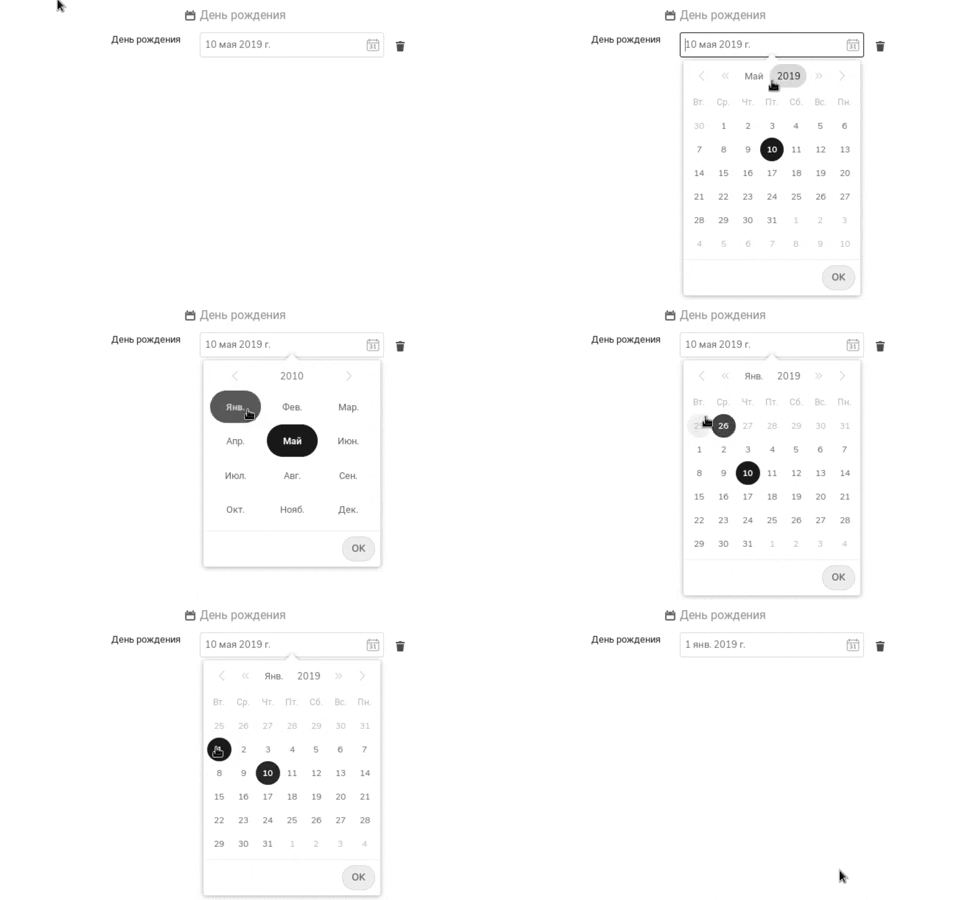
- Click on birthday field
- Select any year except current
Expected behaviour
Year gets selected
Actual behaviour
Date defaults to current year
Screenshots
Server configuration detail
Operating system: Linux
Webserver: nginx
Database: MariaDB
PHP version: 7.3.7
Nextcloud version: 16.0.3.0
Contacts version: 3.1.3
Updated from an older Nextcloud/ownCloud or fresh install: updated
Signing status
No errors have been found.
List of activated apps
Enabled:
 - activity: 2.9.1
 - calendar: 1.7.0
 - cloud_federation_api: 0.2.0
 - contacts: 3.1.3
 - cookbook: 0.1.7
 - dav: 1.9.2
 - encryption: 2.4.0
 - federatedfilesharing: 1.6.0
 - files: 1.11.0
 - files_markdown: 2.0.6
 - files_pdfviewer: 1.5.0
 - files_rightclick: 0.13.0
 - files_sharing: 1.8.0
 - files_texteditor: 2.8.0
 - files_trashbin: 1.6.0
 - files_versions: 1.9.0
 - files_videoplayer: 1.5.0
 - firstrunwizard: 2.5.0
 - gallery: 18.3.0
 - issuetemplate: 0.5.0
 - logreader: 2.1.0
 - lookup_server_connector: 1.4.0
 - metadata: 0.9.0
 - notifications: 2.4.1
 - oauth2: 1.4.2
 - password_policy: 1.6.0
 - privacy: 1.0.0
 - provisioning_api: 1.6.0
 - sharebymail: 1.6.0
 - theming: 1.7.0
 - twofactor_backupcodes: 1.5.0
 - viewer: 1.0.0
 - workflowengine: 1.6.0
Disabled:
 - accessibility
 - admin_audit
 - comments
 - federation
 - files_external
 - nextcloud_announcements
 - notes
 - onlyoffice
 - recommendations
 - serverinfo
 - support
 - survey_client
 - systemtags
 - updatenotification
 - user_ldap
Client configuration
Browser: Firefox 67.0
Operating system: Arch Linux
 MadFatVlad
All 10 comments
Hello!
I will need your browser console log to investigate this issue.
Open your console, reload your page and/or do the action leading to this issue and copy/paste the log in this thread.
How to access your browser console (Click to expand)
Chrome
- Press either CTRL + SHIFT + J to open the “console” tab of the Developer Tools.
- Alternative method:
- Press either CTRL + SHIFT + I or F12 to open the Developer Tools.
- Click the “console” tab.
Safari
- Press CMD + ALT + I to open the Web Inspector.
- See Chrome’s step 2. (Chrome and Safari have pretty much identical dev tools.)
IE9
- Press F12 to open the developer tools.
- Click the “console” tab.
Firefox
- Press CTRL + SHIFT + K to open the Web console (COMMAND + SHIFT + K on Macs).
- or, if Firebug is installed (recommended):
- Press F12 to open Firebug.
- Click on the “console” tab.
Opera
- Press CTRL + SHIFT + I to open Dragonfly.
- Click on the “console” tab.
 skjnldsv
on 31 Jul 2019
skjnldsv
on 31 Jul 2019
Hello!
The only thing that pops up after clicking OK is:
The following contact needed a correction that failed: duplicate types
By the way, if i select a year via arrows, then everything works as intended.
MadFatVlad
on 31 Jul 2019
Can you post the vcard?
You can edit the sensitive data :)
skjnldsv
on 31 Jul 2019
BEGIN:VCARD
VERSION:3.0
PRODID:-//Sabre//Sabre VObject 4.1.6//EN
UID:78c67bab-5ffd-4ee3-b002-bd7d9e83dba1
REV;VALUE=DATE-AND-OR-TIME:20190731T075220Z
FN:Я
EMAIL;TYPE=HOME:[email protected]
N:Яxxxxxxxx;xxxxxxxx;;;
X-SOCIALPROFILE;TYPE=GITHUB:xxxxxxxx
NICKNAME:MadFatVlad
IMPP;TYPE=TELEGRAM:https://t.me/xxxxx
BDAY;VALUE=DATE:20280910
END:VCARD
Ok, i think i found the reason it works this way:
src/components/Properties/PropertyDateTime.vue:171
/**
             * Use the current year to ensure we do not lose
             * the year data on v4.0 since we currently have
             * no options to remove the year selection.
             * ! using this.value since this.localValue reflect the current change
             * ! so we need to make sure we do not use the updated data
             * TODO: add option to omit year and not use already existing data
             */
@MadFatVlad yes, but it should not cause issues.
We only take the year if it si already set :thinking:
I'll investigate :)
skjnldsv
on 31 Jul 2019
I'm experiencing the exact same issue. I have to click OK before selecting a month for the year to be updated correctly.
 jangop
on 1 Aug 2019
jangop
on 1 Aug 2019
I can reproduce the issue!
This is a weird behaviour from our datepicker. I'll investigate
skjnldsv
on 6 Aug 2019
Hello,
any update here? This is a really weird issue. I'm glad I know now how to set the year, but I'm not sure I can explain my family how to correctly set the birthdate :D
 Schmuuu
on 3 Sep 2019
Schmuuu
on 3 Sep 2019
Yep, incoming this week :)
Fixed on next release :)
skjnldsv
on 4 Sep 2019
Related issues
 ArnY
·
5Comments
ArnY
·
5Comments
 Peque
·
3Comments
Peque
·
3Comments
 juzim
·
3Comments
juzim
·
3Comments
 IamSAB
·
4Comments
IamSAB
·
4Comments
 RobertZenz
·
4Comments
RobertZenz
·
4Comments
Most helpful comment
Yep, incoming this week :)
Fixed on next release :)