Contacts: Editing nearly impossible - spinning wheel and "The contact you were trying to edit has changed" messages"
Describe the bug
Editing of fields in the mask lead to "changed" messages and the edited text will be discarded
To Reproduce
When adding a new contact or editing an existing one, I go into any of the editing fields and try to enter some text there.
A soon as I'm "slow" in editing, the spinner wheel in the top right corner of the mask appears, I assume to show me that it tries to sync the entered data with the data.
When I continue typing and don't wait until the spinning wheel disappears - the message "_The contact you were trying to edit has changed. Please manually refresh the contact. Any further edits will be discarded_" appears.
When I then click on that button to refresh the data one of the two following things happen:
- my entered / edited data get's cut somewhere and characters are missing and changes are rejected or
- everything seems to be fine (texts are completely shown) until I change to another contact and then back to the initial contact - then the entered data fields miss some of the changes
Expected behavior
Editing of text in the fields should be kept back until the input field will be changed - and then the spinning wheel may appear and transfer the changed text to the server.
Actual behavior
The spinning wheel occurs when the typing is not "fast" enough - it seems that it takes some time to transfer the data to the server; when typing / more changes occur in that time the message seems to occur...
Server configuration
The mentioned Issue Template app is not available for Nextcloud 15...
Operating system:
Server: Linux (Debian, Shared Hoster)
Client: Windows 10
Web server: Apache
Database: MariaDB 5.5.31
PHP version: 7.1.2
Nextcloud version: 15.0
Contacts version: 3.0.1
Updated from an older Nextcloud or fresh install: Update from latest V14
Signing status:
Login as admin user into your Nextcloud and access
http://example.com/index.php/settings/integrity/failed
paste the results here.
List of activated apps:
` - activity: 2.8.2
- admin_audit: 1.5.0
- announcementcenter: 3.4.0
- apporder: 0.6.0
- audioplayer: 2.5.1
- bookmarks: 0.15.1
- calendar: 1.6.4
- cloud_federation_api: 0.1.0
- comments: 1.5.0
- contacts: 3.0.1
- dav: 1.8.0
- external: 3.2.0
- federatedfilesharing: 1.5.0
- federation: 1.5.0
- files: 1.10.0
- files_external: 1.6.0
- files_pdfviewer: 1.4.0
- files_sharing: 1.7.0
- files_texteditor: 2.7.0
- files_trashbin: 1.5.0
- files_versions: 1.8.0
- files_videoplayer: 1.4.0
- firstrunwizard: 2.4.0
- flowupload: 0.0.9
- gallery: 18.2.0
- gpxpod: 3.0.1
- groupfolders: 2.0.2
- impersonate: 1.2.0
- logreader: 2.0.0
- lookup_server_connector: 1.3.0
- metadata: 0.8.0
- nextcloud_announcements: 1.4.0
- notifications: 2.3.0
- oauth2: 1.3.0
- polls: 0.9.5
- previewgenerator: 2.0.0
- provisioning_api: 1.5.0
- serverinfo: 1.5.0
- sharebymail: 1.5.0
- systemtags: 1.5.0
- tasks: 0.9.8
- theming: 1.6.0
- twofactor_backupcodes: 1.4.1
- updatenotification: 1.5.0
- user_usage_report: 1.1.1
- workflowengine: 1.5.0`
Nextcloud configuration:
{
    "system": {
        "instanceid": "***REMOVED SENSITIVE VALUE***",
        "passwordsalt": "***REMOVED SENSITIVE VALUE***",
        "trusted_domains": [
            "***REMOVED SENSITIVE VALUE***",
            "***REMOVED SENSITIVE VALUE***"
        ],
        "activity_expire_days": "60",
        "datadirectory": "***REMOVED SENSITIVE VALUE***",
        "filelocking.debug": false,
        "filelocking.enabled": true,
        "filelocking.ttl": 1800,
        "overwrite.cli.url": "***REMOVED SENSITIVE VALUE***",
        "version": "15.0.0.10",
        "installed": true,
        "dbtype": "mysql",
        "dbname": "***REMOVED SENSITIVE VALUE***",
        "dbhost": "***REMOVED SENSITIVE VALUE***",
        "dbtableprefix": "oc_",
        "dbuser": "***REMOVED SENSITIVE VALUE***",
        "dbpassword": "***REMOVED SENSITIVE VALUE***",
        "default_language": "de",
        "defaultapp": "files",
        "integrity.check.disabled": true,
        "knowledgebaseenabled": true,
        "enable_avatars": true,
        "allow_user_to_change_display_name": true,
        "theme": "",
        "secret": "***REMOVED SENSITIVE VALUE***",
        "loglevel": 3,
        "logdateformat": "Y-m-d H:i:s",
        "logtimezone": "Europe\/Berlin",
        "log_rotate_size": 20971520,
        "skeletondirectory": "\/home\/www\/nextcloud_data\/skeleton",
        "updatechecker": true,
        "trashbin_retention_obligation": "auto",
        "versions_retention_obligation": "disabled",
        "appstoreenabled": true,
        "appstore.experimental.enabled": true,
        "singleuser": false,
        "maintenance": false,
        "htaccess.RewriteBase": "\/",
        "mail_smtpmode": "smtp",
        "updater.release.channel": "stable",
        "mail_smtpsecure": "ssl",
        "mail_smtpauthtype": "LOGIN",
        "mail_from_address": "***REMOVED SENSITIVE VALUE***",
        "mail_smtpauth": 1,
        "mail_domain": "***REMOVED SENSITIVE VALUE***",
        "mail_smtphost": "***REMOVED SENSITIVE VALUE***",
        "mail_smtpport": "465",
        "mail_smtpname": "***REMOVED SENSITIVE VALUE***",
        "mail_smtppassword": "***REMOVED SENSITIVE VALUE***",
        "updater.secret": "***REMOVED SENSITIVE VALUE***",
    }
Client configuration
Browser: Firefox 64.0, 64-Bit
Operating system:
Windows 10 - Pro
CardDAV-clients:
Logs
Web server error log
Insert your webserver log here
Nextcloud log
data/nextcloud.log
Insert your Nextcloud log here
Browser log
Console Log:
JQMIGRATE: Migrate is installed, version 1.4.0 core.js:7:542
New search handler registered search.js:67:4
Connected to dav!
Object { rootUrl: Getter & Setter, advertisedFeatures: Getter & Setter, currentUserPrincipal: Getter & Setter, principalCollections: Getter & Setter, calendarHomes: Getter & Setter, addressBookHomes: Getter & Setter, parser: Getter & Setter, _isConnected: Getter & Setter, _request: Getter & Setter, … }
contacts.js:84:29413
Source-Map-Fehler: TypeError: NetworkError when attempting to fetch resource.
Ressourcen-Adresse: https://***REMOVED SENSITIVE VALUE***/apps/contacts/js/contacts.js?v=5865a6bf-48
Source-Map-Adresse: contacts.js.map[Weitere Informationen]

Want to back this issue? Post a bounty on it! We accept bounties via Bountysource.
 Bodenseematze
All 37 comments
GitMate.io thinks possibly related issues are https://github.com/nextcloud/contacts/issues/358 (Empty contact list showing a spinning wheel), https://github.com/nextcloud/contacts/issues/145 (spinning wheel in contacts NC 11), https://github.com/nextcloud/contacts/issues/53 (spinning wheel when selecting 'all contacts' after upgrade to 1.5.1), https://github.com/nextcloud/contacts/issues/141 (Contact changes in activity stream), and https://github.com/nextcloud/contacts/issues/562 (Changes not saved on Contacts).
 nextcloud-bot
on 9 Jan 2019
nextcloud-bot
on 9 Jan 2019
@Bodenseematze Hey! What kind of hardware are you using for nextcloud?
 skjnldsv
on 11 Jan 2019
skjnldsv
on 11 Jan 2019
Got the same behaviour, when trying to edit newly created contact name.
Nextcloud responses on editing:
XHR PUT https://<skip_domain>/remote.php/dav/addressbooks/users/user1/-/9D2DBD61-08D6-4A20-80BD-D680A4E06FDA.vcf
<?xml version="1.0" encoding="utf-8"?>
<d:error xmlns:d="DAV:" xmlns:s="http://sabredav.org/ns">
  <s:exception>Sabre\DAV\Exception\BadRequest</s:exception>
  <s:message>VCard object with uid already exists in this addressbook collection.</s:message>
</d:error>
<?xml version="1.0" encoding="utf-8"?>
<d:error xmlns:d="DAV:" xmlns:s="http://sabredav.org/ns">
  <s:exception>Sabre\DAV\Exception\PreconditionFailed</s:exception>
  <s:message>An If-Match header was specified, but none of the specified the ETags matched.</s:message>
  <s:header>If-Match</s:header>
</d:error>
Console log
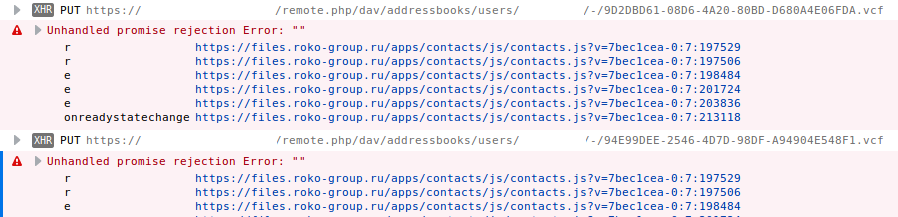
Tested in latest Firefox and Chrome. Also it's look like it looses focus on typing.
Nextcloud 15.0.0
Contacts 3.0.1
 nick-denry
on 12 Jan 2019
nick-denry
on 12 Jan 2019
@nick-denry I created a dedicated issue for yours since this is different :)
Please continue yours on #854
skjnldsv
on 12 Jan 2019
I some times have the same issue. I am using a synology DiskStation DS218+ (Intel Celeron J3355, 64bit, Dual Core 2.0 burst up to 2.5 GHz). Honestly I do not think this is hardware related. Why not update the state on blur instead of using a debouncing mechanism with a relatively short time offset?
 devlux
on 12 Jan 2019
devlux
on 12 Jan 2019
@devlux I think we need both to be honest. But yes, this is not directly a hardware issue, but low power system tends to have some requests taking longer than others and therefore some are finishing before the previous one, generating a 412. Though I need to find something for that!
cc @raimund-schluessler @georgehrke any idea? Cancel the queue? Cancle only unfired requests?
skjnldsv
on 12 Jan 2019
@skjnldsv Maybe you could create a queue for editing using plimit and set the limit to 1
 georgehrke
on 12 Jan 2019
georgehrke
on 12 Jan 2019
@skjnldsv Maybe you could create a queue for editing using plimit and set the limit to 1
I agree it doesn’t make sense to send a follow up request when the first one hasn’t finished. So p-limit seems appropriate. But we need some kind of caching to preserve all changes made wile the initial request is still running.
 raimund-schluessler
on 12 Jan 2019
raimund-schluessler
on 12 Jan 2019
@skjnldsv
This could be not only slow hardware issue but also network issue too if async queries used. The "first one" request could ends later than other requests, so if order of requests is matter it's better to use sync requests instead.
nick-denry
on 12 Jan 2019
Anyway, editing go wrong if typos fixed or even slow or fast typing.
I've install test nextcloud with contacts app to create a screencast.
As you could see it's display "reload" button every time when I try to edit before the previous request is complete. So it's possible to create contact and wait before every request is complete, but editing is worst and changes dropped.
nick-denry
on 13 Jan 2019
@nick-denry thank you so much for the details info! This really helps! :)
On the first video, there is an error 500, can you check what it is?
Also, yes, we need to prioritise the queue, then I guess this won't happens anymore :thinking:
skjnldsv
on 13 Jan 2019
Same behavior as @nick-denry and @Bodenseematze :
NC 15.0.2
Contacts 3.0.1
Ubuntu 16.04
PHP 7.2.13
php-info.txt
config.php.txt
Shall I follow this issue here or that:
https://github.com/nextcloud/contacts/issues/854
?
 Huster-at-github
on 13 Jan 2019
Huster-at-github
on 13 Jan 2019
I don't know which hardware is used - the NC instance is installed at a shared hoster's web space.
The hoster partially used very old software - patched to be more secure, but still very old (e.g. Apache 2.2).
Inbetween my hoster moved my web space to another server - which seems to be a bit faster than the old one.
Now I only can reproduce the problem if I'm really fast in typing when editing....
So I think the problem is only noticeably on servers with slow reaction / communication...
But why has every key press be transferred to the server?
Wouldn't it be sufficient to send the complete text when the user leaves an editing field?
Bodenseematze
on 14 Jan 2019
O.K. I got the error again and was able to get a screenshot of the 412 network error:

I hope, this helps a bit...
Bodenseematze
on 14 Jan 2019
I will work on this this week and provide a patch.
Can I count on you to test it?
skjnldsv
on 14 Jan 2019
If I can - sure!
But as told - since my move to a new hosted server, the bug does only occur sometimes and is not reproducable!
But I hope it happens often enough ;-)
Bodenseematze
on 14 Jan 2019
On the first video, there is an error 500, can you check what it is?
Sorry, can't reproduce for now with several attempts. I'll create new issue if it'll happens somewhen.
nick-denry
on 14 Jan 2019
Strange: Now it's working for ~ 98%.
I deactivated 1 of 3 address books. After that no more errors. Now activated all 3 address books again and have the 98%.
:'(
Difficult ..... will investigate.
Huster-at-github
on 14 Jan 2019
I see this behavior on NC v15.0.2, Contacts v3.0.1, running native Docker image on a 2GHz J1900 system connected via 5Ghz Wifi, having just one address book. It has only been seen for a little while, though the setup has been running for many years. Can't tell whether it started with the v15 upgrade.
 mcnesium
on 17 Jan 2019
mcnesium
on 17 Jan 2019
Same problem here (running Nextcloud 15 in a docker container on a machine with Intel(R) Xeon(R) CPU D-1521 @ 2.40GHz and 32GB RAM.
The contacts app is unusable in this state. There are 700 Addresses in the addressbook.
 tarator
on 21 Jan 2019
tarator
on 21 Jan 2019
Same here: Only one contact in the address book:
Huster-at-github
on 21 Jan 2019
I'm experiencing the same thing. I have to be patient and wait for the loading icon to stop spinning after every change. To prevent issues I first prep all my data in Notepad before I create a new contact.
 JC5
on 23 Jan 2019
JC5
on 23 Jan 2019
@skjnldsv: yes, this is a network issue and network calls should be minimized as much as possible. I would suggest to have a look at the lazy modifier of vuejs. IMHO this is a much better user experience.
devlux
on 24 Jan 2019
On it today :)
skjnldsv
on 24 Jan 2019
@skjnldsv-bot release 3.0.3 😉
georgehrke
on 24 Jan 2019
Does this mean the fix will be in 3.0.3? Or is it already in 3.0.2?
I can see some behaviour change in 3.0.2 - it works better, but still not good.
Now if I edit some fields and type fast (e.g. adding some characters and removing / changing them again) I can see that some of the edits will not find their way to the database - and some of the characters vanish - frustrating if you edit a phone number and some of the digits silently are gone...
And if I do a lot of changes in a field, I still can see the "The contact you were trying to edit has changed" message.
Bodenseematze
on 25 Jan 2019
3.0.3
skjnldsv
on 25 Jan 2019
3.0.3
which is currently not released / available in the app store ;-)
BTW, it seems that the "nightly builds" no longer work - the latest is from 2018-06-15...
Bodenseematze
on 25 Jan 2019
@Bodenseematze Yes, you need to wait for 3.0.3
The nightly builds are off yes.
skjnldsv
on 25 Jan 2019
Should already be fixed in the incoming version
Can you test contacts.tar.gz ?
Bug already exists with this version, @skjnldsv :-(
Huster-at-github
on 25 Jan 2019
Hello,
I am using contact 3.0.3 and I have this bug making me mad.
NC is hosted in house with fast hardware (xeon E3-1240v2, 16GB ram, nvme disk,, GB network) and I am editing locally on the GB network.
It seems the bug is still there,
Best regards
 starox
on 25 Mar 2019
starox
on 25 Mar 2019
I am using contact 3.0.3 and I have this bug making me mad.
Please update to 3.0.5. There were some fixes for similar problems in 3.0.4.
raimund-schluessler
on 25 Mar 2019
It is much better now, thank you
starox
on 25 Mar 2019
I still have this issue with 3.1.1. It's almost impossible to add a new contact. Even when I think it's been added, a quick refresh shows me half of the entries are missing.
NC 15.0.2.0
Contacts 3.1.1
Debian 9
PHP 7.0.33
 CharlesBordet
on 17 Apr 2019
CharlesBordet
on 17 Apr 2019
@Huitziii please open a new issue and fill the issue template :)
Please also attach a screenshot of your network requests.
Before you do anything, still on the development tools, there is a tab called network. Click on it and then the xhr filter. Do your contact edit and screenshot the network log like this:

skjnldsv
on 17 Apr 2019
hello i have the same problem
 pwepwe973
on 3 Jun 2019
pwepwe973
on 3 Jun 2019
@pwepwe973 same answer. Open your own ticket and fill the required informations please :)
skjnldsv
on 3 Jun 2019
Related issues
 stvogel
·
3Comments
stvogel
·
3Comments
 michaelletzgus
·
5Comments
michaelletzgus
·
5Comments
 despens
·
3Comments
despens
·
3Comments
 RobertZenz
·
4Comments
RobertZenz
·
4Comments
 Spartachetto
·
3Comments
Spartachetto
·
3Comments
Most helpful comment
On it today :)