Contacts: Photo loaded only after full contact details fetched
Since version 2.1.0 the contact list width is calculated wrong and the contact preview images are not loaded anymore.
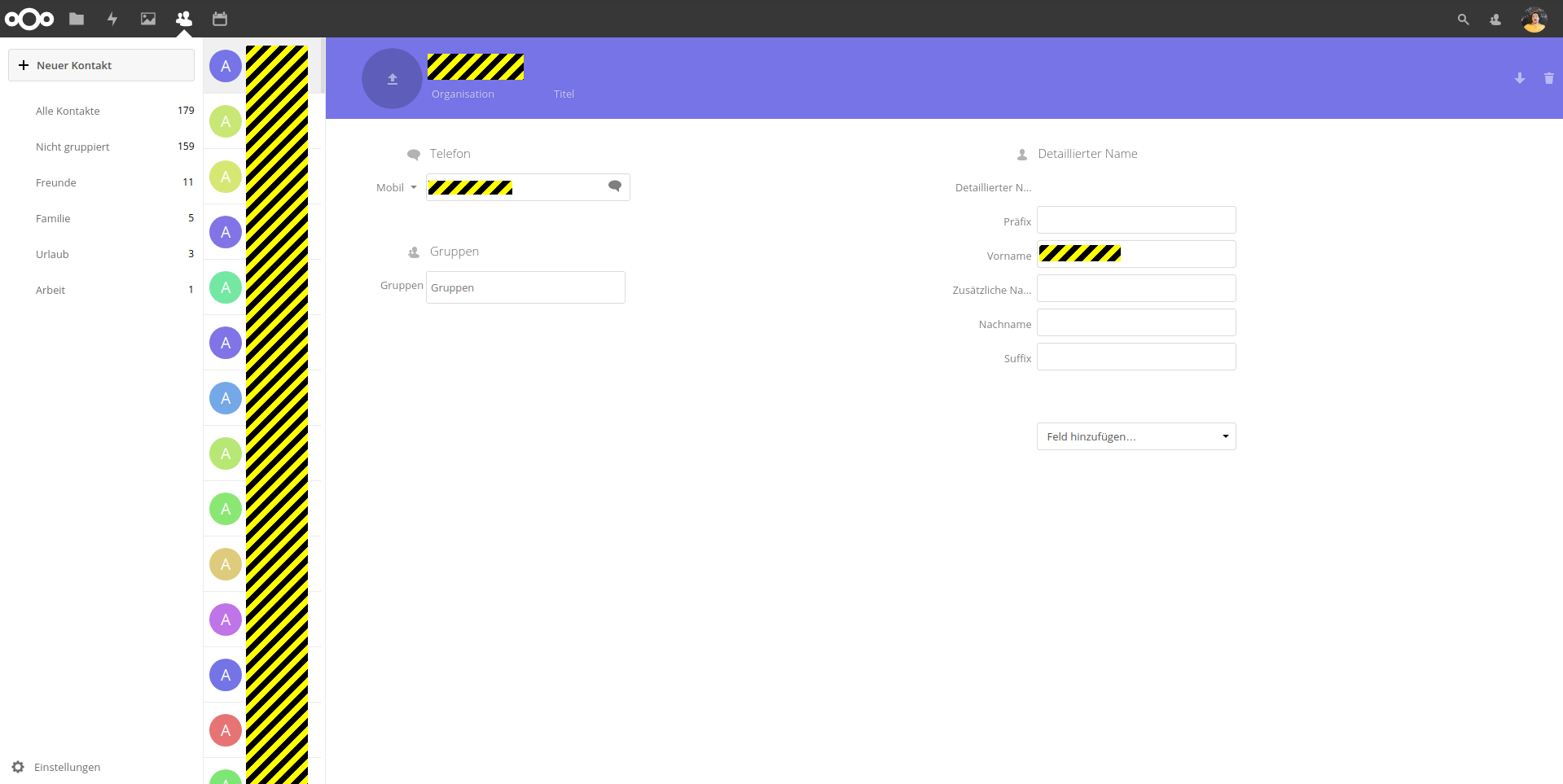
Switching to another contact in list shortly shows the correct width of the list but all contact circles get shifted up.
List should have a fixed width and contact images should be loaded initially.
server version: 13.0.0.14 no additional apps enabled
tested browsers: Firefox 58 and Chrome 64 on Linux Mint
 SimonTank
All 34 comments
Seeing the same on my Chromebook, Chrome 64.
 ghost
on 13 Feb 2018
ghost
on 13 Feb 2018
List width is a duplicate of #453
Image are displayed on my setup. Can you clear your cache please? :)
 skjnldsv
on 13 Feb 2018
skjnldsv
on 13 Feb 2018
Clearing the cache does not help, event tried with disabled cache and hardreload. Contact images only loads the image by clicking on a contact.
No errors appear in the debug console.
SimonTank
on 13 Feb 2018
Do you have the same problem on every contacts? or only a few?
If so, can you post a vcf card here so we can test?
skjnldsv
on 13 Feb 2018

I created a user called Max Mustermann in the Contacts app same problem. Stumbled over the group name Bug #444, not my day. The problem appears on all contacts. No exception.
0719500f-fad6-4abc-897b-732173b4c949.vcf.gz
SimonTank
on 13 Feb 2018
Sooo, is it working for Max Mustermann after all?
skjnldsv
on 13 Feb 2018
Having the same issue after updating to NC13 and latest version of contacts. Tested on latest chrome and microsoft Edge
 mnarwold
on 13 Feb 2018
mnarwold
on 13 Feb 2018
Can you try in incognito/private mode? I want to check something :)
skjnldsv
on 13 Feb 2018
Tried in incognito and have the same problem. It initially loads with the
correct view as it is still bringing up details, but as soon as it finishes
loading the detail panel jumps left.
On Tue, Feb 13, 2018 at 4:33 PM, John Molakvoæ notifications@github.com
wrote:
Can you try in incognito/private mode? I want to check something :)
—
You are receiving this because you commented.
Reply to this email directly, view it on GitHub
https://github.com/nextcloud/contacts/issues/477#issuecomment-365302454,
or mute the thread
https://github.com/notifications/unsubscribe-auth/AiwslaYwpmEy_2b5quGHwpBPMavv5KP_ks5tUas2gaJpZM4SDAtl
.
mnarwold
on 13 Feb 2018
@mnarwold OOoh, I thought you meant the image error.
The width error is known and to be addressed in #453 :)
skjnldsv
on 13 Feb 2018
OK, Thanks, sorry I missed that in your comment above.
mnarwold
on 13 Feb 2018
No worries! Thanks for reporting! :)
skjnldsv
on 13 Feb 2018
@skjnldsv The image in the list only loads if you select a contact (Max Mustermann), and only for this one contact you selected. No images shown on initial list load.
Just tested it on a other instance of Nextcloud i have access to, its Nextcloud 12.0.5.3 with Contacts 2.1.0, same problem there.
SimonTank
on 13 Feb 2018
Oooh, Okay, I understand better! Yes, this is because we introduced a specific loading to speed up the app. The photo is only loaded when the contact is clicked (though on 13, the shown contacts on the list gets preloaded). I'll suggest you upgrade to 13. :)
skjnldsv
on 13 Feb 2018
So the contacts app is not preloading any contact images for the list. Unless you click on a contact. And there is no way to show all images on load?
@skjnldsv I'm already using Nextcloud 13.0.0.14 as documented in the main issue comment.
SimonTank
on 13 Feb 2018
@SimonTank Sorry, I read too fast, your latest message stated 12.0.5.3 so I did not read further! 🙈
My apologies! :)
I misspoke, Indeed, the preloading of images is only done with full contact details load.
@Henni should we fix this? I think we should add the PHOTO field to the 25 contacts preloading function :)
skjnldsv
on 13 Feb 2018
difficult decision...
The photo field is the main reason for the slow down, Best solution in my opinion would be to send a separate (delayed) request just for loading the images. But I wouldn't want to implement this on top of the current architecture...
Long story short... Let's add the PHOTO field to the preloading function and improve on performance later.
 Henni
on 13 Feb 2018
Henni
on 13 Feb 2018
Suggesting to add an option for the plugin to allow users to decide whether to load it or not.
 jzielke84
on 18 Mar 2018
jzielke84
on 18 Mar 2018
Same issue here since an update to nc13. Before everything works just fine so there is no need to develop something new. Just make it as before. The width of contacts is ok since an update of the contacts app but photos will only show up if I click to the contact.
 hast0011
on 24 May 2018
hast0011
on 24 May 2018
since we are humans we tend to recognize faces much faster than words, so is there any possibility to implement "always show pictures" in the list? every other contact app and every website where it's important to identify people shows profile pictures by default.
 Michele64
on 13 Feb 2019
Michele64
on 13 Feb 2019
Hi @skjnldsv
I updated to the newest version. 3.1.1
But the problem exists further on one of my servers.
It tried varies browsers and deactivated and activated the app.
Do you have an idea how to fix this?
Thanks!
 jakobroehrl
on 10 May 2019
jakobroehrl
on 10 May 2019
@jakobroehrl you will need nextcloud 16 for that. :)
The feature that allow us to check if a contact have a photo or not without downloading the picture itself is available on 16 only :wink:
skjnldsv
on 10 May 2019
I just upgraded to 16 and, tadaaah it finally works! Thank you all!
Michele64
on 10 May 2019
@Michele64 on a note from 0 to 10 where 10 is very snappy how would you rate the contacts loading now?
skjnldsv
on 10 May 2019
Like 7 or 8
Michele64
on 10 May 2019
Thanks! @Michele64
Any specific points that would require a dedicated attention? :)
skjnldsv
on 10 May 2019
nothing so far...
one thing I don't get: how to change the contact picture...
Michele64
on 10 May 2019
@Michele64 click the avatar, top right menu :)
skjnldsv
on 10 May 2019
I had the same problem. Also with your hint I had to look twice. This should be improved. Could it be that the three dots are behind the darkened layer? If they were white like the 'X' users would find it better.
Thanks a lot to all who participated to develop this feature!
 m-a-v
on 10 May 2019
m-a-v
on 10 May 2019
There it is!! on my computer it is nearly invisible, see screenshot...

Michele64
on 10 May 2019
@Michele64 Yep, see #1086
skjnldsv
on 11 May 2019
For me the issue still remains on some contacts. The contact pictures still don't load in the list. Only of I open a contact.
It looks like this is only applying to contact pictures I set with my android phone. I sync contacts with davx5.
The Pictures, that load have a very low resolution. Is there a size limit on how big an picture can be?
Contacts Version 3.1.3, Nextcloud 16, PHP 7.2 on Ubuntu Server 18.04. Tested with Firefox and Chromium.
 akoyaxd
on 13 Jun 2019
akoyaxd
on 13 Jun 2019
Hi @akoyaxd could you open a new issue? :)
Also please, attach your browser log (1) and network tab (2) if possible
- Open your console, reload your page and/or do the action leading to this issue and copy/paste the log in this thread.
How to access your browser console (Click to expand)
Chrome
- Press either CTRL + SHIFT + J to open the “console” tab of the Developer Tools.
- Alternative method:
- Press either CTRL + SHIFT + I or F12 to open the Developer Tools.
- Click the “console” tab.
Safari
- Press CMD + ALT + I to open the Web Inspector.
- See Chrome’s step 2. (Chrome and Safari have pretty much identical dev tools.)
IE9
- Press F12 to open the developer tools.
- Click the “console” tab.
Firefox
- Press CTRL + SHIFT + K to open the Web console (COMMAND + SHIFT + K on Macs).
- or, if Firebug is installed (recommended):
- Press F12 to open Firebug.
- Click on the “console” tab.
Opera
- Press CTRL + SHIFT + I to open Dragonfly.
Click on the “console” tab.
Before you do anything, still on the development tools, there is a tab called
network. Click on it and then the xhr filter. Do your action and screenshot the network log like this:

skjnldsv
on 13 Jun 2019
I too have the problem that, for a number of my contacts, there contact pictures are not displayed until I explicitly click on the individual contacts. This persists when I change a given contact, i.e. exchange the picture or modify the contact's name.
Here is an excerpt from one such contact (attached: john_doe.vcf):
BEGIN:VCARD
VERSION:3.0
FN:John Doe
N:Doe;John;;;
ITEM1.X-ABLABEL:
ITEM2.ORG:Università di Pisa
ITEM2.X-ABLABEL:
PHOTO:data:image/jpeg;base64,/9j/4AAQSkZJRgABAQEASABIAAD/2wBDAA0JCgsKCA0LCg
 sODg0PEyAVExISEyccHhcgLikxMC4pLSwzOko+MzZGNywtQFdBRkxOUlNSMj5aYVpQYEpRUk//2
 wBDAQ4ODhMREyYVFSZPNS01T09PT09PT09PT09PT09PT09PT09PT09PT09PT09PT09PT09PT09P
 T09PT09PT09PT0//wgARCAEAAQADAREAAhEBAxEB/8QAGgAAAwEBAQEAAAAAAAAAAAAAAQIDBAA
 FBv/EABgBAQEBAQEAAAAAAAAAAAAAAAABAgME/9oADAMBAAIQAxAAAAFeHPLpolYpujMTOWatBw

[...]

 ORYr+o8konkXo/9/EdhKiy/TtLhNUdS5bbLuUs6i4i1FzDzT/lMIevos1ESEw6wSj6CTL9IQQS3
 SwfPb/v4mYhuY/S1jyJqipg4l3D6GPUFkdxRscQOu4IgwhE0kYwVBBNYfpCH0VEMO0rSP3FZVVV
 qzTFODHJDHmdk3/TBP/Z
UID:50530145-6dbd-483e-abac-fe129cca031c
REV;VALUE=DATE-AND-OR-TIME:2019-07-28T09:03:38Z
END:VCARD
This is on nc16.0.3.
 jangop
on 28 Jul 2019
jangop
on 28 Jul 2019
Related issues
 RobertZenz
·
4Comments
RobertZenz
·
4Comments
 Peque
·
3Comments
Peque
·
3Comments
 Kalytis
·
4Comments
Kalytis
·
4Comments
 michaelletzgus
·
5Comments
michaelletzgus
·
5Comments
 keunes
·
4Comments
keunes
·
4Comments
Most helpful comment
Suggesting to add an option for the plugin to allow users to decide whether to load it or not.