Contacts: Stylesheet not being loaded
Steps to reproduce
- Open the contacts app in Nextcloud
Expected behaviour
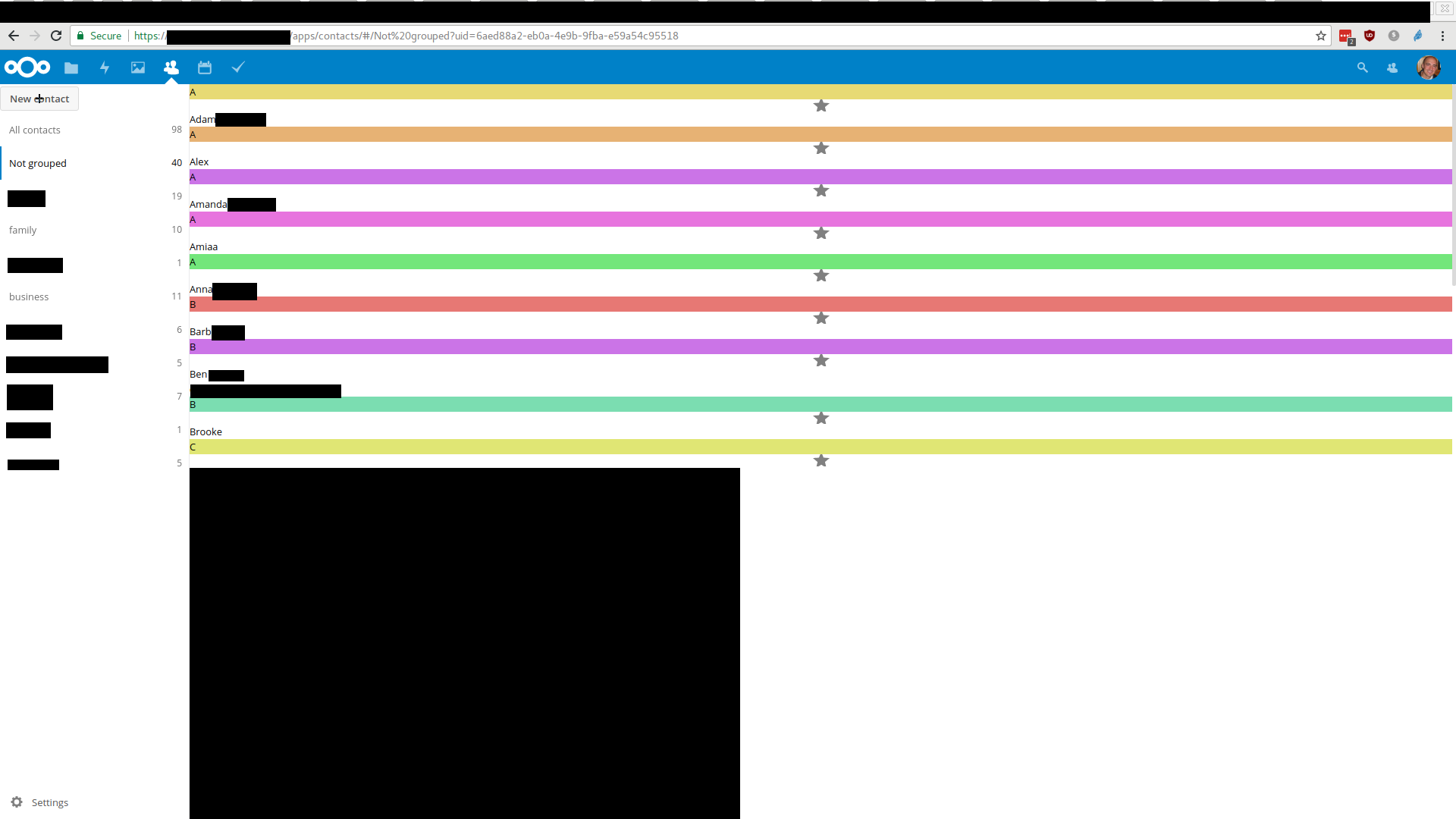
The app should be correctly loaded with all style sheets and look awsome
Actual behaviour
The app looks awful and can't really be used properly. Example:
General server configuration
Operating system: Linux edb3a8f52dbd 4.10.0-35-generic #39-Ubuntu SMP Wed Sep 13 07:46:59 UTC 2017 x86_64
Web server: nginx/1.13.4 (fpm-fcgi)
Database: mysql 10.2.8
PHP version: 7.1.9
PHP-modules loaded
 - Core
 - date
 - libxml
 - openssl
 - pcre
 - sqlite3
 - zlib
 - ctype
 - curl
 - dom
 - fileinfo
 - filter
 - gd
 - hash
 - iconv
 - json
 - mbstring
 - SPL
 - PDO
 - pdo_sqlite
 - bz2
 - posix
 - readline
 - Reflection
 - session
 - SimpleXML
 - standard
 - tokenizer
 - xml
 - xmlreader
 - xmlwriter
 - mysqlnd
 - cgi-fcgi
 - apcu
 - Phar
 - exif
 - ftp
 - gmp
 - intl
 - ldap
 - mcrypt
 - mysqli
 - pcntl
 - pdo_mysql
 - pdo_pgsql
 - pgsql
 - zip
 - redis
 - smbclient
 - libsmbclient
 - Zend OPcache
Nextcloud configuration
Nextcloud version: 12.0.3 - 12.0.3.3
Updated from an older Nextcloud/ownCloud or fresh install: Updated from older Nextcloud versions (docker containers)
Where did you install Nextcloud from: Docker image wonderfall/nextcloud
Are you using external storage, if yes which one: files_external is disabled
Are you using encryption: no
Are you using an external user-backend, if yes which one: no
Signing status
[]
Enabled apps
 - activity: 2.5.2
 - bruteforcesettings: 1.0.2
 - calendar: 1.5.5
 - comments: 1.2.0
 - contacts: 2.0.1
 - dav: 1.3.0
 - drawio: 0.8.8
 - federatedfilesharing: 1.2.0
 - federation: 1.2.0
 - files: 1.7.2
 - files_pdfviewer: 1.1.1
 - files_sharing: 1.4.0
 - files_texteditor: 2.4.1
 - files_trashbin: 1.2.0
 - files_versions: 1.5.0
 - files_videoplayer: 1.1.0
 - firstrunwizard: 2.1
 - gallery: 17.0.0
 - issuetemplate: 0.2.2
 - logreader: 2.0.0
 - lookup_server_connector: 1.0.0
 - nextcloud_announcements: 1.1
 - notifications: 2.0.0
 - oauth2: 1.0.5
 - password_policy: 1.2.2
 - provisioning_api: 1.2.0
 - richdocuments: 1.12.35
 - serverinfo: 1.2.0
 - sharebymail: 1.2.0
 - survey_client: 1.0.0
 - systemtags: 1.2.0
 - tasks: 0.9.5
 - theming: 1.3.0
 - twofactor_backupcodes: 1.1.1
 - twofactor_totp: 1.3.1
 - twofactor_u2f: 1.3.3
 - updatenotification: 1.2.0
 - workflowengine: 1.2.0
Disabled apps
 - admin_audit
 - encryption
 - files_external
 - user_external
 - user_ldap
Content of config/config.php
{
    "datadirectory": "\/data",
    "apps_paths": [
        {
            "path": "\/nextcloud\/apps",
            "url": "\/apps",
            "writable": false
        },
        {
            "path": "\/apps2",
            "url": "\/apps2",
            "writable": true
        }
    ],
    "memcache.local": "\\OC\\Memcache\\APCu",
    "memcache.locking": "\\OC\\Memcache\\Redis",
    "memcache.distributed": "\\OC\\Memcache\\Redis",
    "redis": {
        "host": "redis",
        "port": 6379
    },
    "instanceid": "***REMOVED SENSITIVE VALUE***",
    "passwordsalt": "***REMOVED SENSITIVE VALUE***",
    "secret": "***REMOVED SENSITIVE VALUE***",
    "trusted_domains": [
        "***REMOVED SENSITIVE VALUE***"
    ],
    "overwrite.cli.url": "***REMOVED SENSITIVE VALUE***",
    "htaccess.RewriteBase": "\/",
    "dbtype": "mysql",
    "version": "12.0.3.3",
    "dbname": "nextcloud",
    "dbhost": "mysql",
    "dbport": "",
    "dbtableprefix": "oc_",
    "mail_from_address": "cloud",
    "logtimezone": "UTC",
    "logdateformat": "Y-m-d H:i:s",
    "dbuser": "***REMOVED SENSITIVE VALUE***",
    "dbpassword": "***REMOVED SENSITIVE VALUE***",
    "installed": true,
    "mail_smtpmode": "smtp",
    "mail_domain": "***REMOVED SENSITIVE VALUE***",
    "mail_smtphost": "***REMOVED SENSITIVE VALUE***",
    "mail_smtpport": "587",
    "mail_smtpauth": 1,
    "mail_smtpname": "***REMOVED SENSITIVE VALUE***",
    "mail_smtppassword": "***REMOVED SENSITIVE VALUE***",
    "mail_smtpsecure": "tls",
    "mail_smtpauthtype": "LOGIN",
    "appstore.experimental.enabled": false,
    "loglevel": 2,
    "trusted_proxies": [
        "172.18.0.1",
        "172.20.0.1"
    ],
    "maintenance": false,
    "theme": "",
    "trashbin_retention_obligation": "auto, 90"
}
Client configuration
Browser: Mozilla/5.0 (X11; Linux x86_64; rv:55.0) Gecko/20100101 Firefox/55.0
Operating system: Arch Linux
Logs
 shieldwed
All 28 comments
Duplicate #370
 skjnldsv
on 6 Oct 2017
skjnldsv
on 6 Oct 2017
This is for Version 2.0.1 and Nextcloud 12, so I guess this isn't quite a duplicate of #370.
shieldwed
on 6 Oct 2017
Have you tried clearing your cache?
skjnldsv
on 6 Oct 2017
Yes, I have. I also tried different machines. Please also see https://help.nextcloud.com/t/contacts-not-showing-up-correctly-after-2-0-1-update/21951 as I don't seem to be the only one.
shieldwed
on 6 Oct 2017
As you state the style.css isn't even requested when opening the contacts app, @skjnldsv do you know of any reason why this could be the case?
Also cc @Henni here
 irgendwie
on 6 Oct 2017
irgendwie
on 6 Oct 2017
Damn, that's strange. Nothing in the source code?
skjnldsv
on 6 Oct 2017
I'm getting the error ResourceLocator can not find a web root (root: /apps2/contacts, file: css/contacts/cebb6e979c8177b33ce1dff19dab0452-style.css, webRoot: , throw: true)
I am running Nextcloud with a Docker configuration. I'm on version 12.0.3 with 2.0.1 of contacts.
 dmp1ce
on 6 Oct 2017
dmp1ce
on 6 Oct 2017
Maybe the scss wasn't compiled?
/apps2/contacts/css # pwd
/apps2/contacts/css
/apps2/contacts/css # ls -alh
total 105
drwxr-xr-x    2 991      991           10 Oct  4 14:49 .
drwxr-xr-x    9 991      991            9 Oct  4 14:49 ..
-rw-r--r--    1 991      991          184 Oct  4 14:49 _animations.scss
-rw-r--r--    1 991      991         2.4K Oct  4 14:49 _app-content-list.scss
-rw-r--r--    1 991      991          880 Oct  4 14:49 _contactlist.scss
-rw-r--r--    1 991      991         8.3K Oct  4 14:49 _details.scss
-rw-r--r--    1 991      991          531 Oct  4 14:49 _navigation.scss
-rw-r--r--    1 991      991         5.5K Oct  4 14:49 _settings.scss
-rw-r--r--    1 991      991        18.0K Oct  4 14:49 style.css
-rw-r--r--    1 991      991          134 Oct  4 14:49 style.scss
It should be compiled automatically by the server and stored into /data/appdata_xxxxxx/css/contacts
skjnldsv
on 6 Oct 2017
/data/appdata_xxxx/css/contacts # pwd
/data/appdata_xxxx/css/contacts
/data/appdata_xxxx/css/contacts # ls -alh
total 19
drwxr-xr-x    2 991      991            3 Oct  6 13:18 .
drwxr-xr-x    8 991      991            8 Oct  4 14:49 ..
-rw-r--r--    1 991      991         3.3K Oct  5 16:21 cebb6e979c8177b33ce1dff19dab0452-style.css.gzip
@dmp1ce can you check the gzip file? Is the stylesheet in it?
% ll
total 24K
▕ -rw-r--r--▏http:http│<  sec │  15K│2933078af7952208ea8b73dc956a6293-style.css
▕ -rw-r--r--▏http:http│<  sec │ 617B│2933078af7952208ea8b73dc956a6293-style.css.deps
▕ -rw-r--r--▏http:http│<  sec │   3K│2933078af7952208ea8b73dc956a6293-style.css.gzip
Yes, it looks like it:
/data/appdata_xxxx/css/contacts # zcat cebb6e979c8177b33ce1dff19dab0452-style.css.gzip
.app-content-list{width:30%;height:100%;overflow-x:hidden;overflow-y:auto;border-right:1px solid #ebebeb}
@irgendwie from server?
skjnldsv
on 6 Oct 2017
'from server'?
irgendwie
on 6 Oct 2017
I think it's coming from the server. :)
skjnldsv
on 6 Oct 2017
I can see a request, that has got the same file hash but very different content:
Request is:
https://${DOMAIN}/css/core/6874280a60229306c19164c8509ff5a1-share.css?v=2583d054ec168dd15455e32d4141db0a-7
File in /data/appdata_xxxx/css/contacts are:
-rw-r--r--    1 991      991          14484 Oct  6 15:44 6874280a60229306c19164c8509ff5a1-style.css
-rw-r--r--    1 991      991            427 Oct  6 15:44 6874280a60229306c19164c8509ff5a1-style.css.deps
-rw-r--r--    1 991      991           3349 Oct  6 15:44 6874280a60229306c19164c8509ff5a1-style.css.gzip
But with very different content.
shieldwed
on 6 Oct 2017
@shieldwed On your source, on the contacts app, can you paste here those lines?
<link rel="stylesheet" href="/core/vendor/jquery-ui/themes/base/jquery-ui.css?v=12782fbb89abfae9d65b9d3a122b08d3-11">
<link rel="stylesheet" href="/css/core/2933078af7952208ea8b73dc956a6293-jquery-ui-fixes.css?v=12782fbb89abfae9d65b9d3a122b08d3-11">
<link rel="stylesheet" href="/css/core/2933078af7952208ea8b73dc956a6293-server.css?v=12782fbb89abfae9d65b9d3a122b08d3-11">
<link rel="stylesheet" href="/css/core/2933078af7952208ea8b73dc956a6293-share.css?v=12782fbb89abfae9d65b9d3a122b08d3-11">
<link rel="stylesheet" href="/apps/files_versions/css/versions.css?v=12782fbb89abfae9d65b9d3a122b08d3-11">
<link rel="stylesheet" href="/core/css/jquery.ocdialog.css?v=12782fbb89abfae9d65b9d3a122b08d3-11">
<link rel="stylesheet" href="/css/contacts/2933078af7952208ea8b73dc956a6293-style.css?v=12782fbb89abfae9d65b9d3a122b08d3-11">
@skjnldsv How can I load these lines into the contacts app?
I just noticed the following error message in the web console every time I load the contacts app (although I am not certain this is related):
Content Security Policy: The page’s settings blocked the loading of a resource at self (“script-src 'nonce-${NONCE}' 'unsafe-eval'”). Source: ondrop attribute on INPUT element.
${NONCE} is dynamic though and changes with every reload of the app.
content-security-policy:
default-src 'none';base-uri 'none';manifest-src 'self';script-src 'nonce-${NONCE}' 'unsafe-eval';style-src 'self' 'unsafe-inline';img-src 'self' data: blob:;font-src 'self';connect-src 'self';media-src 'self';frame-src https://${COLLABORA_DOMAIN}
${NONCE} is the same value as stated above in the console error message.
shieldwed
on 7 Oct 2017
@skjnldsv I was just able to insert the following line into the contacts page:
<link rel="stylesheet" href="/css/contacts/6874280a60229306c19164c8509ff5a1-style.css?v=2583d054ec168dd15455e32d4141db0a-7">
I had to take the serial numbers and version (v=) field from the other style sheets, but after successfully injecting it into my browser, the page looked actually as it is supposed to.
So, I guess the style sheet is generated correctly on the server but not loaded from the contacts main page.
shieldwed
on 7 Oct 2017
Do you have anything in your nextcloud log? I find it strange that the scss server fails without warning :)
skjnldsv
on 7 Oct 2017
Do you have anything in your nextcloud log? I find it strange that the scss server fails without warning :)
skjnldsv
on 7 Oct 2017
Do you have anything in your nextcloud log? I find it strange that the scss server fails without warning :)
skjnldsv
on 7 Oct 2017
@skjnldsv just found this:
{"reqId":"6Q5mFZKOvYMFqPqGG4Qh","level":3,"time":"2017-10-07 15:06:37","remoteAddr":"${IP}","user":"${USER}","app":"lib","method":"GET","url":"\/apps\/contacts\/","message":"ResourceLocator can not find a web root (root: \/apps2\/contacts, file: css\/contacts\/6874280a60229306c19164c8509ff5a1-style.css, webRoot: , throw: true)","userAgent":"Mozilla\/5.0 (X11; Linux x86_64; rv:56.0) Gecko\/20100101 Firefox\/56.0","version":"12.0.3.3"}
Perfect!! It's the problem!! :)
Can we move to /server? Can you open an issue for it?
I think it's been fixed on master but not sure about stable12!
skjnldsv
on 7 Oct 2017
You are right, it behaves like nextcloud/server#5289
shieldwed
on 7 Oct 2017
Tried on stable12, on master, it's working fine!
I think the fix is here but not shipped yet! :/
skjnldsv
on 9 Oct 2017
still have the same question on 12.0.3
 cybexr
on 1 Dec 2017
cybexr
on 1 Dec 2017
It has been fixed in server. You need to wait for the next release.
skjnldsv
on 1 Dec 2017
Related issues
 IamSAB
·
4Comments
IamSAB
·
4Comments
 spoorun
·
3Comments
spoorun
·
3Comments
 Dennis1993
·
5Comments
spoorun
·
5Comments
Dennis1993
·
5Comments
spoorun
·
5Comments
 despens
·
3Comments
despens
·
3Comments
Most helpful comment
Yes, I have. I also tried different machines. Please also see https://help.nextcloud.com/t/contacts-not-showing-up-correctly-after-2-0-1-update/21951 as I don't seem to be the only one.