Contacts: allow to enter and differentiate more than one mobile phone number, e.g for business and private use
I was told (https://github.com/nextcloud/server/issues/3469) that this would be GUI issue and need to be opened in the contacts app section.
Expected behavior
It should be possible to enter separate mobile phone numbers for business and private use, like it is already possible for fax numbers.
Current behavior
Only one mobile phone number can be entered at the moment. Due to the fact that more and more people own at least a business and a private mobile phone, an option to differentiate mobile phones
for business and private use should be added.
Steps to reproduce
- Open the contacts app.
- try to enter and differentiate more than one mobile phone number.
Environment
Server Configuration
OS: Linux 3.2.84
Web server: Apache2 2.4.25
Database: MariaDB 5.5.54
PHP version: 5.6.29
Nextcloud version: 11.0.1
Client Configuration
Browser: Mozilla Firefox 51.0.1
Operating system: Windows 7
 j-ed
j-ed
All 7 comments
Hum, I can easily add multiple mobile number. Did you add a new field (bottom?)
 skjnldsv
on 17 Feb 2017
skjnldsv
on 17 Feb 2017
@skjnldsv I'm able to add multiple mobile numbers but I cannot differentiate them afterwards.
I want to add e.g. a private and a business mobile number, which both are created using an the following format:
TEL;TYPE=CELL:<business-number>
TEL;TYPE=CELL:<private-number>
By adding an option to differentiate both entries mobile number I would expect to find the following formatted entries being created by the app (similar to the fax number handling)
TEL;TYPE=WORK,CELL:<business-number>
TEL;TYPE=HOME,CELL:<private-number>
Okay, much understandable now :)
Thanks.
skjnldsv
on 18 Feb 2017
We'll go for this pretty soon.
As a record, android handle this as TEL;WORK;CELL:0123456789
MS contacts app seems to be ok with this too!
WORK,CELL does not seems to be good for both of them.
Can someone test with apple?
skjnldsv
on 15 Oct 2017
@skjnldsv
Nextcloud: 12.0.3
Contacts App: nightly_build_2017-10-13
I've just created a test account with two mobile phone numbers:
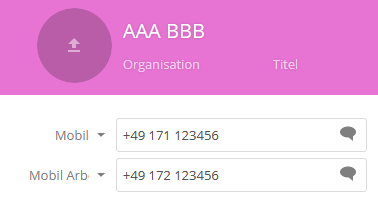
BEGIN:VCARD
VERSION:3.0
FN:AAA BBB
UID:784ead8c-f6fb-4a74-97e6-806bf603ac04
CATEGORIES:Privat
REV:20171017T091259Z
TEL;TYPE=CELL:+49 171 123456
TEL;TYPE=WORK,CELL:+49 172 123456
END:VCARD
After the synchronization has taken place the record looked like this on iOS 10.3.3:
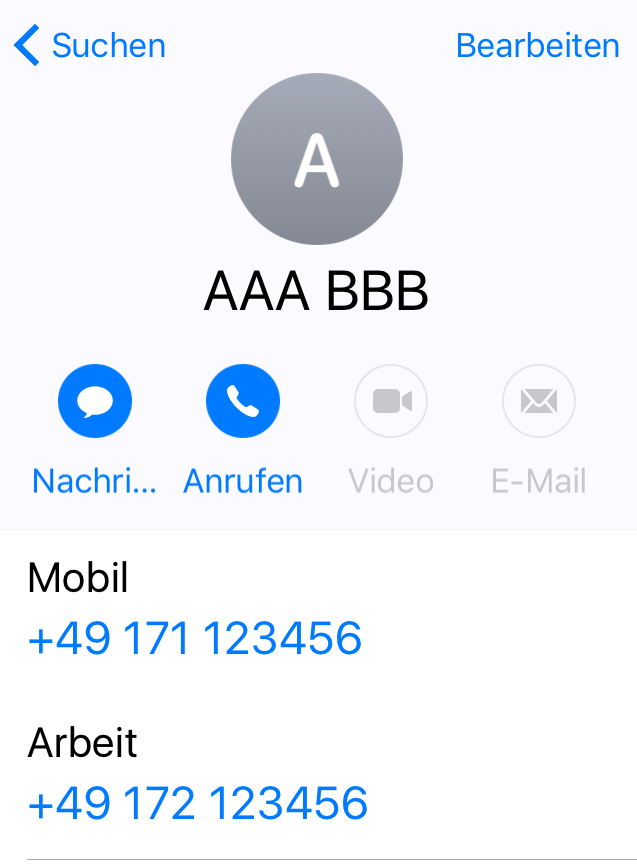
BEGIN:VCARD
VERSION:3.0
PRODID:-//Apple Inc.//iPhone OS 10.3.3//EN
N:AAA BBB;;;;
FN:   AAA BBB
TEL;type=CELL;type=VOICE;type=pref:+49 171 123456
TEL;type=WORK;type=VOICE:+49 172 123456
END:VCARD
It looks like Apple doesn't support all field label types.
j-ed
on 17 Oct 2017
Damn, it's a shame! :(
skjnldsv
on 17 Oct 2017
@skjnldsv I think that doesn't matter, because it uses WORK (Arbeit) to label that number without modifying the original record.
j-ed
on 17 Oct 2017
Related issues
 IamSAB
·
4Comments
IamSAB
·
4Comments
 spoorun
·
3Comments
spoorun
·
3Comments
 jtrees
·
3Comments
jtrees
·
3Comments
 michaelletzgus
·
5Comments
michaelletzgus
·
5Comments
 ArnY
·
5Comments
ArnY
·
5Comments
Most helpful comment
@skjnldsv I think that doesn't matter, because it uses
WORK(Arbeit) to label that number without modifying the original record.