Consul: Envoy Proxy breaks when enabling Consul TLS
After enable TLS on consul, everything _appears_ to work, however services that talk to the envoy proxy fail to pass data.
Setup
Consul = 1.7.2
ACLs = Enabled
TLS = Enabled
- Consul TLS is enabled on consul agent
  "ca_file": "/etc/ssl/certs/foobar-consul-ca.pem",
  "cert_file": "/etc/consul/client1.dc1.consul.pem",
  "key_file": "/etc/consul/client1.dc1.consul.key",
  "connect": {
    "enabled": true
  },
  "ports": {
    "grpc": 8502,
    "https": 8501
  },
- Envoy service registered in `/etc/consul/service_foobar.json
{
  "service": {
    "checks": [],
    "enable_tag_override": false,
    "id": "foobar",
    "name": "foobar",
    "tags": []
    "connect": {
      "sidecar_service": {
        "proxy": {
          "upstreams": [
            {
              "destination_name": "buzz",
              "local_bind_port": 8888
            }
....
- Envoy proxy is running
/usr/local/bin/consul connect envoy --sidecar-for foobar -admin-bind localhost:19000
Symptoms
Consul logs this error periodically
[WARN] agent: grpc: Server.Serve failed to complete security handshake from "127.0.0.1:53448": tls: first record does not look like a TLS handshake
Envoy proxy logs this error every few seconds
[warning][config] [bazel-out/k8-opt/bin/external/envoy/source/common/config/_virtual_includes/grpc_stream_lib/common/config/grpc_stream.h:91] gRPC config stream closed: 14, upstream connect error or disconnect/reset before headers. reset reason: connection termination
 spuder
All 13 comments
This is caused by the consul connect command being rejected because it does not present a certificate.
The work around is to add the following environment variables _before_ starting the envoy proxy
CONSUL_HTTP_SSL=true
CONSUL_HTTP_ADDR=127.0.0.1:8501
CONSUL_CACERT=/etc/ssl/certs/consul-ca.pem
CONSUL_CLIENT_CERT=/etc/consul/client1.dc1.consul.pem
CONSUL_CLIENT_KEY=/etc/consul/client1.dc1.consul.key
/usr/local/bin/consul connect envoy --sidecar-for foobar -admin-bind localhost:19000
If using systemd to start the envoy proxy, the following may be a more appropriate config
Note the line EnvironmentFile=-/etc/sysconfig/envoy This will only load the environment variables in that file if the file exists
/etc/systemd/system/envoy-foobar.service
[Unit]
Description=Start envoy proxy
Requires=local-fs.target
After=local-fs.target

[Service]
Type=simple
ExecStart=/usr/local/bin/consul connect envoy --sidecar-for foobar -admin-bind localhost:19000
EnvironmentFile=-/etc/sysconfig/envoy

[Install]
WantedBy=multi-user.target
/etc/sysconfig/envoy
CONSUL_HTTP_SSL=true
CONSUL_HTTP_ADDR=127.0.0.1:8501
CONSUL_CACERT=/etc/ssl/certs/consul-ca.pem
CONSUL_CLIENT_CERT=/etc/consul/client1.dc1.consul.pem
CONSUL_CLIENT_KEY=/etc/consul/client1.dc1.consul.key
Resolution
This took me longer than I care to admit to figure out. It would be great if there was documentation warning users that enabling TLS will require that envoy load additional environment variables.
One possible place to add documentation is in the _learning_ section for consul connect
https://learn.hashicorp.com/consul/developer-mesh/connect-envoy
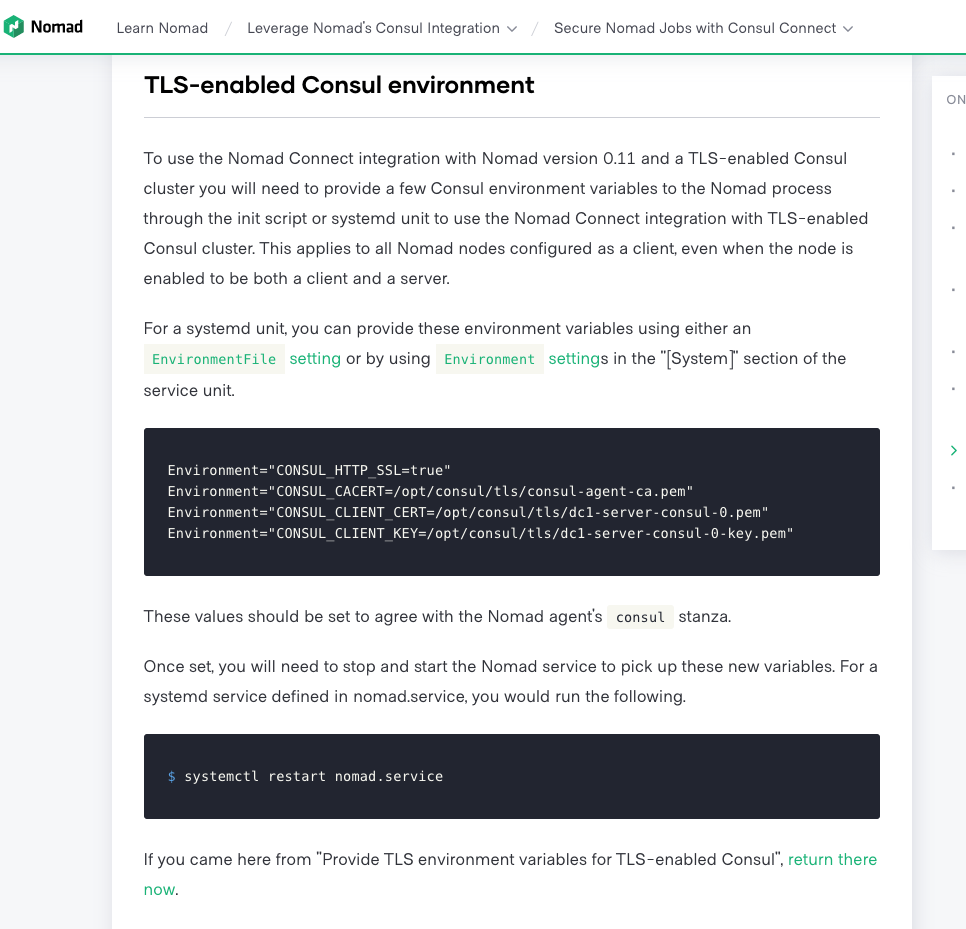
Nomad has a very similar learning section called TLS-enabled Consul environment. This is what clued me into what was going wrong.
https://learn.hashicorp.com/nomad/consul-integration/nomad-connect-acl#tls-enabled-consul-environment
spuder
on 20 May 2020
Hi @spuder,
Sorry to hear you had so much trouble with this. This was also reported in #7473 and fixed in #7608 which is included in 1.8.0-beta1. With this change, CONSUL_HTTP_SSL will be automatically set to true if CONSUL_HTTP_ADDR contains the https scheme.
 blake
on 20 May 2020
blake
on 20 May 2020
Thanks for linking that issue. I think there is still some documentation required because It was not clear that these other environment variables are also required
CONSUL_CACERT=/etc/ssl/certs/consul-ca.pem
CONSUL_CLIENT_CERT=/etc/consul/client1.dc1.consul.pem
CONSUL_CLIENT_KEY=/etc/consul/client1.dc1.consul.key
As far as I can tell, there is no way to directly configure envoy to use those variables.
By removing these 3 variables, envoy fails with this error
consul[26207]: Proto constraint validation failed (BootstrapValidationError.StaticResources: ["embedded message failed validation"] | caused by StaticResourcesValidationError.Clusters[i]: ["embedded message failed validation"] | caused by ClusterValidationError.HiddenEnvoyDeprecatedTlsContext: ["embedded message failed validation"] | caused by UpstreamTlsContextValidationError.CommonTlsContext: ["embedded message failed validation"] | caused by CommonTlsContextValidationError.ValidationContext: ["embedded message failed validation"] | caused by CertificateValidationContextValidationError.TrustedCa: ["embedded message failed validation"] | caused by DataSourceValidationError.InlineString: ["value length must be at least " '\x01' " bytes"]): node {
Thanks for linking that issue. I think there is still some documentation required because It was not clear that these other environment variables are also required
As a newcomer to Consul, having this documented in the manuals as well as in the learning modules would have saved me hours/days of debugging while trying to get my first Ingress Gateway with Envoy as a side car working in a proof of concept where TLS is enabled every where...
Thanks to the thread in this Issue, I finally got it working, but only after upgrading to latest Consul-1.8.3 and Envoy 1.4.2 on Linux/Ubuntu, and setting all these environment variables, notably also CONSUL_GRPC_ADDR:
$ export CONSUL_HTTP_SSL=true
$ export CONSUL_HTTP_ADDR=https://127.0.0.1:8501
$ export CONSUL_GRPC_ADDR=https://127.0.0.1:8502
$ export CONSUL_CACERT="/etc/consul.d/consul-agent-ca.pem"
$ export CONSUL_CLIENT_CERT="/etc/consul.d/dc1-server-consul-4.pem"
$ export CONSUL_CLIENT_KEY="/etc/consul.d/dc1-server-consul-4-key.pem"
 hb9cwp
on 16 Aug 2020
hb9cwp
on 16 Aug 2020
Just a note for anyone else struggling with this - make sure you are including both the Consul pki root AND intermediate certs in the SAME file if you don't have a single self-signed root CA, under either ca_path or ca_file, otherwise you'll be up against remote error: tls: bad certificate until you realize that only a self-signed CA certificate can ever be considered, well, a certificate authority (specifically a root). You CANNOT have /etc/consul.d/ssl.ca.d/root.pem AND /etc/consul.d/ssl.ca.d/intermediate.pem - they MUST be in a single file as a chain of INTERMEDIATE/ROOT, in that order; you can use -ca-path but it's the same deal /etc/consul.d/ssl.ca.d/ssl.chain.pem with INTERMEDIATE/ROOT in SINGLE file.
 quinndiggity
on 7 Sep 2020
quinndiggity
on 7 Sep 2020
What in case of auto_encrypt is set to true ?
In that case, the client cert and key are in memory (https://learn.hashicorp.com/tutorials/consul/tls-encryption-secure)
I cannot provide the values for CONSUL_CLIENT_CERT and CONSUL_CLIENT_KEY
What can be done for this scenario?
 ashwinkupatkar
on 8 Sep 2020
ashwinkupatkar
on 8 Sep 2020
What in case of auto_encrypt is set to true ?
In that case, the client cert and key are in memory (https://learn.hashicorp.com/tutorials/consul/tls-encryption-secure)
I cannot provide the values for CONSUL_CLIENT_CERT and CONSUL_CLIENT_KEY
What can be done for this scenario?
https://github.com/hashicorp/consul/issues/8170#issuecomment-688039670
I too haven't been able to find any means of issuing client certs for the sidecars when using auto_encrypt and consul's built-in CA
I think the closest option is to bootstrap the cluster in order to generate the cluster id (there's no way to have/set deterministic cluster id at the current time), then generate a certificate in some manner independently of consul with the random cluster id as a SAN URI (ie. SPIFFE=spiffe://3116ff7e-e927-f54b-6ef6-1a7943cbb49e.consul) and set it manually in the config:
connect = {
  enabled = true
  ca_provider = "consul"
  ca_config   = {
    private_key        = "...CONSUL_CA_KEY_CONTENTS..."
    root_cert          = "...CONSUL_CA_CRT_CONTENTS..."
- this way you can still sign client certs; otherwise consul connect is pretty broken or otherwise forces users to implement it in an insecure manner
definitely seems to be a shortcoming at the moment; I'm hoping hashicorp notices this, as well as the shortcomings of the documentation around consul connect's pki/certificate management
quinndiggity
on 9 Sep 2020
:point_up: even the workaround solution is a bit shaky, as it's a two step process which involves needing to use either of:
cat > config.json <<EOF
{
  "Provider": "consul",
  "ForceWithoutCrossSigning": false,
  "Config": {
    "CSRMaxPerSecond": 50,
    "LeafCertTTL": "72h",
    "PrivateKey": "... pem contents ...",
    "PrivateKeyBits": 256,
    "PrivateKeyType": "ec",
    "RootCert": "... pem contents ...",
    "RotationPeriod": "2160h"
  }
}
EOF
consul connect ca set-config -config-file=config.jsoncurl -XPUT ... /connect/ca/configuration ...
quinndiggity
on 9 Sep 2020
when using that approach, it results in the private key being readable via:
consul connect ca get-configcurl -XGET ... /connect/ca/configuration ...
quinndiggity
on 9 Sep 2020
I just noticed another odd effect - we have Consul set up with one primary datacenter, and 30+ secondary datacenters
In the primary datacenter we have a Vault instance, and the primary datacenter consul cluster uses Vault for its Connect CA.
In all secondary datacenters we use Consul's internal CA (because Vault is isolated in the VPC, and the secondary datacenters' Consul servers do not have line of sight with Vault; additionally, you MUST have a unique intermediate_pki_path for EVERY secondary datacenter, otherwise all the secondary Consul clusters will compete, overwriting the intermediate keypair repeatedly until a race condition occurs and they corrupt the keypair causing a complete outage. It is not reasonable for us to have intermediate_pki_path_N x30+ pki mounts, it gets unmanageable quickly)
For Consul clients in the primary datacenter I can manually issue a client certificate from the pki_consul_intermediate/issue/leaf-cert endpoint, ie:
vault write -format=json pki_consul_intermediate/issue/leaf-cert \
      common_name="client.primary.consul" \
      alt_names="localhost" \
      ip_sans="127.0.0.1" \
      uri_sans="" \
      other_sans="" \
      ttl="72h" \
      format="pem" \
      private_key_format="der" \
      exclude_cn_from_sans=false
and use the issued client cert like so:
consul connect envoy \
       -grpc-addr=https://localhost:8502 \
       -ca-file=/etc/consul.d/ssl.ca.d/ssl.chain.pem \
       -client-cert=/etc/consul.d/ssl.crt.pem \
       -client-key=/etc/consul.d/ssl.key.pem \
       -http-addr=https://localhost:8501 \
       -tls-server-name=localhost \
       -token=... \
       -admin-bind 127.0.0.1:19005 \
       -envoy-version=1.14.2 \
       -sidecar-for some-service
and all is well
However, in secondary datacenters, due to using the internal Consul CA (and not having a static key/cert set) we cannot issue client certs. What is strange, is that leaf-certificates issued from the intermediate pki path in the primary datacenter (ie. pki_consul_intermediate/issue/leaf-cert) are accepted just fine by the grpc endpoint, but the Consul agent https path REFUSES to accept them (Get "https://localhost:8501/v1/agent/services": remote error: tls: bad certificate). In this instance though, we can use the HTTP endpoint and it _works_, ie:
consul connect envoy \
       -grpc-addr=https://localhost:8502 \
       -ca-file=/etc/consul.d/ssl.ca.d/ssl.chain.pem \
       -client-cert=/etc/consul.d/ssl.crt.pem \
       -client-key=/etc/consul.d/ssl.key.pem \
       -http-addr=http://localhost:8500 \
       -tls-server-name=localhost \
       -token=... \
       -admin-bind 127.0.0.1:19005 \
       -envoy-version=1.14.2 \
       -sidecar-for another-service
Secondary datacenters shouldn't even be aware of the intermediate CA configured for the primary datacenter :thinking:
The PKI for Consul Connect makes very little sense, and makes it quite difficult to implement securely with tls validation all the way through :weary:
quinndiggity
on 9 Sep 2020
As far as i know, CA replication happens to the secondary dc.
ashwinkupatkar
on 9 Sep 2020
As far as i know, CA replication happens to the secondary dc.
Yes, but there is no automated manner in which /v1/connect/ca/roots's contents are passed on to envoy, as far as I understand; it must be set manually with -ca-file=/etc/consul.d/ssl.ca.d/ssl.chain.pem
quinndiggity
on 15 Sep 2020
Hi @quinndiggity, @spuder,
I found a way out for providing the client certs to envoy proxy while using auto encrypt mode and still using verify_incoming=true (rpc and https) and passing the service certs ONLY to the envoy proxy.
This is how I experimented:
Extract the leaf cert of the service using this api : curl http://127.0.0.1:8500/v1/agent/connect/ca/leaf/
Get the certPEM and the PrivateKeyPEM and put it to a file and assign them to environment vars CONSUL_CLIENT_CERT and CONSUL_CLIENT_KEY
Pass these vars along with other environment vars (CONSUL_CACERT, CONSUL_HTTP_ADDR, CONSUL_HTTP_SSL, CONSUL_GRPC_ADDR ) and you will see envoy proxy establishes connection to the actual service.
Ref: #8636
ashwinkupatkar
on 26 Sep 2020
Related issues
 darron
·
4Comments
darron
·
4Comments
 eshujiushiwo
·
3Comments
eshujiushiwo
·
3Comments
 matteoturra
·
4Comments
matteoturra
·
4Comments
 wing731
·
3Comments
wing731
·
3Comments
 nschoe
·
4Comments
nschoe
·
4Comments
Most helpful comment
As a newcomer to Consul, having this documented in the manuals as well as in the learning modules would have saved me hours/days of debugging while trying to get my first Ingress Gateway with Envoy as a side car working in a proof of concept where TLS is enabled every where...
Thanks to the thread in this Issue, I finally got it working, but only after upgrading to latest Consul-1.8.3 and Envoy 1.4.2 on Linux/Ubuntu, and setting all these environment variables, notably also CONSUL_GRPC_ADDR:
$ export CONSUL_HTTP_SSL=true
$ export CONSUL_HTTP_ADDR=https://127.0.0.1:8501
$ export CONSUL_GRPC_ADDR=https://127.0.0.1:8502
$ export CONSUL_CACERT="/etc/consul.d/consul-agent-ca.pem"
$ export CONSUL_CLIENT_CERT="/etc/consul.d/dc1-server-consul-4.pem"
$ export CONSUL_CLIENT_KEY="/etc/consul.d/dc1-server-consul-4-key.pem"