Consul: Web UI broken: Cannot read property 'nextHopProtocol' of undefined
Overview of the Issue
We recently upgraded to the latest Consul release. Now the UI does work but it intermittently shows an error. Refreshing a couple of times or opening the UI in an new window helps resolve it. But after some time it breaks again. There's no error in the server log, but there's a Javascript error in the console of the browser. So this is likely a 100% UI bug.
The error:
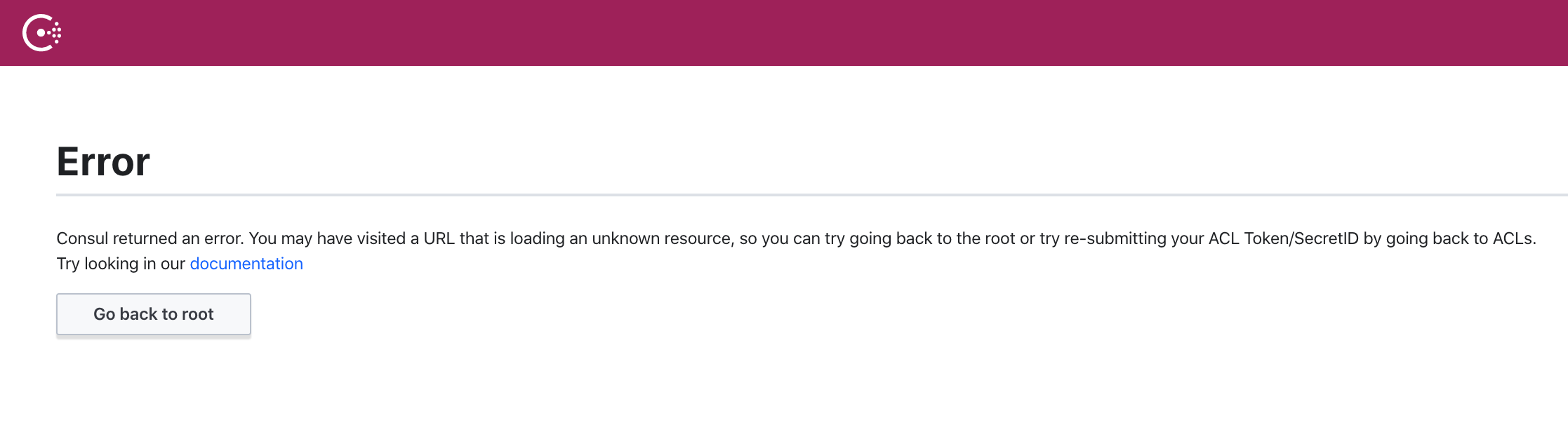
Console shows:
Error while processing route: index Cannot read property 'nextHopProtocol' of undefined TypeError: Cannot read property 'nextHopProtocol' of undefined
See log fragments for more details.
Reproduction Steps
- Just open the Web UI. I haven't entered an ACL token yet.
Consul info for both Client and Server
Client info
agent:
    check_monitors = 0
    check_ttls = 0
    checks = 3
    services = 3
build:
    prerelease =
    revision = 9ea1a204
    version = 1.7.2
consul:
    acl = enabled
    known_servers = 3
    server = false
runtime:
    arch = amd64
    cpu_count = 4
    goroutines = 71
    max_procs = 4
    os = linux
    version = go1.13.7
serf_lan:
    coordinate_resets = 0
    encrypted = true
    event_queue = 0
    event_time = 10
    failed = 0
    health_score = 0
    intent_queue = 0
    left = 0
    member_time = 236
    members = 25
    query_queue = 0
    query_time = 1
Server info
agent:
    check_monitors = 0
    check_ttls = 1
    checks = 4
    services = 4
build:
    prerelease =
    revision = 9ea1a204
    version = 1.7.2
consul:
    acl = enabled
    bootstrap = false
    known_datacenters = 1
    leader = true
    leader_addr = 10.180.48.12:8300
    server = true
raft:
    applied_index = 700473
    commit_index = 700473
    fsm_pending = 0
    last_contact = 0
    last_log_index = 700473
    last_log_term = 10
    last_snapshot_index = 689107
    last_snapshot_term = 9
    latest_configuration = [{Suffrage:Voter ID:b37debdc-9b7a-f881-630d-da40239a8300 Address:10.180.48.12:8300} {Suffrage:Voter ID:a58b98d8-c51a-2ccc-d1ef-415e84472d35 Address:10.180.48.11:8300} {Suffrage:Voter ID:1844c789-ea3a-c5af-8ba6-16a739882925 Address:10.180.48.16:8300}]
    latest_configuration_index = 0
    num_peers = 2
    protocol_version = 3
    protocol_version_max = 3
    protocol_version_min = 0
    snapshot_version_max = 1
    snapshot_version_min = 0
    state = Leader
    term = 10
runtime:
    arch = amd64
    cpu_count = 2
    goroutines = 242
    max_procs = 2
    os = linux
    version = go1.13.7
serf_lan:
    coordinate_resets = 0
    encrypted = true
    event_queue = 0
    event_time = 10
    failed = 0
    health_score = 0
    intent_queue = 0
    left = 0
    member_time = 236
    members = 25
    query_queue = 0
    query_time = 1
serf_wan:
    coordinate_resets = 0
    encrypted = true
    event_queue = 0
    event_time = 1
    failed = 0
    health_score = 0
    intent_queue = 0
    left = 0
    member_time = 8
    members = 3
    query_queue = 0
    query_time = 1
Operating system and Environment details
Browser: Chrome 80.0.3987.163 (Official Build) (64-bit) on MacOS.
Log Fragments
The Chrome console shows:
Error while processing route: index Cannot read property 'nextHopProtocol' of undefined TypeError: Cannot read property 'nextHopProtocol' of undefined
    at https://example.org:8501/mgmt/consul/assets/consul-ui-80219c43077ea818f035ddb261cd9256.js:1902:47
    at e (https://example.org:8501/mgmt/consul/assets/consul-ui-80219c43077ea818f035ddb261cd9256.js:1904:20)
    at https://example.org:8501/mgmt/consul/assets/consul-ui-80219c43077ea818f035ddb261cd9256.js:1903:44
    at e (https://example.org:8501/mgmt/consul/assets/consul-ui-80219c43077ea818f035ddb261cd9256.js:1904:20)
    at r.init (https://example.org:8501/mgmt/consul/assets/consul-ui-80219c43077ea818f035ddb261cd9256.js:1234:16)
    at r [as init] (https://example.org:8501/mgmt/consul/assets/vendor-5b94eb6a11bff93d1247a342ee40dbf8.js:3018:9)
    at m (https://example.org:8501/mgmt/consul/assets/vendor-5b94eb6a11bff93d1247a342ee40dbf8.js:2922:218)
    at Function.e.create (https://example.org:8501/mgmt/consul/assets/vendor-5b94eb6a11bff93d1247a342ee40dbf8.js:2933:8)
    at e.r.create (https://example.org:8501/mgmt/consul/assets/vendor-5b94eb6a11bff93d1247a342ee40dbf8.js:1341:18)
    at https://example.org:8501/mgmt/consul/assets/vendor-5b94eb6a11bff93d1247a342ee40dbf8.js:1315:76
Note: I've replaced hostname with example.org
Note: There's no error in the Consul server log.
 rkettelerij
All 7 comments
Hi @rkettelerij ,
Thanks for the report! This is indeed a UI bug.
If possible, could you let me know which version you were upgrading from?
Thanks!
 johncowen
on 14 Apr 2020
johncowen
on 14 Apr 2020
From 1.6.2 to 1.7.2
rkettelerij
on 14 Apr 2020
Hi @rkettelerij ,
Would it be possible to check whether you get this error in Firefox or Safari? I have been able to replicate in Chrome (intermittently, a 'shift refresh' reloads correctly when I see it happen) but not Firefox or Safari.
Thanks,
johncowen
on 14 Apr 2020
I have a similar issue with FF on consul 1.7.2 freshly deployed on kubernetes.
I just tried on Chromium and i do not experience the issue.
Don't know if it is related to the same issue. If not, feel free to comment, i'll open a new one
Error while processing route: index s is undefined e/<@https://localhost:8080/ui/assets/consul-ui-1034a51dd9841fefe83310c723a625fe.js:1899:38
e@https://localhost:8080/ui/assets/consul-ui-1034a51dd9841fefe83310c723a625fe.js:1901:20
e/<@https://localhost:8080/ui/assets/consul-ui-1034a51dd9841fefe83310c723a625fe.js:1900:44
e@https://localhost:8080/ui/assets/consul-ui-1034a51dd9841fefe83310c723a625fe.js:1901:20
init@https://localhost:8080/ui/assets/consul-ui-1034a51dd9841fefe83310c723a625fe.js:1232:16
r@https://localhost:8080/ui/assets/vendor-5b94eb6a11bff93d1247a342ee40dbf8.js:3018:9
m@https://localhost:8080/ui/assets/vendor-5b94eb6a11bff93d1247a342ee40dbf8.js:2922:218
v</e.create@https://localhost:8080/ui/assets/vendor-5b94eb6a11bff93d1247a342ee40dbf8.js:2933:9
m</r.create@https://localhost:8080/ui/assets/vendor-5b94eb6a11bff93d1247a342ee40dbf8.js:1341:18
u/<@https://localhost:8080/ui/assets/vendor-5b94eb6a11bff93d1247a342ee40dbf8.js:1315:76
u@https://localhost:8080/ui/assets/vendor-5b94eb6a11bff93d1247a342ee40dbf8.js:1321:45
o</n.lookup@https://localhost:8080/ui/assets/vendor-5b94eb6a11bff93d1247a342ee40dbf8.js:1306:38
lookup@https://localhost:8080/ui/assets/vendor-5b94eb6a11bff93d1247a342ee40dbf8.js:2859:144
u@https://localhost:8080/ui/assets/vendor-5b94eb6a11bff93d1247a342ee40dbf8.js:2039:10
nt</i.get@https://localhost:8080/ui/assets/vendor-5b94eb6a11bff93d1247a342ee40dbf8.js:2256:16
r/l.get<@https://localhost:8080/ui/assets/vendor-5b94eb6a11bff93d1247a342ee40dbf8.js:2192:97
findAll@https://localhost:8080/ui/assets/consul-ui-1034a51dd9841fefe83310c723a625fe.js:53:324
je/s<@https://localhost:8080/ui/assets/vendor-5b94eb6a11bff93d1247a342ee40dbf8.js:7194:219
w@https://localhost:8080/ui/assets/vendor-5b94eb6a11bff93d1247a342ee40dbf8.js:5076:12
E/<@https://localhost:8080/ui/assets/vendor-5b94eb6a11bff93d1247a342ee40dbf8.js:5083:27
p</t.invoke@https://localhost:8080/ui/assets/vendor-5b94eb6a11bff93d1247a342ee40dbf8.js:4609:163
p</t.flush@https://localhost:8080/ui/assets/vendor-5b94eb6a11bff93d1247a342ee40dbf8.js:4601:74
m</t.flush@https://localhost:8080/ui/assets/vendor-5b94eb6a11bff93d1247a342ee40dbf8.js:4614:358
U</r._end@https://localhost:8080/ui/assets/vendor-5b94eb6a11bff93d1247a342ee40dbf8.js:4676:9
U</r.end@https://localhost:8080/ui/assets/vendor-5b94eb6a11bff93d1247a342ee40dbf8.js:4631:230
U</r._run@https://localhost:8080/ui/assets/vendor-5b94eb6a11bff93d1247a342ee40dbf8.js:4678:118
U</r._join@https://localhost:8080/ui/assets/vendor-5b94eb6a11bff93d1247a342ee40dbf8.js:4677:246
U</r.join@https://localhost:8080/ui/assets/vendor-5b94eb6a11bff93d1247a342ee40dbf8.js:4642:13
h@https://localhost:8080/ui/assets/vendor-5b94eb6a11bff93d1247a342ee40dbf8.js:3492:28
e.bind/<@https://localhost:8080/ui/assets/vendor-5b94eb6a11bff93d1247a342ee40dbf8.js:3495:10
l@https://localhost:8080/ui/assets/vendor-5b94eb6a11bff93d1247a342ee40dbf8.js:956:20
a/</c<@https://localhost:8080/ui/assets/vendor-5b94eb6a11bff93d1247a342ee40dbf8.js:957:229
 kri5
on 14 Apr 2020
kri5
on 14 Apr 2020
Hi @rkettelerij ,
Would it be possible to check whether you get this error in Firefox or Safari? I have been able to replicate in Chrome (intermittently, a 'shift refresh' reloads correctly when I see it happen) but not Firefox or Safari.
Thanks,
I've tested it in Firefox and indeed it doesn't occur in Firefox, only in Chrome.
rkettelerij
on 14 Apr 2020
@kri5 can confirm the issue with Firefox
FF 75.0 Win 10 x64
Error while processing route: index s is undefined e/<@http://10.0.100.20:8500/ui/assets/consul-ui-80219c43077ea818f035ddb261cd9256.js:1902:38
e@http://10.0.100.20:8500/ui/assets/consul-ui-80219c43077ea818f035ddb261cd9256.js:1904:20
e/<@http://10.0.100.20:8500/ui/assets/consul-ui-80219c43077ea818f035ddb261cd9256.js:1903:44
e@http://10.0.100.20:8500/ui/assets/consul-ui-80219c43077ea818f035ddb261cd9256.js:1904:20
init@http://10.0.100.20:8500/ui/assets/consul-ui-80219c43077ea818f035ddb261cd9256.js:1234:16
r@http://10.0.100.20:8500/ui/assets/vendor-5b94eb6a11bff93d1247a342ee40dbf8.js:3018:9
m@http://10.0.100.20:8500/ui/assets/vendor-5b94eb6a11bff93d1247a342ee40dbf8.js:2922:218
v</e.create@http://10.0.100.20:8500/ui/assets/vendor-5b94eb6a11bff93d1247a342ee40dbf8.js:2933:9
m</r.create@http://10.0.100.20:8500/ui/assets/vendor-5b94eb6a11bff93d1247a342ee40dbf8.js:1341:18
u/<@http://10.0.100.20:8500/ui/assets/vendor-5b94eb6a11bff93d1247a342ee40dbf8.js:1315:76
u@http://10.0.100.20:8500/ui/assets/vendor-5b94eb6a11bff93d1247a342ee40dbf8.js:1321:45
o</n.lookup@http://10.0.100.20:8500/ui/assets/vendor-5b94eb6a11bff93d1247a342ee40dbf8.js:1306:38
lookup@http://10.0.100.20:8500/ui/assets/vendor-5b94eb6a11bff93d1247a342ee40dbf8.js:2859:144
u@http://10.0.100.20:8500/ui/assets/vendor-5b94eb6a11bff93d1247a342ee40dbf8.js:2039:10
nt</i.get@http://10.0.100.20:8500/ui/assets/vendor-5b94eb6a11bff93d1247a342ee40dbf8.js:2256:16
r/l.get<@http://10.0.100.20:8500/ui/assets/vendor-5b94eb6a11bff93d1247a342ee40dbf8.js:2192:97
findAll@http://10.0.100.20:8500/ui/assets/consul-ui-80219c43077ea818f035ddb261cd9256.js:53:324
je/s<@http://10.0.100.20:8500/ui/assets/vendor-5b94eb6a11bff93d1247a342ee40dbf8.js:7194:219
w@http://10.0.100.20:8500/ui/assets/vendor-5b94eb6a11bff93d1247a342ee40dbf8.js:5076:12
E/<@http://10.0.100.20:8500/ui/assets/vendor-5b94eb6a11bff93d1247a342ee40dbf8.js:5083:27
p</t.invoke@http://10.0.100.20:8500/ui/assets/vendor-5b94eb6a11bff93d1247a342ee40dbf8.js:4609:163
p</t.flush@http://10.0.100.20:8500/ui/assets/vendor-5b94eb6a11bff93d1247a342ee40dbf8.js:4601:74
m</t.flush@http://10.0.100.20:8500/ui/assets/vendor-5b94eb6a11bff93d1247a342ee40dbf8.js:4614:358
U</r._end@http://10.0.100.20:8500/ui/assets/vendor-5b94eb6a11bff93d1247a342ee40dbf8.js:4676:9
U</r.end@http://10.0.100.20:8500/ui/assets/vendor-5b94eb6a11bff93d1247a342ee40dbf8.js:4631:230
U</r._run@http://10.0.100.20:8500/ui/assets/vendor-5b94eb6a11bff93d1247a342ee40dbf8.js:4678:118
U</r._join@http://10.0.100.20:8500/ui/assets/vendor-5b94eb6a11bff93d1247a342ee40dbf8.js:4677:246
U</r.join@http://10.0.100.20:8500/ui/assets/vendor-5b94eb6a11bff93d1247a342ee40dbf8.js:4642:13
h@http://10.0.100.20:8500/ui/assets/vendor-5b94eb6a11bff93d1247a342ee40dbf8.js:3492:28
e.bind/<@http://10.0.100.20:8500/ui/assets/vendor-5b94eb6a11bff93d1247a342ee40dbf8.js:3495:10
l@http://10.0.100.20:8500/ui/assets/vendor-5b94eb6a11bff93d1247a342ee40dbf8.js:956:20
a/</c<@http://10.0.100.20:8500/ui/assets/vendor-5b94eb6a11bff93d1247a342ee40dbf8.js:957:229
Chrome(-ium) browsers seem to work fine on my machine
The problem can be caused by my configuration, but it is indeed reproducible. I am currently trying to find more details, but no success so far
EDIT:
The issue is privacy.resistFingerprinting=true configuration flag
 Renerick
on 18 Apr 2020
Renerick
on 18 Apr 2020
Hi @Renerick
Oh wow! Your final edit there is great info! 👏
This issue is related to us avoiding restricting users to the 6 HTTP connection limit under HTTP/1 (we try to figure out if a the UI is running over HTTP/2 and if so ignore this restriction). I'm assuming in the case of privacy.resistFingerprinting=true this information is quite rightly not available to the UI.
The fix we added for this has a more graceful fallback, so if we can't detect HTTP/2 support then we fallback to the 6 connection limit even if you are running over HTTP/2. Some thoughts off the top of my head are, we could add a UI setting to override this/manually let the user ignore the HTTP/1 connection limit.
Thanks again for the info!
johncowen
on 20 Apr 2020
Related issues
 nicholasjackson
·
3Comments
nicholasjackson
·
3Comments
 slackpad
·
3Comments
slackpad
·
3Comments
 lmb
·
4Comments
lmb
·
4Comments
 wing731
·
3Comments
wing731
·
3Comments
 sandstrom
·
3Comments
sandstrom
·
3Comments
Most helpful comment
Hi @Renerick
Oh wow! Your final edit there is great info! 👏
This issue is related to us avoiding restricting users to the 6 HTTP connection limit under HTTP/1 (we try to figure out if a the UI is running over HTTP/2 and if so ignore this restriction). I'm assuming in the case of
privacy.resistFingerprinting=truethis information is quite rightly not available to the UI.The fix we added for this has a more graceful fallback, so if we can't detect HTTP/2 support then we fallback to the 6 connection limit even if you are running over HTTP/2. Some thoughts off the top of my head are, we could add a UI setting to override this/manually let the user ignore the HTTP/1 connection limit.
Thanks again for the info!