Consul: [bug] Clients browsing new UI are getting 403 due to non-existent ACL set
1.1.0 Beta UI
Describe the problem you're having
I apologize in advance, this is going to be a terrible bug report.
I've gotten several reports, and have encountered the behavior myself of users going to the new UI for the first time (having been to the old one) and getting a permission denied.
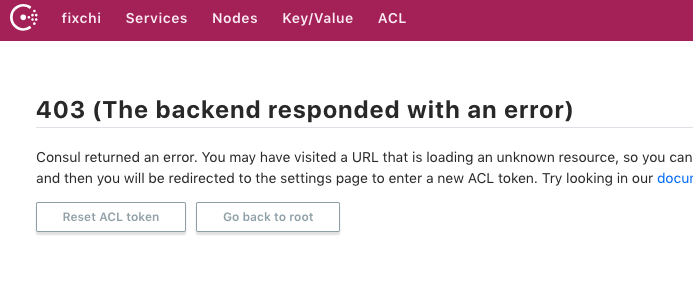
The User has to go to the ACL tab and clear their token to get the page to load correctly. Sometimes this clearing has to be done twice (the first time it shows a 4 character '**' instead). All users have used the old ui before. Likely haven't cleared their browser caches. I _believe_ some never used ACLs on the old sites.
My gut is telling me theres something off about how the new Beta site is reading the ACL token from the old site (if there is a difference).
I've had reports of it from at least two other users not including experiencing it myself.
 dekimsey
All 10 comments
Hi @dekimsey ,
Thanks for the bug report, thanks for filing issues on this for us, and don't worry about apologizing! We'll get to the bottom of it together.
So, I'm just trying to understand the issue more so could you confirm the following for me?
- You are only seeing this problem when you have used the old UI previously and have now enabled the new UI on the same domain as the previous old UI install?
- Could you confirm whether or not you had ACLs enabled on the old UI install AND the new UI install?
- The browser you are using when seeing the issue.
Additionally, I've tried to replicate your problem by:
Enabling ACLs on a fresh consul install _without_ setting the CONSUL_BETA_UI environment variable. On arriving at the ACLs page in the old UI, I get a permission denied error (expected). I then use the UI settings page to enter my ACL token (the master one in this case) and navigate back to the ACLs page, and I now see the ACLs listing. I bring the install down again, but I don't close my browser tab with the old UI in it.
I then start a completely fresh install of consul on the same domain, but this time I specify CONSUL_BETA_UI=1. My browser tab still has the old UI in it from the old install, until I hit refresh in my browser. On hitting refresh on the ACL's page, the page gets refreshed to the new UI and I can still see the ACLs listing as the browser has remembered my token that I entered using the old UI (expected).
I then click on the [Settings] link in the top right of the new UI, delete the token from the ACL TOKEN input field and hit the [Save] button. I get a green notification to say the settings where saved (i.e. I have cleared my ACL token). Now when I click on the [ACL] link in the new UI in the top navigation I get the 403 error you've screengrabbed above (expected). I didn't have to clear my token twice.
I then click the [Reset ACL token] presented on the 403 page, and re-enter my ACL token and click the [Save] button. Again, I get a notification that my settings have been saved. I then click on the [ACL] link in the navigation again, and I see the ACL token listing (expected).
I then bring down my consul install, disable the ACLs in the config, and bring the same install back up again, still with CONSUL_BETA_UI=1. I then refresh the browser tab I had open (I still have the previous acl token saved in my browser). This time I see a '401 (ACL support disabled)' message (expected), but when navigating to [Services], [Nodes] etc. I see the listings I expect to see. When clicking [Settings] I can see that my token is still saved, but I can still delete this by removing the dots from the input field and clicking the [Save] button.
From what I can see everything is working as expected.
Apologies if the above is a little verbose, but I'm hoping one of us can spot what the other is doing differently.
My gut is telling me theres something off about how the new Beta site is reading the ACL token from the old site (if there is a difference).
The new UI was built to use the same method of saving/reading the ACL token, what did change was the way we send the token to the backend in the API requests back to consul.
I think before we start looking to see if there is anything amiss here, it would be really good to drill down to find out what the exact problem is.
Finally, remember if whatever this is is getting in the way of your workflow, you can use the old UI until we can get to the bottom of what this is.
 johncowen
on 19 Jun 2018
johncowen
on 19 Jun 2018
You are only seeing this problem when you have used the old UI previously and have now enabled the new UI on the same domain as the previous old UI install?
Yes. Exactly.
Could you confirm whether or not you had ACLs enabled on the old UI install AND the new UI install?
Do you mean I have an ACL token set in my UI? I did under the old ones. Some of the reports are from people who never used the ACL token.
Okay, I got it to happen. My coworker added the status page to our chat room for that tenant. This muddles the water a bit since it's embedded in Microsoft Teams as an external page. But to be clear, I've seen the behavior in browsers outside this kiosk view.
When I on my computer went to go look at it I see a 403.
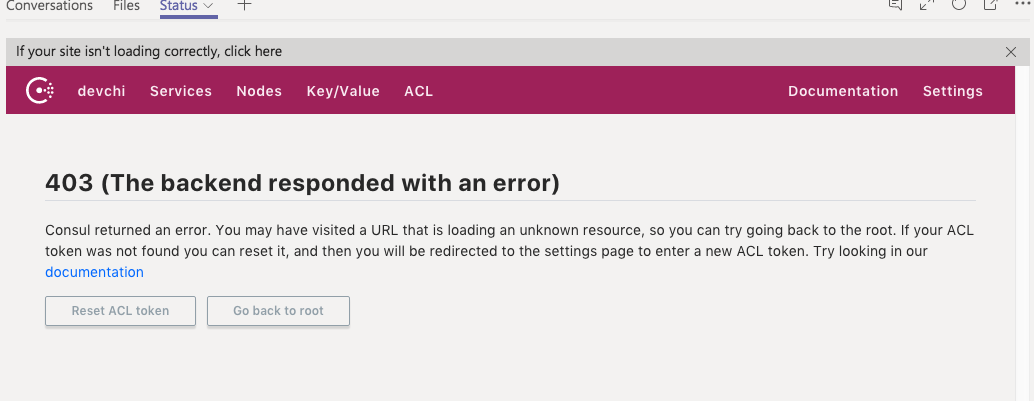
So I click on ACL and see nothing is set.
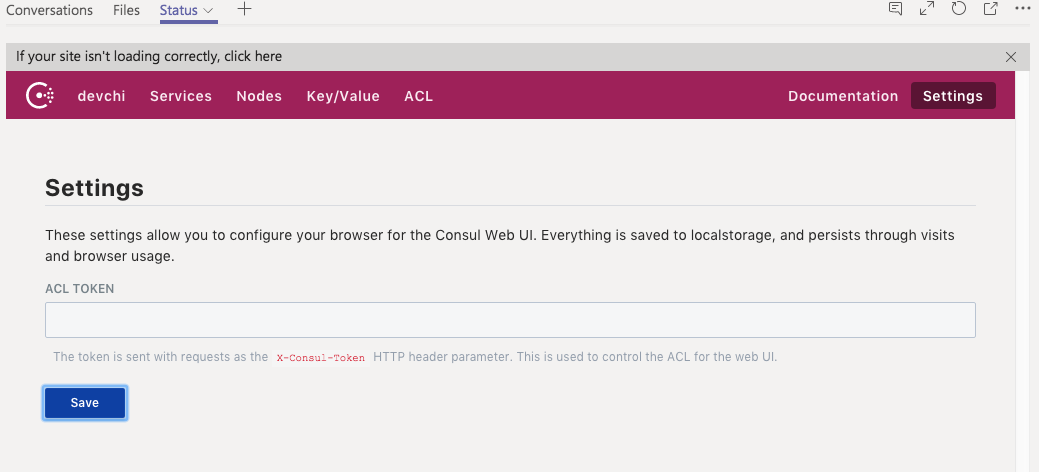
Okay, well I'll hit Save anyway. Clearly something is set.
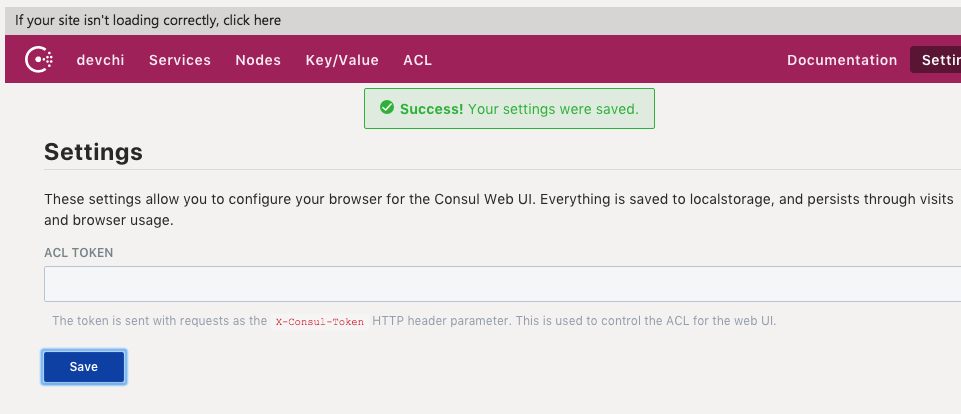
Then I'll click back to Services.
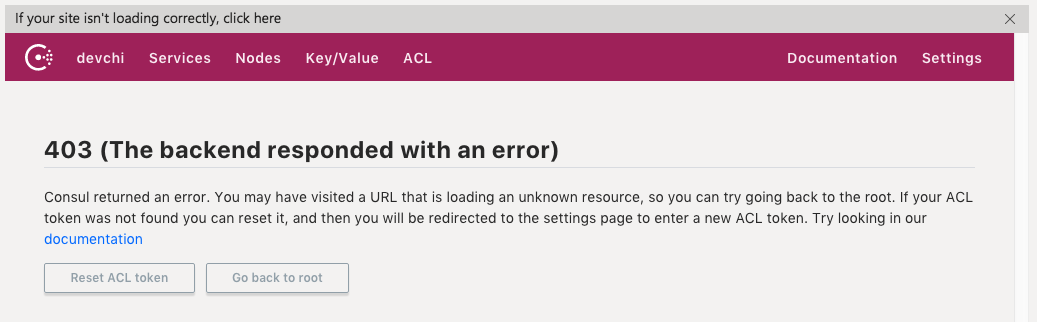
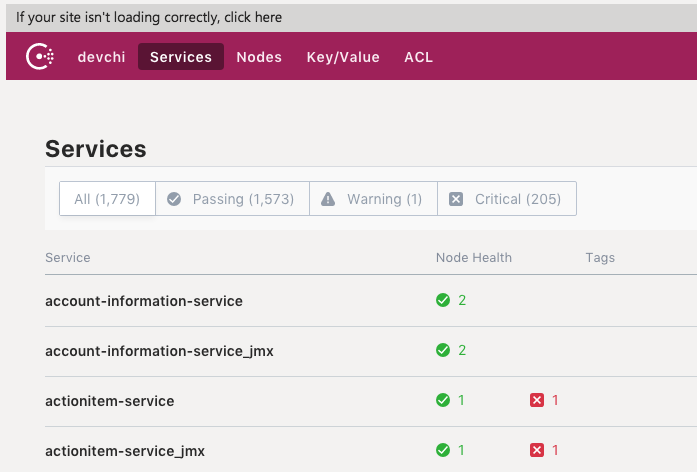
Well that's odd, I know there is an anonymous token and it's correct. Lemme look at the ACLs again.
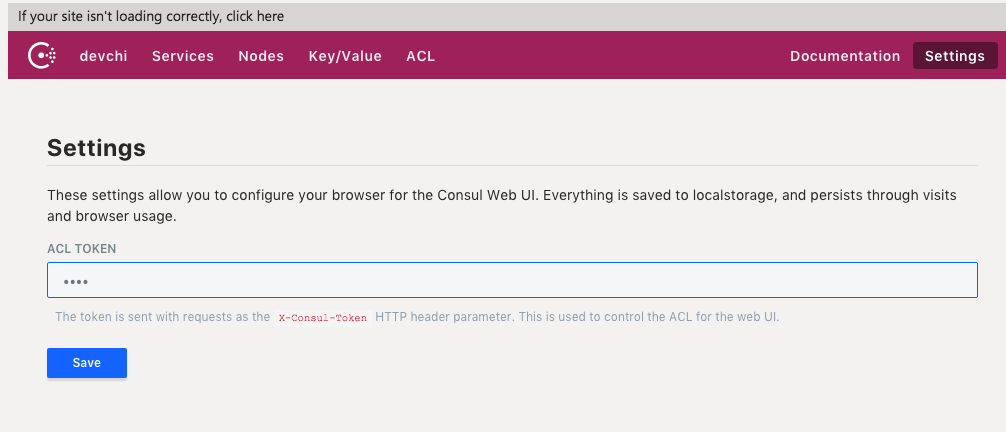
And there is a 4 character ACL set. I do not have access to browser dev tools, so I can't see what this is.
Clear it again I guess? I highlight the characters and delete them.
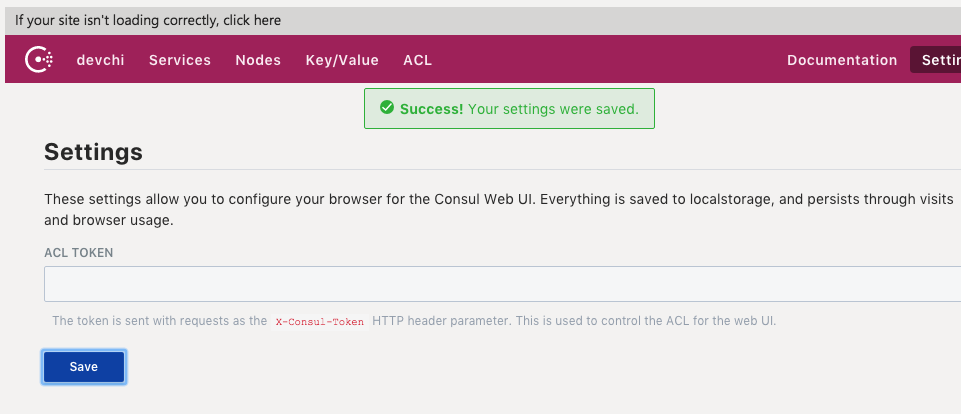
Works now.
The haproxy traffic from my box when I ran into the issue there is a few minute delay from when I loaded the tab and noticed the issue to when I was able to start taking screenshots:
[19/Jun/2018:11:17:33.268] https-in~ https-in/devchi-inf-001 88/0/0/1/89 301 186 - - ---- 1/1/0/1/0 0/0 "GET / HTTP/1.1"
[19/Jun/2018:11:17:33.357] https-in~ https-in/devchi-inf-002 28/0/0/1/31 200 4833 - - ---- 1/1/0/1/0 0/0 "GET /ui/ HTTP/1.1"
[19/Jun/2018:11:17:33.388] https-in~ https-in/devchi-inf-003 80/0/1/0/82 200 5542 - - ---- 1/1/0/1/0 0/0 "GET /ui/assets/vendor-c3a9380433ef2f2efb4ed437d3b54b31.css HTTP/1.1"
[19/Jun/2018:11:17:33.470] https-in~ https-in/devchi-inf-001 27/0/1/1/29 200 46881 - - ---- 4/4/0/1/0 0/0 "GET /ui/assets/consul-ui-fd032aa6d4c81cb6714bde7019fca516.css
HTTP/1.1"
[19/Jun/2018:11:17:33.497] https-in~ https-in/devchi-inf-003 31/0/1/2/111 200 200153 - - ---- 4/4/1/1/0 0/0 "GET /ui/assets/consul-ui-5b92b4b084738a6c8d4662cd5dd81e58.js HTTP/1.1"
[19/Jun/2018:11:17:33.497] https-in~ https-in/devchi-inf-002 32/0/0/16/355 200 1243494 - - ---- 4/4/0/1/0 0/0 "GET /ui/assets/vendor-314559974db7480f89eff5585c15bd34.js
HTTP/1.1"
[19/Jun/2018:11:17:33.852] https-in~ https-in/devchi-inf-001 387/0/0/1/388 200 189 - - ---- 4/4/0/1/0 0/0 "GET /v1/catalog/datacenters HTTP/1.1"
[19/Jun/2018:11:17:34.239] https-in~ https-in/devchi-inf-002 26/0/1/0/27 200 189 - - ---- 4/4/0/1/0 0/0 "GET /v1/catalog/datacenters HTTP/1.1"
[19/Jun/2018:11:17:34.267] https-in~ https-in/devchi-inf-001 26/0/1/0/27 200 189 - - ---- 4/4/1/1/0 0/0 "GET /v1/catalog/datacenters HTTP/1.1"
[19/Jun/2018:11:17:33.609] https-in~ https-in/devchi-inf-003 685/0/0/4/689 403 304 - - ---- 4/4/0/1/0 0/0 "GET /v1/internal/ui/services?dc=devchi HTTP/1.1"
[19/Jun/2018:11:17:34.297] https-in~ https-in/devchi-inf-002 31/0/0/7/38 200 189 - - ---- 4/4/0/1/0 0/0 "GET /v1/catalog/datacenters HTTP/1.1"
[19/Jun/2018:11:20:48.110] https-in~ https-in/devchi-inf-003 30/0/0/2/32 200 189 - - ---- 1/1/0/1/0 0/0 "GET /v1/catalog/datacenters HTTP/1.1"
[19/Jun/2018:11:20:48.143] https-in~ https-in/devchi-inf-001 29/0/0/1/30 200 189 - - ---- 1/1/0/1/0 0/0 "GET /v1/catalog/datacenters HTTP/1.1"
[19/Jun/2018:11:20:48.173] https-in~ https-in/devchi-inf-002 27/0/0/2/29 200 189 - - ---- 1/1/0/1/0 0/0 "GET /v1/catalog/datacenters HTTP/1.1"
[19/Jun/2018:11:20:48.202] https-in~ https-in/devchi-inf-003 26/0/0/7/33 403 304 - - ---- 2/2/0/1/0 0/0 "GET /v1/internal/ui/services?dc=devchi HTTP/1.1"
[19/Jun/2018:11:20:48.236] https-in~ https-in/devchi-inf-001 30/0/0/1/31 200 189 - - ---- 2/2/0/1/0 0/0 "GET /v1/catalog/datacenters HTTP/1.1"
[19/Jun/2018:11:21:01.074] https-in~ https-in/devchi-inf-002 34/0/0/1/35 200 189 - - ---- 1/1/0/1/0 0/0 "GET /v1/catalog/datacenters HTTP/1.1"
[19/Jun/2018:11:21:01.109] https-in~ https-in/devchi-inf-003 29/0/1/1/31 200 189 - - ---- 1/1/0/1/0 0/0 "GET /v1/catalog/datacenters HTTP/1.1"
[19/Jun/2018:11:21:13.290] https-in~ https-in/devchi-inf-001 30/0/0/1/31 200 189 - - ---- 2/2/0/1/0 0/0 "GET /v1/catalog/datacenters HTTP/1.1"
[19/Jun/2018:11:21:13.291] https-in~ https-in/devchi-inf-002 31/0/0/4/35 403 281 - - ---- 2/2/0/1/0 0/0 "GET /v1/internal/ui/services?dc=devchi HTTP/1.1"
[19/Jun/2018:11:21:13.327] https-in~ https-in/devchi-inf-003 32/0/1/2/35 200 189 - - ---- 2/2/0/1/0 0/0 "GET /v1/catalog/datacenters HTTP/1.1"
[19/Jun/2018:11:21:13.363] https-in~ https-in/devchi-inf-001 4845/0/1/0/4846 200 189 - - ---- 2/2/0/1/0 0/0 "GET /v1/catalog/datacenters HTTP/1.1"
[19/Jun/2018:11:21:18.208] https-in~ https-in/devchi-inf-002 30/0/1/1/32 200 189 - - ---- 2/2/0/1/0 0/0 "GET /v1/catalog/datacenters HTTP/1.1"
[19/Jun/2018:11:21:30.339] https-in~ https-in/devchi-inf-003 30/0/0/2/32 200 189 - - ---- 2/2/0/1/0 0/0 "GET /v1/catalog/datacenters HTTP/1.1"
[19/Jun/2018:11:21:30.342] https-in~ https-in/devchi-inf-001 31/0/0/47/78 200 5190 - - ---- 2/2/0/1/0 0/0 "GET /v1/internal/ui/services?dc=devchi HTTP/1.1"
Well it's repeatable. Seems to happen in first load of incognito mode.
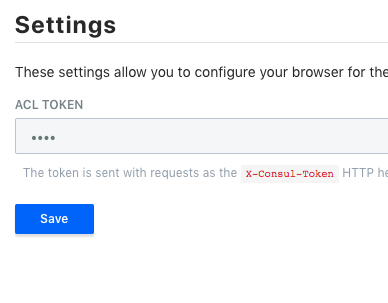
Hah. So I have access to Dev Tools here at least.
$('input[type=password]').val()
"null"
Guessing. Totally. I'm not familiar with ember and the particulars of the UI architecture & implementation.
The stringification of None to a header value is resulting in the "null" value.
dekimsey
on 19 Jun 2018
Ok so looks like you've nailed one issue here 👍
Looks like the issue is if you go to save an empty token setting, only when you haven't had a token set already, it saves the string null as your token?
That sound about right?
johncowen
on 19 Jun 2018
Yup, that would be my armchair impression. It looks like it's loading of the null value is an issue.
dekimsey
on 19 Jun 2018
Hi @dekimsey (again!! 😄 )
Thanks for all your help with these by the way, I'm just triple checking on this one also to make sure we've addressed you issue.
Please let me know if not.
Thanks,
johncowen
on 3 Jul 2018
hi @johncowen, I'll look into giving the new version a try tomorrow. Crazy week, sorry for the lack of response.
dekimsey
on 6 Jul 2018
Hey @dekimsey ,
No problem! Don't mind me, sorry, this was more of a courtesy to check it was good for you more than anything.
Drop back in when you are less busy 👍
johncowen
on 6 Jul 2018
@johncowen Looks like it's all working, thanks for fixing this so quickly!
dekimsey
on 10 Jul 2018
Related issues
 pritam97
·
3Comments
pritam97
·
3Comments
 darron
·
4Comments
darron
·
4Comments
 hooksie1
·
3Comments
hooksie1
·
3Comments
 achille-roussel
·
4Comments
achille-roussel
·
4Comments
 runswithd6s
·
3Comments
runswithd6s
·
3Comments