Consul: panic when Starting Consul agent
version: 0.7.1
==> Starting Consul agent...
panic: log not found
goroutine 1 [running]:
panic(0xd01e60, 0xc42014a0d0)
 /goroot/src/runtime/panic.go:500 +0x1a1
github.com/hashicorp/consul/vendor/github.com/hashicorp/raft.NewRaft(0xc420196750, 0x1340440, 0xc420210180, 0x1346340, 0xc420210280, 0x1342740, 0xc4202121a0, 0x1340900, 0xc4202122e0, 0x1347300, ...)
 /gopath/src/github.com/hashicorp/consul/vendor/github.com/hashicorp/raft/api.go:491 +0xa5c
github.com/hashicorp/consul/consul.(*Server).setupRaft(0xc4201c01e0, 0x0, 0x0)
 /gopath/src/github.com/hashicorp/consul/consul/server.go:488 +0x830
github.com/hashicorp/consul/consul.NewServer(0xc420180380, 0xc420180380, 0x0, 0x0)
 /gopath/src/github.com/hashicorp/consul/consul/server.go:263 +0xa18
github.com/hashicorp/consul/command/agent.(*Agent).setupServer(0xc42016c300, 0x1, 0xc42014d020)
 /gopath/src/github.com/hashicorp/consul/command/agent/agent.go:406 +0xf7
github.com/hashicorp/consul/command/agent.Create(0xc4201cb800, 0x1339e80, 0xc4201c6440, 0x0, 0x0, 0x0)
 /gopath/src/github.com/hashicorp/consul/command/agent/agent.go:196 +0xac7
github.com/hashicorp/consul/command/agent.(*Command).setupAgent(0xc420147110, 0xc4201cb800, 0x1339e80, 0xc4201c6440, 0xc4201c4420, 0x0, 0x1339e80)
 /gopath/src/github.com/hashicorp/consul/command/agent/command.go:469 +0xaf
github.com/hashicorp/consul/command/agent.(*Command).Run(0xc420147110, 0xc42000a100, 0xc, 0xc, 0x0)
 /gopath/src/github.com/hashicorp/consul/command/agent/command.go:842 +0x99d
github.com/hashicorp/consul/vendor/github.com/mitchellh/cli.(*CLI).Run(0xc42015c540, 0xc42015c540, 0xc420141a00, 0x9)
 /gopath/src/github.com/hashicorp/consul/vendor/github.com/mitchellh/cli/cli.go:153 +0x24e
main.realMain(0xc4200001a0)
 /gopath/src/github.com/hashicorp/consul/main.go:46 +0x1f1
main.main()
 /gopath/src/github.com/hashicorp/consul/main.go:18 +0x22
 hehailong5
All 20 comments
Panic is coming from here:
https://github.com/hashicorp/consul/blob/v0.7.1/vendor/github.com/hashicorp/raft/api.go#L485-L494.
@hehailong5 do you have any more info on what was happening before you started the agent? It looks like something happened to the database file used for the Raft log, with the error coming from down here:
 slackpad
on 20 Apr 2017
slackpad
on 20 Apr 2017
Hi,
this can be reproduced as followings:
1) fresh start the consul
2) kill -9
3) bring up again the consul
I guess the "kill -9" may be blamed for this issue, but how to recover from this situation with old data?
hehailong5
on 21 Apr 2017
@hehailong5 I cannot reproduce this. Tested this with 0.7.1 on a 3 node cluster on linux/amd64 as follows:
# setup 3 node linux cluster with
# https://github.com/magiconair/vagrant/tree/master/consul-3node-cluster

./consul-0.7.1 agent -server -data-dir data -bind 192.168.33.11 -bootstrap-expect 3
./consul-0.7.1 agent -server -data-dir data -bind 192.168.33.12 -join 192.168.33.11
./consul-0.7.1 agent -server -data-dir data -bind 192.168.33.13 -join 192.168.33.11
# wait until leader is elected
pkill -9 -f consul # on any node
# restart consul with the same command
 magiconair
on 30 May 2017
magiconair
on 30 May 2017
@hehailong5 Some more questions which could help us to track this down:
- Could you specify the exact commands you are executing to reproduce this behavior?
- Is this reproducible every time?
- Which platform are you running on?
magiconair
on 30 May 2017
just ran into this running 0.8.0:
==> Starting Consul agent...
panic: log not found

goroutine 1 [running]:
github.com/hashicorp/consul/vendor/github.com/hashicorp/raft.NewRaft(0xc420178870, 0x1870800, 0xc4202db090, 0x1876ac0, 0xc4202fa780, 0x1872c40, 0xc4202f6be0, 0x1870d40, 0xc4202f6d60, 0x1877e40, ...)
    /gopath/src/github.com/hashicorp/consul/vendor/github.com/hashicorp/raft/api.go:491 +0xb0b
github.com/hashicorp/consul/consul.(*Server).setupRaft(0xc420255180, 0x0, 0x0)
    /gopath/src/github.com/hashicorp/consul/consul/server.go:558 +0x554
github.com/hashicorp/consul/consul.NewServer(0xc420282d80, 0xc420282d80, 0x0, 0x0)
    /gopath/src/github.com/hashicorp/consul/consul/server.go:300 +0xc18
github.com/hashicorp/consul/command/agent.(*Agent).setupServer(0xc420167d40, 0x1, 0xc420226960)
    /gopath/src/github.com/hashicorp/consul/command/agent/agent.go:591 +0xe1
github.com/hashicorp/consul/command/agent.Create(0xc42021c400, 0x1868900, 0xc420217f00, 0xc4201e1da0, 0xc420226240, 0x10c0a00, 0xc420141828, 0x40f712)
    /gopath/src/github.com/hashicorp/consul/command/agent/agent.go:236 +0xc60
github.com/hashicorp/consul/command/agent.(*Command).setupAgent(0xc4201d6b00, 0xc42021c400, 0x1868900, 0xc420217f00, 0xc4201e1da0, 0x0, 0x1)
    /gopath/src/github.com/hashicorp/consul/command/agent/command.go:686 +0xac
github.com/hashicorp/consul/command/agent.(*Command).Run(0xc4201d6b00, 0xc42000e120, 0x6, 0x6, 0x0)
    /gopath/src/github.com/hashicorp/consul/command/agent/command.go:1032 +0xaf4
github.com/hashicorp/consul/vendor/github.com/mitchellh/cli.(*CLI).Run(0xc4200d8900, 0xc4200d8900, 0x40, 0xc4201f0560)
    /gopath/src/github.com/hashicorp/consul/vendor/github.com/mitchellh/cli/cli.go:153 +0x1a8
main.realMain(0xc4200001a0)
    /gopath/src/github.com/hashicorp/consul/main.go:54 +0x40d
main.main()
    /gopath/src/github.com/hashicorp/consul/main.go:18 +0x22
version: "2"
services:
  consul:
    env_file:
      - /etc/sysconfig/global
      - /etc/sysconfig/consul
    command: [
      "agent",
      "-config-dir", "/consul/config",
      "-data-dir", "/consul/data" ]
    container_name: consul
    image: private-registry.org/ops/consul:0.8.0
    network_mode: host
    volumes:
      - /opt/consul:/consul/data
      - /etc/consul.d:/consul/config
config.json:
{
    "advertise_addr": "x.x.x.x",
    "client_addr": "0.0.0.0",
    "datacenter": "int",
    "disable_update_check": true,
    "dns_config": {
        "allow_stale": true,
        "max_stale": "10s",
        "service_ttl": {
            "*": "10s"
        }
    },
    "leave_on_terminate": true,
    "log_level": "info",
    "node_name": "ip-x-x-x-x",
    "performance": {
        "raft_multiplier": 1
    },
    "ports": {
        "dns": 8600
    },
    "recursors": [
        "x.x.x.x"
    ],
    "rejoin_after_leave": true,
    "retry_join": [
        "x.x.x.x",
        "x.x.x.x",
        "x.x.x.x"
    ],
    "server": true,
    "telemetry": {
        "statsd_address": "x.x.x.x:8125"
    },
    "ui": true
}
 chiefy
on 27 Jun 2017
chiefy
on 27 Jun 2017
I've reworked the way we're setting up logs after 0.8.3 so this should no longer happen. I'm going to close the issue. If you see this happening, please comment and we'll reopen.
magiconair
on 20 Oct 2017
still see this when running 0.8.4
==> WARNING: Bootstrap mode enabled! Do not enable unless necessary
==> Starting Consul agent...
panic: log not found
goroutine 1 [running]:
github.com/hashicorp/consul/vendor/github.com/hashicorp/raft.NewRaft(0xc4201ce990, 0x18eac80, 0xc4203485f0, 0x18f1040, 0xc420355fc0, 0x18ed1c0, 0xc4203589a0, 0x18eb380, 0xc420358ae0, 0x18f2360, ...)
/gopath/src/github.com/hashicorp/consul/vendor/github.com/hashicorp/raft/api.go:491 +0xb0b
github.com/hashicorp/consul/consul.(Server).setupRaft(0xc42025aa00, 0x0, 0x0)
/gopath/src/github.com/hashicorp/consul/consul/server.go:595 +0x5e9
github.com/hashicorp/consul/consul.NewServerLogger(0xc42025a780, 0xc420235810, 0x0, 0x0, 0x0)
/gopath/src/github.com/hashicorp/consul/consul/server.go:320 +0xc1f
github.com/hashicorp/consul/command/agent.(Agent).makeServer(0xc42022e6c0, 0x1, 0xc42028c900, 0x0)
/gopath/src/github.com/hashicorp/consul/command/agent/agent.go:860 +0x112
github.com/hashicorp/consul/command/agent.(Agent).Start(0xc42022e6c0, 0xc42022e6c0, 0x0)
/gopath/src/github.com/hashicorp/consul/command/agent/agent.go:238 +0x4f6
github.com/hashicorp/consul/command/agent.(Command).run(0xc42018e0f0, 0xc42007e020, 0xd, 0xd, 0x0)
/gopath/src/github.com/hashicorp/consul/command/agent/command.go:720 +0x4db
github.com/hashicorp/consul/command/agent.(Command).Run(0xc42018e0f0, 0xc42007e020, 0xd, 0xd, 0xc4201ebde0)
/gopath/src/github.com/hashicorp/consul/command/agent/command.go:669 +0x56
github.com/hashicorp/consul/vendor/github.com/mitchellh/cli.(CLI).Run(0xc42011ea80, 0xc42011ea80, 0x40, 0xc42022d5a0)
/gopath/src/github.com/hashicorp/consul/vendor/github.com/mitchellh/cli/cli.go:160 +0x1cc
main.realMain(0xc420000340)
/gopath/src/github.com/hashicorp/consul/main.go:54 +0x40d
main.main()
/gopath/src/github.com/hashicorp/consul/main.go:18 +0x22
hehailong5
on 28 Nov 2017
command issued:
consul agent -server -bootstrap -data-dir /home/release-test/1.17.30.03.p02/consul/../consul-works/data-dir -config-dir /home/release-test/1.17.30.03.p02/consul/../consul-works/config-dir -config-dir /home/release-test/1.17.30.03.p02/consul/../consul-works/custom-config-dir -node=server -domain=msb -disable-host-node-id -bind=127.0.0.1 -client=0.0.0.0No, this rarely happens
- Linux x64
hehailong5
on 28 Nov 2017
same issue on 0.8.4
 tsorya
on 28 Nov 2017
tsorya
on 28 Nov 2017
Command used: ['consul', 'agent', '-bind=1.120.4.70', '-data-dir=/mnt/data/consul', '-clien
t=0.0.0.0', '-config-file=/etc/consul_config.json', '-config-dir=/etc/consul.d', '-server', u'-retry-join=1.120.3.142', u'-retry-join=1.120.0.5', '-re
try-interval=5s']
 romfreiman
on 28 Nov 2017
romfreiman
on 28 Nov 2017
So, if my understanding is correct, what happend is that the node (with consul server) which crashed, had most recent index that was not yet propagated to other servers.
Once restarted, it cannot find the index remotely and hence keep on crashing. Restarting other servers, leading to the same issue - they cannot find that index and fail to start.
What we did was manually restoring the cluster from older snapshot, but we lost some data due to this.
@slackpad any suggestion how can we overcome this failure without going back in time?
Thanks,
Rom
romfreiman
on 29 Nov 2017
Consul 1.0.1-rc1
[root@VM_138_179_centos conf.d]# consul agent -node agent-0 -bind 10.135.138.179 -server -client 10.135.138.179 -syslog -ui -data-dir /tmp/consul -config-dir=/root/consul/conf.d
==> Starting Consul agent...
panic: log not found
goroutine 1 [running]:
github.com/hashicorp/consul/vendor/github.com/hashicorp/raft.NewRaft(0xc420242750, 0x1caa220, 0xc4202f8f50, 0x1cb1320, 0xc4202607c0, 0x1cad260, 0xc420314f60, 0x1cab460, 0xc4203150a0, 0x1cb29e0, ...)
/root/go/src/github.com/hashicorp/consul/vendor/github.com/hashicorp/raft/api.go:491 +0x14ef
github.com/hashicorp/consul/agent/consul.(Server).setupRaft(0xc420154c80, 0x0, 0x0)
/root/go/src/github.com/hashicorp/consul/agent/consul/server.go:620 +0x603
github.com/hashicorp/consul/agent/consul.NewServerLogger(0xc420154280, 0xc4202f8af0, 0xc4200768a0, 0x0, 0xc4202f8af0, 0xc42011ff00)
/root/go/src/github.com/hashicorp/consul/agent/consul/server.go:364 +0xda9
github.com/hashicorp/consul/agent.(Agent).Start(0xc42022da00, 0xc42022da00, 0x0)
/root/go/src/github.com/hashicorp/consul/agent/agent.go:288 +0x2ed
github.com/hashicorp/consul/command/agent.(cmd).run(0xc420293000, 0xc420010100, 0xc, 0xc, 0x0)
/root/go/src/github.com/hashicorp/consul/command/agent/agent.go:337 +0x414
github.com/hashicorp/consul/command/agent.(cmd).Run(0xc420293000, 0xc420010100, 0xc, 0xc, 0xc42006d630)
/root/go/src/github.com/hashicorp/consul/command/agent/agent.go:77 +0x50
github.com/hashicorp/consul/vendor/github.com/mitchellh/cli.(*CLI).Run(0xc420083560, 0xc420083560, 0x40, 0xc42029b560)
/root/go/src/github.com/hashicorp/consul/vendor/github.com/mitchellh/cli/cli.go:242 +0x1eb
main.realMain(0xfbcfa7)
/root/go/src/github.com/hashicorp/consul/main.go:52 +0x3fb
main.main()
/root/go/src/github.com/hashicorp/consul/main.go:19 +0x22
 wubo0067
on 19 Dec 2017
wubo0067
on 19 Dec 2017
Hi,
Any progress on this one?
We found the cluster can be recovered by removing the raft.db file, and the services registered via agent interface before come back as well while those registered via catalog interface Not coming back. Is this as expected?
hehailong5
on 28 Mar 2018
I just ran into this with Consul 1.0.6, and indeed removing raft.db as @hehailong5 said immediately fixed the problem.
 nh2
on 26 May 2018
nh2
on 26 May 2018
@hehailong5 solution fixed my issue!
sudo find / -name "raft.db" revealed 3 raft.db's related to consul, deleted all 3 with rm -f and consul is back to working!
 codybentson
on 15 Oct 2018
codybentson
on 15 Oct 2018
Hi, We are getting Panic: log not found error when we downgrade the consul server version from 1.3.0 to 0.8.4.
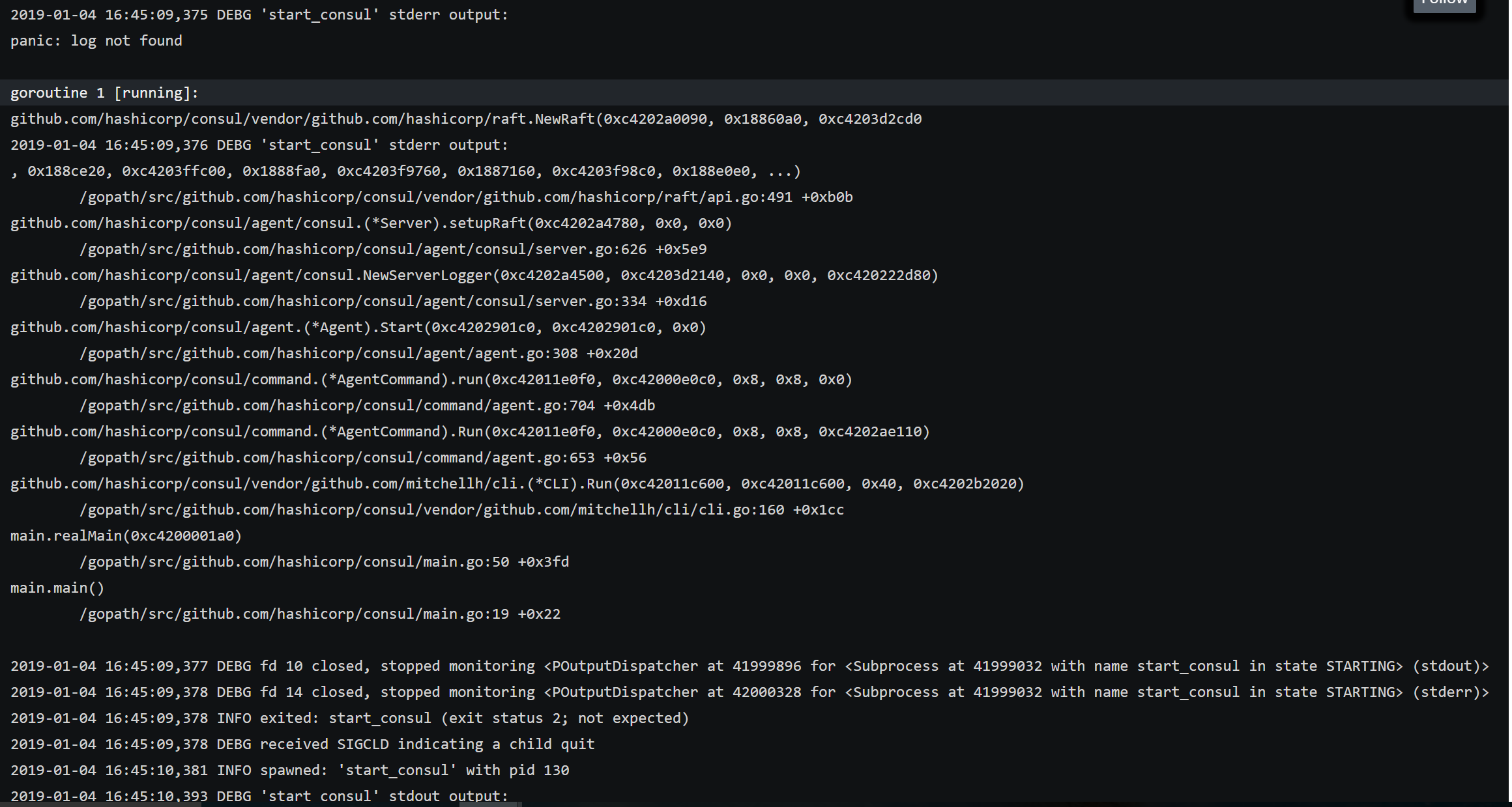
can anyone help us with an alternative other than deleting the raft.db file since we might lose data regarding our cluster state, services registered, KV pairs etc., and also can we downgrade the version from 1.3.0 to 0.8.4 because I see that once we upgrade to version 1.4.0 we cannot downgrade it.
 harika224121
on 4 Jan 2019
harika224121
on 4 Jan 2019
@pearkes can you please suggest any solution for this other then removing the raft.db file since we might lose data
harika224121
on 6 Feb 2019
Small note here removing raft.db fixed the problem with our consul version 1.0.2, However we now noticed that after regenerating the raft.db we can no longer take snapshots.
2019/04/09 13:24:45 [ERR] snapshot: Failed to get meta data to open snapshot: open /opt/evertz/insite/parasite/applications/py-1/data/consul/raft/snapshots/1-1578046-1554830685069/meta.json: no such file or directory
Note we restored to a snapshot at one point and then removed raft.db to fix the panic log not found issue mentioned above.
 GummyDonut
on 15 Apr 2019
GummyDonut
on 15 Apr 2019
How I get this error:
- My Consul instance goes out of disk space.
- After when I clean some log files and free disk space, I tried to start Consul server but get the error:
Failed to start Raft: failed to load any existing snapshots - I go to the Consul data dir and moved the raft/snapshot folder to the raft/snapshot.bk
- Restart Consul server, and get the error:
Starting Consul agent... panic: log not found - After that, I moved all raft folder from raft to the raft.bk and restart Consul server. All works as expected.
If I understand correctly if I have only one Consul node, I will have no problems after these actions, because the Raft protocol responsible for a cluster managing.
 Nmishin
on 27 Jun 2019
Nmishin
on 27 Jun 2019
Hi All,
Apologies for raising a dead topic, but I will close this issue. Consul is now on 1.8 major release, and has had many consistency improvements since < 1.0.
If you are still running into this issue on higher than 1.0, please open a new topic, reference this issue, and provide replication steps with log files.
Thank you all.
 jsosulska
on 28 Jul 2020
jsosulska
on 28 Jul 2020
Related issues
 wargamez
·
4Comments
wargamez
·
4Comments
 atomantic
·
4Comments
atomantic
·
4Comments
 nschoe
·
4Comments
nschoe
·
4Comments
 wing731
·
3Comments
wing731
·
3Comments
 hooksie1
·
3Comments
hooksie1
·
3Comments
Most helpful comment
I just ran into this with Consul 1.0.6, and indeed removing
raft.dbas @hehailong5 said immediately fixed the problem.