Console: Arrow keys not working in Bash on Windows 10
Bash on Windows 10 is a new thing, currently available for beta testing by Windows Insiders only.
Running bash.exe or cmd.exe /C bash from Run dialog (Win + R) directly works fine.
Running bash.exe or cmd.exe /C bash from ConsoleZ seems to work too, but arrow keys do not work.
Expected Behavior
Hitting arrow keys (right, left, up, down, home, end) should allow me to navigate the current line of prompt as well as inside editors like vim, nano, etc.
Actual Behavior
Hitting arrow keys has no effects either on the prompt or inside editors. Inside vim, I can still use j/k to navigate up/down so it's the problem with arrow keys specifically.
Steps to reproduce
- You need to be a Window Insiders (Register at https://insider.windows.com/)
- You need to run Windows 10, build 14316 (hit Win + R and run "winver" to check your build number)
- You need to have Bash on Ubuntu on Windows installed. (See https://blogs.windows.com/windowsexperience/2016/04/06/announcing-windows-10-insider-preview-build-14316/ for instructions)
- Run either cmd.exe, or powershell.exe in ConsoleZ, then run "bash" (C:\WINDOWS\system32\bash.exe to be exact). Type a few characters then try to use arrow keys and you will see.
- Alternative to 4, run C:\WINDOWS\system32\bash.exe directly in ConsoleZ, which will yield the same issue.
- Run bash.exe directly from Win + R to confirm arrow keys work outside of ConsoleZ.
Diagnostic Report
ConsoleZ aero amd64 1.16.1.16068
is elevated? no
UAC prefix "Administrator: "
Tab (active): Bash
View (active): 1. Bash
is elevated? no
Windows console font
font index: 0
face name: Lucida Console
font familly: 54 MODERN vector true type
font weight: 400
font size: width=3 height=5
max window size: cols=154 rows=187
ConsoleZ font
GetFontLanguageInfo returns 262144.
The font contains extra glyphs not normally accessible using the code page.
Monitors 3
+ Flags 1 primary
DeviceID \\?\DISPLAY#MEI96A2#4&1835d135&0&UID265988#{e6f07b5f-ee97-4a90-b076-33f57bf4eaa7}
DeviceKey \Registry\Machine\System\CurrentControlSet\Control\Class\{4d36e96e-e325-11ce-bfc1-08002be10318}\0001
DeviceName \\.\DISPLAY1\Monitor0
DeviceString Surface Display
StateFlags 3
Rect (0,0)x(3000,2000)
Work (0,80)x(3000,2000)
DPI (per monitor: yes) X=192 Y=192
+ Flags 0
DeviceID \\?\DISPLAY#DELA0A6#4&1835d135&0&UID200195#{e6f07b5f-ee97-4a90-b076-33f57bf4eaa7}
DeviceKey \Registry\Machine\System\CurrentControlSet\Control\Class\{4d36e96e-e325-11ce-bfc1-08002be10318}\0002
DeviceName \\.\DISPLAY2\Monitor0
DeviceString Dell U3415W(DisplayPort)
StateFlags 3
Rect (-1878,-1440)x(1562,0)
Work (-1878,-1400)x(1562,0)
DPI (per monitor: yes) X=96 Y=96
+ Flags 0
DeviceID \\?\DISPLAY#DELA0A6#4&1835d135&0&UID208387#{e6f07b5f-ee97-4a90-b076-33f57bf4eaa7}
DeviceKey \Registry\Machine\System\CurrentControlSet\Control\Class\{4d36e96e-e325-11ce-bfc1-08002be10318}\0003
DeviceName \\.\DISPLAY3\Monitor0
DeviceString Dell U3415W(DisplayPort)
StateFlags 3
Rect (1562,-1440)x(5002,0)
Work (1562,-1400)x(5002,0)
DPI (per monitor: yes) X=96 Y=96
System dpi 192
System metrics
SM_CXSMICON 32
SM_CYSMICON 32
SM_CXICON 64
SM_CYICON 64
SM_CXVIRTUALSCREEN 6880
SM_CYVIRTUALSCREEN 3440
SM_CYVIRTUALSCREEN 3440
Settings file C:\Users\duybui\Programs\ConsoleZ\console.xml
<?xml version="1.0"?>
<settings>
<console change_refresh="10" refresh="100" rows="25" columns="80" buffer_rows="500" buffer_columns="0" shell="" init_dir="" start_hidden="0" save_size="0" background_text_opacity="255">
<colors background_text_opacity="255">
<color id="0" r="57" g="57" b="57"/>
<color id="1" r="31" g="91" b="255"/>
<color id="2" r="175" g="255" b="0"/>
<color id="3" r="135" g="255" b="255"/>
<color id="4" r="239" g="41" b="41"/>
<color id="5" r="209" g="138" b="255"/>
<color id="6" r="255" g="135" b="0"/>
<color id="7" r="198" g="198" b="198"/>
<color id="8" r="178" g="178" b="178"/>
<color id="9" r="95" g="175" b="215"/>
<color id="10" r="161" g="219" b="0"/>
<color id="11" r="0" g="215" b="175"/>
<color id="12" r="255" g="75" b="75"/>
<color id="13" r="255" g="78" b="163"/>
<color id="14" r="252" g="233" b="79"/>
<color id="15" r="253" g="253" b="231"/>
</colors>
<cursor style="12" r="255" g="255" b="255"/>
<background type="0" r="48" g="48" b="48">
<image file="" relative="0" extend="0" position="0">
<tint opacity="0" r="0" g="0" b="0"/>
</image>
</background>
</console>
<appearance>
<font name="Fira Code Retina" size="12" bold="0" italic="0" smoothing="3" bold_intensified="0" italic_intensified="0" extra_width="0" ligature="1">
<color use="0" r="0" g="0" b="0"/>
</font>
<window title="ConsoleZ" icon="" use_tab_icon="1" use_console_title="0" show_cmd="1" show_cmd_tabs="1" use_tab_title="1" trim_tab_titles="20" trim_tab_titles_right="0" main_title_format="?U([%u] )?N({%u} )%m?s( - %s)" tab_title_format="%n. ?U([%u] )?N({%u} )%t?s( - %s)"/>
<controls show_menu="0" show_toolbar="0" show_statusbar="0" show_tabs="1" hide_single_tab="1" show_scrollbars="1" flat_scrollbars="0" tabs_on_bottom="0" hide_tab_icons="0" show_searchbar="0"/>
<styles caption="0" resizable="1" taskbar_button="1" border="0" inside_border="2" tray_icon="0" quake_like="0" jumplist="1" integrated_ime="0" quake_animation_time="300" hide_when_inactive="0" per_monitor_dpi="1">
<selection_color r="255" g="255" b="255"/>
<highlight_color r="191" g="191" b="191"/>
</styles>
<position x="-1" y="-1" dock="-1" snap="-1" z_order="0" save_position="0" w="-1" h="-1" save_size="0"/>
<transparency type="0" active_alpha="255" inactive_alpha="255" r="0" g="0" b="0"/>
<fullscreen start_in_fullscreen="0" fullscreen_monitor="0">
<controls show_menu="0" show_toolbar="0" show_searchbar="0" show_statusbar="0" show_tabs="1" hide_single_tab="1" tabs_on_bottom="0" hide_tab_icons="0" show_scrollbars="1"/>
</fullscreen>
</appearance>
<behavior>
<copy_paste copy_on_select="1" clear_on_copy="1" no_wrap="1" trim_spaces="1" copy_newline_char="1" sensitive_copy="1" include_left_delimiter="0" include_right_delimiter="0" left_delimiters=" ([" right_delimiters=" )]" eol_spaces="1" rtf="1"/>
<scroll page_scroll_rows="0"/>
<tab_highlight flashes="3" stay_highligted="1"/>
<close allow_closing_last_view="0" confirm_closing_multiple_views="1"/>
<focus follow_mouse="0"/>
<instance allow_multi="1"/>
<clone use_current_dir="0"/>
<search match_case="0" match_whole_word="0"/>
<runas use_credprov="1"/>
</behavior>
<hotkeys use_scroll_lock="1">
<hotkey ctrl="1" shift="0" alt="0" extended="0" code="83" command="settings"/>
<hotkey ctrl="0" shift="0" alt="0" extended="0" code="112" command="help"/>
<hotkey ctrl="0" shift="0" alt="1" extended="0" code="115" command="exit"/>
<hotkey ctrl="1" shift="0" alt="0" extended="0" code="112" command="newtab1"/>
<hotkey ctrl="1" shift="0" alt="0" extended="0" code="113" command="newtab2"/>
<hotkey ctrl="1" shift="0" alt="0" extended="0" code="114" command="newtab3"/>
<hotkey ctrl="1" shift="0" alt="0" extended="0" code="115" command="newtab4"/>
<hotkey ctrl="1" shift="0" alt="0" extended="0" code="116" command="newtab5"/>
<hotkey ctrl="1" shift="0" alt="0" extended="0" code="117" command="newtab6"/>
<hotkey ctrl="1" shift="0" alt="0" extended="0" code="118" command="newtab7"/>
<hotkey ctrl="1" shift="0" alt="0" extended="0" code="119" command="newtab8"/>
<hotkey ctrl="1" shift="0" alt="0" extended="0" code="120" command="newtab9"/>
<hotkey ctrl="1" shift="0" alt="0" extended="0" code="121" command="newtab10"/>
<hotkey ctrl="1" shift="0" alt="0" extended="0" code="122" command="newtab11"/>
<hotkey ctrl="1" shift="0" alt="0" extended="0" code="123" command="newtab12"/>
<hotkey ctrl="1" shift="0" alt="0" extended="0" code="49" command="switchtab1"/>
<hotkey ctrl="1" shift="0" alt="0" extended="0" code="50" command="switchtab2"/>
<hotkey ctrl="1" shift="0" alt="0" extended="0" code="51" command="switchtab3"/>
<hotkey ctrl="1" shift="0" alt="0" extended="0" code="52" command="switchtab4"/>
<hotkey ctrl="1" shift="0" alt="0" extended="0" code="53" command="switchtab5"/>
<hotkey ctrl="1" shift="0" alt="0" extended="0" code="54" command="switchtab6"/>
<hotkey ctrl="1" shift="0" alt="0" extended="0" code="55" command="switchtab7"/>
<hotkey ctrl="1" shift="0" alt="0" extended="0" code="56" command="switchtab8"/>
<hotkey ctrl="1" shift="0" alt="0" extended="0" code="57" command="switchtab9"/>
<hotkey ctrl="1" shift="0" alt="0" extended="0" code="48" command="switchtab10"/>
<hotkey ctrl="0" shift="0" alt="0" extended="0" code="0" command="switchtab11"/>
<hotkey ctrl="0" shift="0" alt="0" extended="0" code="0" command="switchtab12"/>
<hotkey ctrl="1" shift="0" alt="0" extended="0" code="9" command="nexttab"/>
<hotkey ctrl="1" shift="1" alt="0" extended="0" code="9" command="prevtab"/>
<hotkey ctrl="0" shift="0" alt="0" extended="0" code="0" command="movetableft"/>
<hotkey ctrl="0" shift="0" alt="0" extended="0" code="0" command="movetabright"/>
<hotkey ctrl="1" shift="0" alt="0" extended="0" code="87" command="closetab"/>
<hotkey ctrl="1" shift="0" alt="0" extended="0" code="82" command="renametab"/>
<hotkey ctrl="1" shift="0" alt="0" extended="1" code="34" command="nextview"/>
<hotkey ctrl="1" shift="0" alt="0" extended="1" code="33" command="prevview"/>
<hotkey ctrl="0" shift="0" alt="1" extended="1" code="37" command="leftview"/>
<hotkey ctrl="0" shift="0" alt="1" extended="1" code="39" command="rightview"/>
<hotkey ctrl="0" shift="0" alt="1" extended="1" code="38" command="topview"/>
<hotkey ctrl="0" shift="0" alt="1" extended="1" code="40" command="bottomview"/>
<hotkey ctrl="0" shift="0" alt="0" extended="0" code="0" command="dechsize"/>
<hotkey ctrl="0" shift="0" alt="0" extended="0" code="0" command="inchsize"/>
<hotkey ctrl="0" shift="0" alt="0" extended="0" code="0" command="decvsize"/>
<hotkey ctrl="0" shift="0" alt="0" extended="0" code="0" command="incvsize"/>
<hotkey ctrl="1" shift="1" alt="0" extended="0" code="87" command="closeview"/>
<hotkey ctrl="0" shift="0" alt="0" extended="0" code="0" command="detachview"/>
<hotkey ctrl="0" shift="0" alt="0" extended="0" code="0" command="attach"/>
<hotkey ctrl="1" shift="1" alt="0" extended="0" code="79" command="splithoriz"/>
<hotkey ctrl="1" shift="1" alt="0" extended="0" code="69" command="splitvert"/>
<hotkey ctrl="0" shift="0" alt="0" extended="0" code="0" command="splitswap"/>
<hotkey ctrl="0" shift="0" alt="0" extended="0" code="0" command="clone"/>
<hotkey ctrl="0" shift="0" alt="0" extended="0" code="122" command="fullscreen"/>
<hotkey ctrl="1" shift="0" alt="0" extended="0" code="96" command="zoom100"/>
<hotkey ctrl="1" shift="0" alt="0" extended="0" code="107" command="zoominc"/>
<hotkey ctrl="1" shift="0" alt="0" extended="0" code="109" command="zoomdec"/>
<hotkey ctrl="1" shift="0" alt="0" extended="0" code="71" command="groupall"/>
<hotkey ctrl="1" shift="1" alt="0" extended="0" code="71" command="ungroupall"/>
<hotkey ctrl="1" shift="0" alt="0" extended="0" code="84" command="grouptab"/>
<hotkey ctrl="1" shift="1" alt="0" extended="0" code="84" command="ungrouptab"/>
<hotkey ctrl="0" shift="0" alt="0" extended="0" code="0" command="clear"/>
<hotkey ctrl="1" shift="0" alt="0" extended="1" code="45" command="copy"/>
<hotkey ctrl="1" shift="0" alt="0" extended="0" code="65" command="selectall"/>
<hotkey ctrl="1" shift="0" alt="0" extended="1" code="46" command="clear_selection"/>
<hotkey ctrl="0" shift="1" alt="0" extended="1" code="45" command="paste"/>
<hotkey ctrl="0" shift="0" alt="0" extended="0" code="0" command="paste_selection"/>
<hotkey ctrl="0" shift="0" alt="0" extended="0" code="0" command="stopscroll"/>
<hotkey ctrl="0" shift="0" alt="0" extended="0" code="0" command="textselleft"/>
<hotkey ctrl="0" shift="0" alt="0" extended="0" code="0" command="textselright"/>
<hotkey ctrl="0" shift="0" alt="0" extended="0" code="0" command="textseltop"/>
<hotkey ctrl="0" shift="0" alt="0" extended="0" code="0" command="textselbottom"/>
<hotkey ctrl="0" shift="0" alt="0" extended="0" code="0" command="textselhome"/>
<hotkey ctrl="0" shift="0" alt="0" extended="0" code="0" command="textselend"/>
<hotkey ctrl="0" shift="0" alt="0" extended="0" code="0" command="textselpageup"/>
<hotkey ctrl="0" shift="0" alt="0" extended="0" code="0" command="textselpagedown"/>
<hotkey ctrl="0" shift="0" alt="0" extended="0" code="0" command="colselleft"/>
<hotkey ctrl="0" shift="0" alt="0" extended="0" code="0" command="colselright"/>
<hotkey ctrl="0" shift="0" alt="0" extended="0" code="0" command="colseltop"/>
<hotkey ctrl="0" shift="0" alt="0" extended="0" code="0" command="colselbottom"/>
<hotkey ctrl="0" shift="0" alt="0" extended="0" code="0" command="colselhome"/>
<hotkey ctrl="0" shift="0" alt="0" extended="0" code="0" command="colselend"/>
<hotkey ctrl="0" shift="0" alt="0" extended="0" code="0" command="colselpageup"/>
<hotkey ctrl="0" shift="0" alt="0" extended="0" code="0" command="colselpagedown"/>
<hotkey ctrl="0" shift="0" alt="0" extended="0" code="0" command="scrollrowup"/>
<hotkey ctrl="0" shift="0" alt="0" extended="0" code="0" command="scrollrowdown"/>
<hotkey ctrl="0" shift="0" alt="0" extended="0" code="0" command="scrollpageup"/>
<hotkey ctrl="0" shift="0" alt="0" extended="0" code="0" command="scrollpagedown"/>
<hotkey ctrl="0" shift="0" alt="0" extended="0" code="0" command="scrollcolleft"/>
<hotkey ctrl="0" shift="0" alt="0" extended="0" code="0" command="scrollcolright"/>
<hotkey ctrl="0" shift="0" alt="0" extended="0" code="0" command="scrollpageleft"/>
<hotkey ctrl="0" shift="0" alt="0" extended="0" code="0" command="scrollpageright"/>
<hotkey ctrl="0" shift="0" alt="0" extended="0" code="0" command="find"/>
<hotkey ctrl="0" shift="0" alt="0" extended="0" code="0" command="findnext"/>
<hotkey ctrl="0" shift="0" alt="0" extended="0" code="0" command="findprev"/>
<hotkey ctrl="0" shift="0" alt="0" extended="0" code="0" command="switchtransparency"/>
<hotkey ctrl="1" shift="1" alt="0" extended="0" code="112" command="dumpbuffer"/>
<hotkey ctrl="0" shift="0" alt="0" extended="0" code="0" command="cmdMenu1"/>
<hotkey ctrl="0" shift="0" alt="0" extended="0" code="0" command="cmdMenu2"/>
<hotkey ctrl="0" shift="0" alt="0" extended="0" code="0" command="cmdMenu3"/>
<hotkey ctrl="0" shift="0" alt="0" extended="0" code="0" command="ctrlC"/>
<hotkey ctrl="0" shift="0" alt="0" extended="0" code="0" command="externalcmd1"/>
<hotkey ctrl="0" shift="0" alt="0" extended="0" code="0" command="externalcmd2"/>
<hotkey ctrl="0" shift="0" alt="0" extended="0" code="0" command="externalcmd3"/>
<hotkey ctrl="0" shift="0" alt="0" extended="0" code="0" command="externalcmd4"/>
<hotkey ctrl="0" shift="0" alt="0" extended="0" code="0" command="externalcmd5"/>
<hotkey ctrl="0" shift="0" alt="0" extended="0" code="0" command="externalcmd6"/>
<hotkey ctrl="0" shift="0" alt="0" extended="0" code="0" command="externalcmd7"/>
<hotkey ctrl="0" shift="0" alt="0" extended="0" code="0" command="externalcmd8"/>
<hotkey ctrl="0" shift="0" alt="0" extended="0" code="0" command="externalcmd9"/>
<hotkey ctrl="0" shift="0" alt="0" extended="0" code="0" command="externalcmd10"/>
<hotkey ctrl="0" shift="0" alt="0" extended="0" code="0" command="activate" win="0"/>
</hotkeys>
<mouse>
<actions>
<action ctrl="0" shift="0" alt="0" button="1" name="copy"/>
<action ctrl="0" shift="1" alt="0" button="1" name="select"/>
<action ctrl="0" shift="0" alt="0" button="0" name="select_column"/>
<action ctrl="0" shift="0" alt="0" button="3" name="paste"/>
<action ctrl="1" shift="0" alt="0" button="1" name="drag"/>
<action ctrl="0" shift="0" alt="0" button="4" name="link"/>
<action ctrl="0" shift="0" alt="0" button="2" name="menu"/>
<action ctrl="0" shift="0" alt="0" button="0" name="menu2"/>
<action ctrl="0" shift="0" alt="0" button="0" name="menu3"/>
</actions>
</mouse>
<tabs>
<tab title="PowerShell" use_default_icon="0">
<console shell="powershell -NoProfile -NoExit -File %USERPROFILE%\setup\WindowsPowerShell\Microsoft.PowerShell_profile.ps1" init_dir="" priority="2" run_as_user="0" user="" net_only="0" run_as_admin="0"/>
</tab>
<tab title="PowerShell (admin)" use_default_icon="0">
<console shell="powershell -NoProfile -NoExit -File %USERPROFILE%\setup\WindowsPowerShell\Microsoft.PowerShell_profile.ps1" init_dir="" priority="2" run_as_user="0" user="" net_only="0" run_as_admin="1"/>
</tab>
<tab title="UM" use_default_icon="0">
<console shell=""C:\Program Files\Git\usr\bin\ssh.exe" -A -Y -L 2009:localhost:2009 [email protected]" init_dir="" priority="2" run_as_user="0" user="" net_only="0" run_as_admin="0">
<env var="SSH_AUTH_SOCK" value="/TMP/SSH-NHZMWTU2CFOT/AGENT.13856" check="1"/>
<env var="SSH_AGENT_PID" value="16932" check="1"/>
</console>
</tab>
<tab title="Bash" use_default_icon="1">
<console shell="bash" init_dir="" priority="2" run_as_user="0" user="" net_only="0" run_as_admin="0"/>
</tab>
<tab title="ConsoleZ" use_default_icon="0">
<console shell="" init_dir="" priority="2" run_as_user="0" user="" net_only="0" run_as_admin="0"/>
</tab>
</tabs>
<external_commands>
</external_commands>
</settings>
 khuongduybui
All 25 comments
Please follow issue creation instructions, otherwise this issue will be closed.
 cbucher
on 7 Apr 2016
cbucher
on 7 Apr 2016
I added the missing info.
khuongduybui
on 7 Apr 2016
I can confirm this under win10, arrow keys not working with power shell
 sean1985zc
on 4 Jun 2016
sean1985zc
on 4 Jun 2016
Concerning BashOnWindows issue, we can only hope a fix from Microsoft...
https://github.com/Microsoft/BashOnWindows/issues/111
(@sean1985zc PowerShell can not be affected by the current issue...)
cbucher
on 7 Jun 2016
I've also run into this issue. It will likely be more common now, since Windows bash was recently released to the public.
 GinoF
on 4 Aug 2016
GinoF
on 4 Aug 2016
Same bug here when add the bash directly in a tab of ConsoleZ.
Thanks for help.
 johannpinson
on 5 Aug 2016
johannpinson
on 5 Aug 2016
The way "Bash on Ubuntu on Windows" is launched change nothing to the issue.
There is a bug in implementation of the virtual terminal input handling in the console host (Windows Subsystem for Linux).
https://github.com/Microsoft/BashOnWindows/issues/111#issuecomment-232733125
This is always a beta. The issue is tracked by Microsoft development team. Hope the fix come quickly.
Microsoft vscode project seems to encounter the same issue. I think this can have a good impact on issue priority :wink:
cbucher
on 6 Aug 2016
The original Console2 2.0 beta148 x64 https://sourceforge.net/projects/console/ dose not have this arrow keys issue, but it is not hi-dpi compatible application.
I hope this will help you.
 nobk
on 8 Aug 2016
nobk
on 8 Aug 2016
The original Console2 doesn't use WriteConsoleInput API but simply forward window message (WM_CHAR, ...) to the hidden console window.
Forwarding window message doesn't work with:
- mixing elevated/normal applications
- remote calling
- grouping consoles (dead chars)
cbucher
on 19 Aug 2016
Too bad because it seems that is a problem from Microsoft/Ubuntu/Bash but I don't think that they will solve the problem because bash don't works with WriteConsoleInput and nobody will change this.
I got you cbucher but the only solution is probably to do like ConEmu and to add a workaround to ConsoleZ
 pinonpierre
on 6 Oct 2016
pinonpierre
on 6 Oct 2016
Any updates?
khuongduybui
on 12 Nov 2016
Also having this issue with ConsoleZ 1.17.2.
 abluescarab
on 8 Dec 2016
abluescarab
on 8 Dec 2016
+1
Console 2 isn't affect by this.
 SirTimmyTimbit
on 20 Dec 2016
SirTimmyTimbit
on 20 Dec 2016
People, if you really want this bug be fixed you should massively ask about progress here: https://github.com/Microsoft/BashOnWindows/issues/111
It seems Visual Studio Code will use winpty as workaround.
Microsoft has not planned to fix this bug because too few people has complained and some applications wrote workaround.
If you want Microsoft developers change their mind, show them you care about this bug!
I don't know if workarounds are 100% functional...
cbucher
on 2 Feb 2017
Can you implement a workaround in the meantime? Please see https://github.com/Microsoft/BashOnWindows/issues/111#issuecomment-234460063 ... thanks
 SidShetye
on 20 May 2017
SidShetye
on 20 May 2017
You can use WSL Bridge. This is the "workaround" used by other term/console wrapper applications.
WSL Bridge releases a Windows executable and a back-end WSL executable. These executables communicate with TCP connection. This tool simply bypasses Microsoft work! (WSL integration with Windows console). Personally, I don't consider this is a good workaround and I cannot understand Microsoft's answer: "we don't know if we will fix this bug because a workaround exists"
You can also use a local SSH session.
Microsoft will fix a feature bug only if people massively insist (for example, by commenting here: https://github.com/Microsoft/BashOnWindows/issues/111).

cbucher
on 24 May 2017
I came here while looking for anything related to following:
Arrow keys stopped to work for history navigation in PowerShell opened in ConsoleZ - they do scrolling instead.
F8 still works for history. And arrows work in underlying PS window if shown.
Is this the same issue or should I open separate one?
If they made it work in vscode somehow, it might be time to do some changes too.
 KillyMXI
on 10 Sep 2017
KillyMXI
on 10 Sep 2017
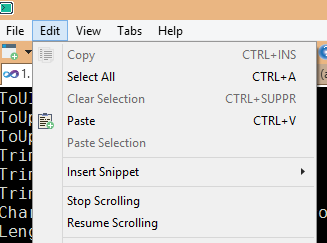
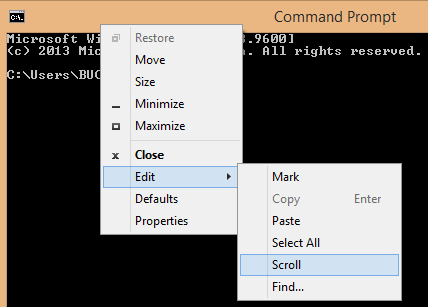
@KillyMXI It has nothing to do with this issue. You activated scroll lock mode.
cbucher
on 11 Sep 2017
That was it. Although I can't make it reproducible with these menu items.
Solved by turning Scroll Lock off from osk.exe - my laptop has no dedicated key.
Now I'm puzzled how it got turned on - I can't find any Fn+ combination for Scroll Lock either.
Thanks and sorry for bothering with not an actual issue.
KillyMXI
on 11 Sep 2017
Good News.
The Microsoft patch will be available in any build insider of Windows 10 with a version higher than 17017 (so it is not in the Fall Creators Update).
cbucher
on 20 Oct 2017
Keypress doesn't work in Git Bash for me also. But it works fine with ConEmu64 (https://conemu.github.io/) on Windows 10.
 ghost
on 29 Mar 2018
ghost
on 29 Mar 2018
It has nothing to do with this issue. You activated scroll lock mode.
Thank you @cbucher for helping with PEBCAK. I had run into this "issue" a couple of times forgot about the scroll lock key, as it also affects the arrow keys.
 cruzzer
on 28 Apr 2018
cruzzer
on 28 Apr 2018
For people following this. The Spring Creators update https://www.microsoft.com/en-us/software-download/windows10 seems to fix this issue.
It's not GA yet but if you can download and install it manually.
 opsydev
on 1 May 2018
opsydev
on 1 May 2018
Yay! Finally we can close this issue.
Took only just 2 years :(
 VarunAgw
on 2 May 2018
VarunAgw
on 2 May 2018
Confirm seems to work in 1803 with an oldish ver of Console
 ericblade
on 2 May 2018
ericblade
on 2 May 2018
Related issues
 FredoVelcro-zz
·
22Comments
FredoVelcro-zz
·
22Comments
 Adambean
·
3Comments
Adambean
·
3Comments
 davidknaack
·
15Comments
davidknaack
·
15Comments
 rramsey
·
3Comments
rramsey
·
3Comments
 MarcinOrlowski
·
9Comments
MarcinOrlowski
·
9Comments
Most helpful comment
Good News.
The Microsoft patch will be available in any build insider of Windows 10 with a version higher than 17017 (so it is not in the Fall Creators Update).