Connected-react-router: Switch not updating Route when route change occurs
If Switch is never re-rendered, it doesn't update which causes it to not update which Route component it should render.
When I used react-router-redux, I had to wrap my components with react-redux's connect function like so:
import { connect } from 'react-redux'
import { createSelector } from 'reselect'

import {
  Redirect as DisconnectedRedirect,
  Route as DisconnectedRoute,
  Switch as DisconnectedSwitch,
} from 'react-router-dom'

const mapStateToProps = (
  createSelector(
    ({ router }) => router,
    router => ({ ...router }),
  )
)

export const Redirect = connect(mapStateToProps)(DisconnectedRedirect)
export const Route = connect(mapStateToProps)(DisconnectedRoute)
export const Switch = connect(mapStateToProps)(DisconnectedSwitch)
While I don't have to do this with connected-react-router for most cases, I do have to do it when Switch is wrapped in a component that never updates, meaning, it never causes Switch to re-render.
If I use the Switch component from my previous implementation, it works fine.
Example to reproduce:
import PropTypes from 'prop-types'
import { Component } from 'react'

export class NeverRerender extends Component {
  static propTypes = {
    children: PropTypes.node.isRequired,
  }

  shouldComponentUpdate() {
    return false
  }

  render() {
    return this.props.children
  }
}

export default NeverRerender
Wrap Switch in this component. It will not update on route changes.
For example:
<NeverRerender>
  <Switch>
    <Route
      component={LoginWidget}
      path="/login"
    />

    <Redirect to="/login" />
  </Switch>
</NeverRerender>
In this example, if I go to /login, it works fine. If I go to /, then it redirects to /login, but then the LoginWidget never loads because Switch isn't re-rendered.
 Sawtaytoes
All 12 comments
I'm facing on similar issue. In my case, it is not rendering component by changing path with replace in redux action.
 djKooks
on 23 Aug 2018
djKooks
on 23 Aug 2018
@djKooks Does yours work with the solution I provided which wraps them in connect?
Sawtaytoes
on 23 Aug 2018
@Sawtaytoes oh, no. It seems my problem is bit different with yours...
djKooks
on 24 Aug 2018
Just faced the same issue.
The solution seems to be to just map the location to your props.
export default connect((state) => {
    return {
        location: state.router.location.pathname
    }
})(App);
App then can include Switch and Route and will be rerenderd when state.router.location.pathname changes
 thereapman
on 24 Aug 2018
thereapman
on 24 Aug 2018
I also faced this issue. @thereapman simple fix worked for me.
 ross-weir
on 25 Aug 2018
ross-weir
on 25 Aug 2018
That's the same solution I presented originally. It's a workaround for an issue with connected-react-router
Sawtaytoes
on 25 Aug 2018
@thereapman , is it not affecting performance?
 goonerDp
on 29 Aug 2018
goonerDp
on 29 Aug 2018
@goonerDp not 100% sure. But basically when your location won't change the component also should not re-render. I think this is the "most-proper" reduxy way to do it.
thereapman
on 30 Aug 2018
I found that problem lies in the order I used connect with withRouter
not working
connect(mapStateToProps))(withRouter(MyComponentWithSwitch))
working
withRouter(connect(mapStateToProps))(MyComponentWithSwitch))
 3plusalpha
on 9 Oct 2018
3plusalpha
on 9 Oct 2018
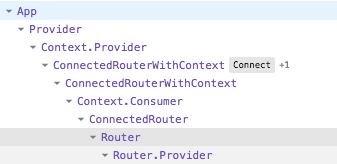
Hum, I think I made it work without a custom connect by just removing the <Router> component from the up-tree. I know that it's in opposition with the doc (edit : maybe not, see the following mention), but I saw the <ConnectedRouter> is already rendering it and it has itself the redux connection.
I'm new to this component, but what I think to be a strange intrication (two <Router.Provider> ?) of Components is removed. But on a possible side effect <BrowserRouter> is gone.
It still seems to work on my app. Looking forward your opinions on this.
From

To
 challet
on 17 Dec 2019
challet
on 17 Dec 2019
As per this SO answer:
Changing from this:
    <Switch>
      <Route path="/">
        <Welcome />
      </Route>
      <Redirect to="/" />
    </Switch>
To this:
    <Switch>
      <>
        <Route path="/">
          <Welcome />
        </Route>
        <Redirect to="/" />
      </>
    </Switch>
... worked for me.
I was trying to implement a basic fallback redirect for any paths not explicitly specified, so random paths like http://localhost:3000/askfjasdf would redirect to http://localhost:3000. For some reason adding the fragment as a top level child of <Switch> did the trick.
 adamcaron
on 14 Aug 2020
adamcaron
on 14 Aug 2020
It's been a long time since I last used connected-react-router. Closing because I can't verify fixes anymore.
Sawtaytoes
on 10 Mar 2021
Related issues
 tonoslav
·
4Comments
tonoslav
·
4Comments
 preciselywilliam
·
4Comments
preciselywilliam
·
4Comments
 Guymestef
·
5Comments
Guymestef
·
5Comments
 alexseitsinger
·
3Comments
alexseitsinger
·
3Comments
 Hardtack
·
3Comments
Hardtack
·
3Comments
Most helpful comment
Just faced the same issue.
The solution seems to be to just map the location to your props.
Appthen can includeSwitchandRouteand will be rerenderd whenstate.router.location.pathnamechanges