Issue
Recently updated to version v1.11.5. After this update, I've noticed that RAM usage will be negative when using the $mem variable and other memory-dependent functions such as the usage graph as seen below which did not occur in prior versions.

Information
OS: Arch Linux
Package: conky-nvidia
Version: conky 1.11.5_pre
Relevant configuration to produce the image above:
conky.config = {
--========================================================================
background = true,
update_interval = 2,
-- Info Settings
cpu_avg_samples = 2,
net_avg_samples = 2,
double_buffer = true,
no_buffers = true,
format_human_readable = true,
-- Window Settings
own_window = true,
own_window_type = 'desktop',
own_window_argb_visual = true,
own_window_argb_value = 0,
own_window_hints = 'undecorated,below,sticky,skip_taskbar,skip_pager',
gap_x = 1300,
gap_y = 0,
minimum_width = 600,
maximum_width = 600,
border_inner_margin = 40,
border_outer_margin = 0,
draw_graph_borders = true,
alignment = 'top_right',
-- Display Settings
use_xft = true,
font = 'Ubuntu Mono:regular:size=10',
default_color = '#FFFFFF',
own_window_colour = '#000000',
-- Local Variables
color0 = 'green',
color1 = 'gray',
color2 = '#1793D1',
color3 = 'yellow',
color4 = 'red',
--========================================================================
};
conky.text = [[
${goto 50}${font FontAwesome}${font}${voffset -2} ${mem}/${memmax} ( ${memperc} % ) ${color2}|${color} ${font FontAwesome}${font}${voffset -2} ${swapperc}% ${goto 310}${swapbar 7,305}
${goto 60}${memgraph 30,555 AAF5D0 00B35B}
${goto 40}${color2}${hr 2}${color}
]];
Logs don't see anything wrong as there are no errors so I don't think they're necessary here.
 leogx9r
All 41 comments
I'm also having this problem.
OS: Arch Linux
Package: conky
Version: conky 1.11.5_pre

Config:
conky.config = {
    alignment = 'top_left',
    background = false,
    border_width = 1,
    cpu_avg_samples = 2,
    default_color = 'white',
    default_outline_color = 'white',
    default_shade_color = 'white',
    double_buffer = true,
    draw_borders = false,
    draw_graph_borders = true,
    draw_outline = false,
    draw_shades = false,
    use_xft = true,
    font = 'DejaVu Sans Mono:size=9',
    gap_x = 10,
    gap_y = 10,
    minimum_height = 5,
    minimum_width = 5,
    net_avg_samples = 2,
    no_buffers = true,
    out_to_console = false,
    out_to_stderr = false,
    extra_newline = false,
    own_window = true,
    own_window_class = 'Conky',
    own_window_type = 'normal',
    own_window_hints = 'undecorated,below,sticky,skip_taskbar,skip_pager',
    own_window_transparent = false,
    stippled_borders = 0,
    update_interval = 1.0,
    uppercase = false,
    use_spacer = 'right',
    show_graph_scale = false,
    show_graph_range = false,
    temperature_unit = "fahrenheit",
    color0 = "77ff00",
    color1 = "64ed95",
    color2 = "00007f"
}

conky.text = [[
${color0}RAM:  ${color1}$memperc%$alignc$mem/$memmax
${membar 9}
]]
 DaruSupaHaka
on 15 Aug 2019
DaruSupaHaka
on 15 Aug 2019
I have this issue too.
OS: ArchLinux
Package: conky (official repo)
Version: 1.11.5-1
WM: OpenBox
DM: LightDM
This config file produce the bug:
conky.config = {
    background = true,
    double_buffer = true,

    alignment = 'top_left',

    border_width = 1,
    cpu_avg_samples = 2,
    default_color = 'white',
    default_outline_color = 'white',
    default_shade_color = 'white',
    draw_borders = false,
    draw_graph_borders = true,
    draw_outline = false,
    draw_shades = false,

    gap_x = 10,
    gap_y = 50,
    net_avg_samples = 2,
    no_buffers = true,
    out_to_console = false,
    out_to_stderr = false,
    extra_newline = false,

    own_window = true,
    own_window_type = 'override',
    own_window_transparent = true,
    own_window_colour = '#000000',
    own_window_argb_visual = false,
    own_window_argb_value = 0,
    own_window_hints = 'undecorated,below,sticky,skip_taskbar,skip_pager',

    maximum_width = 250,
    stippled_borders = 0,
    update_interval = 1,
    uppercase = false,
    use_spacer = 'none',

    show_graph_scale = false,
    show_graph_range = false,

    use_xft = true,
    xftalpha = 0.1,
    font = 'Droid Sans:size=12',
    color0 = 'white',
    color1 = '#EAEAEA',
    color2 = '#FFA300',
    color3 = 'grey',
};

conky.text = [[
# Process
${color2}CPU ${color0}${alignr}${cpu cpu0}%
${cpubar cpu0 5,250}
${top name 1} ${alignr} ${top cpu 1}%
${top name 2} ${alignr} ${top cpu 2}%
${top name 3} ${alignr} ${top cpu 3}%
${top name 4} ${alignr} ${top cpu 4}%
${top name 5} ${alignr} ${top cpu 5}%
${top name 6} ${alignr} ${top cpu 6}%
${top name 7} ${alignr} ${top cpu 7}%
${top name 8} ${alignr} ${top cpu 8}%
${top name 9} ${alignr} ${top cpu 9}%
${top name 10} ${alignr} ${top cpu 10}%

${color2}RAM ${color0}${alignr}${mem}
${membar 5,250}
${top_mem name 1} ${alignr} ${top_mem mem_res 1}
${top_mem name 2} ${alignr} ${top_mem mem_res 2}
${top_mem name 3} ${alignr} ${top_mem mem_res 3}
${top_mem name 4} ${alignr} ${top_mem mem_res 4}
${top_mem name 5} ${alignr} ${top_mem mem_res 5}
${top_mem name 6} ${alignr} ${top_mem mem_res 6}
${top_mem name 7} ${alignr} ${top_mem mem_res 7}
${top_mem name 8} ${alignr} ${top_mem mem_res 8}
${top_mem name 9} ${alignr} ${top_mem mem_res 9}
${top_mem name 10} ${alignr} ${top_mem mem_res 10}

# Neofetch
${voffset 120}
${color2}${font Source Code Pro:size=11}${exec neofetch --stdout --cpu_cores physical --cpu_speed off --cpu_temp off --disable theme icons memory shell term gpu}
]]
However, if i separate that part and remove some lines the problem disappears.
conky.config = {
    use_xft = true,
    xftalpha = 0.1,
    update_interval = 1,
    total_run_times = 0,

    alignment = 'top_left',
    gap_x = 300,
    gap_y = 300,

    own_window = true,
    own_window_type = 'override',
    own_window_transparent = true,
    own_window_hints = 'undecorated,below,sticky,skip_taskbar,skip_pager',
    double_buffer = true,
};

conky.text = [[
${color2}RAM ${color0}${alignr}${mem}
${membar 5,250}
]];
This image doesn't show negative value, but I believe it is the same problem. I will try a reboot to see if I can take another screenshot with negative value.
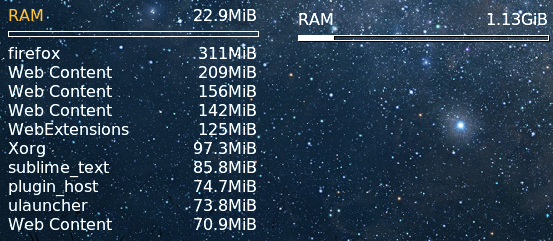
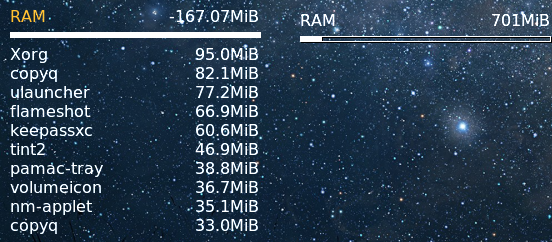
Update: Got the image! Steps to get this on my computer:
- Start the computer.
- Run Sublime Text then close it, now the number goes negative. In fact, closing any program will result in incorrect number, but I find out that closing Sublime Text results in more error compared to closing GNOME Terminal, so I guess the number displayed is somehow related to the memory freed during that time slice.
 01885404983
on 15 Aug 2019
01885404983
on 15 Aug 2019
I'm also have similar issue
 webcaptcha
on 15 Aug 2019
webcaptcha
on 15 Aug 2019
I'm experiencing this same issue after updating - ~linked here is a public GitLab snippet showing a screenshot and the configuration in use.~
I note that the RAM flicks between being negative and non-negative for me - ~as can be seen by the histograph at the very top of the linked screenshot.~
OS: Arch Linux 5.2.8-arch1-1-ARCH
Package: conky 1.11.5-1
_EDIT [23-Dec-2019] - Strikeouts added to reflect snippet no longer being available._
 Kage-Yami
on 15 Aug 2019
Kage-Yami
on 15 Aug 2019
I have the exact same setup as @01885404983 , even the same theme.
RAM appears to flick between 150mb and 650mb with each tick according to conky.
This occurred for me on the upgrade path of 1.11.4-1 -> 1.11.5-1 .
A memory-related commit between bfc43cfe (good) and c6b9d2ed (bad) has occurred.
 Arffeh
on 16 Aug 2019
Arffeh
on 16 Aug 2019
Finally had some time to look at this.
Regression was introduced in PR https://github.com/brndnmtthws/conky/pull/871
I've reverted the two commits ( ba33f9a & a439333 ) from that in the v1.11.5 code and confirmed it's working.
```diff
diff --git a/src/common.cc b/src/common.cc
index 9f15602a..4167c37c 100644
--- a/src/common.cc
+++ b/src/common.cc
@@ -293,6 +293,12 @@ void update_stuff() {
/* if you registered a callback with conky::register_cb, this will run it */
conky::run_all_callbacks();
+
- /* XXX: move the following into the update_meminfo() functions? */
- if (no_buffers.get(*state)) {
- info.mem -= info.bufmem;
- info.memeasyfree += info.bufmem;
- }
}
/* Ohkie to return negative values for temperatures */
diff --git a/src/linux.cc b/src/linux.cc
index 57760fac..09ad75e7 100644
--- a/src/linux.cc
+++ b/src/linux.cc
@@ -227,10 +227,7 @@ int update_meminfo(void) {
full or non-present, OOM happens. Therefore this is the value users want to
monitor, regarding their RAM.
*/
- if (no_buffers.get(*state)) {
- info.mem -= info.bufmem;
- info.memeasyfree += info.bufmem;
- }
+
fclose(meminfo_fp);
return 0;
}
````
The only problem is this fix naturally will reintroduce the bug #860 so an alternative method will be required. For now I've just applied this patch prior to building to resolve the issue on my end.
leogx9r
on 16 Aug 2019
I've been spending some time trying to get a grasp of how information is updated and what functions are being called per interval. The problem is that some parts of the code are handling things in a 'classic' way by calling certain specific functions compared to having all the information updated roughly once per interval. It seems like an errant call to update_meminfo() is instead clobbering the values in unexpected ways due to multi-threading.
I made the ridiculously simple change in def5940 with the hopes that this will prevent it from happening. I tested it with some of the configuration options that everyone else is running in this thread and it seems to rectify the problem, but I would like some other people to test it to see if this isn't the case.
 DeDeDeDeDestruction
on 17 Aug 2019
DeDeDeDeDestruction
on 17 Aug 2019
@CtrlSequence Had some time to test your fix https://github.com/CtrlSequence/conky/commit/def59409d5fb48ed97b198875fe66e24dfe28e43 and I've confirmed it also works.
leogx9r
on 17 Aug 2019
I tried cherry-pick commit def59409d5fb48ed97b198875fe66e24dfe28e43 on top of release 1.11.5. It seems eliminated the negative RAM. However, RAM usage still jumping around between right and wrong values.
Not a complete fix.
 truongan
on 19 Aug 2019
truongan
on 19 Aug 2019
However, RAM usage still jumping around between right and wrong values.
Not a complete fix.
I have a couple of questions:
- How wrong are the values?
- How often does it jump? Every update interval? Random intervals?
- What configuration options are you using?
DeDeDeDeDestruction
on 19 Aug 2019
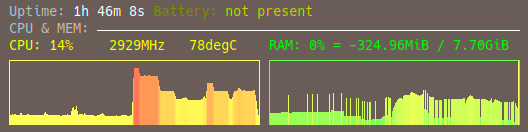
cpugraph and memgraph when compiling
the jump seems random
 pingplug
on 21 Aug 2019
pingplug
on 21 Aug 2019
@pingplug Your RAM value is showing a negative number. Did you try def5940?
If so, what configuration options are you using?
DeDeDeDeDestruction
on 21 Aug 2019
However, RAM usage still jumping around between right and wrong values.
Not a complete fix.I have a couple of questions:
* How wrong are the values?

* How often does it jump? Every update interval? Random intervals?

* What configuration options are you using?
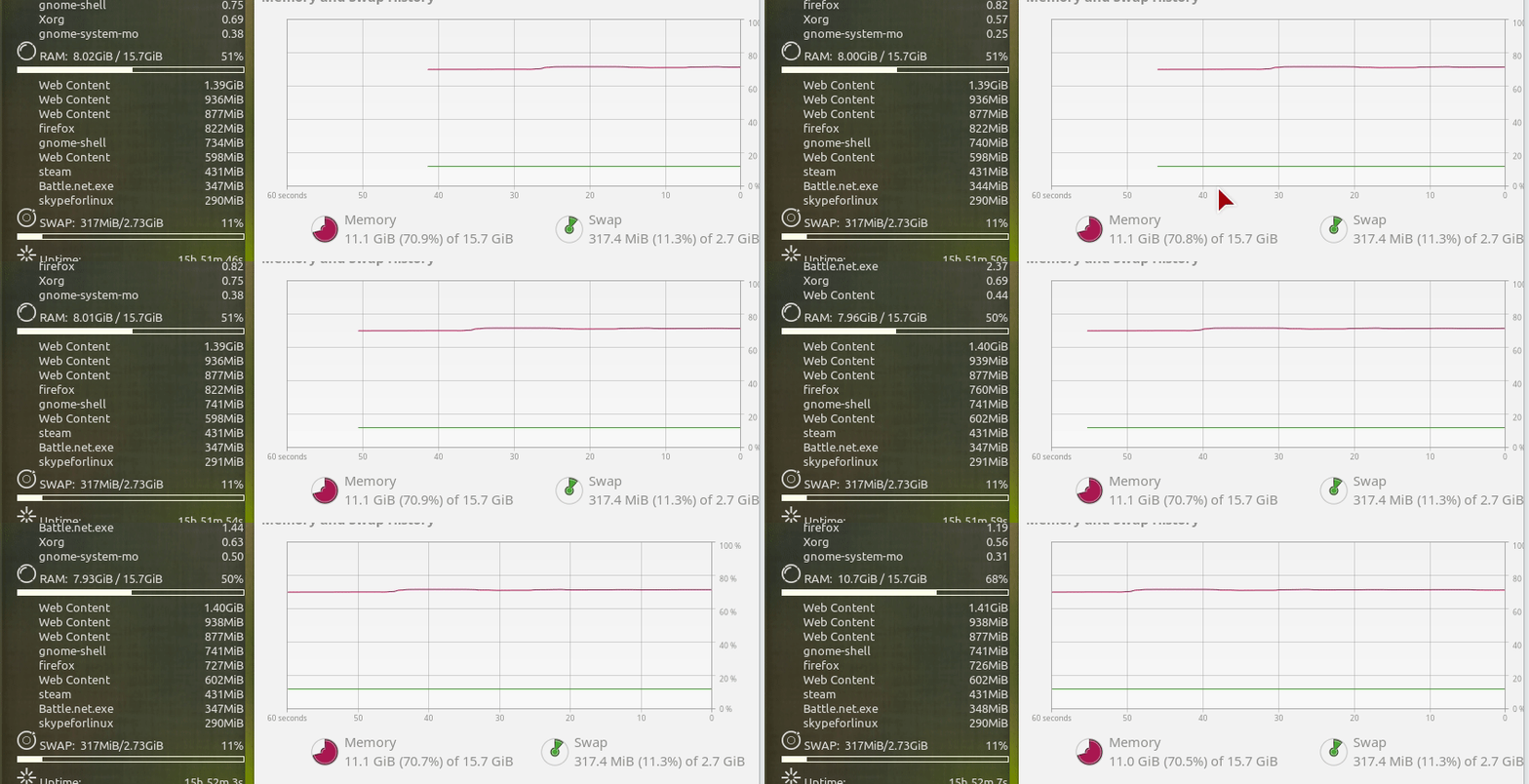
Hi, sorry for the long wait. The jump seems random, thus hard to describe. Therefore it took me a few days to prepare a screen capture. You can see too jump in the attached gif with about 2GiB of wrong memory usage value compare to the report by gnome-system-monitor:
truongan
on 21 Aug 2019
And here is the text in my configuration
update_interval 1
${GOTO 20}${font StyleBats:size=18}g${font} RAM: $alignc $mem / $memmax $alignr $memperc%
${GOTO 20}${membar}
${GOTO 20}        ${top_mem name 1}${alignr}${top_mem mem_res 1}
${GOTO 20}        ${top_mem name 2}${alignr}${top_mem mem_res 2}
${GOTO 20}        ${top_mem name 3}${alignr}${top_mem mem_res 3}
${GOTO 20}        ${top_mem name 4}${alignr}${top_mem mem_res 4}
${GOTO 20}        ${top_mem name 5}${alignr}${top_mem mem_res 5}
@truongan I might have an idea of what's going on, and I was wondering if you could help me out with it since unfortunately my WM is not being to kind to running out_to_x at the moment:
If you could find out roughly the value that RAM jumps to, and then try running conky with no_buffers = false and seeing if it's the same as the spike.
I have a suspicion that I can't quite confirm on my end.
DeDeDeDeDestruction
on 22 Aug 2019
@truongan I think I might've misunderstood the gif: I was thinking that 7-8GiB of RAM was the correct number, not 11GiB (as displayed in gnome-system-monitor), and that the jump was up to 11GiB. I'm having trouble recreating the problem on my end in either instance, however.
In the meantime, I tried an alternative to keep the calculations from modifying the information structure variables directly within the update_meminfo() function, which I'm hoping will solve this problem overall (I feel stupid for not considering this in the first place...). I'm really hoping this https://github.com/brndnmtthws/conky/pull/878/commits/d405b217cf5edc795a92101d161defa46614ab86 works.
DeDeDeDeDestruction
on 22 Aug 2019
@truongan I think I might've misunderstood the gif: I was thinking that 7-8GiB of RAM was the correct number, not 11GiB (as displayed in gnome-system-monitor), and that the jump was up to 11GiB. I'm having trouble recreating the problem on my end in either instance, however.
In the meantime, I tried an alternative to keep the calculations from modifying the information structure variables directly within the update_meminfo() function, which I'm hoping will solve this problem overall (I feel stupid for not considering this in the first place...). I'm really hoping this d405b21 works.
I will try it out at the latest.
I also noticed that the bug doesn't appear on my laptop where I install Archlinux default conky package (with no nvidia support). Hope that info helps somehow.
truongan
on 22 Aug 2019
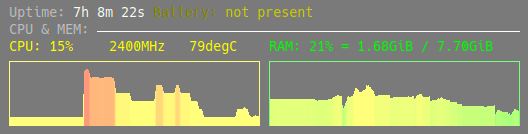
@CtrlSequence with def5940 it works
pingplug
on 26 Aug 2019
@pingplug d405b217cf5edc795a92101d161defa46614ab86 works too? I don't doubt it. Just verifying.
 lasers
on 27 Aug 2019
lasers
on 27 Aug 2019
I must have made some mistake with the uninstalling in my previous test. because not only d405b217cf5edc795a92101d161defa46614ab86 work for me now but def59409d5fb48ed97b198875fe66e24dfe28e43 work as well. All seems well, thank you @CtrlSequence
truongan
on 27 Aug 2019
Closed via #878.
lasers
on 27 Aug 2019
Can there be a release made for this bug fix? It's been there for a while and would be nice to have it fixed when I upgrade my packages.
 stevenxxiu
on 7 Sep 2019
stevenxxiu
on 7 Sep 2019
(Contents moved to below comment due to limitations with email replies.)
Kage-Yami
on 7 Sep 2019
If you're on Arch and don't mind an AUR package, then conky-nvidia has this
patched in already.
Scratch that, the package has been removed from AUR, presumably because the official Arch package enables NVIDIA integration now.
Kage-Yami
on 20 Sep 2019
Not sure why this issue is closed, but I still have this issue. Manjaro Cinnamon, Conky version 1.11.5-2.
 Sojiro84
on 27 Sep 2019
Sojiro84
on 27 Sep 2019
@Sojiro84 You can use my conky-git PKGBUILD in the meantime. The AUR version hasn't been updated since '15 (It's been almost 20 years since the turn of the millennia, I think we can abbreviate the year now, eh?) and is missing a lot.
 yochananmarqos
on 28 Sep 2019
yochananmarqos
on 28 Sep 2019
Why not just release new version? So many questions about this issue and still no release.
webcaptcha
on 28 Sep 2019
Is there any downside to run conky as it is right now (v1.11.5)? Or is it preferable to wait until a new version is released?
 yssmcl
on 9 Oct 2019
yssmcl
on 9 Oct 2019
There is a another issue about the same problem which still open #886
 croxarens
on 11 Oct 2019
croxarens
on 11 Oct 2019
I have the same problem on Manjaro
 hamdyaea
on 8 Nov 2019
hamdyaea
on 8 Nov 2019
Same problem on Manjaro. Jumping around, also with negative values.
 shinanqu
on 10 Nov 2019
shinanqu
on 10 Nov 2019
Indeed, Manjaro has the same problem.(still...)
 HerrDierk
on 11 Nov 2019
HerrDierk
on 11 Nov 2019
I solved it, saw the solution somewhere, sorry, not sure where exactly. But you need to uninstall everything conky related. Then install
conky-git and the conky manager. Now it should work. At least it worked for me :-) Good luck!
shinanqu
on 11 Nov 2019
I solved it, saw the solution somewhere, sorry, not sure where exactly. But you need to uninstall everything conky related. Then install
conky-git and the conky manager. Now it should work. At least it worked for me :-) Good luck!
Correct, I have read it on the Manjaro forum. Install the git-version and everything is fine.
HerrDierk
on 11 Nov 2019
Im not sure why this is closed either, running v1.11.5-5 (conky-lua-nv) and still have this issue...
 thevik
on 13 Dec 2019
thevik
on 13 Dec 2019
Im not sure why this is closed either, running v1.11.5-5 (conky-lua-nv) and still have this issue...
Because this issue has been resolved. No new release with this fix has been created so distros can't actually use the fix if they're not using the git repo but a tag to build. If you build directly from the source, it'll work just fine.
leogx9r
on 17 Dec 2019
Whoops! I should have read the 2 comments above my own with more clarity. Thank you!
thevik
on 17 Dec 2019
I have this issue too. A release would be nice.
Version is 1.11.5_pre
 boratanrikulu
on 30 Dec 2019
boratanrikulu
on 30 Dec 2019
I also have the latest release v1.11.5 and instead of going to negative value, my RAM usage flickers down to 3GB from 17GB out of 32GB of total RAM.
I would like see a release sometime soon so it covers this commit.
 0Ky
on 11 Jan 2020
0Ky
on 11 Jan 2020
I'm on manjaro and have the latest release conky 1.11.5_pre and RAM is negative value. It worked perfectly fine when I set it up but now after letting it run for hours it started to do this.
EDIT: Uninstalled conky via pacman -Rsn and installed conky-git via pikaur and now it works :).
 SmileyBoy321
on 29 Mar 2020
SmileyBoy321
on 29 Mar 2020
I'm on manjaro and have the latest release conky 1.11.5_pre and RAM is negative value. It worked perfectly fine when I set it up but now after letting it run for hours it started to do this.
EDIT: Uninstalled conky via pacman -Rsn and installed conky-git via pikaur and now it works :).
This is how I fixed my issue ... until I switched to conky-cli and it reappeared. Even contacted the package maintainer and pointed him at the problem but he was unwilling to do anything about it because the fix isn't in it's own revision (no change to version number). So I wrote my own script to monitor ram use and call it instead.
 robertpartridge
on 31 Mar 2020
robertpartridge
on 31 Mar 2020
Related issues
 Microcrap
·
4Comments
Microcrap
·
4Comments
 moyamo
·
3Comments
moyamo
·
3Comments
 zero77
·
3Comments
zero77
·
3Comments
 sdban
·
4Comments
sdban
·
4Comments
 ghost
·
4Comments
ghost
·
4Comments
Most helpful comment
Why not just release new version? So many questions about this issue and still no release.