Conky: Display of the Network Speed is incorrect
Distro: Archlinux
Kernel: 4.14.71-1-vfio-lts
Affected Conky Version: conky-1.11.4-1-x86_64.pkg.tar.xz
Issue
After the last update of the package
conky-1.11.3-1-x86_64.pkg.tar.xz => conky-1.11.4-1-x86_64.pkg.tar.xz
the Display of the Network Speed from the active Network Interface doesn't work as expected.
It should show the maximum Downloadspeed / Uploadspeed in MiB, instead it shows a random value of Bytes.
Information
network interface setup:
ip a

1: lo: <LOOPBACK,UP,LOWER_UP> mtu 65536 qdisc noqueue state UNKNOWN group default qlen 1000
    link/loopback 00:00:00:00:00:00 brd 00:00:00:00:00:00
    inet 127.0.0.1/8 scope host lo
       valid_lft forever preferred_lft forever
2: enp5s0: <BROADCAST,MULTICAST,UP,LOWER_UP> mtu 1500 qdisc mq state UP group default qlen 1000
    link/ether d4:55:89:27:13:e5 brd ff:ff:ff:ff:ff:ff
    inet 10.192.5.18/24 brd 10.192.5.255 scope global enp5s0
       valid_lft forever preferred_lft forever
3: enp0s26u1u6: <BROADCAST,MULTICAST,UP,LOWER_UP> mtu 1500 qdisc fq_codel state down
snippet from my conky config is:
${else}${if_up enp5s0}
${voffset -5}${color0}${font ConkyColors:size=15}s${font}${color}${goto 32}${voffset -12}Up: ${font Liberation Sans:style=Bold:size=8}${color1}${upspeed enp5s0}${color}${font} ${alignr}${color2}${upspeedgraph enp5s0 8,60 77507B 5C3566}${color}
${goto 32}Insgesamt: ${font Liberation Sans:style=Bold:size=8}${color2}${totalup enp5s0}${color}${font}
${voffset 4}${color0}${font ConkyColors:size=15}t${font}${color}${goto 32}${voffset -12}Down: ${font Liberation Sans:style=Bold:size=8}${color1}${downspeed enp5s0}${color}${font} ${alignr}${color2}${downspeedgraph enp5s0 8,60 77507B 5C3566}${color}
${goto 32}Insgesamt: ${font Liberation Sans:style=Bold:size=8}${color2}${totaldown enp5s0}${color}${font}
${voffset 2}${color0}${font ConkyColors:size=15}B${font}${color}${goto 32}${voffset -6}Lokale IP: ${alignr}${color2}${addr enp5s0}${color}
Steps to reproduce:
- Downgrade to the previous Version conky-1.11.3-1-x86_64.pkg.tar.xz
- Use speedtest-cli to test the maximum Bandwidth of the Internet Link
- The Result is fine as expected
- Upgrade to the latest Version conky-1.11.4-1-x86_64.pkg.tar.xz
- Use speedtest-cli to test the maximum Bandwidth of the Internet Link
- Bug appears with incorrect numbers in the Display
Can you confirm this bug ?
many thanks for the good work !
 terminologie-x
All 13 comments
It is the same on openSUSE Tumbleweed, kernel 5.1.16 and Conky 1.11.4. Speed seems to be half of the real value more than a random value.
 micrococo
on 20 Jul 2019
micrococo
on 20 Jul 2019
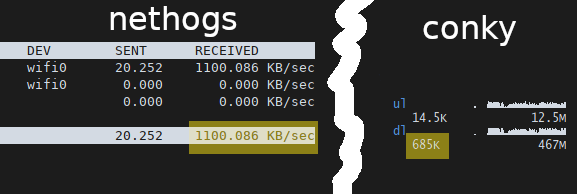
By comparing the download speed reported by nethogs and conky 1.11.4.
I can confirme that conky display incorrect value.
Distro: Archlinux
Kernel: 5.2.1-arch1-1-ARCH
conky: 1.11.4-1
 S-Aarab
on 21 Jul 2019
S-Aarab
on 21 Jul 2019
Yes, I noticed this issue yesterday. I came here to write up of this problem, but I saw that you've already made it.
Seeing its code, the problem I think is here: https://github.com/brndnmtthws/conky/commit/d1a3c0eaa34ff2b8ac472f401b63d4d1c0a938e5 and https://github.com/brndnmtthws/conky/commit/b177dbc4b29f508f53e359b67665cd573d091ab2
Archlinux
Kernel 5.2.1-zen
conky 1.11.4-1
 1985a
on 23 Jul 2019
1985a
on 23 Jul 2019
While I'd love to take credit for this problem, those two commits only made it into master this morning. And according to the other posters, the problem showed up between versions 1.11.3 and 1.11.4, so sometime in January or February of this year.
 Tomunu
on 24 Jul 2019
Tomunu
on 24 Jul 2019
I can also confirm this issue on Arch Linux with kernel "5.2.4-arch1-1-ARCH":
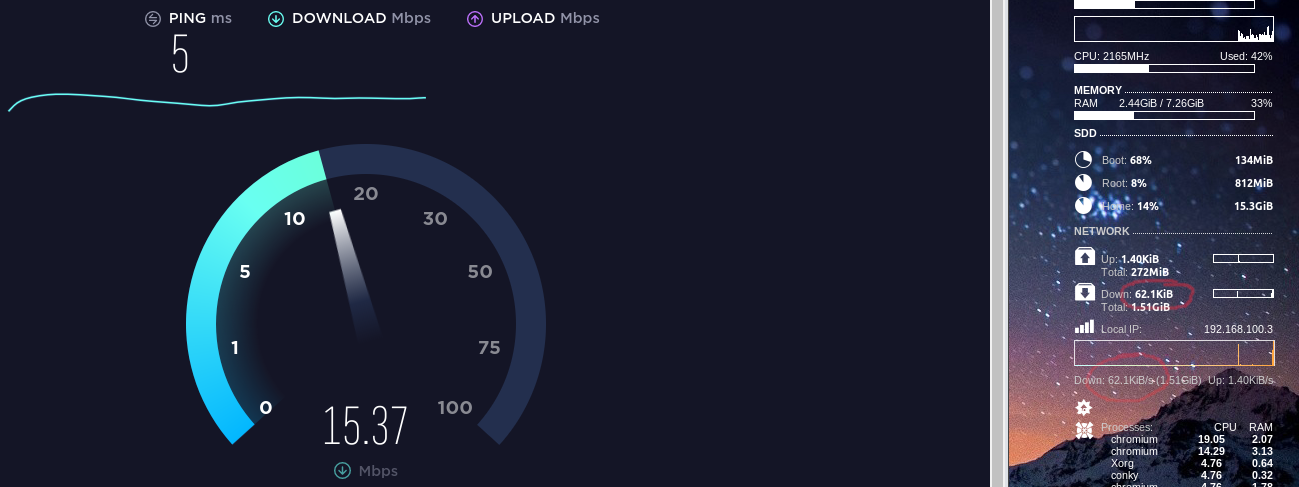
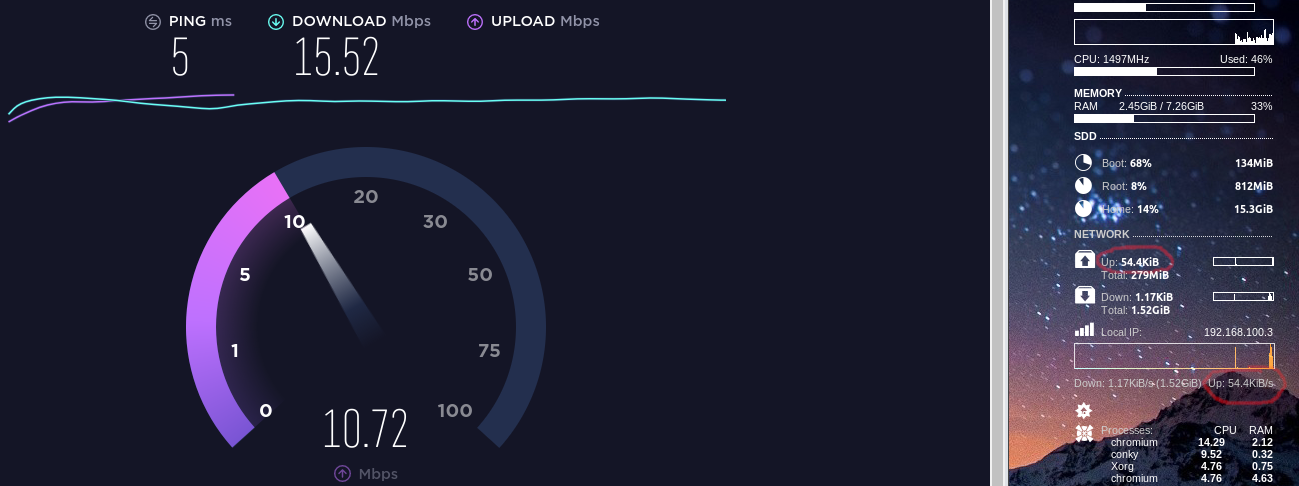
The download speed seems to be off by a factor of 32, while the upload speed seems to be off by a factor of 24.
Temporary fix
In print_downspeed() (at https://github.com/brndnmtthws/conky/blob/master/src/net_stat.cc#L209)
human_readable(ns->recv_speed, p, p_max_size);
needs to be changed to:
human_readable(ns->recv_speed * 32, p, p_max_size);
In print_upspeed() (at https://github.com/brndnmtthws/conky/blob/master/src/net_stat.cc#L226)
human_readable(ns->trans_speed, p, p_max_size);
needs to be changed to:
human_readable(ns->trans_speed * 24, p, p_max_size);
The factors may differ on other systems.
 trizen
on 30 Jul 2019
trizen
on 30 Jul 2019
I had said that
according to the other posters, the problem showed up between versions 1.11.3 and 1.11.4, so sometime in January or February of this year
But any change that was made after 1.11.3 and included in 1.11.4 would have happened sometime from February to June.
(I had the wrong idea of when the version number got changed.)
Tomunu
on 31 Jul 2019
I've bisected the bug down to the conky::run_all_callbacks() call introduced in evaluate() at commit https://github.com/brndnmtthws/conky/commit/c352069b31b2dbb4d87503603d6c6d3ddd517df6#diff-82f9776e410a6deb1ebda2de8fed0126R739
The comment 2 lines above prompted me to check my config for $execp calls. There's only one $execpi:
${execpi 3600 checkupdates | wc -l}
Removing this call fixes the network speed display.
This is a bit of a guess but, @trizen, does your config contain four or five calls to $execp or $execpi? If so, perhaps each call to conky::run_all_callbacks() within evaluate() is somehow halving the network speed.
Since I don't know the codebase, could someone take the ball from here?
Personally I can workaround the bug by replacing my ${execpi} with ${execi} because I don't need it to parse conky variables out of checkupdates or wc.
 miblodelcarpio
on 5 Oct 2019
miblodelcarpio
on 5 Oct 2019
I just updated to the latest Git version https://github.com/brndnmtthws/conky/commit/b2a5a47a284fbe6c50a8346a53936e803c38b5a3 to fix Negative/too low memory reading #886.
However it still has this issue.
I do need execpi however, to use the following conky variables in my weather Lua script:
${alignc}to align the weather information to the center${font Symbola:size=25}to display weather characters${color ddd}for colors of temperature
I hope this can be fixed soon.
 stevenxxiu
on 18 Mar 2020
stevenxxiu
on 18 Mar 2020
Removing all the eval from my config worked for me, I had
mytemplate = [[${eval ${\1}}%]],
which was reducing the network speed anytime it was used in the config.
 kewlfft
on 14 Apr 2020
kewlfft
on 14 Apr 2020
For now to fix the network speed we can delete the line conky::run_all_callbacks(); in conky/src/conky.cc.
This is also mentioned in:
stevenxxiu
on 6 May 2020
But wouldn't simply deleting this line break the nested $exec thing that the offending commit added? I mean, the commit message (https://github.com/brndnmtthws/conky/commit/c352069b31b2dbb4d87503603d6c6d3ddd517df6) seems to suggest that the conky::run_all_callbacks() is needed for the nesting.
If so, and we're willing to delete this line in order to fix the bugs it introduced, while knowing that it'll break the nesting feature, perhaps it'd be better to remove the whole commit?
Also referencing: https://github.com/brndnmtthws/conky/issues/870#issuecomment-612451635 and https://github.com/brndnmtthws/conky/issues/876#issuecomment-599209402
miblodelcarpio
on 6 May 2020
For now to fix the network speed we can delete the line
conky::run_all_callbacks();inconky/src/conky.cc.This is also mentioned in:
* [#870 (comment)](https://github.com/brndnmtthws/conky/issues/870#issuecomment-612451635)

* [#876 (comment)](https://github.com/brndnmtthws/conky/issues/876#issuecomment-599209402)
it works for me
1985a
on 19 Sep 2020
i had net_avg_samples = 2, and it showed 2x lower speeds or something along those lines changed this to net_avg_samples = 1, and everything seems to behave like it should. speeds are reported correctly.
hope it helps someone else also.
edit: ok it doesn't seem to fix it entirely, its still off by some numbers. lower is ok, but at say 14MiB/s it shows just 11.5MiB/s
edit2: yeah confirming that removing conky::run_all_callbacks(); made it work, shows correct numbers now.
 xpander69
on 11 Dec 2020
xpander69
on 11 Dec 2020
Related issues
 BytEvil
·
4Comments
BytEvil
·
4Comments
 bad-interpreter
·
4Comments
bad-interpreter
·
4Comments
 zero77
·
3Comments
zero77
·
3Comments
 Airblader
·
4Comments
Airblader
·
4Comments
 sdban
·
4Comments
sdban
·
4Comments
Most helpful comment
For now to fix the network speed we can delete the line
conky::run_all_callbacks();inconky/src/conky.cc.This is also mentioned in: