Conky: keep horizontal position on multi line ${exec ...} output
Hi,
When I change the horizontal position with ${goto xyz} and do an ${exec} then which prints multiple lines, only the first line is on its horizontal position. All lines below it are on positon 0.
I think this is a bug and It would be great to see a fix for this.
Kind Regards,
Michael
 Stummi
All 12 comments
Example Configuration:
own_window true

TEXT
${goto 100}${exec printf '%s\n%s' foo bar}
open since 2013, any updates? any new command since then that makes this possible?
 madnight
on 8 Sep 2017
madnight
on 8 Sep 2017
Like command cal output.
 stardiviner
on 10 Dec 2017
stardiviner
on 10 Dec 2017
@stardiviner thats exactly the reason why i'm here : )
madnight
on 10 Dec 2017
${goto 100}${execpi cal} acts same way.
insert it in each line with sed 's/^/${goto 100}/',
like this: ${execpi cal|sed 's/^/${goto 100}/'}
 samuiyo
on 20 Jan 2018
samuiyo
on 20 Jan 2018
It would be good to have a solution in a more systematic (and efficient) way, as execpi parses the output and can be resource-heavy...
 ikuraj
on 8 Jul 2018
ikuraj
on 8 Jul 2018
It's not a bug. It's a feature. :laughing: What if an user want some lines to shift a bit left or right? Or to print different colors per line? That's just two examples. Conky offer way more than that.
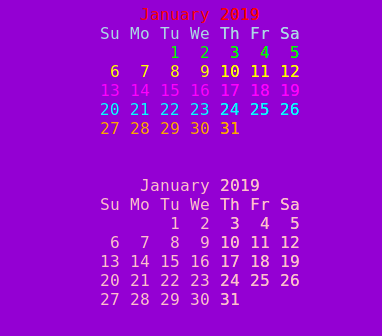
Here, I'm making a nice rainbow out of cal.
conky.config = {out_to_x=true}
conky.text = [[
    ${color red}${goto 100}${execi 3600 cal | sed -n 1p}
    ${color lightblue}${goto 100}${execi 3600 cal | sed -n 2p}
    ${color green}${goto 100}${execi 3600 cal | sed -n 3p}
    ${color yellow}${goto 100}${execi 3600 cal | sed -n 4p}
    ${color magenta}${goto 100}${execi 3600 cal | sed -n 5p}
    ${color cyan}${goto 100}${execi 3600 cal | sed -n 6p}
    ${color orange}${goto 100}${execi 3600 cal | sed -n 7p}
    ${color pink}${goto 100}${execi 3600 cal | sed -n 8p}
]]
I think we should respect newlines anyway not for x, but for console, ncurses, et cetera too. @brndnmtthws, please chime in with your thoughts about this issue. Thanks.
 lasers
on 5 Aug 2018
lasers
on 5 Aug 2018
${execpi cal|sed 's/^/${goto 100}/'}
It is not working as it only appends $goto 100} with each line.

 raghav18gupta
on 14 Jan 2019
raghav18gupta
on 14 Jan 2019
${execpi 60 cal|sed 's/^/${goto 100}/'}
lasers
on 14 Jan 2019
This is great! Thanks
stardiviner
on 15 Jan 2019
@lasers How do you make it colorful? apply ${color red} on each line? But still don't know how do you do that?
stardiviner
on 15 Jan 2019
The config. EDIT: I realize you might got confused. I was showing both.
conky.config = {
    alignment = 'top_left',
    background = false,
    border_width = 1,
    cpu_avg_samples = 2,
    default_color = 'white',
    default_outline_color = 'white',
    default_shade_color = 'white',
    draw_borders = false,
    draw_graph_borders = true,
    draw_outline = false,
    draw_shades = false,
    use_xft = true,
    font = 'DejaVu Sans Mono:size=12',
    gap_x = 5,
    gap_y = 60,
    minimum_height = 5,
    minimum_width = 5,
    net_avg_samples = 2,
    no_buffers = true,
    out_to_console = false,
    out_to_ncurses = false,
    out_to_stderr = false,
    out_to_x = true,
    extra_newline = false,
    own_window = true,
    own_window_class = 'Conky',
    own_window_type = 'desktop',
    own_window_colour = 'darkviolet',
    stippled_borders = 0,
    update_interval = 1.0,
    uppercase = false,
    use_spacer = 'none',
    show_graph_scale = false,
    show_graph_range = false
}

conky.text = [[
${color red}${goto 100}${execi 3600 cal | sed -n 1p}
${color lightblue}${goto 100}${execi 3600 cal | sed -n 2p}
${color green}${goto 100}${execi 3600 cal | sed -n 3p}
${color yellow}${goto 100}${execi 3600 cal | sed -n 4p}
${color magenta}${goto 100}${execi 3600 cal | sed -n 5p}
${color cyan}${goto 100}${execi 3600 cal | sed -n 6p}
${color orange}${goto 100}${execi 3600 cal | sed -n 7p}
${color pink}${goto 100}${execi 3600 cal | sed -n 8p}

${execpi 10 cal|sed 's/^/${goto 100}/'}
]]
Related issues
 sdban
·
4Comments
sdban
·
4Comments
 txtsd
·
4Comments
txtsd
·
4Comments
 akorop
·
3Comments
akorop
·
3Comments
 bad-interpreter
·
4Comments
bad-interpreter
·
4Comments
 Dimerbone
·
4Comments
Dimerbone
·
4Comments
Most helpful comment
${execpi 60 cal|sed 's/^/${goto 100}/'}