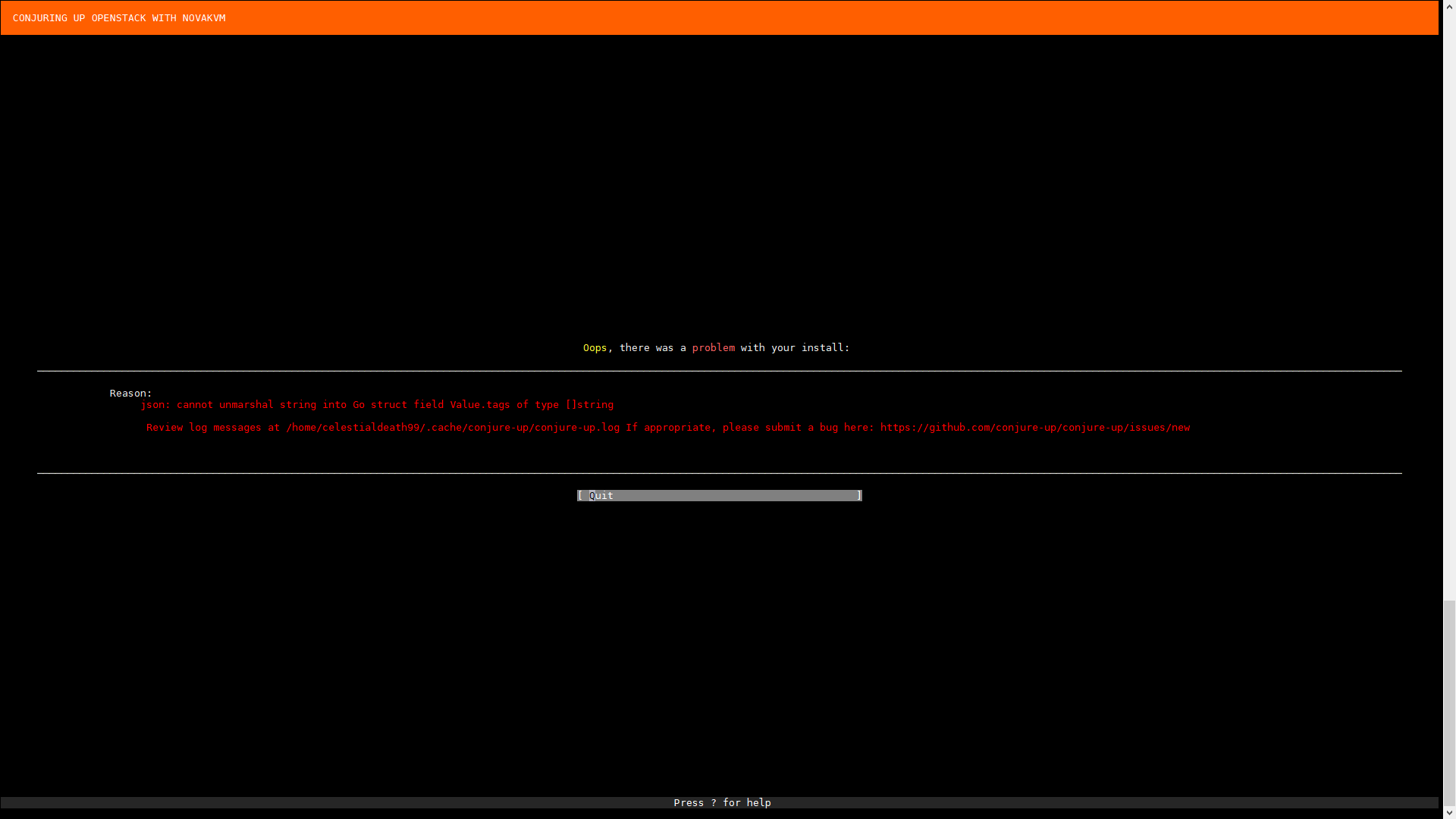
Conjure-up: Conjure-up fails while creating juju model with the following. exception: json: cannot unmarshal string into Go struct field Value.tags of type []string
Report
Thank you for trying conjure-up! Before reporting a bug please make sure you've gone through this checklist:
- [x] Is this problem already documented at https://docs.ubuntu.com/conjure-up/en/troubleshoot#common-spell-problems
- no - [x] Is conjure-up running inside a virtual machine?
- yes, VMWare ESXi - [x] Is this problem reproducible with
sudo snap refresh conjure-up --edge?
- yes, also withsudo snap refresh conjure-up --beta
Please provide the output of the following commands
celestialdeath99@maas:~$ which juju
/snap/bin/juju
celestialdeath99@maas:~$ juju version
2.3.1-xenial-amd64
celestialdeath99@maas:~$ which conjure-up
/snap/bin/conjure-up
celestialdeath99@maas:~$ conjure-up --version
conjure-up 2.5.2
celestialdeath99@maas:~$ which lxc
/usr/bin/lxc
celestialdeath99@maas:~$ /snap/bin/lxc config show
If this is your first time using LXD, you should also run: lxd init
To start your first container, try: lxc launch ubuntu:16.04

config: {}
celestialdeath99@maas:~$ /snap/bin/lxc version
2.21
celestialdeath99@maas:~$ cat /etc/lsb-release
DISTRIB_ID=Ubuntu
DISTRIB_RELEASE=16.04
DISTRIB_CODENAME=xenial
DISTRIB_DESCRIPTION="Ubuntu 16.04.3 LTS"
celestialdeath99@maas:~$
Please attach tarball of ~/.cache/conjure-up:
Sosreport
- No output was given
What Spell was Selected?
**`OpenStack with NovaKVM`**
What provider (aws, maas, localhost, etc)?
**`maas`**
MAAS Users
2.3.0 (6434-gd354690-0ubuntu1~16.04.1)
Commands ran
sudo snap install juju --classic
sudo snap install lxd
sudo snap install conjure-up --classic --edge
Additional Information
This only seems to happen when I pin specific nodes to the different IDs in conjure-up. I want conjure-up to use my larger servers as compute nodes by does not automatically do that.
 brandan-schmitz
All 4 comments
I think this is fixed with the recent release of juju 2.3.3, @Celestialdeath99 can you try with sudo snap refresh conjure-up --edge?
 adam-stokes
on 16 Feb 2018
adam-stokes
on 16 Feb 2018
@battlemidget
It still exists. I destroyed the old controller, and cloud. Completely removed all snaps and reinstalled with sudo snap install conjure-up --edge It successfully deployed the juju controller, and I am able to access the web UI and use that method to deploy a config, but I have to recreate the base package and configurations as it does not want to properly import configurations.

Again, this only occurs when specifically selecting target hosts in the Architecture configurations:
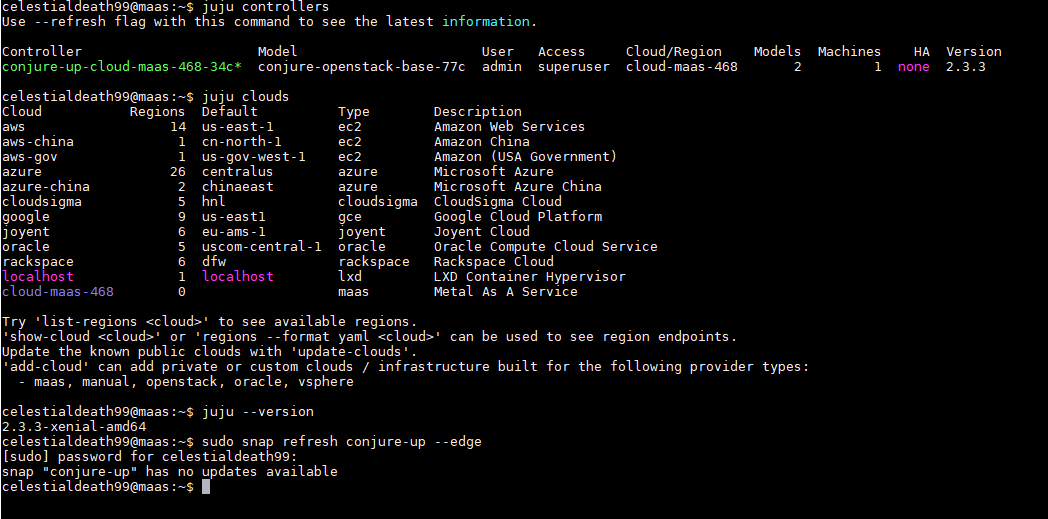
This is after running conjure-up and then checking the versions:
And here is the log:
conjure-up.log
This is the deployment config that was generated:
machines:
  '0':
    constraints: tags=fx74m8
    series: xenial
  '1':
    constraints: tags=k4bxns
    series: xenial
  '2':
    constraints: tags=xbw436
    series: xenial
  '3':
    constraints: tags=6xqndn
    series: xenial
relations:
- - ceph-osd:mon
  - ceph-mon:osd
- - cinder:image-service
  - glance:image-service
- - cinder:amqp
  - rabbitmq-server:amqp
- - cinder:identity-service
  - keystone:identity-service
- - cinder:cinder-volume-service
  - nova-cloud-controller:cinder-volume-service
- - cinder:shared-db
  - mysql:shared-db
- - neutron-api:identity-service
  - keystone:identity-service
- - neutron-api:shared-db
  - mysql:shared-db
- - neutron-api:amqp
  - rabbitmq-server:amqp
- - neutron-gateway:neutron-plugin-api
  - neutron-api:neutron-plugin-api
- - nova-cloud-controller:neutron-api
  - neutron-api:neutron-api
- - nova-compute:amqp
  - rabbitmq-server:amqp
- - nova-compute:image-service
  - glance:image-service
- - nova-cloud-controller:cloud-compute
  - nova-compute:cloud-compute
- - ceph-mon:client
  - nova-compute:ceph
- - ceph-mon:client
  - glance:ceph
- - ceph-radosgw:mon
  - ceph-mon:radosgw
- - glance:identity-service
  - keystone:identity-service
- - glance:shared-db
  - mysql:shared-db
- - glance:amqp
  - rabbitmq-server:amqp
- - nova-cloud-controller:image-service
  - glance:image-service
- - nova-cloud-controller:identity-service
  - keystone:identity-service
- - nova-cloud-controller:amqp
  - rabbitmq-server:amqp
- - nova-cloud-controller:quantum-network-service
  - neutron-gateway:quantum-network-service
- - nova-cloud-controller:shared-db
  - mysql:shared-db
- - keystone:shared-db
  - mysql:shared-db
- - openstack-dashboard:identity-service
  - keystone:identity-service
- - ceph-radosgw:identity-service
  - keystone:identity-service
- - neutron-gateway:amqp
  - rabbitmq-server:amqp
series: xenial
services:
  ceph-mon:
    charm: cs:ceph-mon-15
    num_units: 3
    options:
      expected-osd-count: 3
      source: cloud:xenial-pike
    to:
    - lxd:1
    - lxd:2
    - lxd:3
  ceph-osd:
    charm: cs:ceph-osd-250
    num_units: 3
    options:
      autotune: true
      osd-devices: /dev/sdb
      osd-reformat: 'yes'
      source: cloud:xenial-pike
    to:
    - '1'
    - '2'
    - '3'
  ceph-radosgw:
    charm: cs:ceph-radosgw-253
    num_units: 1
    options:
      source: cloud:xenial-pike
    to:
    - lxd:0
  cinder:
    charm: cs:cinder-265
    num_units: 1
    options:
      block-device: None
      glance-api-version: 2
      openstack-origin: cloud:xenial-pike
      worker-multiplier: 0.25
    to:
    - lxd:1
  glance:
    charm: cs:glance-260
    num_units: 1
    options:
      openstack-origin: cloud:xenial-pike
      worker-multiplier: 0.25
    to:
    - lxd:2
  keystone:
    charm: cs:keystone-272
    num_units: 1
    options:
      admin-password: openstack
      admin-user: admin
      openstack-origin: cloud:xenial-pike
      worker-multiplier: 0.25
    to:
    - lxd:3
  mysql:
    charm: cs:percona-cluster-256
    num_units: 1
    options:
      innodb-buffer-pool-size: 256M
      max-connections: 1000
    to:
    - lxd:0
  neutron-api:
    charm: cs:neutron-api-254
    num_units: 1
    options:
      dns-domain: cloud.example.
      enable-dvr: true
      enable-qos: true
      flat-network-providers: physnet1
      neutron-security-groups: true
      openstack-origin: cloud:xenial-pike
      worker-multiplier: 0.25
    to:
    - lxd:1
  neutron-gateway:
    charm: cs:neutron-gateway-242
    num_units: 1
    options:
      bridge-mappings: physnet1:br-ex
      data-port: br-ex:eno2
      enable-metadata-network: true
      openstack-origin: cloud:xenial-pike
      worker-multiplier: 0.25
    to:
    - '0'
  nova-cloud-controller:
    charm: cs:nova-cloud-controller-302
    num_units: 1
    options:
      console-access-protocol: spice
      console-proxy-ip: local
      network-manager: Neutron
      openstack-origin: cloud:xenial-pike
      worker-multiplier: 0.25
    to:
    - lxd:2
  nova-compute:
    charm: cs:nova-compute-275
    num_units: 3
    options:
      config-flags: default_ephemeral_format=ext4
      enable-live-migration: true
      enable-resize: true
      migration-auth-type: ssh
      openstack-origin: cloud:xenial-pike
      resume-guests-state-on-host-boot: true
    to:
    - '1'
    - '2'
    - '3'
  openstack-dashboard:
    charm: cs:openstack-dashboard-252
    num_units: 1
    options:
      allow-password-autocompletion: true
      cinder-backup: true
      neutron-network-dvr: true
      neutron-network-firewall: true
      neutron-network-lb: true
      neutron-network-vpn: true
      openstack-origin: cloud:xenial-pike
      os-public-hostname: horizon.mcresolution.org
      password-retrieve: true
      webroot: /
    to:
    - lxd:3
  rabbitmq-server:
    charm: cs:rabbitmq-server-69
    num_units: 1
    options:
      management_plugin: true
    to:
    - lxd:0
This appears to happen with any conjure-up spell when specifying a tag (for the maas provider). Still exists in 2.5.6.
 shoshin71
on 21 Apr 2018
shoshin71
on 21 Apr 2018
Hopefully me and @johnsca can dig into early next week. Sorry for the delay
adam-stokes
on 21 Apr 2018
Related issues
 davparker
·
8Comments
davparker
·
8Comments
 naisanza
·
10Comments
naisanza
·
10Comments
 canonical-cgregan
·
3Comments
canonical-cgregan
·
3Comments
 hyperbolic2346
·
4Comments
hyperbolic2346
·
4Comments
 magick93
·
6Comments
magick93
·
6Comments
Most helpful comment
This appears to happen with any conjure-up spell when specifying a tag (for the maas provider). Still exists in 2.5.6.