Conjure-up: Master hangout - (update-status) Waiting for kube-system pods to start
Report
- [] Is this problem already documented at https://docs.ubuntu.com/conjure-up/en/troubleshoot#common-spell-problems
No - [] Is conjure-up running inside a virtual machine?
No - [] Is this problem reproducible with
sudo snap refresh conjure-up --edge?
Yes
Please provide the output of the following commands
which juju
/snap/bin/juju

juju version
2.3-rc2-xenial-amd64

which conjure-up
/snap/bin/conjure-up

conjure-up --version
conjure-up 2.5-alpha1

which lxc
/snap/bin/lxc

/snap/bin/lxc config show
config:
  core.https_address: '[::]'

/snap/bin/lxc version
2.20

cat /etc/lsb-release
DISTRIB_ID=Ubuntu
DISTRIB_RELEASE=16.04
DISTRIB_CODENAME=xenial
DISTRIB_DESCRIPTION="Ubuntu 16.04.3 LTS"
Please attach tarball of ~/.cache/conjure-up:
tar cvzf conjure-up.tar.gz ~/.cache/conjure-up
Sosreport
Please attach a sosreport:
sudo apt install sosreport
sosreport

get this as output

sosreport (version 3.4)

no valid plugins were enabled
The resulting output file can be attached to this issue.
What Spell was Selected?
What provider (aws, maas, localhost, etc)?
localhost
MAAS Users
Which version of MAAS?
Commands ran
Please outline what commands were run to install and execute conjure-up:
sudo snap install conjure-up
sudo snap install lxd
juju boostrap localhost localhost
juju deploy kubernetes-core
Additional Information
 zlatkojosic
All 7 comments
juju status
juju-status.txt
zlatkojosic
on 28 Nov 2017
sudo snap install conjure-up
sudo snap install lxd
juju boostrap localhost localhost
juju deploy kubernetes-core
Why did you run the juju commands directly? For localhost deployments conjure-up includes additional properties to get LXD in a state to where kubernetes will deploy correctly.
So your steps should be
sudo snap install conjure-up --classic
sudo snap install lxd
conjure-up kubernetes
 adam-stokes
on 29 Nov 2017
adam-stokes
on 29 Nov 2017
having a similar problem in a similar situation, spinning up a test cluster on a single localhost. used snap to install lxd and conjure-up --classic on LTS 16.04
Ran your steps above (using conjure-up), and after some time I have green checks for the rsa, three etcd and a load balancer, and four flannel instances. But my master is "Waiting for kube-system pods to start" and three workers are "Waiting for kubelet,kube-proxy to start."
The bottom status bar of the conjure-up terminal session says "Setting relation kubeapi-load-balancer:apiserver <-> kubernetes-master:kube-api-endpoint"
Been sitting there for two hours now. Admittedly the metal is not powerful but the four cores are ~30% and RAM is only 50%, I/O wait time is 10-30%. The bottleneck is probably the storage, LXC is using a btrfs volume on a SATA disk. But two hours?
Any guidance for this newbie would be appreciated.
 randyrue
on 5 Jan 2018
randyrue
on 5 Jan 2018
@randyrue We are about to release 2.5.1 to stable channel, could you try sudo snap refresh conjure-up --candidate and re-do your deployment? There are a few important fixes that handle some of the race conditions we were seeing during deployment.
adam-stokes
on 6 Jan 2018
Hi Adam,
That seems to have resolved the issue.
Should I be concerned about running a pre-release? Do I need to make any
changes before I consider this for a prod environment?
A side note, I'm also trying to do this on a Xen VM where I have more
cores and RAM available, but the conjure-up shell UI via putty to a VM
doesn't recognize the first "enter" keystroke to select the canonical
kubernetes install? Running conjure-up from the console did work...
Randy
On 1/5/2018 6:02 PM, Adam Stokes wrote:
>
@randyrue https://github.com/randyrue We are about to release 2.5.1
to stable channel, could you try |sudo snap refresh conjure-up
--candidate| and re-do your deployment?—
You are receiving this because you were mentioned.
Reply to this email directly, view it on GitHub
https://github.com/conjure-up/conjure-up/issues/1247#issuecomment-355714848,
or mute the thread
https://github.com/notifications/unsubscribe-auth/AHXuEem1vD3Jd06aU5VlS-EeLA551_tsks5tHtQegaJpZM4QuAmy.
randyrue
on 8 Jan 2018
@randyrue Hey Randy, we just released 2.5.1 to stable release so you should be good to go.
For the side note, I'm not entirely sure about the enter keystroke through putty, is there another terminal based program you could try?
Thanks
Adam
adam-stokes
on 9 Jan 2018
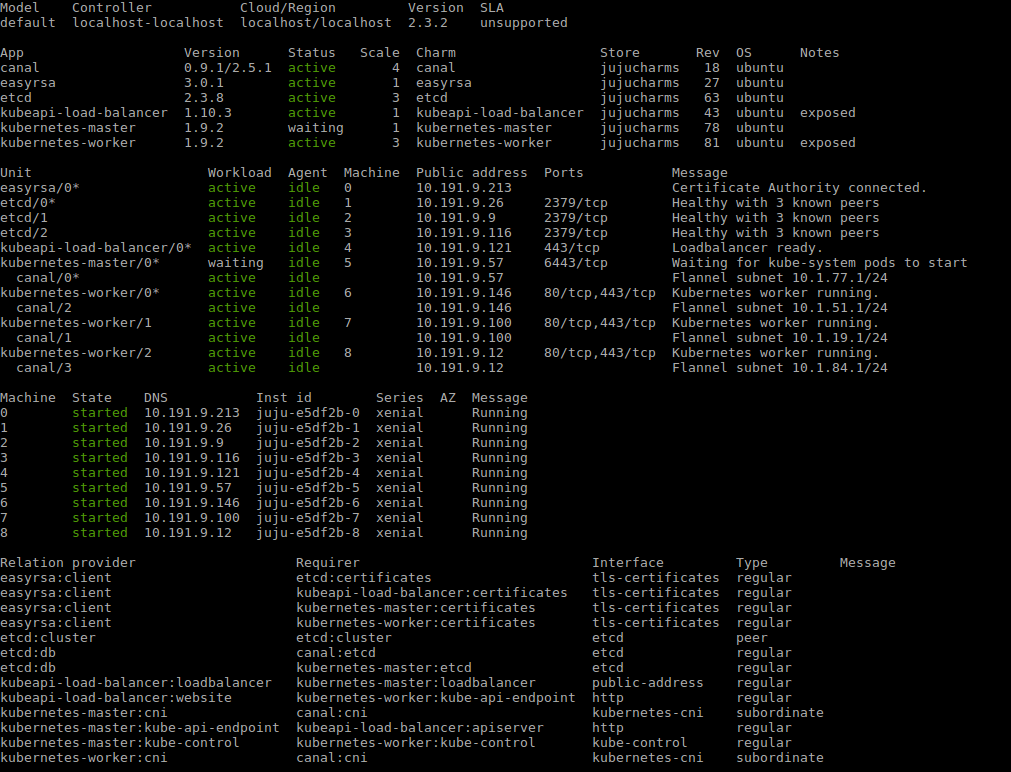
I have the same problem.
The status does not change from "Waiting for kube-system pods to start"
I'm using: https://api.jujucharms.com/charmstore/v5/canonical-kubernetes-canal/archive/bundle.yaml
and juju deploy bundle.yaml
@battlemidget
 bsampaiosilva
on 5 Feb 2018
bsampaiosilva
on 5 Feb 2018
Related issues
 canonical-cgregan
·
3Comments
canonical-cgregan
·
3Comments
 bigjools
·
6Comments
bigjools
·
6Comments
 davparker
·
8Comments
davparker
·
8Comments
 quantonganh
·
4Comments
quantonganh
·
4Comments
 JimMcHale
·
3Comments
JimMcHale
·
3Comments
Most helpful comment
I have the same problem.
The status does not change from "Waiting for kube-system pods to start"
I'm using: https://api.jujucharms.com/charmstore/v5/canonical-kubernetes-canal/archive/bundle.yaml
and juju deploy bundle.yaml
@battlemidget