Confluent-kafka-dotnet: Evaluating event hub with kafka endpoint using confluent kafka library
Description
We are evaluating the azure event hub with Kafka endpoint using a confluent Kafka library (1.5.1) and we are observing high RTT(Avg latency), consumer fetch cycle time, and sometimes rebalance counts also increases. These metrics are logged using the statistics handler.
Below are the consumer config:
var consumerConfig = new ConsumerConfig
{
BootstrapServers = config.Broker,
SaslUsername = config.SaslUsername,
SaslPassword = config.SaslPassword,
SaslMechanism = SaslMechanism.Plain,
SecurityProtocol = SecurityProtocol.SaslSsl,
AutoOffsetReset = AutoOffsetReset.Earliest,
GroupId = "sample-eventhub",
EnableAutoCommit = false,
TopicMetadataRefreshIntervalMs = 200000,
ConsumeResultFields = "timestamp,topic",
QueuedMaxMessagesKbytes = 5,
StatisticsIntervalMs = 60000,
SocketKeepaliveEnable = true,
SessionTimeoutMs = 60000
};
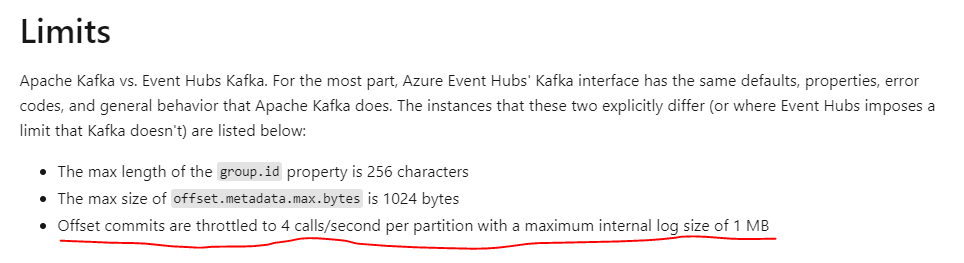
Note: One of the reasons for high consumer fetch cycle time is message commit (_streamConsumer.Commit) is taking a longer time than the application processing the message.
The same code and configuration work well with the Kafka broker, but not with the event hub with Kafka endpoint. Can you please share your suggestions to improve the performance?
 snober
All 3 comments
Note: One of the reasons for high consumer fetch cycle time is message commit (_streamConsumer.Commit) is taking a longer time than the application processing the message.
sounds like a sub optimal implementation somewhere on the event hubs side, or a slow network. You might like to check out Confluent Cloud on Azure as an alternative. you could enable the stats handler and have a look at the rtt broker value to see how long the underlying protocol requests are taking.
note that you generally don't want to commit after each consumed message, as thats blocking and slows consumption enormously. instead, consider doing this periodically (EnableAutoCommit=true,EnableAutoOffsetStore=false + StoreOffsets method).
 mhowlett
on 3 May 2021
mhowlett
on 3 May 2021
Thanks, @mhowlett for your suggestions.
1) Even we tried with auto-commit as true, but the performance results are same.
2) RTT is around ~520 milliseconds.
3) We have already checked the network between our consumer and event hubs. Even we tried vnet peering.
snober
on 4 May 2021
@mhowlett, thanks for the guide, this strategy of using AutoCommit=true, EnableAutoOffsetStore=false + StoreOffset method solved my performance problem
 guilherme-bauer
on 7 May 2021
guilherme-bauer
on 7 May 2021
Related issues
 farodin91
·
3Comments
farodin91
·
3Comments
 MihaiComan87
·
3Comments
MihaiComan87
·
3Comments
 mohoch1
·
3Comments
mohoch1
·
3Comments
 Marusyk
·
3Comments
Marusyk
·
3Comments
 zoeysaurusrex
·
4Comments
zoeysaurusrex
·
4Comments
Most helpful comment
sounds like a sub optimal implementation somewhere on the event hubs side, or a slow network. You might like to check out Confluent Cloud on Azure as an alternative. you could enable the stats handler and have a look at the
rttbroker value to see how long the underlying protocol requests are taking.note that you generally don't want to commit after each consumed message, as thats blocking and slows consumption enormously. instead, consider doing this periodically (EnableAutoCommit=true,EnableAutoOffsetStore=false + StoreOffsets method).