Confluent-kafka-dotnet: ProduceAsync still deadlocks for nuget version: Confluent.Kafka -Version 1.0.0-experimental-12
Description
I upgraded to Confluent.Kafka -Version 1.0.0-experimental-12 according to what you mentioned here. If I am not wrong, this package includes 1.0-experimental-9.
545
But I still see ProduceAsync deadlock (for a console application). I added debug: all in the config and captures the following log:

Here is the relevant code:
  var config = new Dictionary<string, object> {
            { "bootstrap.servers", "192.168.0.228:9092" },
            { "queue.buffering.max.ms", 1 },
            { "socket.blocking.max.ms", 1 },
            { "debug", "all"}
        };
        _producer = new Producer<string, string>(config, new StringSerializer(Encoding.UTF8), new StringSerializer(Encoding.UTF8));

    public void Publish<T>(T message) where T : IExternalMessage
    {
        if (message == null) throw new ArgumentNullException("message");
        var value = JsonConvert.SerializeObject(message, ExternalMessageConverters.SerializerSettings);
        Logger.Info("Publishing External Message: " + message.GetType().FullName + "\r\n" + value);
        var partition = new TopicPartition(_topicNamePrefix + message.Topic, new Partition(message.PartitionKey % 20));
        var m = new Message<string, string>
        {
            Key = message.Key,
            Value = value
        };
        Console.WriteLine("BEGIN ProduceAsync: {0}", DateTime.Now);
        _producer.ProduceAsync(partition, m).Wait();
        Console.WriteLine("END ProduceAsync: {0}", DateTime.Now);
        //AsyncContext.Run(async () =>
        //{
        //});
        Logger.Info("DONE Publishing Message");
    }
The entire log is attached below:
How to reproduce
Checklist
Please provide the following information:
- [ ] Confluent.Kafka nuget version: Confluent.Kafka -Version 1.0.0-experimental-12
- [ ] Apache Kafka version: kafka_2.11-2.0.0
- [ ] Client configuration: see code above
- [ ] Operating system: Client runs on Windows 7 (my dev machine). Kafka Server runs in Ubuntu 14.04.5 LTS
- [ ] Provide logs (with "debug" : "..." as necessary in configuration)
- [ ] Provide broker log excerpts
- [ ] Critical issue
 foresightyj
All 11 comments
It is kind of weird that I have 3 types of projects that depend on Publish which uses ProduceAsync in my application. One is an ASP.NET MVC 5 application, the other is ASP.NET Web API 2 application and the others are console applications.
The reason I upgraded to your 1.0-experimental-9 is that the MVC application deadlocks while the other two run well. After the upgrade, the MVC application runs well but the console application deadlocks now. (The Web API project still runs OK FYI)
foresightyj
on 29 Aug 2018
thanks for the issue @foresightyj - are you using .NET Framework or .NET Core? if you can provide a complete example / project file demonstrating the problem that would be really useful. I'll address this soon after we get 1.0-beta out.
 mhowlett
on 29 Aug 2018
mhowlett
on 29 Aug 2018
I must apologize for not making a minimal test case in the first place. I started out fresh and made a minimal test project just now and it worked well. Yet my original project still didn't.
I then copied my project elsewhere and started removing irrelevant code and libs. It still didn't work so I diffed the two projects and found two differences:
First in csproj file, there is difference in the librdkafka dll. This may not be a problem but it was the first difference I noticed.

Second, this is definitely the problem. I forgot how I upgraded the confluent kafka nuget packages but the dependencies below failed to be included in the console application's csproj file. The diff to the right is the fix.
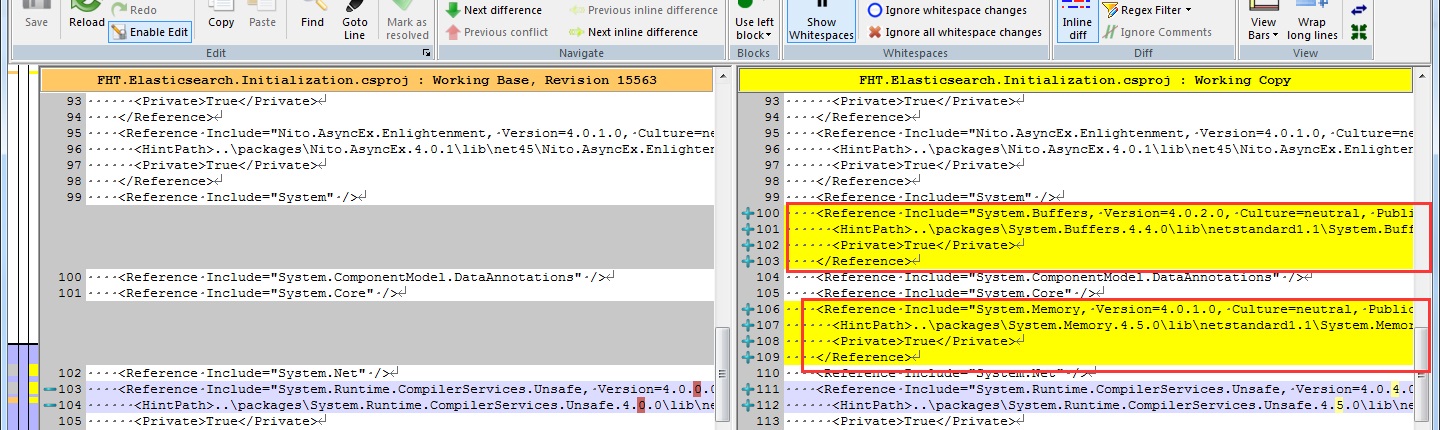
After fixing the two problems, *Version 1.0.0-experimental-12 works like a charm.
foresightyj
on 30 Aug 2018
Thanks for your time. I am going to close the issue.
foresightyj
on 30 Aug 2018
great, glad you got it working.
mhowlett
on 30 Aug 2018
@mhowlett
I had encountered the same problem several times. Almost in all cases, it is because System.Memory
, System.Runtime.CompilerServices.Unsafe are missing. However, the code runs happily without any warning until it deadlocks at PublishAsync. It is very hard to guess what goes wrong.
I got into this situation probably because I use Resharper to automatically add references or manually edit your csproj files. In such cases, dependencies can get loose.
In the end, I added a few lines in my kafka publisher:
#if DEBUG
            //make sure System.Memory, System.Runtime.CompilerServices.Unsafe are loaded
            Console.WriteLine(typeof (System.Memory<char>).Assembly.FullName + " is loaded");
            Console.WriteLine(typeof (System.Runtime.CompilerServices.Unsafe).Assembly.FullName + " is loaded");
#endif
to make sure that these two types can be instantiated without any problem.
I am wondering why Confluent.Kafka does not complain when System.Memory.dll is missing. Could you add similar checks in Confluent.Kafka so we do not have to?
foresightyj
on 8 Nov 2018
thanks for the input @foresightyj. re-opening as a reminder to investigate further.
mhowlett
on 8 Nov 2018
There is also possibility, that using Task.Wait() on asynchronous method (which is ProduceAsync) causes deadlock. If you want to execute async method synchronously, you should use GetAwaiter().GetResult()
 kiedd
on 13 Dec 2018
kiedd
on 13 Dec 2018
thanks @kiedd - this should all be fixed in -beta3 which I expect to be out early next week.
mhowlett
on 14 Dec 2018
waiting for the beta3, did not release yet, i meet above issue also.
 billzhuang
on 19 Dec 2018
billzhuang
on 19 Dec 2018
Happy to throw in some testing on this when beta 3 releasesas we are up against this bug. Thanks for getting this crushed so quickly.
 handpix
on 19 Dec 2018
handpix
on 19 Dec 2018
Related issues
 michael-huxtable
·
4Comments
michael-huxtable
·
4Comments
 kvandake
·
3Comments
kvandake
·
3Comments
 ThomasHjorslevFcn
·
3Comments
ThomasHjorslevFcn
·
3Comments
 jeffreycruzana
·
3Comments
jeffreycruzana
·
3Comments
 vinodres
·
4Comments
vinodres
·
4Comments
Most helpful comment
thanks for the input @foresightyj. re-opening as a reminder to investigate further.