Confluent-kafka-dotnet: librdkafka fails to load on 2.1-aspnetcore-runtime-alpine
Description
using container 2.1-aspnetcore-runtime works, 2.1-aspnetcore-runtime-alpine fails
Unhandled Exception: System.Reflection.TargetInvocationException: Exception has been thrown by the target of an invocation. ---> System.DllNotFoundException: Failed to load the librdkafka native library.
submission-term-dd1.1.vclyzsukdl49@tcwsddu1 at Confluent.Kafka.Impl.LibRdKafka.Initialize(String userSpecifiedPath)
submission-term-dd1.1.vclyzsukdl49@tcwsddu1 at Confluent.Kafka.Producer..ctor(IEnumerable1 config, Boolean manualPoll, Boolean disableDeliveryReports)
submission-term-dd1.1.vclyzsukdl49@tcwsddu1 at Confluent.Kafka.Producer2..ctor(IEnumerable1 config, ISerializer1 keySerializer, ISerializer`1 valueSerializer, Boolean manualPoll, Boolean disableDeliveryReports)
How to reproduce
Create a ASP.Net Core 2.1 project with Confluent.Kafka 0.11.5. Include the standard producer. Build the project and deploy in Docker using the official Microsoft Alpine image.
Using the official (stretch) container works fine.
Checklist
Please provide the following information:
- [x ] Confluent.Kafka nuget version: 0.11.5
- [ ] Apache Kafka version:
- [ ] Client configuration:
- [x ] Operating system: Alpine Linux container
- [ ] Provide logs (with "debug" : "..." as necessary in configuration)
- [ ] Provide broker log excerpts
- [ ] Critical issue
 scovel
All 36 comments
this linux distro is currently not supported. we've been talking about supporting it though. @edenhill - do we have a timeline on this yet?
 mhowlett
on 28 Aug 2018
mhowlett
on 28 Aug 2018
i should note that you can use Confluent.Kafka on alpine linux today by using a custom librdkafka build and Library.Load. By support I mean including an alpine linux build in the librdkafka.redist nuget package.
mhowlett
on 30 Aug 2018
You should be able to use the official alpine package:
https://pkgs.alpinelinux.org/package/edge/community/x86_64/librdkafka
 edenhill
on 30 Aug 2018
edenhill
on 30 Aug 2018
I have a same problem, I publish my dotnet core console project by using command :dotnet publish -c Release -r win-x64 . The file as follows
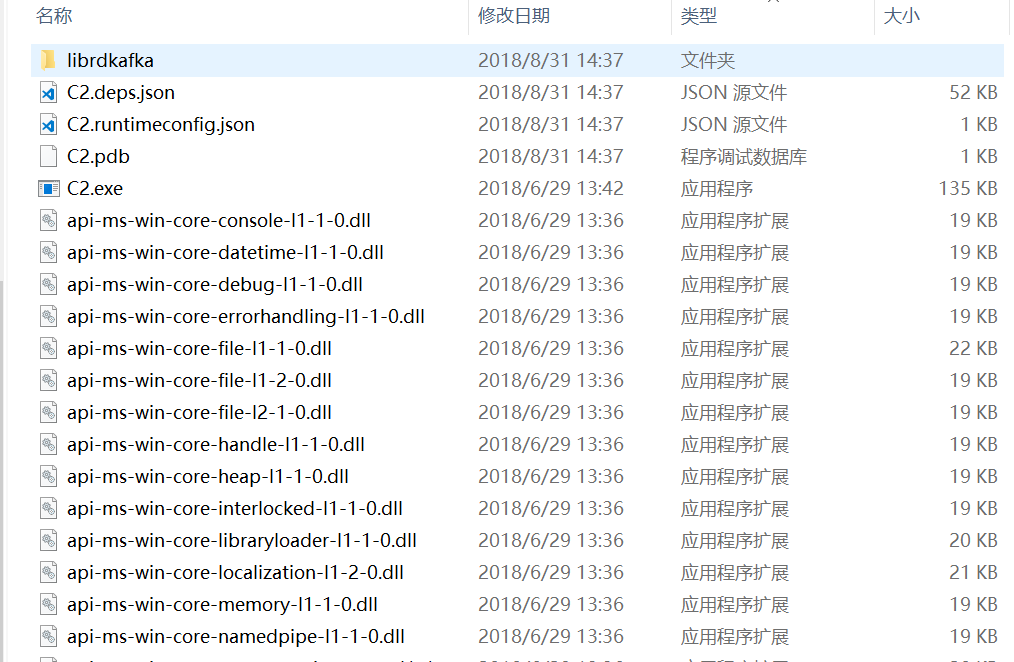
There is a error that Unhandled Exception: System.DllNotFoundException: Failed to load the librdkafka native library ,when I run C2.exe.
my code as follows:
` class Program
{
static void Main (string[] args)
{
var conf = new Dictionary
{
{
"group.id",
"test-consumer-group"
},
{
"bootstrap.servers",
"localhost:9092"
},
{
"auto.commit.interval.ms",
5000
},
{
"auto.offset.reset",
"earliest"
}
};
        using (var consumer = new Consumer<Null, string> (conf, null, new StringDeserializer (Encoding.UTF8)))
        {
            consumer.OnMessage += (_, msg) => Console.WriteLine ($"Read '{msg.Value}' from: {msg.TopicPartitionOffset}");

            consumer.OnError += (_, error) => Console.WriteLine ($"Error: {error}");

            consumer.OnConsumeError += (_, msg) => Console.WriteLine ($"Consume error ({msg.TopicPartitionOffset}): {msg.Error}");

            consumer.Subscribe ("testByTian");

            while (true)
            {
                consumer.Poll (TimeSpan.FromMilliseconds (100));
            }
        }
    }
}`
PS: os : Win10
<PackageReference Include="Confluent.Kafka" Version="0.11.5" />
  <PackageReference Include="librdkafka.redist" Version="0.11.5" />
 bluetianx
on 31 Aug 2018
bluetianx
on 31 Aug 2018
I have the same problem in ubuntu 18.04
The project was generated using
dotnet publish project.csproj -c Release -r ubuntu.18.04-x64
Then I can see the "librdkafka.so" in the publish folder.
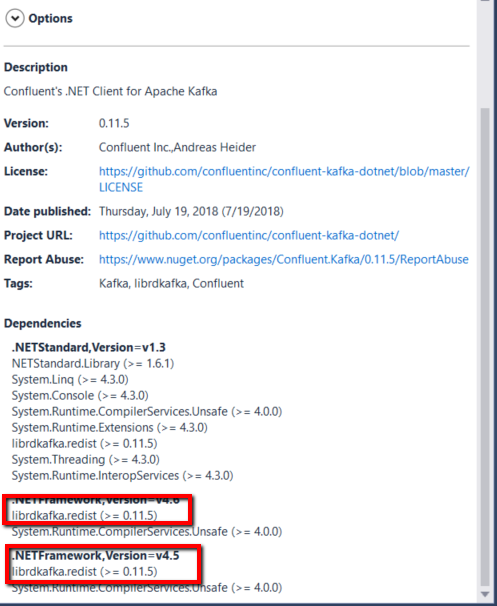
But ones I tryed to execute it in a ubuntu 18.04 this error appears "Unhandled Exception: System.DllNotFoundException: Failed to load the librdkafka native library."
The dependency installed in my project its the 0.11.5 by the nuGet Package Manager
 cguillencr
on 3 Sep 2018
cguillencr
on 3 Sep 2018
The official Alpine build is a good start but what I need is support in the NuGet package as @mhowlett mentioned. We're developing on Macs and PCs, and deploying to Docker.
The Alpine image is significantly smaller than the default image (stretch) so it is a big win if we can use it.
scovel
on 6 Sep 2018
same problem :(
 swASO
on 25 Sep 2018
swASO
on 25 Sep 2018
Same problem here using W10 x64 - Version 10.0.17134.285. VS2017 15.8.5
Not using containers. Just publishing a .netcoreapp2.1 self-contained executable to a different location.
Exception Info: Farfetch.Framework.Kafka.Client.Exceptions.ClientProducerInitializationException: Failed to load the librdkafka native library. ---> System.DllNotFoundException: Failed to load the librdkafka native library.
   at Confluent.Kafka.Impl.LibRdKafka.Initialize(String userSpecifiedPath)
The folder librdkafka is correctly copied to publish output directory but the program tries to load from the publish output directory root.
When debbuging it loads correctly from the librdkafka folder. This only happens when publishing.
EDIT: This is a Confluent.Kafka issue. It happens when publishing to RuntimeId win-x64. For the time being, publish with RID win7-x64. This is fixed on version 1.0-experimental-9: https://github.com/confluentinc/confluent-kafka-dotnet/issues/513
 se7zer
on 3 Oct 2018
se7zer
on 3 Oct 2018
I used docker to create an Alpine image using the librdkafka apk. How do I get Confluent.Kafka to point to the updated library? I'm still getting the same DLL Not Found message.
scovel
on 9 Oct 2018
@scovel - I was struggling with this issue month ago. The only solution I figured out was to use base image microsoft/dotnet:2.1.4-runtime-stretch-slim instead of alpine. Alpine is not supported as far as I know. Now everything is working smoothly.
 klesta490
on 9 Oct 2018
klesta490
on 9 Oct 2018
There is a librdkafka apk for alpine that should work. The generic Linux librdkafka.so must be compiled against a different version of some library that is not available in Alpine.
The trick is to get Kafka to use the apk version and not the version in the runtimes folder.
There appears to be a way to specify a path/filename for a custom library, but I don't see it exposed anywhere...
scovel
on 9 Oct 2018
I tried this also ;) LibRdKafka.Initialize(string userSpecifiedPath) but it didn't worked for me... It was requiring more and more libs not available on alpine.
klesta490
on 9 Oct 2018
Still on 0.11.5...
Hhhmm, that's where I'm at now.
Dockerfile
FROM microsoft/dotnet:2.1-aspnetcore-runtime-alpine
RUN apk add librdkafka
WORKDIR /app
COPY --from=build-env /app/myApp/out .
ENTRYPOINT ["dotnet", "myApp.dll"]
Code:
Console.WriteLine("Using custom path for librdkafka.");
Confluent.Kafka.Library.Load("/usr/lib/librdkafka.so.1");
Getting an error, but not what I expected:
Using custom path for librdkafka.
Unhandled Exception: System.DllNotFoundException: Failed to load the librdkafka native library.
myApp.1.scz73zvncfsy@tcwsddu1 at Confluent.Kafka.Impl.LibRdKafka.Initialize(String userSpecifiedPath)
I expected it to work or to log
$"Failed to load librdkafka at location '{userSpecifiedPath}'. dlerror: '{PosixNative.LastError}'."
@edenhill @mhowlett is this a valid work-around until you add native support?
scovel
on 9 Oct 2018
Create your own (Customize) Alpine image and run on top of that image. In that image you may install librdkafka and other third-party packages.
FROM alpine:3.7
RUN apk add librdkafka \
librdkafka-dev \
--no-cache --repository https://pkgs.alpinelinux.org/package --allow-untrusted
Install .NET Core Runtime
RUN apk add --no-cache \
ca-certificates \
\
# .NET Core dependencies
krb5-libs \
libgcc \
libintl \
libssl1.0 \
libstdc++ \
tzdata \
userspace-rcu \
zlib \
&& apk -X https://dl-cdn.alpinelinux.org/alpine/edge/main add --no-cache \
lttng-ust
Configure Kestrel web server to bind to port 80 when present
ENV ASPNETCORE_URLS=http://+:80 \
# Enable detection of running in a container
DOTNET_RUNNING_IN_CONTAINER=true \
# Set the invariant mode since icu_libs isn't included (see https://github.com/dotnet/announcements/issues/20)
DOTNET_SYSTEM_GLOBALIZATION_INVARIANT=true
 Isuama
on 5 Nov 2018
Isuama
on 5 Nov 2018
Attempting to add librkafka & librkafka-dev (referenced from @Isuama) to the microsoft/dotnet:2.1-sdk-alpine3.7 image OR microsoft/dotnet:2.1-runtime-alpine3.7 AND doing a dotnet publish -r alpine.3.7-x64 does not seem to work.
I'm seeing this exception...
EXCEPTION in Method: Publish - Exception: System.EntryPointNotFoundException: Unable to find an entry point named 'rd_kafka_headers_new' in shared library 'librdkafka'.
   at Confluent.Kafka.Impl.NativeMethods.NativeMethods.rd_kafka_headers_new(IntPtr size)
   at Confluent.Kafka.Impl.SafeKafkaHandle.marshalHeaders(IEnumerable`1 headers)
   at Confluent.Kafka.Impl.SafeKafkaHandle.Produce(String topic, Byte[] val, Int32 valOffset, Int32 valLength, Byte[] key, Int32 keyOffset, Int32 keyLength, Int32 partition, Int64 timestamp, IEnumerable`1 headers, IntPtr opaque)
   at Confluent.Kafka.Producer.ProduceImpl(String topic, Byte[] val, Int32 valOffset, Int32 valLength, Byte[] key, Int32 keyOffset, Int32 keyLength, Timestamp timestamp, Partition partition, IEnumerable`1 headers, IDeliveryHandler deliveryHandler)
 darrenfurr
on 8 Jan 2019
darrenfurr
on 8 Jan 2019
thanks @darrenfurr . just wanted to note that we're tracking this internally (off-the-shelf support for alpine that is). It will be done after 1.0-RC1. i'm not sure if it'll make into 1.0 (likely not), but likely 1.0.1.
mhowlett
on 8 Jan 2019
Thanks @mhowlett .
As a workaround I ended up using the microsoft/dotnet:2.1.4-runtime-stretch-slim image as stated above.
I'll be monitoring this issue as we'd ideally like to use alpine.
darrenfurr
on 8 Jan 2019
Let me add another voice to the chorus -- definitely expected to be able to just install 1.0-beta2 on microsoft/dotnet:2.1-aspnetcore-runtime-alpine and see things work.
The inability to get the old version of libsasl2 on alpine makes this a barrier. Am using stretch-slim as a workaround also.
 RobvH
on 6 Feb 2019
RobvH
on 6 Feb 2019
@RobvH So you need SASL GSSAPI/Kerberos support?
edenhill
on 6 Feb 2019
@edenhill Thanks so much for the reply! No we don't need sasl support. Not at all.
But we can't run the librdkafka (1.0-PRE) that's included in the 1.0.0-beta2 nuget package b/c the microsoft/dotnet:2.1-aspnetcore-runtime-alpine image lacks libsasl2.so.2 and alpine only offers libsasl2.so.3. I even tried sim linking over but that set faults (figured, but tried anyway).
Without it, librdkafka won't load and the dotnet core 2.1 runtime says it can't find it. I brought in 0.11.x and that worked, but it crashes soon because there are flag related functions in the newer version that don't exist in the older.
My understanding is based on running ldd on the bundled librdkakfa.so in the 1.0.0-BETA2 nuget package and seeing that ld can't resolve libsasl2.so.2. When I run on microsoft/dotnet:2.1.4-runtime-stretch-slim it works.
RobvH
on 6 Feb 2019
This works for me with the 1.0.0-beta2 (admittidly on .Net Core 2.2):
FROM microsoft/dotnet:2.2-runtime-deps-alpine
# Add the kafka native lib
RUN apk update && \
    apk add librdkafka librdkafka-dev
 Im5tu
on 7 Feb 2019
Im5tu
on 7 Feb 2019
We'll look into adding an alpine build of librdkafka to the nuget package after the v1.0.0 release.
Not sure if we should build librdkafka on microsoft/dotnet:2.1-aspnetcore-runtime-alpine or one of the base alpine images.
edenhill
on 7 Feb 2019
definitely the microsoft images since this is what 99% of people will be using and the reason there's so much demand for this.
mhowlett
on 8 Feb 2019
@mhowlett @edenhill I think it does not matter either you use official or MS build because MS does not differ too much from the official one. Just some packages installed.
https://github.com/dotnet/dotnet-docker/blob/master/2.2/runtime-deps/alpine3.8/amd64/Dockerfile
https://github.com/dotnet/dotnet-docker/blob/master/2.2/sdk/alpine3.8/amd64/Dockerfile
 vchekan
on 21 Feb 2019
vchekan
on 21 Feb 2019
So I've updated to Confluent.Kafka 1.0.0-RC3, which uses librdkafka 1.0.0 and tried to deploy on 2.2 (mcr.microsoft.com/dotnet/core/runtime:2.2-alpine) . Doesn't seem like it got fixed.
Unhandled Exception: System.Reflection.TargetInvocationException: Exception has been thrown by the target of an invocation. ---> System.DllNotFoundException: Failed to load the librdkafka native library.
   at Confluent.Kafka.Impl.Librdkafka.Initialize(String userSpecifiedPath)
   at Confluent.Kafka.Producer`2..ctor(ProducerBuilder`2 builder)
@scovel Can you locate the file alpine-librdkafka.so (might be in your project build directory, or perhaps in ~/.nuget) and then do ldd path/to/alpine-librdkafka.so and paste the output here?
edenhill
on 4 Apr 2019
/usr/src/app/runtimes/linux-x64/native $ ls -la
total 49120
drwxr-xr-x    2 root     root           113 Apr  4 19:22 .
drwxr-xr-x    3 root     root            20 Apr  4 19:22 ..
-rwxr--r--    1 root     root      16101408 Mar 25 23:38 alpine-librdkafka.so
-rwxr--r--    1 root     root       1692616 Mar 25 23:38 centos7-librdkafka.so
-rwxr--r--    1 root     root      20703192 Mar 25 23:38 debian9-librdkafka.so
-rwxr--r--    1 root     root      11792174 Mar 25 23:38 librdkafka.so
/usr/src/app/runtimes/linux-x64/native $ ldd alpine-librdkafka.so
    ldd (0x7f2c81091000)
    libc.musl-x86_64.so.1 => ldd (0x7f2c81091000)
/usr/src/app/runtimes/linux-x64/native $
That looks good.
What if you try to to explicitly Load("path/to/alpine-librdkafka.so")?
@mhowlett has the API details on how
edenhill
on 4 Apr 2019
use Library.Load before any other Confluent.Kafka calls. assuming that works, the library loader isn't finding alpine-librdkafka.so for some reason.
mhowlett
on 4 Apr 2019
I added this code to the Main()
Library.Load("/usr/src/app/runtimes/linux-x64/native/alpine-librdkafka.so");
I get this error:
System.DllNotFoundException: Failed to load the librdkafka native library.
   at Confluent.Kafka.Impl.Librdkafka.Initialize(String userSpecifiedPath)
   at submissionTerm.ServiceClass.Main(String[] args) in /usr/src/app/ServiceClass.cs:line 34
that error implies a dependency issue in librdkakfa (or possible the path is incorrect?) but the ldd output is implying everything's fine with that. does it work in the 2.1 docker image (IIRC, I tested this, but not 2.2).
something that should definitely work is compiling librdkafka in the docker image you're using, grabbing that .so and referencing that with Library.Load (of course we want to get to the bottom of what the problem here is though).
mhowlett
on 5 Apr 2019
Alpine, even the SDK doesn't seem to have much for tools installed. I guess that's why it's small. export LD_DEBUG=libs does nothing.
The path is correct
/usr/src/app $   ls /usr/src/app/runtimes/linux-x64/native/alpine-librdkafka.so
/usr/src/app/runtimes/linux-x64/native/alpine-librdkafka.so
Is there any other information I get can to help you out?
/usr/src/app $ cat /etc/os-release
NAME="Alpine Linux"
ID=alpine
VERSION_ID=3.8.4
PRETTY_NAME="Alpine Linux v3.8"
HOME_URL="http://alpinelinux.org"
BUG_REPORT_URL="http://bugs.alpinelinux.org"
/usr/src/app $ dotnet --info
.NET Core SDK (reflecting any global.json):
 Version:   2.2.105
 Commit:    7cecb35b92

Runtime Environment:
 OS Name:     alpine
 OS Version:  3.8
 OS Platform: Linux
 RID:         linux-musl-x64
 Base Path:   /usr/share/dotnet/sdk/2.2.105/

Host (useful for support):
  Version: 2.2.3
  Commit:  6b8ad509b6

.NET Core SDKs installed:
  2.2.105 [/usr/share/dotnet/sdk]

.NET Core runtimes installed:
  Microsoft.AspNetCore.All 2.2.3 [/usr/share/dotnet/shared/Microsoft.AspNetCore.All]
  Microsoft.AspNetCore.App 2.2.3 [/usr/share/dotnet/shared/Microsoft.AspNetCore.App]
  Microsoft.NETCore.App 2.2.3 [/usr/share/dotnet/shared/Microsoft.NETCore.App]

To install additional .NET Core runtimes or SDKs:
  https://aka.ms/dotnet-download
Will this fix be released as a patch version? We really need this fix but there is no released version with it right now.
 zhengbli
on 15 May 2019
zhengbli
on 15 May 2019
Does this work for others? Using alpine image still does not work for me.
 SaurabhHarwande
on 21 May 2019
SaurabhHarwande
on 21 May 2019
it's not in a release yet, waiting for librdkafka 1.0.1.
mhowlett
on 21 May 2019
 ratri-git
on 2 Dec 2019
ratri-git
on 2 Dec 2019
Related issues
 mohoch1
·
3Comments
mohoch1
·
3Comments
 nitinpi
·
4Comments
nitinpi
·
4Comments
 ietvijay
·
3Comments
ietvijay
·
3Comments
 Duorman
·
3Comments
Duorman
·
3Comments
 Ravindranrajendran
·
3Comments
Ravindranrajendran
·
3Comments
Most helpful comment
The official Alpine build is a good start but what I need is support in the NuGet package as @mhowlett mentioned. We're developing on Macs and PCs, and deploying to Docker.
The Alpine image is significantly smaller than the default image (stretch) so it is a big win if we can use it.