ConEmuHk64 injecting hooks FAILED, code -703
Please do not post problems found in old builds, update first.
ConEmu versions has following formatYYMMDD, so if you are using old build,
there are chances that your problem was fixed long ago.
https://conemu.github.io/en/OldBuild.html.Please do search first in the open https://github.com/Maximus5/ConEmu/issues?q=is%3Aopen
or closed https://github.com/Maximus5/ConEmu/issues?q=is%3Aclosed issues.Please do not try to attach or paste here large files like crash dumps, logs or xml settings.
Use external hosting services like https://conemu.github.io/en/DropBox.html
or https://gist.github.com/.Please do not post here third-party problems, this is ConEmu project issue tracker.
Versions
ConEmu build: 190331 x32/x64
OS version: Windows 10 x64
Used shell version (Far Manager, git-bash, cmd, powershell, cygwin, whatever): cmd
Problem description
I'm using Cmder. Since today (Windows update?), I'm having lots of errors attempting to create a new ConEmu instances. Example error (always same error):
ConEmuHk64, PID=3860

cmd.exe: PID=3860
Injecting hooks into PID=7280
FAILED, code=-703:0x00000005
Steps to reproduce
- Open ConEmu (either via Cmder or directly executing ConEmu64.exe, using cmder's init.bat script)
3.
Actual results
Error is thrown
Expected results
No errors thrown
Additional files
 elegos
All 9 comments
Try run Cmder.exe as administrator
 iurimattos
on 2 Jul 2019
iurimattos
on 2 Jul 2019
I'm experiencing the same thing with the {git bash} in GitExtensions. Same error starting from command line, 'C:\Program Files (x86)\GitExtensions\ConEmu\ConEmu.exe -basic -run {git bash}'.
Works ok if run either as administrator. I do not have this issue on Win7.
ConEmu version: 190310
Windows 10
I have confirmed the same issue exists in version: 190623
 danzollo
on 4 Jul 2019
danzollo
on 4 Jul 2019
Having same issue when trying to create a Task for VS2019.
Used this as reference: https://conemu.github.io/en/Tasks.html#create-new-task
This is my Task:

Text:
cmd /k ""C:\Program Files (x86)\Microsoft Visual Studio\2019\Community\VC\Auxiliary\Build\vcvars64.bat"" -new_console:t:"VS2019 x64"
Result:

Any hints how to solve this?
 tomasorti
on 15 Jul 2019
tomasorti
on 15 Jul 2019
I think that for my problem is all about the company's security policies. Running as admin resolves the issue, but then I access the files as administration and it's not what I really want. I think I won't be able to use ConEmu on the office workstation.
elegos
on 15 Jul 2019
Ok, it seems running ConEmu as administrator bypasses this error.
Thanks @elegos ! 😄
tomasorti
on 15 Jul 2019
It would be interesting to know more about that error in order to address it and, in case, ask the security administrator about an exception, or why it is required to inject hooks to let ConEmu work correctly and try to figure out a workaround for the "trimmed by security" computers.
elegos
on 15 Jul 2019
I have this issue (also on a corporate laptop so I'm guessing this is caused by one of the Windows 10 mitigation policies which group policy turns on). What's interesting is that apart from the MsgBox, it doesn't seem to cause any issues. I'm guessing the hook dll is used for features of ConEmu that I don't use so I'm wondering if I could just fix this by forking ConEmu and removing hook injection.. or adding an option to remove it..
Lots of system applications do perform hook injection on corporate laptops but they invariably do it via driver based injection via APC or IDT patching. Generally speaking, this isn't the kind of thing you'd expect apps to be doing, so I'm not sure this is a good design choice for ConEmu because Microsoft are increasingly hostile to user mode hooking and ConEmu is always going to be one Windows 10 update from being broken...
EDIT: Ah, looks like that already exists: "-cur_console:i". This fixes all my issues.
 benstaniford
on 3 Nov 2019
benstaniford
on 3 Nov 2019
Another solution, as referenced in
https://conemu.github.io/en/ConEmuHk.html
is to disable inject ConEmuHk.dll entirely, but see link above for potential issues.
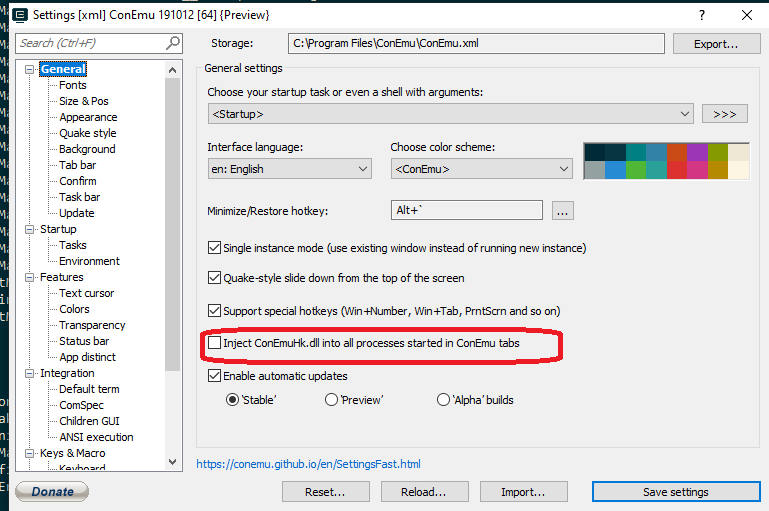
Doing this on my corporate laptop solved the problem which would cause me to dismiss this dialog numerous times during software builds.
 gnac
on 1 Jun 2020
gnac
on 1 Jun 2020
Another solution, as referenced in
https://conemu.github.io/en/ConEmuHk.html
is to disable inject ConEmuHk.dll entirely, but see link above for potential issues.
Doing this on my corporate laptop solved the problem which would cause me to dismiss this dialog numerous times during software builds.

This works for me.
 jimiatworking
on 1 Jul 2020
jimiatworking
on 1 Jul 2020
Related issues
 rfgamaral
·
3Comments
rfgamaral
·
3Comments
 altbdoor
·
4Comments
altbdoor
·
4Comments
 jrcharney
·
5Comments
jrcharney
·
5Comments
 DrMerlin
·
4Comments
DrMerlin
·
4Comments
 pyhedgehog
·
3Comments
pyhedgehog
·
3Comments
Most helpful comment
It would be interesting to know more about that error in order to address it and, in case, ask the security administrator about an exception, or why it is required to inject hooks to let ConEmu work correctly and try to figure out a workaround for the "trimmed by security" computers.