Conemu: Why can't we change next/previous tab shortcut?
Versions
ConEmu build: 190108 [64] [Preview]
OS version: Windows Windows 10 version 1703 (x64)
Used shell version (Far Manager, git-bash, cmd, powershell, cygwin, whatever): ???
Problem description
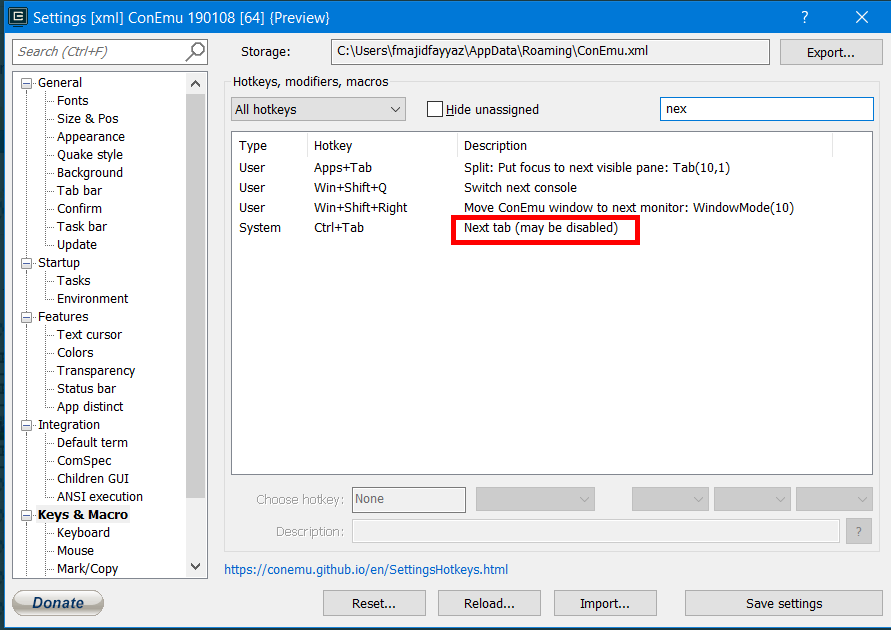
I was wondering why we cannot change the keyboard shortcut to navigate to next/previous tab? When I open the settings, it says (may be disabled). I tried searching the Internet to find out why that's the case, but I didn't find anything.
Steps to reproduce
- Open the settings window
- Go to Keys & Macro
- Search for next tab or previous tab
 farzadmf
All 9 comments
This is hardcoded because it highly depends on options and current keyboard state.
And yes, it may be disabled. Look at the Tab bar settings page.
 Maximus5
on 28 Jan 2019
Maximus5
on 28 Jan 2019
So, does it mean that I cannot change it to use my own shortcut?
farzadmf
on 28 Jan 2019
@farzadmf : use AutoHotkey to remap your key-combo shortcuts per/application!
Somehow like this (not tested):
#IfWinActive ahk_class VirtualConsoleClass
    F1::   sendinput ^+{tab}
    F2::   sendinput ^{tab}
#ifWinActive
 m0n
on 29 Jan 2019
m0n
on 29 Jan 2019
Thank you @m0n , great idea! AutoHotKey wasn't in my mind at all :)
farzadmf
on 29 Jan 2019
It's better to use GuiMacro
Maximus5
on 29 Jan 2019
Thank you @Maximus5 , I didn't know about them. I'll need to go through the docs to see how to do it
farzadmf
on 30 Jan 2019
Hi @Maximus5 , so I tried to set up a shortcut and use a GUI Macro:
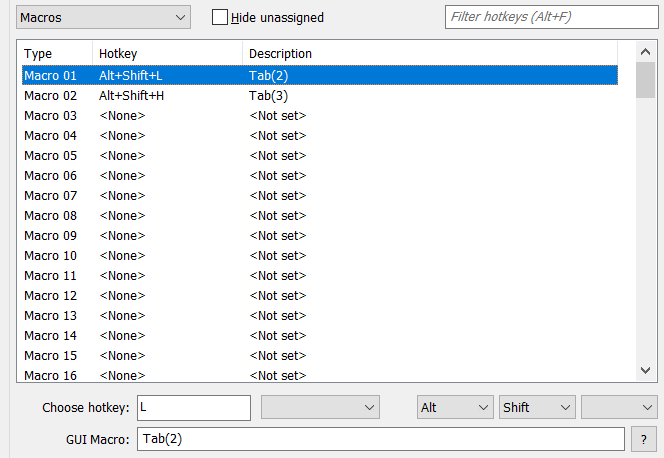
But, when I press my shortcut key, I see the tab being changed in ConEmu, but for some reason, the focus isn't changed to that (I mean I only see the change in the tab bar)
farzadmf
on 30 Jan 2019
Uncheck "Settings/Tab bar/Lazy tab switch"!
m0n
on 30 Jan 2019
Thank you @m0n , that does the trick :)
Closing this as using GUI Macros resolves my issue
farzadmf
on 30 Jan 2019
Related issues
 dandv
·
3Comments
dandv
·
3Comments
 imalos
·
5Comments
imalos
·
5Comments
 pyhedgehog
·
3Comments
pyhedgehog
·
3Comments
 jrcharney
·
5Comments
jrcharney
·
5Comments
 eblis
·
5Comments
eblis
·
5Comments
Most helpful comment
Uncheck "Settings/Tab bar/Lazy tab switch"!