Conemu: feature request: Change title to reflect the current directory
if this is possible it will be very helpful for me. thanks
 sl5net
All 12 comments
This should be possible
 DRSDavidSoft
on 22 Apr 2018
DRSDavidSoft
on 22 Apr 2018
it's not possible. yes it should. or where? or what?
sl5net
on 22 Apr 2018
Well, if you read AnsiEscapeCodes.html, and according to RenameTab.cmd it seems that the following escape code can rename the tab:
%ESC%]9;3;"<new_title_str>"%ESC%\
You want to rename the tab to the current working directory, so instead of <new_title_str> we can use %CD% (cmd.exe's current working directory variable)
However, we want to echo this after each new command is executed, so we tie it to the %PROMPT% environment variable, and change %ESC% to $e and then change %CD% to $p (these are according to ConEmu and Windows cmd's documentation)
And then we can prepend the result like this:
prompt $E]9;3;"$P"$E\%prompt%
Now all you need to do is to run the above command _at each startup_ for which you may add it to the _end of_ the CmdInit.cmd file that ConEmu uses.
So you get this:
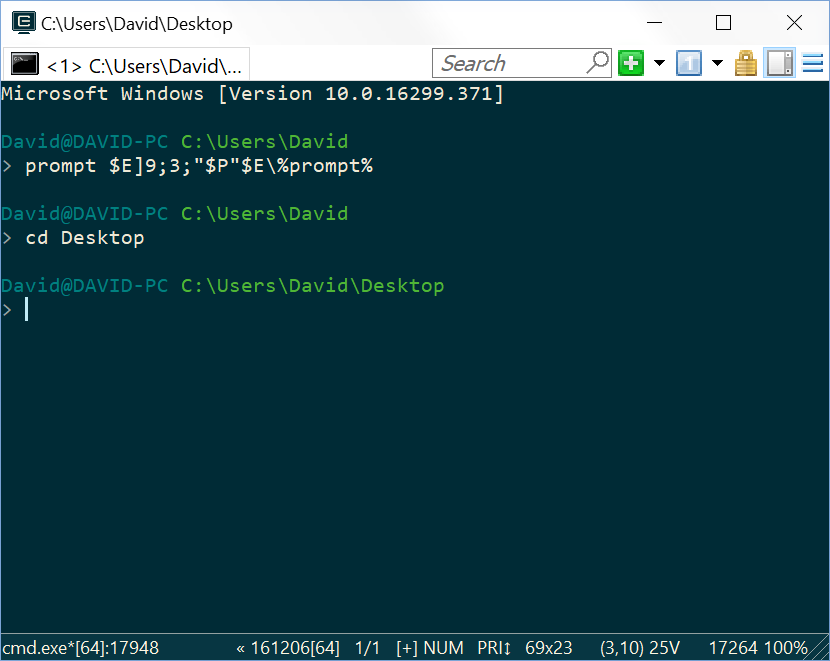
(Notice that the diectory appears in the titlebar.)
DRSDavidSoft
on 22 Apr 2018
thanks! i will try it! BTW some tools like https://github.com/sl5net/global-IntelliSense-everywhere read the window's title and change behavior (for example, IntelliSense, bash or similar) automatically depending on relavent mismatches that are obtained from the windows.
sl5net
on 22 Apr 2018
Interesting, thanks for introducing such tools to me!
DRSDavidSoft
on 22 Apr 2018
seems i do something wrong?

sl5net
on 22 Apr 2018
Yep, you are using cmder )
It overwrites prompt via clink and this may break things.
- https://conemu.github.io/en/OldBuild.html
- https://conemu.github.io/en/ShellWorkDir.html (I prefer to see directory in the tab title)
 Maximus5
on 22 Apr 2018
Maximus5
on 22 Apr 2018
? "cmder" ? i using ConEmu-Maximus5 is a Windows console emulator with tabs, which represents multiple consoles and simple GUI applications as one customizable GUI window with various features.
You may run any shell of your chose (Tasks are recommended) on ConEmu startup.
Far Manager (a console program for managing files and archives in Windows)gains a lot of improvements in ConEmu: Drag and Drop, Tabs for editors and so on.
© 2006-2008 Zoin (based on console emulator by SEt)
© 2009-2017 ConEmu.[email protected]
Online documentation: https://conemu.github.io/en/TableOfContents.html
You can show your appreciation and support future development by donating.

sl5net
on 22 Apr 2018
- Your cropped screenshot https://github.com/Maximus5/ConEmu/issues/1472#issuecomment-383367714 is definitely the cmder.
- 180206 is OldBuild.
Maximus5
on 22 Apr 2018
@sl5net No, you're mistaken. Cmder is a terminal package created by using clink and extending ConEmu. While Cmder is built on ConEmu, you shouldn't ask @Maximus5 for help, because as he said, Clink changes how the prompt string is proccessed.
You have to actually consider the following issues:
1- Cmder actually sets /title Cmder in ConEmu, which is a fixed title, as explained in #1521 by @Maximus5.
2- Clink is a pre-processor for anything prompt related. The ESC ] 9 ; 3 ; ”txt“ ST escape sequence is ConEmu-specific OSC, Clink can't understand it, and to make this work it should pass the sequence, which it does not.
Even if you open ConEmu.exe from cmder\vendor\conemu-maximus5 directory, it runs the ConEmu with Cmder-specific designed configuration file, which should not be considered vanilla ConEmu.
You have two options now:
1- Download vanilla ConEmu from here without any additions (I've tested the sequence I gave you, and it works)
2- Open a new issue at Cmder, and ask @Maximus5 to implement something like #1521, while we at Cmder would work to make sure Clink doesn't break ConEmu-specific escape codes.
Hope this helps! :)
DRSDavidSoft
on 22 Apr 2018
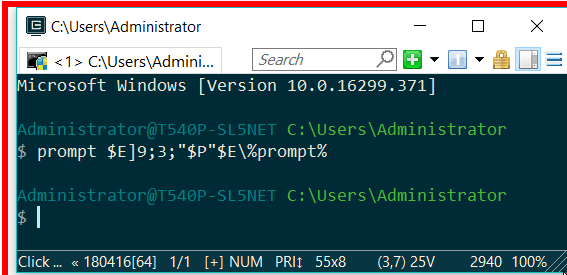
YES 😀 i changed noting into install configuration 😄 and works well ! what wonderful day !
and i addet
prompt $E]9;3;"$P"$E\%prompt%
end of the CmdInit.cmd .
and restarted codeEmu one time (you need to do this, open a nother tab only not worked). thats all. easy.
sl5net
on 22 Apr 2018
not works anymore.
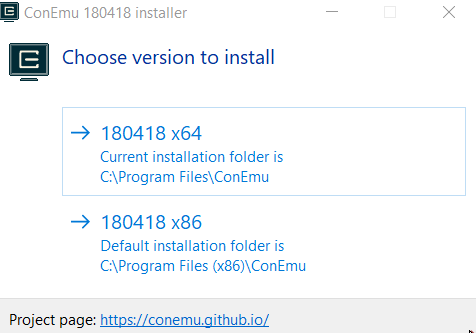
for minutes i installed it by installer version ConEmuSetup.180506.exe
and i addet
prompt $E]9;3;"$P"$E%prompt%
end of the CmdInit.cmd .
and restarted codeEmu one time. ==> not working
sl5net
on 9 May 2018
Related issues
 altbdoor
·
4Comments
altbdoor
·
4Comments
 imalos
·
5Comments
imalos
·
5Comments
 UweKeim
·
5Comments
UweKeim
·
5Comments
 madcampos
·
6Comments
madcampos
·
6Comments
 joanis
·
3Comments
joanis
·
3Comments
Most helpful comment
Well, if you read AnsiEscapeCodes.html, and according to RenameTab.cmd it seems that the following escape code can rename the tab:
%ESC%]9;3;"<new_title_str>"%ESC%\You want to rename the tab to the current working directory, so instead of
<new_title_str>we can use%CD%(cmd.exe's current working directory variable)However, we want to echo this after each new command is executed, so we tie it to the
%PROMPT%environment variable, and change%ESC%to$eand then change%CD%to$p(these are according to ConEmu and Windows cmd's documentation)And then we can prepend the result like this:
prompt $E]9;3;"$P"$E\%prompt%Now all you need to do is to run the above command _at each startup_ for which you may add it to the _end of_ the
CmdInit.cmdfile that ConEmu uses.So you get this:
(Notice that the diectory appears in the titlebar.)