ConEmu window remains be shown at all virtual desktops (win10)
I have 2 virtual desktops (Windows 10):
- Open ConEmu at _first_ desktop
- Switch to _second_ desktop
Result: ConEmu window is shown like it was opened on _second_ desktop (I don't need this). The most annoying is that ConEmu window is focused every time I switch desktops.
Is there any way to make it act like usual window (if I move to another desktop, ConEmu window won't move)?
 axlebedev
All 13 comments
axlebedev
on 10 Sep 2015
I'm having this issue as well (also on windows 10), and the fix mentioned in #247 doesn't work for me as the checkbox is gone in my build (151115), yet ConEmu continues to persist itself to every virtual desktop and steal focus each time (including sliding down if it's in Quake-style mode).
Is there a chance I have the setting persisted in a configuration file somewhere and need to remove it?
 andrewgodwin
on 16 Nov 2015
andrewgodwin
on 16 Nov 2015
LogFiles, Screenshots
 Maximus5
on 16 Nov 2015
Maximus5
on 16 Nov 2015
Screenshots of Appearance and Task Bar below (can do others if needed), and log files from a fresh start, with several virtual desktop switches and resultant focusings.


ConEmu-gui-11896.txt
ConEmu-input-12260.txt
ConEmuC-size-12260.txt
andrewgodwin
on 16 Nov 2015
Actually, I meant screenshots of the desktop, to understand what are you doing (exact steps) and compare timings of screenshots with points in LogFiles. For example, ShareX may create screenshots using current timestamp. This will help.
Maximus5
on 17 Nov 2015
At the moment, I suppose this relates to gh-210
Maximus5
on 17 Nov 2015
Err, this may be weird but I want this feature (ConEmu shown on all virtual desktops) and it was like that before. Somewhere in between, I lost this "feature". Is there a way to get it back?
 BYK
on 9 May 2016
BYK
on 9 May 2016
BYK commented on May 9
Err, this may be weird but I want this feature (ConEmu shown on all virtual desktops) and it was like that before. Somewhere in between, I lost this "feature". Is there a way to get it back?
yes me too!
 chickerson
on 11 Jul 2016
chickerson
on 11 Jul 2016
Agree, to show the console on all desktops is the correct behaviour for Quake-style console. In current version when you trigger Quake-style console Windows moves you to the desktop ConEmu was initially opened on while I believe it should stay on current desktop and popup there!
 iwuvjhdva
on 11 Oct 2016
iwuvjhdva
on 11 Oct 2016
I echo the above sentiments. I use so many virtual desktops daily. I hate how Quake mode will force my screen to switch to the virtual desktop that it was initially opened on. It needs to slide down on any current virtual desktop I am currently viewing for this to be useful for me. Is there any such setting to trigger it to behave this way?
 dgunderson
on 20 Oct 2017
dgunderson
on 20 Oct 2017
Oh, I just found it in settings: Main > Size & Pos > Restore to active monitor:
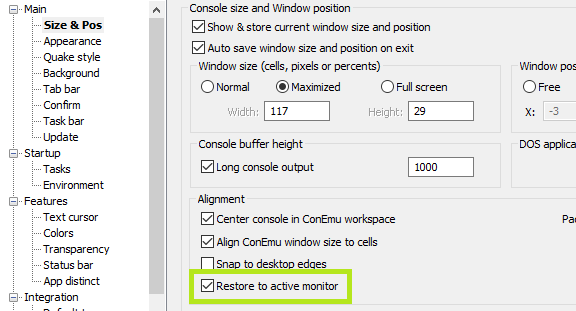
That does what I want. Thanks, and never mind. :)
dgunderson
on 20 Oct 2017
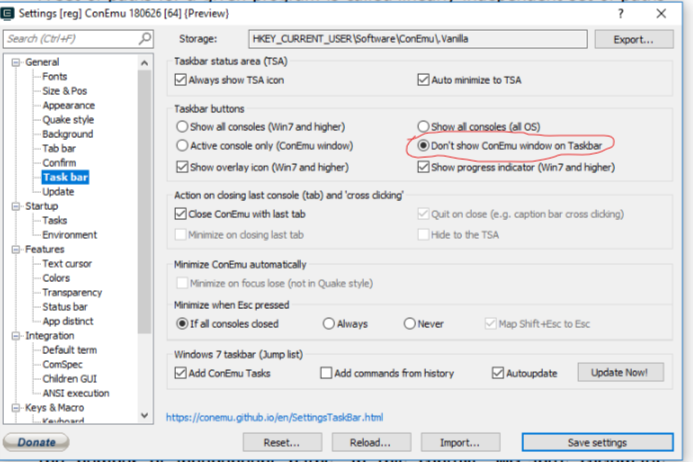
Just like to add to this. You also have to select the "Don't show ConEmu window on Taskbar" for it to work.
Location:-General ->Taskbar->Don't show ConEmu window on Taskbar
 BikramKumar6928
on 5 Nov 2018
BikramKumar6928
on 5 Nov 2018
@BikramKumar6928 Thanks!
 OOPMan
on 20 Aug 2019
OOPMan
on 20 Aug 2019
Related issues
 imalos
·
5Comments
imalos
·
5Comments
 phazei
·
6Comments
phazei
·
6Comments
 xkx
·
3Comments
xkx
·
3Comments
 pyhedgehog
·
3Comments
pyhedgehog
·
3Comments
 Daniel15
·
3Comments
Daniel15
·
3Comments
Most helpful comment
Agree, to show the console on all desktops is the correct behaviour for Quake-style console. In current version when you trigger Quake-style console Windows moves you to the desktop ConEmu was initially opened on while I believe it should stay on current desktop and popup there!