Conductor: Proposal for workflow variables
Feature:
A workflow definition may occasionally declare a "variables" data block. The variables can be used to hold data properties in runtime. The variables can be initialized when a workflow is started, updated when tasks are executed (based on task outputs) and may be set (to specific values) at any stage in the workflow.
Introduce a new system task for managing the variables: SET_VARIABLE
Motivation:
In the current mechanism for passing data between the tasks(say T1->T2), it is apparent that the workflow author "knows" _taskReferenceName_ for chaining data in the runtime (T2.input is initialized with T1.output). There is an underlying assumption that T1 has executed when T2 has been SCHEDULED. This is great and works very well when workflows are only constructed with a linear chain of tasks.
However, the system task constructs like DECISION, FORK, DYNAMIC_FORK, etc allow for branching in the workflow executions. Also, functionality for skipping the optional tasks in workflow execution runtime implies that all tasks may not have been executed. Thus, a downstream task may not easily depend upon "output" from previous tasks.
The variables block at the workflow level will allow referencing data without knowing any _taskReferenceName_ and hence simplify workflow definition in such use cases. Please consider below example
Example:
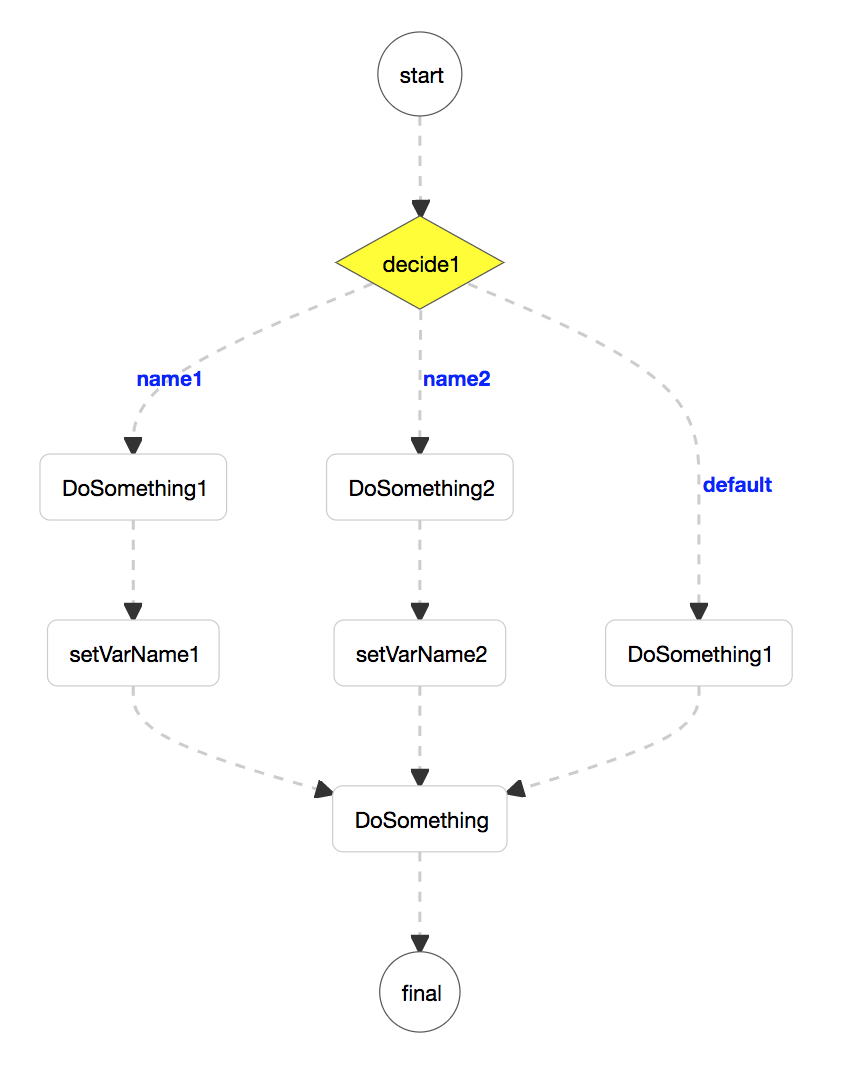
The end task "DoSomething" requires an input "user" which can be provided either by task "DoSomething1" or "DoSomething2". Let's say required input comes either from "${DoSomeName1.output.reviewer}" or "${DoSomeName2.output.Approver}" respectively for "DoSomething1" or "DoSomething2".
Using the variables block, whichever task executes in the decision branch, the workflow variables property "${workflow.variables.someUser}" can be updated based on appropriate task output. And the end task "DoSomething" can construct its input as {"user": "${workflow.variables.someUser}"} independent of executed taskreferenceName.
SET_VARIABLE:
The workflow variables can be updated by invoking SET_VARIABLE system task. This system task expects input parameters as a map, in the same way, any task receives input in the conductor's workflow. If the key name is the same as any global variable name then the value of the global variable is updated as per the input. In the above example, the workflow is updating the variables (someNumber, someUser) as per the output of different tasks, at different stages in the workflow.
Instead of a new system task, another strategy to update the variables could be to check and update the variables whenever tasks are completed.
In the example, it is used to set the property "${workflow.variables.someUser}" with either the "someUser": "${DoSomeName1.output.reviewer}" or "someUser": "${DoSomeName2.output.Approver}" outputs of different task.
Attachments
Workflow definition
Workflow Execution
 choubisat
All 7 comments
Hello,
Sorry but I am not sure to understand the utility of this new task: in the presented example you could use a exclusive join task instead. Could you check and eventually explain why the exclusive join task is not enough for your use case ?
Maybe there is some other case where your task could be used. Could you then provide another example ?
 andrea11
on 4 Jul 2019
andrea11
on 4 Jul 2019
@andrea11: Thanks for your response. I checked the Exclusive join task it is definitely helpful in the above case. However, with variables, it's easier to
- Map different output parameters into a common field. In the above example, the first decision branch produces an outputparameter named as "reviewer" & the other one produces the o/p named as "Approver", both can be mapped to common variable "user".
- Also, variables can be used when the decision branches execute more than one tasks. e.g. consider this workflow
DECISION{[T1,T2,T3,T4], [T5,T6,T7]}->EJ{T4,T7}->T8. If T8 needs to work with the output of T1, T2 or T5, T6, etc.
I will also try and look for some other workflow examples using FORK or Dynamic_Fork. Meanwhile, please share your share feedback for the above points.
choubisat
on 4 Jul 2019
@andrea11 , @jkaipa : Please find a couple of below use cases for using workflow variables Where Exclusive join or other tasks cannot be used easily. Few examples:
- workflow Aggregate parameters: A fork workflow, with long-running tasks, at a given point in time, fetch the percent_workflow_complete value for the running instance

Details on Tasks in the workflow:
- DoSomething: dummy tasks to be executed by assigned users
- update: lambda task that update variable
- updateCompletion: save lambda output into the workflow.variable
- Workflow def
- Find MAX, MIN, AVG etc :
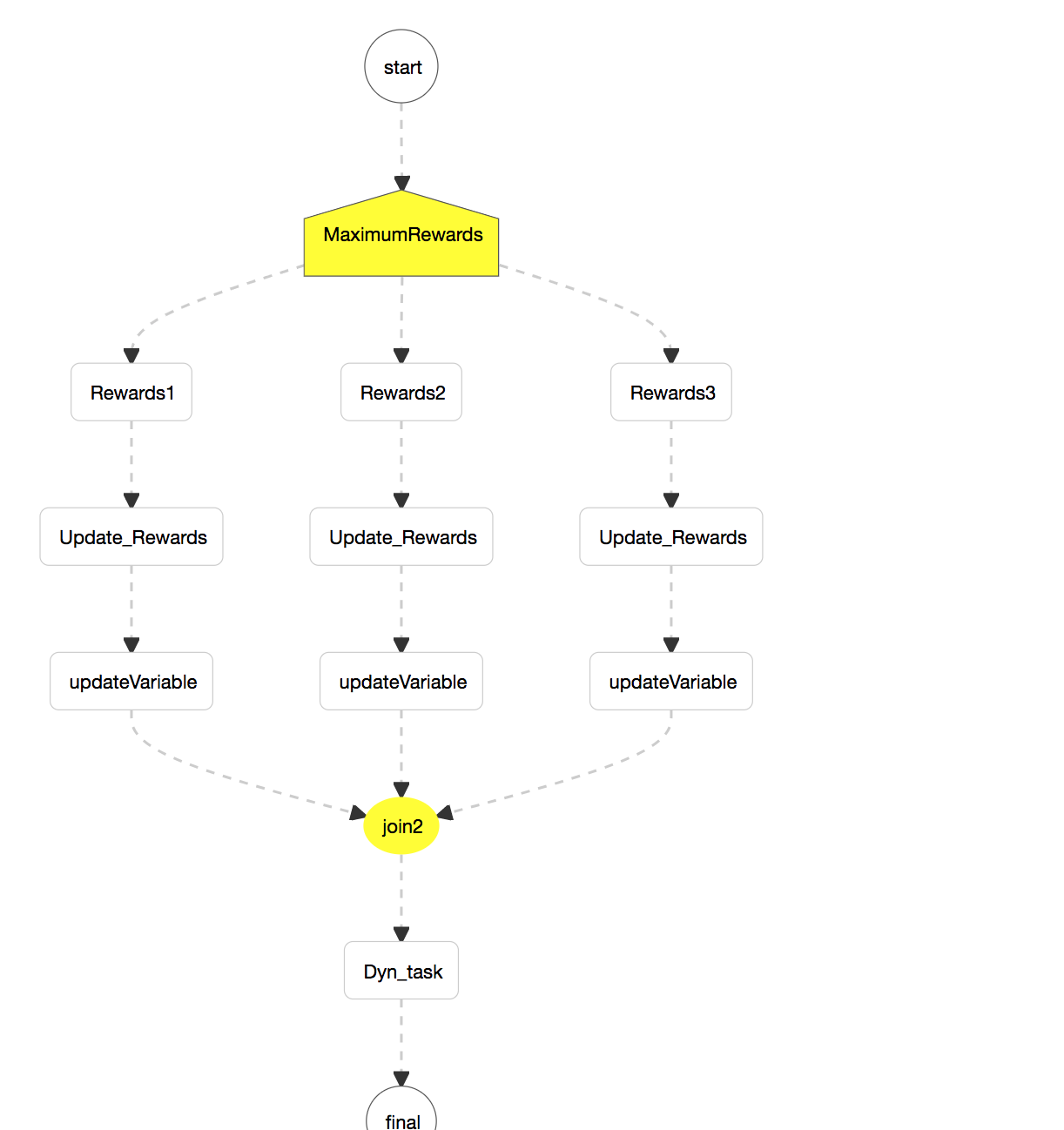
Details on Tasks in the workflow:
- Rewards: some dummy tasks
- Update_Rewards: a lambda task to compare current value and update to the maximum value
- updateVariable: set the variable to the maximum value.
- workflow Def
choubisat
on 8 Jul 2019
@choubisat Thank you very much for the proposal and the excellent write-up detailing the various use-cases.
Can you please clarify that based on your example here, are you proposing to set default values for the workflow variables in the workflow definition?
 apanicker-nflx
on 16 Jul 2019
apanicker-nflx
on 16 Jul 2019
@apanicker-nflx : for above, yes the variables can be initialized like this when the workflow starts running ( in workflow instance).
The above is an example for a running workflow instance ( for definition). Hence, it is populated using this block.
choubisat
on 16 Jul 2019
@choubisat Looks good. Once minor nit would be to rename SET_VARIABLE task to make it more intuitive/indicative of a system task updating workflow variables(only).
Other than that, the proposal looks good to be moved forward to PR. Also, consider how to limit the size of variables in your implementation. Since, this is just a Map<String, Object> this leaves it open for use to store large JSON objects, etc
apanicker-nflx
on 23 Jul 2019
Submitted PR for this issue: https://github.com/Netflix/conductor/pull/1323
choubisat
on 19 Sep 2019
Related issues
 sangeetanadgir
·
4Comments
sangeetanadgir
·
4Comments
 RemcoBuddelmeijer
·
6Comments
RemcoBuddelmeijer
·
6Comments
 HardiChandra
·
3Comments
HardiChandra
·
3Comments
 hados99
·
5Comments
hados99
·
5Comments
 Leggrand
·
4Comments
Leggrand
·
4Comments