Hi,
I really like the feature of Blur of transparent windows, for example, in the terminal. However, I'm wondering, if it is possible to change the radius of the blur so that the text or patterns in the background image can be heavily smeared. Thank you very much.
 guotsuan
All 23 comments
Well, this probably won't work quite as expected. The full explanation would probably be a bit tricky: Partly due to the my lack of knowledge, partly because of performance and implementation considerations, we don't actually use a proper and generic blurring algorithm, but the much simplified box blur algorithm. We use a 3x3 convolution kernel, and the strongest blurring effect possible in this way is to use use 1 on all elements of the kernel, as far as I know, and we are doing this already. To increase the blur strength further may require multiple-pass blurring, and probably, a larger convolution kernel? Yet the implementation of Xorg's convolution filter is almost purely software, as far as know, i.e. they transform pixels in CPU instead of GPU. Multiple-pass blurring may double or triple the cost of blur, eventually making blur unusable with X Render backend. (Well, let's say Xorg's convolution is already unusable on some boxes as indicated in #69.) Another problem is, as the blur strength increases, the faults in an algorithm will gradually show up. Unless we switch to the costly Gaussian blur, the effect may not look too great with increased blur strength. I could implement all this, but once I start imagining the incoming stream of bug reports regarding performance and ugly appearance and other things I don't yet know right now...
You are not left with no way if you just wish to increase the blur strength a little bit, though: compton by default reduces blur strength according the opacity of the window on the front, i.e. a window of 80% opacity will have more blurry background than a window with 50% opacity. This is mostly done to smooth the effect during fading. You could disable it with --blur-background-fixed to get a little more blur strength. If you want a smooth blur effect during fading as well as increased blur strength, you could try to tune how compton calculates blur strength -- or better, factor of the center pixel -- at line 1335 of src/compton.c:
  // Adjust blur strength according to window opacity, to make it appear
  // better during fading
  if (!ps->o.blur_background_fixed) {
    double pct = 1.0 - get_opacity_percent(w) * (1.0 - 1.0 / 9.0);
    factor_center = pct * 8.0 / (1.1 - pct);
  }
The lower factor_center is, the more blurry it will look, but things may go crazy when factor_center drops below 1.
 richardgv
on 10 Apr 2013
richardgv
on 10 Apr 2013
I'm really appreciate your detailed explanation. Thank you again!
guotsuan
on 10 Apr 2013
Due to extremely popular demands _(Okay I really have no idea why people love blur so much...)_, I added blur convolution kernel customization to compton (2e6fb0203d, richardgv-dev branch), --blur-kern. You may play with different convolution kernels now to see if you could get your desired results. The syntax of --blur-kern is pretty puzzling, though, so make sure you read the usage text (compton -h) before trying.
One quick (and ugly) way to get things more blurry is --blur-kern '5,5,1,1,1,1,1,1,1,1,1,1,1,1,1,1,1,1,1,1,1,1,1,1,1,1,', essentially a 5x5 box blur, but the boxy look is pretty apparent with this enlarged kernel.
richardgv
on 25 Apr 2013
I have tried it. It is awesome!! For me, the reason I want the blur is it makes the backgrounds of my terminals are not monotonous colours. However, the clear background images may distract your attention.
The blur of background can highlight the texts in the foreground terminals.
Previously, I think the blur effect of transparent background should be not difficult. After I tried several
compositors, I found most of them are lacking of this feature, probably because of the reasons that you
have mentioned before. Thank you!
guotsuan
on 25 Apr 2013
Great. I will try it out!
 jerri
on 26 Apr 2013
jerri
on 26 Apr 2013
It seems, there is a problem with blurred backgrounds in gnome-terminal. First of all, the blur_kern works perfect. Performance is not that bad. I have to admit I am using xmonad, so moving windows are not my problem. :)
But when I move my cursor in the gnome-terminal, it seems to updated the background and lines are shown in the blurred background. This doesn't happen without blurred backgrounds. The problem seems not to be connected to the blur-kern. It also happens with the normal compton-version.
Unfortunately I can't make a screenshot of it, because as soon as I change the window, the gnome-terminal gets redrawn and the problem disappears. I try to make an screenshot with my camera.
jerri
on 26 Apr 2013
@jerri:
But when I move my cursor in the gnome-terminal, it seems to updated the background and lines are shown in the blurred background.
If you are using --glx-use-copysubbuffermesa, --glx-swap-method, or --glx-copy-from-front, compton doesn't repaint more than the damaged region, but with blur, the pixels close-by will be affected as well and this part isn't repainted, which could create some abnormal "lines" around damaged region. For 3x3 blur it will be 1px wide, for 5x5 it would be 2px, etc. It isn't hard to fix, but I'm struck in a huge pile of bugs now, so give me some time, okay?
Another case is, nvidia-drivers probably have bugs in its XRender implementation that creates lines as well.
richardgv
on 26 Apr 2013
I see. No problem. Just wanted to report it. Thanks for your information. Will experiment a little bit with it. :)
jerri
on 26 Apr 2013
@jerri:
I've pushed a possible workaround of the blur pixel corruption issue as 8113e4e in richardgv-dev branch. If you have a 3x3 blur kernel you could use --resize-damage 1, for 5x5 --resize-damage 2, for 7x7 --resize-damage 3, etc. It isn't that fast, I'm afraid, which is why it isn't enabled by default, but I hope it isn't disastrously slow.
richardgv
on 27 Apr 2013
Great, will try this on monday. Don't have my work computer around at the moment!
jerri
on 27 Apr 2013
Wonderful! Everything works as expected! Thanks a lot. Visible blur at last. Now I have to optimize my configuration.
btw: It would be awesome if there where named blur kernels, like e.g. gauss, etc. Just an idea.
jerri
on 29 Apr 2013
@jerri:
btw: It would be awesome if there where named blur kernels, like e.g. gauss, etc. Just an idea.
Alright, I added it to richardgv-dev branch (a3f6f44). You may choose from 3x3box, 5x5box, 7x7box, 3x3gaussian, 5x5gaussian ... 11x11gaussian.
Beware that our Guassian kernels are built with sigma = 0.84089642 . I've also added a Python 3 blur kernel generator, and you could adjust the sigma value yourself if you don't like it. For a 5x5 Gaussian kernel with sigma 1:
./bin/compton-convgen.py --dump-compton -f=sigma=1 gaussian 5
You are the man!!! Thanks a lot!
jerri
on 30 Apr 2013
This is so great. compton just went from awesome to ultracool!
jerri
on 30 Apr 2013
I just happened upon this issue while googling for "compton blurred background". I didn't actually have any hope that it was possible, but to my amazement I found that it was even implemented in the compton version from Debian stretch's package manager.
However, I was going for the "frosted glass" look that's extensively used on iPhone/iOS:
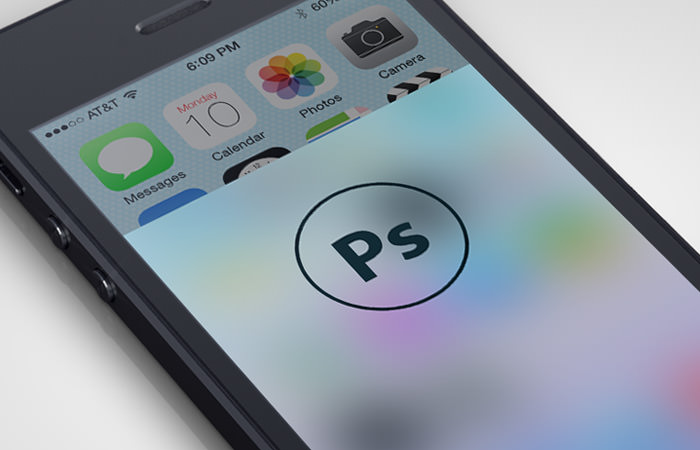
For this I need more intense blurring, and I've been unable to figure out how to do that with compton. Reading through this issue I'm getting the sense that it's impossible due to performance issues, but I would like to try.
Is this something I might accomplish in Compton if I read up on the blur terminology? (kernel, sigma etc.)
 Hubro
on 19 Oct 2017
Hubro
on 19 Oct 2017
@Hubro It seems that it's possible in C, according to this page.
You don't have to push it very far : Standard blur (even 3x3box should do the trick), but you just have to reapply a semi-transparent overlay of the color you want to display.
So in your example, Apple might only have done one simple gaussian blur on some white background, and then reapplied a white color with 60% opacity on top of it.
 raphael141714
on 9 Nov 2017
raphael141714
on 9 Nov 2017
@raphael141714 The thing is, all the values I've tried for blur kernel leaves the background far too sharp to achieve the frosted glass effect. In the screenshot above, the background is heavily smeared out.
Hubro
on 10 Nov 2017
This matrix :
"25,25,0.000338, 0.000404, 0.000476, 0.000552, 0.00063, 0.000708, 0.000784, 0.000854, 0.000917, 0.000968, 0.001006, 0.00103, 0.001038, 0.00103, 0.001006, 0.000968, 0.000917, 0.000854, 0.000784, 0.000708, 0.00063, 0.000552, 0.000476, 0.000404, 0.000338, 0.000404, 0.000483, 0.000569, 0.00066, 0.000754, 0.000848, 0.000938, 0.001022, 0.001097, 0.001158, 0.001204, 0.001233, 0.001243, 0.001233, 0.001204, 0.001158, 0.001097, 0.001022, 0.000938, 0.000848, 0.000754, 0.00066, 0.000569, 0.000483, 0.000404, 0.000476, 0.000569, 0.000671, 0.000778, 0.000888, 0.000999, 0.001105, 0.001204, 0.001292, 0.001364, 0.001419, 0.001452, 0.001464, 0.001452, 0.001419, 0.001364, 0.001292, 0.001204, 0.001105, 0.000999, 0.000888, 0.000778, 0.000671, 0.000569, 0.000476, 0.000552, 0.00066, 0.000778, 0.000902, 0.00103, 0.001158, 0.001282, 0.001397, 0.001498, 0.001582, 0.001645, 0.001684, 0.001698, 0.001684, 0.001645, 0.001582, 0.001498, 0.001397, 0.001282, 0.001158, 0.00103, 0.000902, 0.000778, 0.00066, 0.000552, 0.00063, 0.000754, 0.000888, 0.00103, 0.001176, 0.001323, 0.001464, 0.001595, 0.001711, 0.001807, 0.001879, 0.001923, 0.001938, 0.001923, 0.001879, 0.001807, 0.001711, 0.001595, 0.001464, 0.001323, 0.001176, 0.00103, 0.000888, 0.000754, 0.00063, 0.000708, 0.000848, 0.000999, 0.001158, 0.001323, 0.001487, 0.001645, 0.001793, 0.001923, 0.002031, 0.002112, 0.002162, 0.002179, 0.002162, 0.002112, 0.002031, 0.001923, 0.001793, 0.001645, 0.001487, 0.001323, 0.001158, 0.000999, 0.000848, 0.000708, 0.000784, 0.000938, 0.001105, 0.001282, 0.001464, 0.001645, 0.001821, 0.001984, 0.002129, 0.002248, 0.002338, 0.002393, 0.002412, 0.002393, 0.002338, 0.002248, 0.002129, 0.001984, 0.001821, 0.001645, 0.001464, 0.001282, 0.001105, 0.000938, 0.000784, 0.000854, 0.001022, 0.001204, 0.001397, 0.001595, 0.001793, 0.001984, 0.002162, 0.002319, 0.00245, 0.002547, 0.002607, 0.002628, 0.002607, 0.002547, 0.00245, 0.002319, 0.002162, 0.001984, 0.001793, 0.001595, 0.001397, 0.001204, 0.001022, 0.000854, 0.000917, 0.001097, 0.001292, 0.001498, 0.001711, 0.001923, 0.002129, 0.002319, 0.002488, 0.002628, 0.002732, 0.002797, 0.002819, 0.002797, 0.002732, 0.002628, 0.002488, 0.002319, 0.002129, 0.001923, 0.001711, 0.001498, 0.001292, 0.001097, 0.000917, 0.000968, 0.001158, 0.001364, 0.001582, 0.001807, 0.002031, 0.002248, 0.00245, 0.002628, 0.002775, 0.002886, 0.002954, 0.002977, 0.002954, 0.002886, 0.002775, 0.002628, 0.00245, 0.002248, 0.002031, 0.001807, 0.001582, 0.001364, 0.001158, 0.000968, 0.001006, 0.001204, 0.001419, 0.001645, 0.001879, 0.002112, 0.002338, 0.002547, 0.002732, 0.002886, 0.003001, 0.003072, 0.003096, 0.003072, 0.003001, 0.002886, 0.002732, 0.002547, 0.002338, 0.002112, 0.001879, 0.001645, 0.001419, 0.001204, 0.001006, 0.00103, 0.001233, 0.001452, 0.001684, 0.001923, 0.002162, 0.002393, 0.002607, 0.002797, 0.002954, 0.003072, 0.003144, 0.003169, 0.003144, 0.003072, 0.002954, 0.002797, 0.002607, 0.002393, 0.002162, 0.001923, 0.001684, 0.001452, 0.001233, 0.00103, 0.001038, 0.001243, 0.001464, 0.001698, 0.001938, 0.002179, 0.002412, 0.002628, 0.002819, 0.002977, 0.003096, 0.003169, 0.003194, 0.003169, 0.003096, 0.002977, 0.002819, 0.002628, 0.002412, 0.002179, 0.001938, 0.001698, 0.001464, 0.001243, 0.001038, 0.00103, 0.001233, 0.001452, 0.001684, 0.001923, 0.002162, 0.002393, 0.002607, 0.002797, 0.002954, 0.003072, 0.003144, 0.003169, 0.003144, 0.003072, 0.002954, 0.002797, 0.002607, 0.002393, 0.002162, 0.001923, 0.001684, 0.001452, 0.001233, 0.00103, 0.001006, 0.001204, 0.001419, 0.001645, 0.001879, 0.002112, 0.002338, 0.002547, 0.002732, 0.002886, 0.003001, 0.003072, 0.003096, 0.003072, 0.003001, 0.002886, 0.002732, 0.002547, 0.002338, 0.002112, 0.001879, 0.001645, 0.001419, 0.001204, 0.001006, 0.000968, 0.001158, 0.001364, 0.001582, 0.001807, 0.002031, 0.002248, 0.00245, 0.002628, 0.002775, 0.002886, 0.002954, 0.002977, 0.002954, 0.002886, 0.002775, 0.002628, 0.00245, 0.002248, 0.002031, 0.001807, 0.001582, 0.001364, 0.001158, 0.000968, 0.000917, 0.001097, 0.001292, 0.001498, 0.001711, 0.001923, 0.002129, 0.002319, 0.002488, 0.002628, 0.002732, 0.002797, 0.002819, 0.002797, 0.002732, 0.002628, 0.002488, 0.002319, 0.002129, 0.001923, 0.001711, 0.001498, 0.001292, 0.001097, 0.000917, 0.000854, 0.001022, 0.001204, 0.001397, 0.001595, 0.001793, 0.001984, 0.002162, 0.002319, 0.00245, 0.002547, 0.002607, 0.002628, 0.002607, 0.002547, 0.00245, 0.002319, 0.002162, 0.001984, 0.001793, 0.001595, 0.001397, 0.001204, 0.001022, 0.000854, 0.000784, 0.000938, 0.001105, 0.001282, 0.001464, 0.001645, 0.001821, 0.001984, 0.002129, 0.002248, 0.002338, 0.002393, 0.002412, 0.002393, 0.002338, 0.002248, 0.002129, 0.001984, 0.001821, 0.001645, 0.001464, 0.001282, 0.001105, 0.000938, 0.000784, 0.000708, 0.000848, 0.000999, 0.001158, 0.001323, 0.001487, 0.001645, 0.001793, 0.001923, 0.002031, 0.002112, 0.002162, 0.002179, 0.002162, 0.002112, 0.002031, 0.001923, 0.001793, 0.001645, 0.001487, 0.001323, 0.001158, 0.000999, 0.000848, 0.000708, 0.00063, 0.000754, 0.000888, 0.00103, 0.001176, 0.001323, 0.001464, 0.001595, 0.001711, 0.001807, 0.001879, 0.001923, 0.001938, 0.001923, 0.001879, 0.001807, 0.001711, 0.001595, 0.001464, 0.001323, 0.001176, 0.00103, 0.000888, 0.000754, 0.00063, 0.000552, 0.00066, 0.000778, 0.000902, 0.00103, 0.001158, 0.001282, 0.001397, 0.001498, 0.001582, 0.001645, 0.001684, 0.001698, 0.001684, 0.001645, 0.001582, 0.001498, 0.001397, 0.001282, 0.001158, 0.00103, 0.000902, 0.000778, 0.00066, 0.000552, 0.000476, 0.000569, 0.000671, 0.000778, 0.000888, 0.000999, 0.001105, 0.001204, 0.001292, 0.001364, 0.001419, 0.001452, 0.001464, 0.001452, 0.001419, 0.001364, 0.001292, 0.001204, 0.001105, 0.000999, 0.000888, 0.000778, 0.000671, 0.000569, 0.000476, 0.000404, 0.000483, 0.000569, 0.00066, 0.000754, 0.000848, 0.000938, 0.001022, 0.001097, 0.001158, 0.001204, 0.001233, 0.001243, 0.001233, 0.001204, 0.001158, 0.001097, 0.001022, 0.000938, 0.000848, 0.000754, 0.00066, 0.000569, 0.000483, 0.000404, 0.000338, 0.000404, 0.000476, 0.000552, 0.00063, 0.000708, 0.000784, 0.000854, 0.000917, 0.000968, 0.001006, 0.00103, 0.001038, 0.00103, 0.001006, 0.000968, 0.000917, 0.000854, 0.000784, 0.000708, 0.00063, 0.000552, 0.000476, 0.000404, 0.000338"
should have done the trick, but compton says it's too big : parse_matrix(): Matrix width/height too large.
It corresponds to a 12px radius of gaussian blur.
It has been generated thanks to his : http://dev.theomader.com/gaussian-kernel-calculator/
with a sigma of 8.0
raphael141714
on 11 Nov 2017
So what do you have now ? I'm searching to have the same blur and I have the same error
 victorbnl
on 15 Oct 2018
victorbnl
on 15 Oct 2018
I found the solution, use the tryone's fork https://github.com/tryone144/compton
victorbnl
on 15 Oct 2018
https://github.com/tryone144/compton does work really well, it is fairly quick/easy to compile, and the performance is better than the 3x3box blur (which is was the fastest I tested on the regular branch, and still pretty laggy)
 josefwells
on 16 Oct 2018
josefwells
on 16 Oct 2018
to compile? I installed it from the Arch User Repository XD. But yes it works and it's really easier to use. I also like the render. In a nutshell, I love it
victorbnl
on 16 Oct 2018
I forked it and opened a pull request for it because there wasnt one previously, maybe it will get accepted and distributed to everyone.
josefwells
on 17 Oct 2018
Related issues
 enbyss
·
4Comments
enbyss
·
4Comments
 teamblubee
·
10Comments
teamblubee
·
10Comments
 equeim
·
11Comments
equeim
·
11Comments
 sainathadapa
·
3Comments
sainathadapa
·
3Comments
 orschiro
·
3Comments
orschiro
·
3Comments
Most helpful comment
This matrix :
"25,25,0.000338, 0.000404, 0.000476, 0.000552, 0.00063, 0.000708, 0.000784, 0.000854, 0.000917, 0.000968, 0.001006, 0.00103, 0.001038, 0.00103, 0.001006, 0.000968, 0.000917, 0.000854, 0.000784, 0.000708, 0.00063, 0.000552, 0.000476, 0.000404, 0.000338, 0.000404, 0.000483, 0.000569, 0.00066, 0.000754, 0.000848, 0.000938, 0.001022, 0.001097, 0.001158, 0.001204, 0.001233, 0.001243, 0.001233, 0.001204, 0.001158, 0.001097, 0.001022, 0.000938, 0.000848, 0.000754, 0.00066, 0.000569, 0.000483, 0.000404, 0.000476, 0.000569, 0.000671, 0.000778, 0.000888, 0.000999, 0.001105, 0.001204, 0.001292, 0.001364, 0.001419, 0.001452, 0.001464, 0.001452, 0.001419, 0.001364, 0.001292, 0.001204, 0.001105, 0.000999, 0.000888, 0.000778, 0.000671, 0.000569, 0.000476, 0.000552, 0.00066, 0.000778, 0.000902, 0.00103, 0.001158, 0.001282, 0.001397, 0.001498, 0.001582, 0.001645, 0.001684, 0.001698, 0.001684, 0.001645, 0.001582, 0.001498, 0.001397, 0.001282, 0.001158, 0.00103, 0.000902, 0.000778, 0.00066, 0.000552, 0.00063, 0.000754, 0.000888, 0.00103, 0.001176, 0.001323, 0.001464, 0.001595, 0.001711, 0.001807, 0.001879, 0.001923, 0.001938, 0.001923, 0.001879, 0.001807, 0.001711, 0.001595, 0.001464, 0.001323, 0.001176, 0.00103, 0.000888, 0.000754, 0.00063, 0.000708, 0.000848, 0.000999, 0.001158, 0.001323, 0.001487, 0.001645, 0.001793, 0.001923, 0.002031, 0.002112, 0.002162, 0.002179, 0.002162, 0.002112, 0.002031, 0.001923, 0.001793, 0.001645, 0.001487, 0.001323, 0.001158, 0.000999, 0.000848, 0.000708, 0.000784, 0.000938, 0.001105, 0.001282, 0.001464, 0.001645, 0.001821, 0.001984, 0.002129, 0.002248, 0.002338, 0.002393, 0.002412, 0.002393, 0.002338, 0.002248, 0.002129, 0.001984, 0.001821, 0.001645, 0.001464, 0.001282, 0.001105, 0.000938, 0.000784, 0.000854, 0.001022, 0.001204, 0.001397, 0.001595, 0.001793, 0.001984, 0.002162, 0.002319, 0.00245, 0.002547, 0.002607, 0.002628, 0.002607, 0.002547, 0.00245, 0.002319, 0.002162, 0.001984, 0.001793, 0.001595, 0.001397, 0.001204, 0.001022, 0.000854, 0.000917, 0.001097, 0.001292, 0.001498, 0.001711, 0.001923, 0.002129, 0.002319, 0.002488, 0.002628, 0.002732, 0.002797, 0.002819, 0.002797, 0.002732, 0.002628, 0.002488, 0.002319, 0.002129, 0.001923, 0.001711, 0.001498, 0.001292, 0.001097, 0.000917, 0.000968, 0.001158, 0.001364, 0.001582, 0.001807, 0.002031, 0.002248, 0.00245, 0.002628, 0.002775, 0.002886, 0.002954, 0.002977, 0.002954, 0.002886, 0.002775, 0.002628, 0.00245, 0.002248, 0.002031, 0.001807, 0.001582, 0.001364, 0.001158, 0.000968, 0.001006, 0.001204, 0.001419, 0.001645, 0.001879, 0.002112, 0.002338, 0.002547, 0.002732, 0.002886, 0.003001, 0.003072, 0.003096, 0.003072, 0.003001, 0.002886, 0.002732, 0.002547, 0.002338, 0.002112, 0.001879, 0.001645, 0.001419, 0.001204, 0.001006, 0.00103, 0.001233, 0.001452, 0.001684, 0.001923, 0.002162, 0.002393, 0.002607, 0.002797, 0.002954, 0.003072, 0.003144, 0.003169, 0.003144, 0.003072, 0.002954, 0.002797, 0.002607, 0.002393, 0.002162, 0.001923, 0.001684, 0.001452, 0.001233, 0.00103, 0.001038, 0.001243, 0.001464, 0.001698, 0.001938, 0.002179, 0.002412, 0.002628, 0.002819, 0.002977, 0.003096, 0.003169, 0.003194, 0.003169, 0.003096, 0.002977, 0.002819, 0.002628, 0.002412, 0.002179, 0.001938, 0.001698, 0.001464, 0.001243, 0.001038, 0.00103, 0.001233, 0.001452, 0.001684, 0.001923, 0.002162, 0.002393, 0.002607, 0.002797, 0.002954, 0.003072, 0.003144, 0.003169, 0.003144, 0.003072, 0.002954, 0.002797, 0.002607, 0.002393, 0.002162, 0.001923, 0.001684, 0.001452, 0.001233, 0.00103, 0.001006, 0.001204, 0.001419, 0.001645, 0.001879, 0.002112, 0.002338, 0.002547, 0.002732, 0.002886, 0.003001, 0.003072, 0.003096, 0.003072, 0.003001, 0.002886, 0.002732, 0.002547, 0.002338, 0.002112, 0.001879, 0.001645, 0.001419, 0.001204, 0.001006, 0.000968, 0.001158, 0.001364, 0.001582, 0.001807, 0.002031, 0.002248, 0.00245, 0.002628, 0.002775, 0.002886, 0.002954, 0.002977, 0.002954, 0.002886, 0.002775, 0.002628, 0.00245, 0.002248, 0.002031, 0.001807, 0.001582, 0.001364, 0.001158, 0.000968, 0.000917, 0.001097, 0.001292, 0.001498, 0.001711, 0.001923, 0.002129, 0.002319, 0.002488, 0.002628, 0.002732, 0.002797, 0.002819, 0.002797, 0.002732, 0.002628, 0.002488, 0.002319, 0.002129, 0.001923, 0.001711, 0.001498, 0.001292, 0.001097, 0.000917, 0.000854, 0.001022, 0.001204, 0.001397, 0.001595, 0.001793, 0.001984, 0.002162, 0.002319, 0.00245, 0.002547, 0.002607, 0.002628, 0.002607, 0.002547, 0.00245, 0.002319, 0.002162, 0.001984, 0.001793, 0.001595, 0.001397, 0.001204, 0.001022, 0.000854, 0.000784, 0.000938, 0.001105, 0.001282, 0.001464, 0.001645, 0.001821, 0.001984, 0.002129, 0.002248, 0.002338, 0.002393, 0.002412, 0.002393, 0.002338, 0.002248, 0.002129, 0.001984, 0.001821, 0.001645, 0.001464, 0.001282, 0.001105, 0.000938, 0.000784, 0.000708, 0.000848, 0.000999, 0.001158, 0.001323, 0.001487, 0.001645, 0.001793, 0.001923, 0.002031, 0.002112, 0.002162, 0.002179, 0.002162, 0.002112, 0.002031, 0.001923, 0.001793, 0.001645, 0.001487, 0.001323, 0.001158, 0.000999, 0.000848, 0.000708, 0.00063, 0.000754, 0.000888, 0.00103, 0.001176, 0.001323, 0.001464, 0.001595, 0.001711, 0.001807, 0.001879, 0.001923, 0.001938, 0.001923, 0.001879, 0.001807, 0.001711, 0.001595, 0.001464, 0.001323, 0.001176, 0.00103, 0.000888, 0.000754, 0.00063, 0.000552, 0.00066, 0.000778, 0.000902, 0.00103, 0.001158, 0.001282, 0.001397, 0.001498, 0.001582, 0.001645, 0.001684, 0.001698, 0.001684, 0.001645, 0.001582, 0.001498, 0.001397, 0.001282, 0.001158, 0.00103, 0.000902, 0.000778, 0.00066, 0.000552, 0.000476, 0.000569, 0.000671, 0.000778, 0.000888, 0.000999, 0.001105, 0.001204, 0.001292, 0.001364, 0.001419, 0.001452, 0.001464, 0.001452, 0.001419, 0.001364, 0.001292, 0.001204, 0.001105, 0.000999, 0.000888, 0.000778, 0.000671, 0.000569, 0.000476, 0.000404, 0.000483, 0.000569, 0.00066, 0.000754, 0.000848, 0.000938, 0.001022, 0.001097, 0.001158, 0.001204, 0.001233, 0.001243, 0.001233, 0.001204, 0.001158, 0.001097, 0.001022, 0.000938, 0.000848, 0.000754, 0.00066, 0.000569, 0.000483, 0.000404, 0.000338, 0.000404, 0.000476, 0.000552, 0.00063, 0.000708, 0.000784, 0.000854, 0.000917, 0.000968, 0.001006, 0.00103, 0.001038, 0.00103, 0.001006, 0.000968, 0.000917, 0.000854, 0.000784, 0.000708, 0.00063, 0.000552, 0.000476, 0.000404, 0.000338"should have done the trick, but compton says it's too big :
parse_matrix(): Matrix width/height too large.It corresponds to a 12px radius of gaussian blur.
It has been generated thanks to his : http://dev.theomader.com/gaussian-kernel-calculator/
with a sigma of 8.0