Composer: json do not match its signature issue
With the following composer.json:
(none)
{
    ...
}
When I run this command:
composer command -vvv (please include -vvv!)
I get this output:
  [Composer\Repository\RepositorySecurityException]
  The contents of http://packagist.org/p/provider-2014%24778fe81238370a6a10514fa2191d8c49e3b0df47ad7c25361bda5e7c0f48797c.json do not match its signature. This should indicate a man-in-the-middle attack. Try running composer again and report this if you think it is a mistake.
And I expected this to happen:
install cakephp package.
 omerbsh
All 64 comments
Please edit the template a bit more to supply an actual problem case.
 curry684
on 15 Apr 2016
curry684
on 15 Apr 2016
When I try to install by the command "php composer.phar create-project --prefer-dist laravel/laravel public" i get the attached error message.
I wonder if the problem is with the CRT on my computer or on the servers?
omerbsh
on 15 Apr 2016
Are you behind a proxy or using any kind of firewall software?
If the error consistently occurs, one of the above is probably mangling your connections.
 alcohol
on 15 Apr 2016
alcohol
on 15 Apr 2016
Hey,
no use of proxy, i changed machine and i still get the same error.
[Composer\Repository\RepositorySecurityException]
The contents of http://packagist.org/p/provider-2014%24778fe81238370a6a10514fa2191d8c49e3b0df47ad7c25361bda5e7c0f48797c.json do not match its sign
ature. This should indicate a man-in-the-middle attack. Try running composer again and report this if you think it is a mistake.
omerbsh
on 15 Apr 2016
Different machine, but same network?
alcohol
on 15 Apr 2016
Yes, its virtual machines on my computer (Debian).
omerbsh
on 15 Apr 2016
Sorry, not really sure what could be wrong here. But it is definitely a networking issue, nothing we can solve for you.
alcohol
on 15 Apr 2016
add this to your composer
"repositories": {
    "packagist": { "url": "https://packagist.org", "type": "composer" }
 }
 Kendysond
on 26 Jun 2016
Kendysond
on 26 Jun 2016
"repositories": {
    "packagist": { "url": "https://packagist.org", "type": "composer" }
 }
This code above fix the signature issue.
[Composer\Repository\RepositorySecurityException]
The contents of http://packagist.org/p/provider-2014%24778fe81238370a6a10514fa2191d8c49e3b0df47ad7c25361bda5e7c0f48797c.json do not match its sign
ature. This should indicate a man-in-the-middle attack. Try running composer again and report this if you think it is a mistake.
 smilezv
on 27 Dec 2016
smilezv
on 27 Dec 2016
I have had this problem in the morning yesterday and today, and on various days in the past. In my timezone that is early AM hours UTC. Then the problem goes away in the afternoon evening. So I am suspicious that there are daily updates to the package list, and the signature file also gets updated, but somewhere "in the big bad internet" they are cached differently. And so for some hours I receive a new file+old signature or old file+new signature. It is rather annoying!
[Composer\Repository\RepositorySecurityException]
The contents of http://packagist.org/p/provider-2013%2453bd1fb568f984a10d7aa50e4d388dce7787e9d744d748e09a2f3ceadaae5cd1.json do not match its signature. This should indicate a man-in-the-middle attack. Try running composer again and report this if you think it is a mistake.
I will try regularly now to see if there is a real time pattern to this.
The code above to add to composer.json is "a good thing" (tm) and works around the issue.
 phil-davis
on 24 Nov 2017
phil-davis
on 24 Nov 2017
This should indicate a man-in-the-middle attack.
That should actually say "could" hehe.
curry684
on 24 Nov 2017
I get a similar error when running composer require symfony/security-checker:
[Composer\Repository\RepositorySecurityException]
  The contents of https://packagist.org/p/providerlatest%240cbfb40ab72a881d21b70f78286d39cd72e3b0eb8704c13e79dc49624e549973.json do not match its signature. This could indicate a man-in-the-middle attack. Try running composer again and report this if you think it is a mistake.
Adding
"repositories": {
        "packagist": { "url": "https://packagist.org", "type": "composer" }
    }
doesn't help. Any suggestions are welcome.
Thank you.
 TheFuriousSnail
on 16 Jan 2018
TheFuriousSnail
on 16 Jan 2018
@furious-snail Looks like packagist.org is down right now.
 rickselby
on 16 Jan 2018
rickselby
on 16 Jan 2018
It seems to be working again!
 laurentvd
on 16 Jan 2018
laurentvd
on 16 Jan 2018
I tried a couple of times. When accessing the https://packagist.org it is working.
Thank you.
TheFuriousSnail
on 16 Jan 2018
Same problem here. Adding
"repositories": { "packagist": { "url": "https://packagist.org", "type": "composer" } }
does not help.
 munzeedaniel
on 16 Jan 2018
munzeedaniel
on 16 Jan 2018
Same problem here, adding packagist url explicitly didn't work
 hoonzis
on 16 Jan 2018
hoonzis
on 16 Jan 2018
I can access the website https://packagist.org, but I still get the following when I composer update:
The contents of https://packagist.org/p/provider-latest%240cbfb40ab72a881d21b70f78286d39cd72e3b0eb8704c13e79dc49624e549973.json do not match its signature. This could indicate a man-in-the-middle attack. Try running composer again and report this if you think it is a mistake
 necipallef
on 16 Jan 2018
necipallef
on 16 Jan 2018
Same here
 jscontrust
on 16 Jan 2018
jscontrust
on 16 Jan 2018
Similarly..
 yuriyse
on 16 Jan 2018
yuriyse
on 16 Jan 2018
Yeah, seems like packagist is down, or at least the service does not work as expected.
 svenfinke
on 16 Jan 2018
svenfinke
on 16 Jan 2018
Same here :/
 jibay
on 16 Jan 2018
jibay
on 16 Jan 2018
Just wait
 ghost
on 16 Jan 2018
ghost
on 16 Jan 2018
I think this is related to the recent service interruption of packagist.
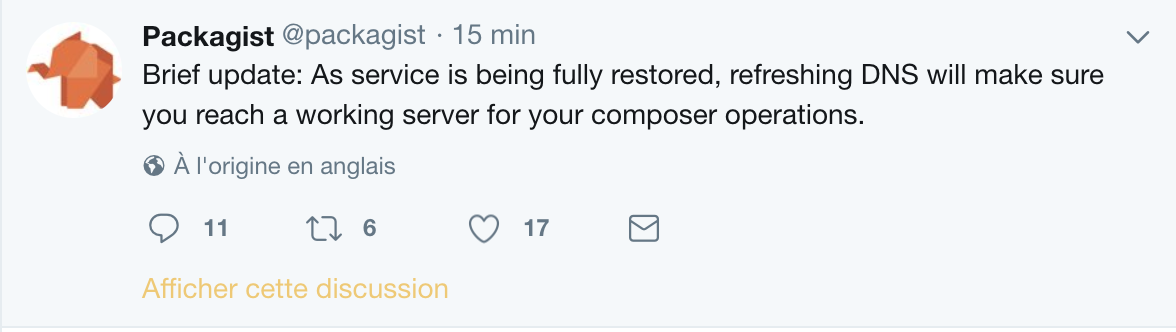
More infos on : https://twitter.com/packagist
 Okipa
on 16 Jan 2018
Okipa
on 16 Jan 2018
same here
 milosilic
on 16 Jan 2018
milosilic
on 16 Jan 2018
Thanks for the update @Okipa, FYI DNS related issue at Packagist.
 Keirul
on 16 Jan 2018
Keirul
on 16 Jan 2018
Yes, we just need to wait a little bit.
 arthurlacoste
on 16 Jan 2018
arthurlacoste
on 16 Jan 2018
For Mac User:
sudo killall -HUP mDNSResponder
nslookup packagist.org
Name: packagist.org
Address: 144.217.203.53
Worked for me
 dlange82
on 16 Jan 2018
dlange82
on 16 Jan 2018
I think it has to do with Packagist being down the past hour. I'm also getting errors. I sent them on Twitter, I'll update this thread when I hear more.
 notflip
on 16 Jan 2018
notflip
on 16 Jan 2018
@endyjasmi Packagist DNS is down. Scroll up.
Keirul
on 16 Jan 2018
Flushing DNS as being told in the twitter worked. Problem is finally gone.
necipallef
on 16 Jan 2018
I guess on a shared hosting I'll have to contact the sysadmins to perform the DNS flush?
notflip
on 16 Jan 2018
that my problem, too
 akentner
on 16 Jan 2018
akentner
on 16 Jan 2018
Have the same problem as well
 shonjord
on 16 Jan 2018
shonjord
on 16 Jan 2018
Indeed, what helped us was using a different DNS:
 RonnyGitHub
on 16 Jan 2018
RonnyGitHub
on 16 Jan 2018
Tried now locally and it's working! It wasn't working locally seconds ago
 LS05
on 16 Jan 2018
LS05
on 16 Jan 2018
Flushing DNS cache (or using Google DNS servers temporary) works for me.
 hirnschmalz
on 16 Jan 2018
hirnschmalz
on 16 Jan 2018
Solved here as well, I'm on Linux so I switched to Google DNS -> https://developers.google.com/speed/public-dns/
Keirul
on 16 Jan 2018
For macOs users, flush your DNS : dscacheutil -flushcache;sudo killall -HUP mDNSResponder;.
Then ping packagist.org, the IP should be 144.217.203.53.
Okipa
on 16 Jan 2018
Odd, flushing the DNS still hasnt worked. Still getting
[Composer\Repository\RepositorySecurityException]
  The contents of https://packagist.org/p/provider-latest%240cbfb40ab72a881d21b70f78286d39cd72e3b0eb8704c13e79dc49624e549973.json do not match its signature. This could indicate a man-in-the-middle attack. Try running composer again and report this if you think it is a mistake.
Im on Linux and used service dnsmasq restart (as we dont have nscd)
Maybe adding a Google dns..
ghost
on 16 Jan 2018
Same here. Google DNS didn't help (Ubuntu 16.04 in VirtualBox for Windows 10).
 kiaplayer
on 16 Jan 2018
kiaplayer
on 16 Jan 2018
@snightingale @kiaplayer
Switching to Google DNS solves it. And using the following to clear any leftover dns:
systemctl restart systemd-resolved.service
EDIT: It doesn't flush the dns, it's a full restart of the service.
Keirul
on 16 Jan 2018
I'm on Mac
Flushing DNS doesn't work
Adding repositories in composer.json doesn't work
Changing DNS to google DNS Worked
 Rui-Git
on 16 Jan 2018
Rui-Git
on 16 Jan 2018
already using google dns, so there's no resolution there.
running composer through the public proxy built into toranproxy does work, however.
ghost
on 16 Jan 2018
Google DNS also solved for me (CentOS)
 ikas
on 16 Jan 2018
ikas
on 16 Jan 2018
Does anyone know a solution for a shared hosting? Where I can't run scripts, change settings..
notflip
on 16 Jan 2018
"repositories": {
    "packagist": {
      "url": "https://packagist.org",
      "type": "composer"
    }
  }
not working.
 vrkansagara
on 16 Jan 2018
vrkansagara
on 16 Jan 2018
@notflip You could locally do a composer install and manually move the packages yourself. I don't see another solution for you.
Keirul
on 16 Jan 2018
@Keirul I'm affraid that will be it. Thank you!
notflip
on 16 Jan 2018
Flushing DNS works for me.
Is there any way to avoid this in the future?
 denisov1985
on 16 Jan 2018
denisov1985
on 16 Jan 2018
@denisov1985 Not really. It would be the same thing as planning to use an alternative for when Google is down.
What you could do is create a private repository and host the packages you personally use for that project. So if you use those dependencies elsewhere you can retrieve them yourself.
But update-wise you can't change a thing.
Keirul
on 16 Jan 2018
Hello everyone. Does somebody know how to flush DNS on Ubuntu desktop 16.04?
 Reserford1991
on 16 Jan 2018
Reserford1991
on 16 Jan 2018
@Reserford1991 Worked for me: systemctl restart systemd-resolved.service
 akadko
on 16 Jan 2018
akadko
on 16 Jan 2018
@Reserford1991 Indeed, @akadko was faster then me, I have already posted that before :)
Keirul
on 16 Jan 2018
@akadko, @Keirul Thanks guys, but composer require laravel/installer still does not work properly. Will try to download installer manually.
Reserford1991
on 16 Jan 2018
For everyone who is using Windows, just flush your DNS with ipconfig /flushdns in your CMD.
This worked for me
 ZenelB
on 16 Jan 2018
ZenelB
on 16 Jan 2018
Update on situation
composer require laravel/installer works already
Reserford1991
on 16 Jan 2018
composer update is working again!
 treuter
on 16 Jan 2018
treuter
on 16 Jan 2018
Our team was monitoring this issue for the past hour, and now it works again. Looks like something was misbehaving on the composer/packagist side.
Interestingly, while the issue was happening, the request GET https://packagist.org/p/provider-latest%240cbfb40ab72a881d21b70f78286d39cd72e3b0eb8704c13e79dc49624e549973.json was returning 200 with an empty body, and now it returns 404 - maybe it has something to do with the issue that most of us had here.
 randomComitter
on 16 Jan 2018
randomComitter
on 16 Jan 2018
@WallTearer these provider-latest%240cbfb40ab72a881d21b70f78286d39cd72e3b0eb8704c13e79dc49624e549973.json is a cache-busted URL (see the 240cbfb40ab72a881d21b70f78286d39cd72e3b0eb8704c13e79dc49624e549973 part being a hash of the file ?). The files are dropped after some time when they got replaced (the cron is dumping files every few minutes, and the latest file probably changes at each dump).
Look in packages.json for the new hash of the provider-latest file.
 stof
on 16 Jan 2018
stof
on 16 Jan 2018
Running composer self-update helped me to get rid of this error.
 nguyentamgm
on 8 Apr 2018
nguyentamgm
on 8 Apr 2018
Thats because 2 machines n their trying to hide plenty machines behind one mostly the victims on one and the crimunals on one as theres plenty violations on the other one...
 adette
on 24 Apr 2018
adette
on 24 Apr 2018
@adette You commented on an old issue which was resolved since packagist.org had dns issues.
"This should indicate a man-in-the-middle attack."
This line of text implies it, I agree. But that wasn't the issue.
It clearly shows you haven't read the other comments, which is really unfortunate.
Keirul
on 25 Apr 2018
The 'should' wording was also rather unfortunate, hence why I had it changed. It now correctly says "This could indicate a man-in-the-middle attack" as it's simply impossible to determine the true cause from the program's end other than that something is wrong with upstream communication.
curry684
on 25 Apr 2018
Related issues
 klausi
·
104Comments
klausi
·
104Comments
 Seldaek
·
55Comments
Seldaek
·
55Comments
 kelunik
·
63Comments
kelunik
·
63Comments
 mlocati
·
55Comments
mlocati
·
55Comments
 sirsquall
·
52Comments
sirsquall
·
52Comments
Most helpful comment
add this to your composer