Components: MatPaginatedTabHeader doesn't scroll last tab fully into view
Reproduction
Use StackBlitz to reproduce your issue: https://stackblitz.com/edit/components-issue-wsbxpk
Steps to reproduce:
- Set selectedIndex to last tab
- Render
Expected Behavior

Selected tab is scrolled fully into view and righthand pagination button disabled just as if the user manually clicked on the last tab
Actual Behavior
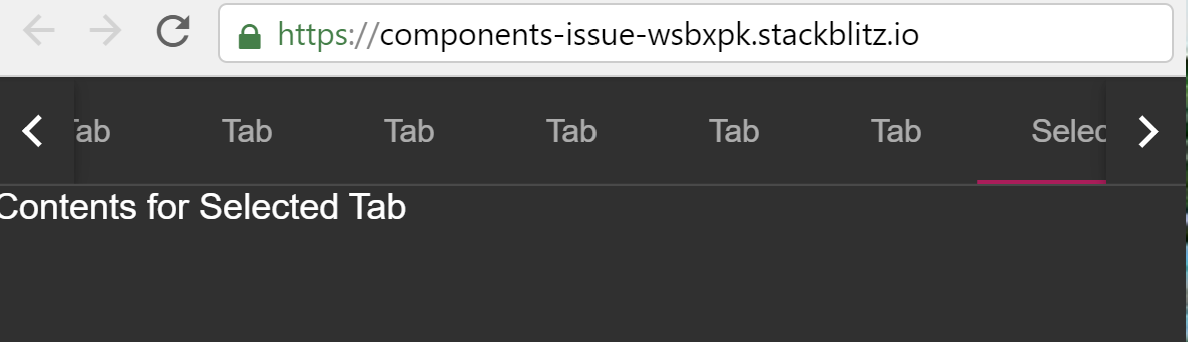
Tab is only partially visible and pagination button remains enabled. When tab titles vary in size only a few pixels of the last tab are visible. Clicking on the last tab manually scrolls it fully into view.
Environment
- Angular: 8.2.14
- CDK/Material: 8.2.3
- Browser(s): Chrome, Firefox, Internet Explorer 11, Safari
- Operating System (e.g. Windows, macOS, Ubuntu): All
 rvv-bouvet
All 4 comments
Looks like we're measuring the element too early, because adding a timeout before skipping to the last tab fixes it.
 crisbeto
on 2 Dec 2019
crisbeto
on 2 Dec 2019
Confirmed that this still happens in v9: https://stackblitz.com/edit/components-issue-1m6t8u?file=app/app.module.ts
 jelbourn
on 26 May 2020
jelbourn
on 26 May 2020
Still happens in v10. Do we have any plan on this?
Use case: I have several tabs, and set the last tab as the default selected tab. After rendering the tabs, the selected last tab is partially shown.
 zhongsp
on 30 Oct 2020
zhongsp
on 30 Oct 2020
Tested in v11, and it currently happens for the first tab when pagination is added. After that, it is correctly showing the tabs
https://stackblitz.com/edit/angular-mat-tabs-issue-uwcjql?file=src/app/tab-group-dynamic-example.html
But additionally, if the title is changed afterward, the position isn't recalculated.
 vivek201
on 26 Mar 2021
vivek201
on 26 Mar 2021
Related issues
 julianobrasil
·
3Comments
julianobrasil
·
3Comments
 kara
·
3Comments
kara
·
3Comments
 vitaly-t
·
3Comments
vitaly-t
·
3Comments
 LoganDupont
·
3Comments
LoganDupont
·
3Comments
 RoxKilly
·
3Comments
RoxKilly
·
3Comments
Most helpful comment
Looks like we're measuring the element too early, because adding a timeout before skipping to the last tab fixes it.